

Forum Replies Created
-
AuthorPosts
-
March 6, 2017 at 3:59 am in reply to: Incorrect sort order when viewing all recurring events #1249765
Andras
KeymasterJim, Lauren,
Thanks for sharing the details. I tried to recreate the issue but so far I have not succeeded. I will need a bit more time to investigate this.
Lauren, could you please share with me your system information in a private reply? That would be much helpful.
Thanks!
Andras
KeymasterHello again Victoria,
Thanks for reaching out with your issue. I’m sorry about this.
Based on the screenshot you sent it looks like there is something that the JetPack plugin doesn’t like. Please deactivate that and see if you still get the error.
Also you might want to check in your wp-config.php file how this is set:
define('WP_DEBUG', true);If you set it to false then the error messages might not be shown to users.
Let me know if that helps.
Cheers,
AndrasKeymasterCiao Marco,
Thanks for using our plugins!
There is a setting under Events > Settings > Tickets where you can set up when the the tickets should be sent to the user. It looks like this:
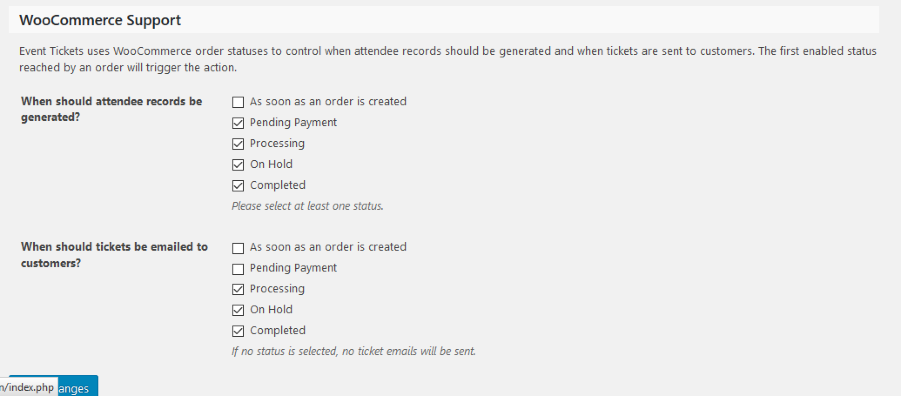
Let me know if this helps.
Cheers,
AndrasKeymasterHello Susan,
First of all, thanks for using our plugins and welcome to the forums!
I’m really sorry you are having issues with ical import. Let me summarize the issues we are trying to tackle here:
- Events are imported with the wrong time, 4-5 hours difference
- Venue details are not being imported
- Multiple events are duplicated
Am I right with the above or did I miss something?
Could you please share with me the ical file / feed that you are importing and is causing these issues? Can you also point out some events so I know what to look for? Where are the feeds originating from, is it Google Calendar?
When events are imported with the wrong time, can it be that it is the UTC time? (New York is UTC-5 in winter, UTC-4 in summer I believe.)
Are events duplicated already on the first import? Or only on a later import which is supposed to update events?
Thanks for clarifying these for me!
Cheers,
AndrasMarch 3, 2017 at 1:50 pm in reply to: The application you're trying to use has made an invalid request to Eventbrite. #1249273KeymasterI appreciate the offer! However, our current policy is not to accept logins or to log in to customer servers/WordPress installations.
If you can give me the details from above, then we can try to find the source of the issue. But still I would recommend checking your API settings and running a conflict test first. That can help us narrow down the issue.
Cheers,
AndrasMarch 3, 2017 at 1:46 pm in reply to: The application you're trying to use has made an invalid request to Eventbrite. #1249267KeymasterAlso you might want to run a test for conflicts. I most probably would start with disabling the Eventbrite API plugin.
Let me know the results.
Cheers,
AndrasMarch 3, 2017 at 1:35 pm in reply to: The application you're trying to use has made an invalid request to Eventbrite. #1249261KeymasterHey Albert, welcome to the premium support forums!
I’m sorry you bumped into an issue with one of our plugins.
In order to be able to help you could you please give me more details on the problem? When / where is this happening? What are you trying to do when this happens?
Also please check if your Eventbrite API settings under Events > Settings > APIs are correct.
Thanks,
AndrasMarch 3, 2017 at 1:20 pm in reply to: _tribe_tickets_attendee_user_id / saving wrong info among other things #1249252KeymasterThis reply is private.
March 3, 2017 at 1:19 pm in reply to: _tribe_tickets_attendee_user_id / saving wrong info among other things #1249250KeymasterHello again Ilkka,
Thanks for reaching out, and sorry about this issue.
I saw your other thread with Geoff, and thanks a lot for all the details you submitted.
Could you give me detailed steps on how I could recreate this? I’m thinking something like:
- Create event with ticket and attendee meta
- Buy as a different user, not as admin
- Mark the purchase completed with admin user
- Check attendee meta id (does this actually show up on the backend somewhere or only in the database? Where should I look in the DB if it’s there?)
Are you doing some other steps?
Also please send me a screenshot of your Events > Settings > Tickets tab, so I can have the same setup as you have.
Share with me any other detail for testing that you find important.
Thanks and looking forward to solving this with you.
Cheers,
AndrasKeymasterHello Wesley United,
Thanks for getting in touch and I’m sorry you are having this issue.
I believe this comes from the style settings for the calendar.
Under Events > Settings > Display tab you most probably have ‘Default page template’ set. Try switching to ‘Default events template’ and see if that fixes it for you.
Let me know the result.
Cheers,
AndrasKeymasterHi Russell,
Thanks for reaching out to us. Let me try to help you with your question.
You can find a list of functions that you can use in custom development here: https://theeventscalendar.com/function/
For the remaining number of tickets I believe you can use this one:
https://theeventscalendar.com/function/tribe_events_count_available_tickets/
And probably this one to check if it is sold out:
https://theeventscalendar.com/function/tribe_events_has_soldout/
There is no dedicated page for ticket stocks, however you should be able to check it on the WooCommerce Products page. If you set up a stock for a ticket, then it will show up in brackets next to “In stock”, like this:
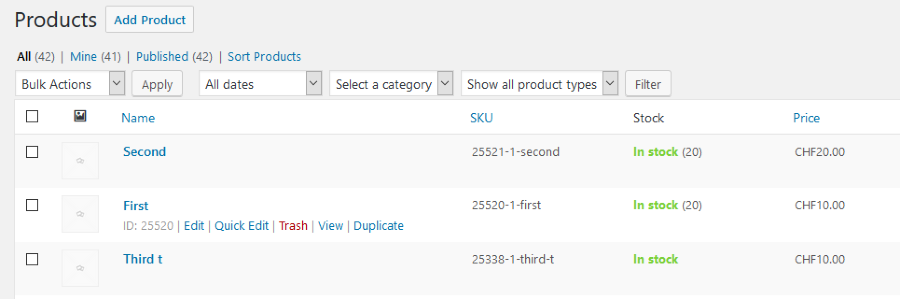
Note though, that if tickets use global stock, then the remaining global stock will be shown for both tickets. In the above example the tickets ‘First’ and ‘Second’ use a global stock of 20. So if you would sell one ‘First’, then afterwards you would see a stock of 19 for both.
I hope these answer your questions. Let me know.
Cheers,
AndrasKeymasterHi Duncan,
Happy to hear you managed to solve this! Great job!
If you need anything help related to the calendars, jut open a new thread and we’ll be happy to help!
Good luck with your project!
Cheers,
AndrasKeymasterHi Hans-Gerd,
I believe that string is being translated in the-events-calendar-de_DE.po, so you will need to translate it there as well.
A.
KeymasterHi Stanley,
Thanks! I checked and that bugticket is already being checked by one of our developers.
I am going to set the status of this ticket to “pending fix” and we will update it once the fix is released. If you have any new questions or issues please create a new ticket and reference this one.
Cheers,
AndrasKeymasterGreat, thanks for getting back to me on that!
Since this is marked resolved I am going to close this ticket, but if you need anything else related to this topic or another please post a new one in the forum and we will be happy to help you out.
Good luck with your project!
Cheers,
AndrasPS: We’d be grateful if you would give us feedback on your satisfaction with support. Just click on one of the classy looking emojis below. 🙂 If you can spare a few words, that’s even better. Thanks!
-
AuthorPosts