

Forum Replies Created
-
AuthorPosts
-
April 4, 2017 at 3:52 pm in reply to: How do I get Map View to show only that day's events ? #1264468
Andras
KeymasterHello Susan,
Thanks for going Pro and welcome to the forums!
Great question you have there. I am able to answer some questions to help you get started on a customization for this, but for the most part that is beyond the support we can provide.
Here is a snippet that can help you get started. Paste it into your child theme’s functions.php file and that should do the trick. Note, if there is already code in that file, then likely you will not need the opening <?php tag.
https://gist.github.com/andrasguseo/552c25143f0856341166acc4c72c5436
This will change all your views to show only today’s events. If you only want that for your map view, then you will need to further customize the code.
Let me know if you have any follow up questions.
Cheers,
AndrasKeymasterHello Kathryn,
Thanks for using our plugins and welcome to the forums!
I’m really sorry about this issue with Event Aggregator. Let me try to help you with that.
By default the “Scheduled imports” and “History” tabs only show up if there is something in them. On a clean install you don’t see those 2. If you did an import, then “History” will show up and only if you have some scheduled imports set up should you see the “Scheduled imports” tab.
So most probably you have them set up, they just don’t show for some reason.
As a first step I would like to ask you to go through our conflict testing guide and see if that brings up anything. Please share with me the results and we’ll continue from there.
Thanks and cheers,
AndrasKeymasterHello Piotr,
Thanks for reaching out to us with your question!
I’m sorry about the unusually long wait for an answer, but the whole team was out last week and new we are catching up.
I checked that thread you mentioned and your issue. At the moment there is no other solution for that, then updating it manually.
Of course you can do it manually but then for what you need global stock?
Different users use it in different ways. And a global stock – even if it needs to be updated manually – enables you to sell only X number of several different tickets to one event, if you have a limitation like that. For example a dinner party for a 100 people where you have veggie meals and meat meals. You don’t limit them separately but you only have a 100 places.
I hope this clarifies. Let me know if you have any other question.
Cheers,
AndrasApril 4, 2017 at 3:10 pm in reply to: Incorrect sort order when viewing all recurring events #1264440KeymasterHello Jim,
I’m sorry to keep you waiting for so long and that the issue is still not resolved. The whole team was out last week on our yearly company retreat and we’re catching up.
As for the status of this issue – beside waiting for @lauren’s answer -, I have one other user who has reported it, but I have not been able to recreate the issue since our last maintenance release. Now we are trying to gather more information, trying to nail down what could be the cause of this. I have a hunch this might be a Windows server thing.
The buggy site that you have, what server is it running on? Windows or Linux?
Could you also please paste here an up-to-date system information of that site?
Thanks and cheers,
Andras
KeymasterHello Jessica,
I’m sorry you had to wait this much for an answer. Last week all of us were out on our yearly company retreat and we are catching up now.
Thanks for the screenshots you submitted.
I see that you are using older and mismatching versions of our plugins (4.4.4 of the free ones, 4.4.1 of the premium ones.) As a first I would recommend to update those to the latest versions. (And generally WordPress and all plugins.)
If the issue still exists then: I also see that you are using Advanced Custom Fields, which could be a cause of this. Would it be possible to disable ACF and check if that influences the Attendee list in any way?
Thanks,
AndrasApril 4, 2017 at 2:51 pm in reply to: "Back To Calendar" to go to last month/year user queried? #1264427KeymasterHey Matt,
Had some discussions with the team how this could be done and got 2 more ideas:
1. Set a cookie on window unload. Then, PHP side, when the single event page is requested, check if that piece of data is available then sanitize and display it.
2. Could probably be done purely from PHP or purely from JS and get results that are mostly acceptable.
Please note that we are limited in supporting customizations. Per our terms and conditions we support features of the plugins and although we try to help get you started on customizations for the most part you are going to have to take it on to complete.
Let me know if you have any follow up questions.
Thanks and cheers,
AndrasKeymasterHallo Ingo,
I checked my settings and it looks like this:
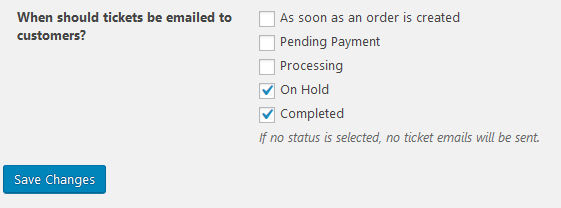
It looks like the “Zahlung erhalten” status is a custom status in your setup and that could cause the issue.
Can you confirm that is a custom status? If yes, please let me know how that was created / what are it’s settings. I will then try to re-create and test it.
Thanks,
AndrasApril 4, 2017 at 2:22 pm in reply to: Purchase of Event Ticket Not Triggering Follow Up Email Campaign #1264403KeymasterHey Chris,
Sorry for letting you wait so long without an answer. Our whole team was out last week for the yearly company retreat and now we’re catching up.
So I tested this again with different scenarios with mixed results.
Scenario #1:
- FU type: events email;
- trigger: after ticket status: completed;
- Enable for specific event category ‘movies’
(https://cloudup.com/cVo7YGUn1Gn)
I believe this is what you are also trying to do.
This didn’t send out the emails. I actually checked the Follow-up Emails > Scheduled Emails page and the email simply doesn’t get generated. Looks like a bug.
Scenario #2:
Same as above but using “Enable for: a specific category” vs. “a specific event category”.
In this case all works fine, email gets generated and eventually sent.
Scenario #3:
FU type: events email but no category restriction.
Result: all works fine, just as you said.
Scenario #4:
If you create a “Customer email” and not an “Events email” then all works fine as well, even with (product) categories.
So the normal way of working with events seems to be bugged. I’m not quite sure where and who needs to do what fixing. We’ll need to find that out. I will try to check this internally. Meanwhile I would suggest you to get in touch with the developers of the FUEmails plugin as well.
As a workaround what you can do is set up categories for the WooCommerce products and use that as a filter. I understand that this can requires some work but at the moment I only have this recommendation.
Hope this helps.
Cheers,
AndrasKeymasterHello again Charles,
Yes, please post your questions here in the thread. If for some reason I will not be able to answer a question or two I will pull in someone who can.
Thanks,
AndrasApril 3, 2017 at 4:12 pm in reply to: Custom Event Attendee collecting fields not showing up #1263579KeymasterThis reply is private.
KeymasterHello Christopher,
Thanks for getting back to me on that. It looks like that despite our fix there are still some remote cases on Windows where this happens.
I have filed a bugticket for this, so our developers will take a closer look at it. Please hang in there.
I am going to set the status of this ticket to “pending fix” and we will update it once the fix is released. Thanks for your patience!
If you have any new questions or issues please create a new ticket and reference this one.
Thanks and cheers,
AndrasKeymasterHi Alix,
I am glad to see you were able to figure it out. Thanks for posting your solution here.
I am going to go ahead and close this ticket. If you have a similar issue or another in the future, please do not hesitate to create a new ticket.
Cheers,
AndrasPS: If you like our plugins, and you didn’t yet do so 🙂 we would be happy to receive a review in the wordpress.org repository. Thanks!
https://wordpress.org/support/plugin/the-events-calendar/reviews/
https://wordpress.org/support/plugin/event-tickets/reviews/KeymasterHi Christophe
I’m really sorry that you had to wait so long for a reply. The whole team was out last week on our yearly company retreat.
I believe the easiest way to add more text to that part is through the .po translation files.
Open this file with PoEdit software or with the Loco Translate plugin in your WordPress dashboard:
wp-content\plugins\event-tickets-plus\lang\event-tickets-plus-fr_FR.po
Look for these string and translate them, change them or add more text as you need:
For the title: “Check in for this event”
For the text: “Scan this QR code at the event to check in.”
Save the file.
Upload the event-tickets-plus-fr_FR.po and event-tickets-plus-fr_FR.mo files to this folder:
wp-content/languages/plugins
You should be all set. Let me know if this does the trick.
Cheers,
AndrasKeymasterDear Susan,
Thanks for the ping and sorry for the long wait for a reply. Last week most of us were out on our yearly company retreat.
Unfortunately the issue is not resolved yet, it didn’t make it in to version 4.4.5.
However, I just talked to my manager and we will try to push a fix for this in the next maintenance release, which is coming later this month. I’m sorry for the delay on this and thank you for your patience!
Cheers,
AndrasKeymasterHallo Tomi,
Ich freue mich das zu hören!
Nun, da alle Probleme hier gelöst sind werde ich dieser Topic schliessen.
Wenn du andere Bugs oder Probleme findest, dann starte einfach einen neuen Topic hier im Forum und wir werden dir gerne helfen.
Freundliche Grüsse
Andras
PS1: Wenn du noch keine Bewertung für unsere Plugins gegeben hast, dann wären wir sehr dankbar. Du kannst die hier machen:
https://www.wordpress.org/plugins/the-events-calendar/reviews/
PS2: Wir wären auch sehr dankbar, wenn du uns Feedback über deine Zufriedenheit mit Unterstützung geben würden. Klicke einfach auf einen der klassisch aussehenden Emojis hier unten. 🙂 Wenn du auch ein paar Worte ersparen kannst, ist das noch besser. Danke x 2!
-
AuthorPosts