

Forum Replies Created
-
AuthorPosts
-
Andras
KeymasterHello Javier,
I’m sorry for the delayed reply. Majority of the company was our last week on our yearly retreat.
I can not upgrade to the latest version, not all the plugins we use are compatible. Anyway, there is no alternative? It is well that “The Events Calendar” is compatible with the latest version, but please, do not stop being it as it was before with previous ones.
I did some testing with earlier versions of WordPress (4.4.2 and 4.4.8) and our plugins. It looks like this is a bug in our plugins. I already filed a high priority bug ticket about this issue.
The only workaround at the moment, that comes to my mind would be downgrading out plugins to an earlier version. I think you will need to go back quite some as I tested The Events Calendar (and Pro) 4.3.2 and that was still buggy.
I am going to set the status of this ticket to “pending fix” and we will update it once the fix is released. Thanks for your patience!
If you have any new questions or issues please create a new ticket and reference this one.
Thanks and cheers,
AndrasKeymasterThis reply is private.
KeymasterThere are a couple of things you can do.
Generally we advise users to create a full backup of the website, both files and database, before running any update. In case something goes wrong this can help restoring the site to a well working condition.
It is also useful to have a staging site where updates or any change can be first tested in a safe environment. Once you are sure the updates work as expected, you can do the update on the live site as well.
If you suspect that a recent plugin update is the cause of the malfunction, you can always go back and downgrade the plugin to the version before the upgrade and wait a bit for the other part to catch up and / or contact a support team to check it out.
In your specific case, since it feels like a theme issue try switching to a default theme like twentysixteen and check if all works properly there. If yet, then it is for sure something caused by the theme.
If you see the issue with twentysixteen as well, then you can do the full conflict test to see if there is maybe a plugin influencing that.
Let me know what you find.
Cheers,
Andras
KeymasterHello again halibutblue,
Thanks for reaching out! I’m sorry about this issue with the widget and all.
I guess this is the original thread:
Could you please follow our conflict testing guide and share with me the results? This will help us eliminate any issues coming from the theme and the plugins you are using.
Thanks and cheers,
AndrasKeymasterSalut Christophe,
Hey, thanks for using our plugins and welcome to the forums!
I’m sorry you are having issues with the ticket email translation. I would love to help you on this topic!
There are different plugins in play here, depending on which email text you are referring to.
Emails regarding the order itself is handled by WooCommerce.
Emails that contain the tickets and the QR code is handled by our plugins.
Please, give me some more details on what you would like to achieve and I’ll be happy to point you in the right direction, so you can fully customize your emails based on your needs.
If there are any issues with some strings not taking over the translation, or no possibility to translate, then please, let me know those as well so we can fix that.
Looking forward to helping you with this.
Cheers,
AndrasMarch 24, 2017 at 9:46 am in reply to: Please send me a REAL invoice with your VAT included … #1259672KeymasterHello Oliver,
Thanks for getting in touch.
This article contains detailed information on how you can print your invoice:
As for VAT, since our company is headquartered in the US, there is no VAT charged for sales abroad.
I hope this clarifies. Let me know if you need anything else.
Cheers,
AndrasKeymasterJust a note for the sake of clarification: the fix won’t recover data that’s already missing. Unfortunately we are not able to do that.
A.
KeymasterHi Eugenio,
Sorry to hear that didn’t help. Could you send me a screenshot of your settings here:
Events > Settings > Tickets tab > WooCommerce support section
It looks like this:
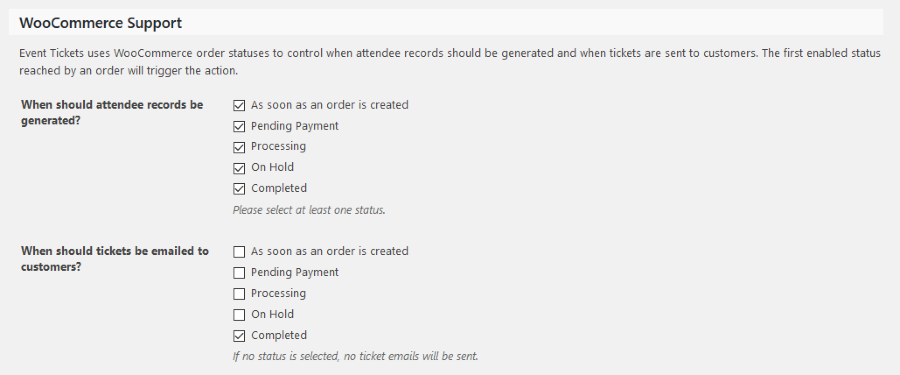
Also please send me a URL of an event where you are having the issue.
Thanks!
Andras
March 24, 2017 at 9:27 am in reply to: Custom Event Attendee collecting fields not showing up #1259590KeymasterThis reply is private.
KeymasterHello Ralph,
I guess the Genie of Uploads tricked us and stole your screenshots. Please upload them again so I can take a look.
Thanks,
AndrasKeymasterHi Uwe,
This is interesting, I don’t know why you are getting those errors, because it seems you do have that data.
At the moment all I can think of that the theme is messing with our heads. This is easy to find out, switch to twentysixteen and run the test again. Check if you still see the errors.
Please check that if you can. Meanwhile I’ll check if anybody on the team has a better idea.
Cheers,
AndrasKeymasterHello Eoghan,
Hey, thanks for reaching out with your questions. Let’s go one-by-one.
1. By “Recurring Events” do you mean that I can have an event (in our case a training session) that is offered on multiple occasions, but the event description only exists in one place, with new dates added for each time it is offered?
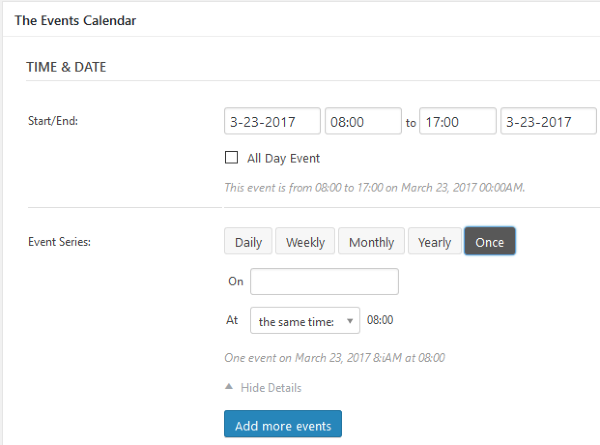
Yes, absolutely. You set up one event and then you can set up recurrence rules. The rules are pretty flexible, you can have daily, weekly, monthly recurrence as well as a custom date. And you can set up multiple rules. Here’s a screenshot to help you get an idea.
If I do go ahead and get the PRO version, can I make events that already exist in my calendar recurring events or will I need to re-enter any event that will become a recurring event in future?
Yes, absolutely, you can make existing events recurring.
2. This might lead on the from the above…or it may be possible already with the basic free version: Can I list, on a single page, all events I have on offer, past and future? We want to show our full portfolio of courses, independent of their dates of offer, so that we can encourage people to request that we run them in-house for them or so that demand will lead to us offering a particular course.
You should be able to set up the number of events listed under Dashboard > Settings > Reading > Blog pages show at most.
As for the past events you will need to do a bit of customization. Though if you have recurring events then you can set it up that all recurrences are shown.
We run each of our events maybe twice or three times per year, not according to any fixed schedule. I understand there’s some sort of “Single Event” option under recurring events, which seems like it might be what we need to use. But do I simply keep on making an individual event recur on its next scheduled date?
This is basically what you see on the screenshot. You set up an event as usual, then you set up a recurrence rule for “Once” and set the date. Then you can set up another recurrence rule for “Once” with a different date. And you can do this for all 365 day in the year if you would like to 🙂 but for that I would rather recommend the daily recurrence.
I hope these answer your questions. Please let me know if there is anything else I can help you with.
Cheers,
AndrasMarch 23, 2017 at 10:45 am in reply to: Custom Event Attendee collecting fields not showing up #1258903KeymasterThis reply is private.
March 23, 2017 at 10:43 am in reply to: Custom Event Attendee collecting fields not showing up #1258897KeymasterHello Katrina,
Thanks for reaching out again! I’m sorry about this issue with the hidden attendee meta fields.
I already checked your site and all seems to be fine in the html code. I suspect some black javascript magic in the background.
I see that you are using the most recent version of The Events Calendar and Event Tickets, however Events Calendar Pro and Event Tickets Plus seems to be an earlier version. Before going any further I would like to ask you to run an update on these two so you have the latest versions of all our plugins. Mismatching versions can cause glitches like the one you are experiencing, and if this is a bug, it might have been fixed already.
I’m looking forward to helping you fix this.
Cheers,
AndrasKeymasterHello Mark,
Thanks for using our plugins and welcome to the forums!
I’m really sorry about this issue with the attendee meta not being recorded.
This is a bug we are aware of and a fix is being prepared. If all goes according to plan it will be released sometime later today. Please hang in there.
I am going to set the status of this ticket to “pending fix” and we will update it once the fix is released. If you have any new questions or issues please create a new ticket and reference this one.
Thanks and cheers,
Andras -
AuthorPosts