

Forum Replies Created
-
AuthorPosts
-
Andras
KeymasterHello Lisa,
I’m helping out Hunter with solving this issue.
Please do let me know the results of your conflict test.
Just want to draw your attention to one thing. In the below screenshot you shared the timepicker looks a whole lot different than our built-in version. It seems as if some javascript timepicker popup would be at play.
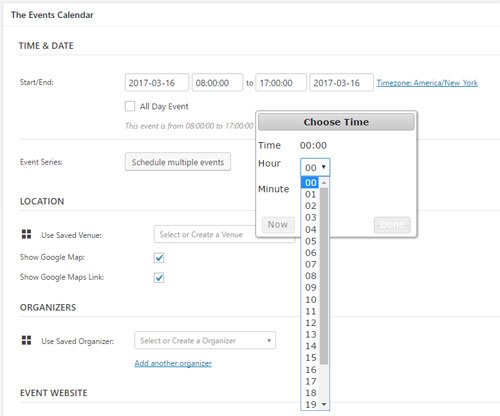
And here is how ours looks like out of the box:
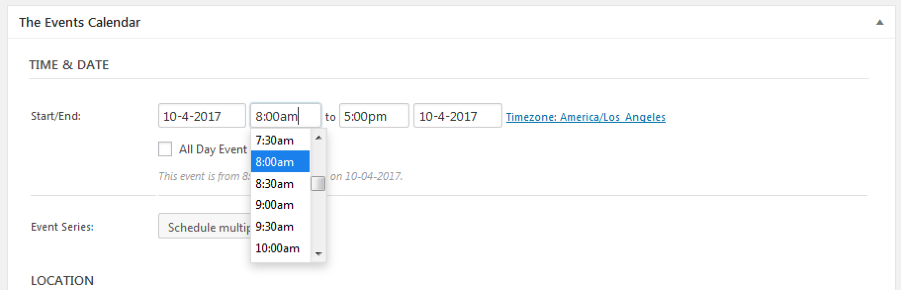
Make sure when you are doing the conflict tests to also disable any custom codes and templates you might be using.
Looking forward to helping you solve this.
Cheers,
AndrasApril 10, 2017 at 1:29 pm in reply to: Event Imports from Facebook not populating with the right location data. #1267901KeymasterThis reply is private.
April 10, 2017 at 1:14 pm in reply to: Event Imports from Facebook not populating with the right location data. #1267897KeymasterThis reply is private.
April 10, 2017 at 9:30 am in reply to: Event time not importing correctly for iCal import (Events Aggregator) #1267717KeymasterI was looking though our logs of bugs and we have an issue there related to the “Z” and not converting the time. This is just to let you know that we are actively looking into this bug.
I am going to set the status of this ticket to “pending fix” and we will update it once the fix is released. If you have any new questions or issues please create a new ticket and reference this one.
Thanks and cheers,
AndrasApril 10, 2017 at 9:22 am in reply to: Event time not importing correctly for iCal import (Events Aggregator) #1267712KeymasterHello David,
I’m sorry for the long radio silence. Our whole team was out the last week of March and now we are playing catch up. 🙂
I checked your staging site for which I have the system information and I saw that an older version (4.3.5) of The Events Calendar is running on it.
The ICS time in Zulu is right, this makes the ics files / exports uniform. There could be 2 other issues though: 1) the ics file / feed doesn’t define the timezone of the events (which could be OK, b/c of the Z-time); 2) event times are not being adjusted based on site timezone.
While you run an update of the plugin we will try to dig a bit deeper.
Cheers,
Andras
KeymasterHello again Kathryn,
Thanks for hanging in there. I had some discussions with team members trying to nail down this issue.
in the Event Log, there is an error every fifteen minutes
A note on this, these are not errors as such – just useful bits of data that are recorded to help us build a better picture of the problem.
The empty “History” and “Scheduled imports” are a curious issue.
Could you possibly do the following:
Enable
define( 'WP_DEBUG', true );
and
define( 'WP_DEBUG_DISPLAY', true );
in your wp-config.php file and re-visit the pages to see if any error messages are printed out on the screen? (WP_DEBUG should already be near the bottom of the file, you just need to set it to true. And add the other line below.)
Also open the web developer tools of your browser (usually Ctrl + Shift + I), switch to the Console tab and reload the page. See if you get any error messages in your console.
Here are 2 posts that can give you some help on the browser developer tools, in case you are not familiar with them:
https://theeventscalendar.com/wordpress-web-developer-extensions/
Let me know if that turns up anything.Thanks,
AndrasKeymasterHey Marco,
I was digging around a bit to see if the map can be easily moved. Unfortunately not. When you are using the shortcode, that doesn’t call the wp-content\plugins\events-calendar-pro\src\views\pro\map.php file – which you could modify. 🙁 It rather calls the smaller bits and pieces.
Here are 2 workarounds which might help:
1. Use the list view and add the map separately at the bottom. You could create template overrides for the list view which at the end would include the map.
2. Set the map view as the default view. (Events > Settings > Display) Set the calendar as your home page. (Settings > Reading > Front page: main events page) and create a template override for the map view.
I hope this helps. Let me know if you have any more questions.
Cheers,
AndrasApril 10, 2017 at 6:05 am in reply to: Reduced recurring events pregeneration, events past this date not deleted #1267509KeymasterOh, and please share with me your system information. Thanks!
April 10, 2017 at 6:04 am in reply to: Reduced recurring events pregeneration, events past this date not deleted #1267508KeymasterHello Angela,
It looks like your backend is bogged down with the number of events it’s handling.
As for removing the recurrences your best options are what Hunter outlined above.
I can recommend couple more things (brainstorming a bit), although simply due to the sheer number of events you have they are going to be time consuming, there is no way around that.
#1: when listing your events on the backend select the unwanted recurrences and bulk-move them to trash. (And you might want to empty the trash afterwards.) Note that afterwards if you edit and update the original event, the set recurrences will be recreated according to your settings, including the number of months forward / backward.
In sorting and filtering the events on the back-end our free Advanced Post Manager plugin might be helpful. You can find it here: Advanced Post Manager (APM)
#2: delete all events and start from scratch. I know this is a long shot and might not be a viable option for you, still it is an option.
#3: Do an sql export your wp-posts and wp-postmeta table. Modify the entries / delete the unwanted lines. Empty the tables. Re-import the modified SQL data. (Might be faster than trying to create a custom sql query that deletes all.)
Just in case there is a different issue here:
When clicking ‘edit all’ on the event the browser (Chrome) hangs, then says the page is non-responsive and needs killing
Does this also happen to newly created events which only have a couple of recurrences? Or only the older ones which never end?
Thanks and cheers,
AndrasApril 10, 2017 at 5:23 am in reply to: Ticket types created for page post incorrectly displayed on My Tickets page #1267496KeymasterSzia András!
I have checked and tested your scenario and can confirm, that indeed the tickets field shows up twice on the My Tickets page. Looks like we have a bug here. I’ll file an internal bugticket for this so our developers can fix it.
Until the fix arrives, as a workaround you can try to hide one of the forms with css like this:
.page div.entry-content form.cart:nth-child(2) {
display: none;
}
I hope this helps and thanks for bringing this to our attention.
I’ll set this topic to “pending fix” and we’ll update it once the fix is released.
Üdv,
AndrásKeymasterThis reply is private.
April 9, 2017 at 9:25 am in reply to: Incorrect sort order when viewing all recurring events #1267326Keymaster@Lauren, thanks a lot for re-checking that and I’m glad to hear your issue is solved.
@Jim, thanks for posting the updated info. It might be that this is a bug that comes up when running on Windows / IIS. We are investigating the issue. I ask for a bit of patience, I’ll be in touch as soon as I have more information on this.
Thanks for your patience and understanding!
Cheers,
AndrasKeymasterHello again Jim,
Again apologies for the long wait. We’ve been swamped a bit due to the one week off and I know this issue has been hanging in there for quite some time, that is why I took some time on a Sunday to help you get this resolved.
I managed to do some thorough testing with the files and database you shared with me. The outcome, simply put: it is the theme that is messing with you.
So I fired up your files on a local install and created a recurring event just with 2 instances, in November and December 2017 with the Vestige theme. And it produced the error just like it is supposed to.
Then did some various tests with the same theme and got the same results.
Then I switched to the twentyfifteen theme, created a recurring event, again November and December, and this time it was properly created, the time did not change from one month to the other.
Then I switched back to Vestige. Obviously this didn’t yet change a thing. Then I simply updated the event which was created with twentyfifteen, and alas, the start times of the events have changed.
So it looks like that the theme has some code in place that changes the event times on creation, even in the database.
I was trying to look in the code of the theme where this modification is done, but it is beyond me. I would suggest you to get in touch with the theme developers to see where and how you could possibly disable this feature.
I’m sorry I cannot give you a ready solution for this, but I do hope this gets you a couple steps closer to a resolution.
Please, let me know if I can be of any more assistance.
Cheers,
AndrasKeymasterHi Jim,
I’m sorry for the long wait for any reply, I do apologize for this. The whole company was out on the week of March 27th on our yearly company retreat and I was travelling the week after.
I have received your files and I am currently looking at the local install trying to figure this daylight saving time issue out. This has top priority for me now. I’ll be in touch within a day, please hang in there.
Thanks for your patience!
Andras
April 4, 2017 at 4:01 pm in reply to: Bug in "Make Event Titles Link to the Event Website URL" Extension #1264473KeymasterHello Craig,
Thanks for reaching out to us with your question.
Yes, you submitted it absolutely correctly. 🙂 Sorry for the long waiting time, the whole team was out last week.
Although I don’t know for sure, my hunch is that the URLs which show up on the map pin hovers are handled by the google api and thus are not affected by our plugin.
I will try to touch base with the developer of the plugin to see if this is the case and if we can do anything about it.
Thanks for your patience!
Cheers,
Andras -
AuthorPosts