

Forum Replies Created
-
AuthorPosts
-
Andras
KeymasterHello James,
Thanks for reaching out to us and I’m really sorry that you had to wait so long for a first reply. We are getting an unusually high amount of requests in our forums. Since all our users are important to us every question gets answered in a timely order.
At the moment deleting events that are removed from Facebook are not part of the functionality of Event Aggregator, I’m sorry.
A possible workaround would be deleting all imported events from your Events Calendar, and remove it from the ‘Ignored’ list as well, and then running the import. I know this is not ideal, but currently that would be the way to do it.
Although this might not be the answer you were hoping for I do hope it clarifies.
Let me know if you have any followup questions. This time I will make sure you will get a faster response.
Cheers,
AndrasApril 11, 2017 at 12:35 pm in reply to: Community Events adding new event date and time format is not working #1268499KeymasterHello Saraliina,
Thanks for getting in touch and I’m really sorry about this issue with the datepicker and the timepicker.
We are aware of this issue, however at this time I don’t have any date set when this will be fixed.
Until then you could paste this snippet into your theme’s functions.php file:
https://gist.github.com/andrasguseo/77073707356b4e9bc55e23bb7ebd67bc
Let me know if that helps.
Cheers,
AndrasKeymasterHello Becky,
Thanks for reaching out with your question.
Filtering by state is unfortunately not possible with the Events Calendar Pro plugin, so the way forward would be using categories. The url structure for the “California” category would be this:
http://www.domain.com/events/category/california/
Of course you can use any slug for the categories, based on your needs.
Regarding the AJAX call, that might be possible but would require some custom development, which we are very limited in supporting. However, I can share with you a list of developers from the community who could help you out with customization requests like this:
I hope this helps you move forward. Let me know if you have any further questions regarding this topic.
Cheers,
AndrasApril 11, 2017 at 12:19 pm in reply to: Reocurring events on same day and also separate days #1268490KeymasterHello Denise,
Thanks for reaching out with this issue.
Based on your system information – thanks for sharing it upfront – I see that you are using an older version of our plugins. As a first I would like to ask you to update the plugins and check if you are still having the issue. This bug was present in previous versions but has been fixed since.
Before running any update creating a full backup of your files and database is always recommended.
Looking forward.
Cheers,
AndrasApril 11, 2017 at 11:55 am in reply to: Click to view next entires and it shows and error box saying no events match. #1268478KeymasterHi Monica,
Thanks for using our plugins and welcome to the forums!
I”m sorry you are experiencing this pagination issue. We might be having a bug here but in order to confirm that I would like to ask you to go through our guide for conflict testing and let me know if you discover anything.
I see you are using Divi. As a first step try switching over to a default theme like twentysixteen and check if that makes this odd behavior go away.
Thanks and cheers,
AndrasKeymasterHi Kathryn,
Thanks for checking that for me. It looks like we found a bug there. I logged an internal bugticket for this so our developers can get a fix done. At this moment I don’t know how long that is going to take, but I will also check if someone can do a quick temporary fix for you. Hang in there.
Cheers,
AndrasKeymasterHello Kristiina,
Thanks for using our plugins and welcome to the forums!
You can easily do a customization like that with overriding the template files. Here are couple of articles that can help you get started on that:
I would suggest overriding the wp-content\plugins\the-events-calendar\src\views\list\single-event.php template to make that happen. You can learn more about overriding calendar templates in our Themer’s Guide, but it basically boils down to this:
- Make a copy of the <span class=”paragraph”>single-event.php</span> template.
- Make a new folder in your theme called “tribe-events” (wp-content/themes/{your-theme}/tribe-events)
- Drop your copied single-event.php file in that last folder
Now that the template is in your theme, you can modify it to suit your needs.
Will this work for you? Please let me know. 🙂
Cheers,
AndrasKeymasterHello NHU-UYEN,
Thanks for using our plugins and welcome to the forums! I’m sorry you are having an issue with Event Aggregator. Let me try to help you find a fix for that.
In order to be able to give you better support please share with me your system information.
Also, could you please share with me the group URL and some individual URLs as well so I can run some tests?
Is it always the same 2 events that get imported?
Is there any difference between (all) the events? Like same / different organizer? Public or Private status? Anything you can think of?
Thanks and looking forward to helping you solve this.
Cheers,
AndrasKeymasterSorry, forgot this, to get absolute clarity:
Does this only happen when you update to a new version of The Events Calendar?
Thanks!
KeymasterHi Andrew,
I’m sorry for the long wait for a reply. We are experiencing an unusually high number of requests in our forums.
Thanks for reaching out with your question. I’m sorry you are having an issue with Event Aggregator. This is unusual, we haven’t experienced this issue or received any reports on that. I’ll try to help you solve this.
Does this happen with every event that you try to import from Facebook with Event Aggregator?
Are you trying to connect to Facebook with a user profile or a business or a brand or …?
Could you share some URLs with me that are causing this issue?
Please check and share with me your Event Aggregator System Status, which you can find at the bottom of the Events > Help page. (https://cloudup.com/c_AbQU9nKmr)
Also check in Facebook – before doing any import and when the issue is likely to appear – if you have Event Aggregator in your approved apps list. You can find this on Facebook when you open Settings, then click on Apps on the left side.
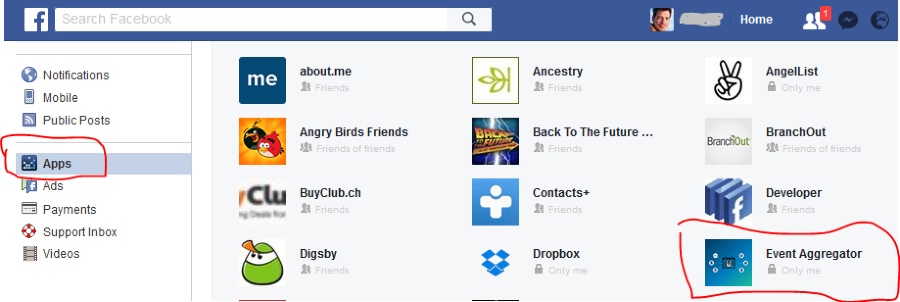
You can also try to remove and re-approve it.
I’m not sure if it could be an issue, but it is worth trying with a different browser than your usual one.
Let me know what you find.
Thanks and cheers,
AndrasKeymasterHello Joe,
Thanks for using our plugins and welcome to the forums!
I’m sorry you are experiencing this issue with Event Aggregator. Let me try to help you solve this.
each time I login to my dashboard and go to the “import” tab I see “import in progress” which doesn’t look correct.
That definitely doesn’t look correct. We had an issue like that before but it was only a visual glitch. No import was running any more, only the notification didn’t disappear.
Does it always show the same status? Or is it different every time?
when I run the automated 30minute import or a manual import there is one particular event that gets ignored.
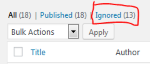
This can happen when you had that event imported before, but then you deleted it, or rather clicked hide & ignore, and it is still in that list. When you go to the list of your events in the dashboard, then you should see a link to it above the list. Just like trash.
Further, in the import history I don’t see any imports being carried out for the last 3 days, although neither the site nor the script was touched.
Imports usually are done based on a cron, which is triggered when someone visits your site. In periods when there are no visits to the sites none of the cron jobs run.
I hope this sheds some light on your questions.
If you still need help with any of these, let me know and then please also check your Event Aggregator System Status at the bottom of the Events > Help page and should look like this:
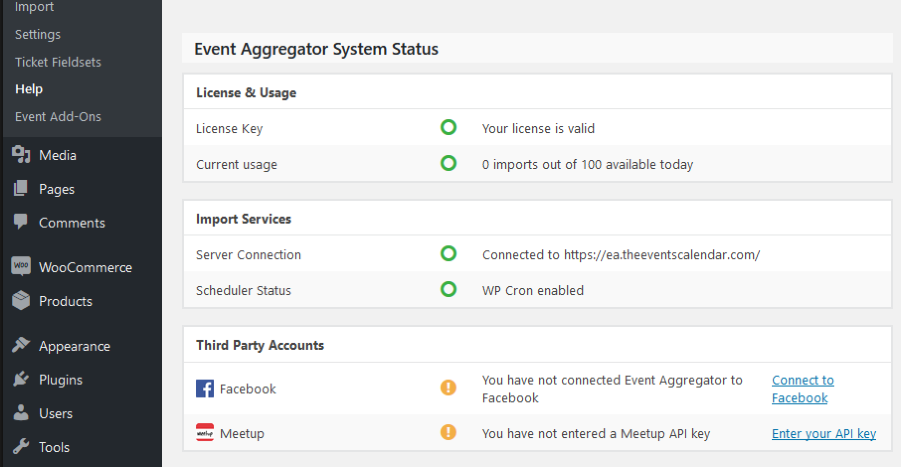
Cheers,
AndrasApril 11, 2017 at 9:12 am in reply to: Ticket types created for page post incorrectly displayed on My Tickets page #1268298Keymaster@András, thanks for reporting back and yeah, you seem to be right that it shouldn’t be there at all.
@first4websites, thanks again for providing your solution here. I will let one of the developers take a look at this to give feedback and might even help in developing a fix.I’ll let you know as soon as I have something.
Cheers,
AndrasApril 11, 2017 at 9:06 am in reply to: Event Imports from Facebook not populating with the right location data. #1268293KeymasterCool, let me know if it works for you.
Thanks and cheers,
AndrasApril 11, 2017 at 8:59 am in reply to: Event time not importing correctly for iCal import (Events Aggregator) #1268289KeymasterThanks for reporting that back. We are currently scoping the next maintenance release and might have a fix for this by the end of the month.
A.
KeymasterHey Jim,
Thanks a lot for your feedback, this is what makes it worth doing support. 🙂 I’m happy I could help you move things along.
I fully understand you being afraid of breaking something. I used to be the same – heck I still am 🙂 – so I started using staging sites for all my important sites for testing and updates. It does help a lot and saved my skin several times. And backups!
I’m happy to leave the topic open and would love to hear when your issue gets resolved. It also might help others in the future. Note though that if there is no movement for 3-4 weeks, then the thread will be automatically closed. But hopefully it will be solved before that. 🙂
Cheers and good luck with your project!
Andras -
AuthorPosts