

Forum Replies Created
-
AuthorPosts
-
April 24, 2017 at 4:48 am in reply to: Previously required fields unchecked but error still happens on checkout #1273331
Andras
KeymasterHello Eric,
Thanks for using our plugins and welcome to the forums!
I am really sorry you had to wait so long to get an answer to your post. We are getting an unusually high number of questions lately. Rest assured, your issue is not overlooked and I’ll try to help you find a solution for this.
I checked your imafs-test page. I wanted to buy 1 of each and I filled out all fields and I still got the red error boxes as if the fields were not filled out. Which is quite unusual.
I see you are using the Avada theme, which uses The Events Calendar and has some customizations with it as well. To rule out that being an issue I would like to ask you o switch to a default theme like twentysixteen and check if the issue exists with that as well.
If the issue cannot be reproduced with twentysixteen, then likely there is something Avada does that makes this appear. In this case the Avada support team might be of help. But let’s not run that much forward.
If the issue still exists with twentysixteen then the next step would be going through our guide for testing for conflicts. This will help us eliminate and conflicting plugins.
Let me know what you find and we’ll go further from there.
Cheers,
AndrasKeymasterNick, I am running some tests on the import. I ask for a bit of patience until I report back with my findings.
Thanks,
AndrasKeymasterI am going to set the status of this ticket to “pending fix” and we will update it once the fix is released. If you have any new questions or issues please create a new ticket and reference this one.
And of course let me know if the workaround does the trick for you.
Thanks and cheers,
AndrasKeymasterHi Thomas,
Thanks for the detailed explanation and the screenshots. I tried recreating the events and I could reproduce the issue, so it looks like we are facing a bug here. I will create an internal bug ticket for this, so the issue can be looked at and fixed by our developers.
As a workaround, you could set up the recurring event in a way that you don’t have exclusions. Here is an example:
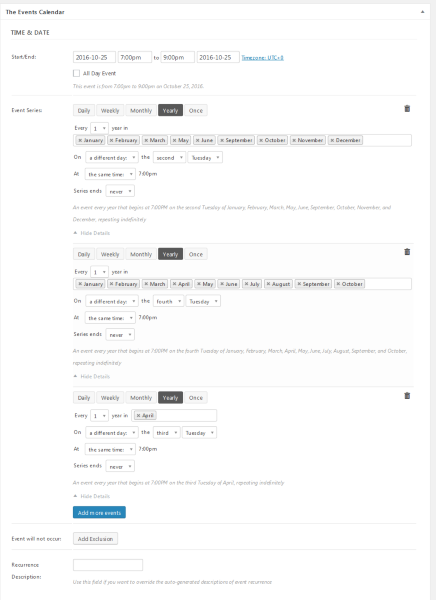
I hope this helps.
Cheers,
AndrasKeymasterSteve, thanks for your reply. Happy to hear things seem to be working okay now.
Since this is marked resolved I am going to close this ticket, but if you need anything else related to this topic or another please post a new one in the forum and we will be happy to help you out.
Cheers,
AndrasApril 24, 2017 at 3:21 am in reply to: Errors after updating Event Tickets Plus and WooCommerce #1273313KeymasterMeanwhile I tested a simple purchase on my local install. Ticket created with WooCommerce 3 and the purchase process went fine without any issues.
Also I tried to do a test purchase on your test site, could add the ticket to the basket, but the checkout page timed out.
Andras
April 24, 2017 at 3:10 am in reply to: Errors after updating Event Tickets Plus and WooCommerce #1273311KeymasterHello again liblogger,
Thanks for the tests and the detailed explanation.
(I believe your post didn’t vanish, it just takes our site some time to show them, probably due to caching.)
Of course I understand you don’t want to implement something that is throwing error messages at you. Please give me some time to check with the team if we are facing a bug here or not. I’ll get back to you soon.
In the meantime if you happen to do more test, please do share the results as they might help us hunt down the source of the issue.
Thanks and cheers,
AndrasApril 24, 2017 at 3:02 am in reply to: Inclued a Google calendar invite on generated ticket #1273309KeymasterHi Johnny,
Let me check that for you and I’ll let you know.
Cheers,
AndrasApril 24, 2017 at 2:57 am in reply to: How do I add a "do not display if no events" to a shortcode? #1273307KeymasterHello Drew,
Please give me some time to check with the developers what can be done. I’ll be in touch soon.
Thanks!
Andras
KeymasterHello Sara,
Your question makes absolute sense.
Unfortunately there is no way to do what you described.
From my point of view, since the events are on different locations and different times, the best solution would be simply creating a separate event for all entries.
Even if you can somehow achieve having multiple venues for one event with The Events Calendar, it would be difficult to assign different dates to the different venues.
When importing from CSV, then definitely every line in the CSV file will be imported as a separate event.
I hope this explains. Let me know if you have any more questions regarding this topic.
Cheers,
AndrasKeymasterHello Uwe,
Thank you for your patience regarding this topic.
I took some time to look into this, but couldn’t come up with a solution. It would require customization efforts, which is beyond our scope of support.
Here is a list of developers, well known in our community who might be able to help you out with this. <span class=”paragraph”>list of freelancers</span>
Probably a way to start this is to create a new custom filter based on the existing price filter. Then either setting up the minimum price and making it effective immediately on the first load, or somehow excluding RSVP tickets from the filtering.
I’m sorry I cannot give you a better solution for this, but I hope this will help you get started.
Cheers,
AndrasKeymasterHello Susan,
Thanks for reaching out! I checked the status of the bug ticket, it is scheduled to be fixed with the next maintenance release sometime early May. So hang in there just a bit more.
I understand you being afraid before an update. I also was until I started implementing the following before doing any major changes or updates on any site:
1. Do a full backup of your site’s files and database. In case something goes wrong this can help you go back to a working version. There are several free and premium plugins for this. Here’s a nice article on the topic and another free plugin which is not included in the article.
2. Set up a staging / test site, where you can test all updates before applying them on your live site. You can set up a staging site under a new domain name or under a subdomain of your main domain. Some of the above plugins can help you create a copy of your site to deploy it to a new domain.
I hope this helps. Hang in there, the fix will come soon.
Cheers,
AndrasKeymasterThis reply is private.
KeymasterHey Nick,
Imported events, when deleted, they don’t go to the trash, but to the ignored list.
Please give me some time while I get an extra set of eyes to take a look at this.
Thanks,
AndrasKeymasterThis reply is private.
-
AuthorPosts