
Home › Forums › Ticket Products › Event Tickets Plus › Inclued a Google calendar invite on generated ticket
- This topic has 14 replies, 4 voices, and was last updated 9 years, 5 months ago by
Andras.
-
AuthorPosts
-
April 10, 2017 at 5:36 pm #1267984
johnny
ParticipantHi how would I go about adding a Google calendar invite to the automatically generated RSVP or Woo Commerce Tickets?
Also would it be possible to resend the original ticket RSVP or Woo Commerce Event to the attendees as a reminder email prior to an event commencing?
April 13, 2017 at 4:13 am #1269339KeymasterHello Johnny,
Thanks for using our plugins and for getting in touch with your questions.
Hi how would I go about adding a Google calendar invite to the automatically generated RSVP or Woo Commerce Tickets?
You could create a template override for the email that is being sent out.
Here is a link to our Themer’s Guide that should help you get started in doing a template override.
https://theeventscalendar.com/knowledgebase/themers-guide/
Also would it be possible to resend the original ticket RSVP or Woo Commerce Event to the attendees as a reminder email prior to an event commencing?
I believe this would be possible manually if you go to the WooCommerce order page of the tickets, and there in the top right corner in the “Order actions” box you should be able to find “Resend tickets”.
If you want to automate that, then a plugin like Follow Up Emails might help you with that.
I hope this helps! Let me know if you have more questions regarding this.
Cheers,
AndrasApril 18, 2017 at 11:44 pm #1271492ParticipantHi Andras, I had a look at guide you supplied. very confusing not sure which ticket file to edit. I just want to add “goggle cal” to both RSVP and Woocomerce tickets that get emailed out. Is there some kind of simpler way to do this.
Thanks
JohnnyApril 19, 2017 at 8:29 am #1271637KeymasterHey Johnny,
I’ll check if there is a simple solution for this.
Will get back to you soon.
Andras
April 19, 2017 at 8:56 am #1271652KeymasterJohnny, you can try this:
Add the following snippet to your child theme’s functions.php file:
add_action ( 'tribe_tickets_ticket_email_ticket_bottom', 'add_gcal_to_email' );
function add_gcal_to_email() {
echo "Hello, this is the extra text";
}
Adjust the text to your needs.
The ticket will look like this:
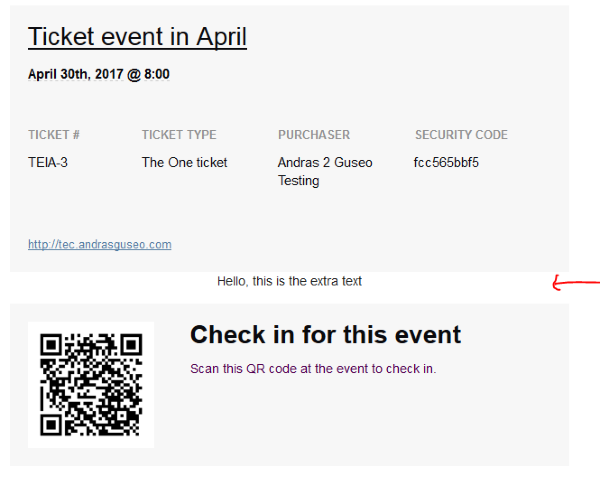
This is the easiest it can go.
You can of course have a longer text, multiple lines and html markup in there as well.
Let me know if this solves it for you.
Cheers,
AndrasApril 19, 2017 at 2:49 pm #1271884ParticipantHi Andras I did what you said but I seem to get a syntax error on line 18 please see screen shot.
Johnny
April 20, 2017 at 3:55 am #1272042ParticipantHi Andras, I did some updates and gave it another go. Seemed to sort of work. Now the text seems to work… But i thought this would be the event gcal link to the event. Is it possible to add the link or have the ical and gcal buttons at the bottom of the email. please see screen images attached.
Thanks
Johnny
April 24, 2017 at 3:02 am #1273309KeymasterHi Johnny,
Let me check that for you and I’ll let you know.
Cheers,
AndrasApril 26, 2017 at 6:52 pm #1275022Brook
ParticipantHowdy Johnny,
Andras has been pretty swamped the last little bit and asked me to take a look at this.
I think this code snippet is exactly what you’re looking for:
https://gist.github.com/elimn/dd7de019f478bd151ca14cafe7d284f1
That will add a working Gcal link to the email template. Note, the Email template does not include any “button” styling, so this is just a plain blue link by default. If you want to style it up you will need add some CSS that changes the look from a regular link to a button. But regardless of how it looks, it should work as you’ve described. 🙂
Let us know if that helped. Cheers!
– Brook
May 1, 2017 at 9:01 pm #1277055ParticipantHi Brook, that codes snippet seemed to work a treat. Would you Also have a code snippet to add an iCal beneath the gCal link.
Thanks
JohnnyMay 2, 2017 at 3:48 pm #1277712KeymasterHey Johnny,
Brook was kind enough to help out with that as well.
Try this snippet for the iCal.
https://gist.github.com/andrasguseo/4a0ade5be8495c5dac34fc5a17f6dc59
Let me know how that works out.
If you want the ical link in a new line, then you might need to add a “<br>” before the
<a class="tribe-events-icalin this second snippet.
Does this do the trick?
Andras
May 2, 2017 at 6:19 pm #1277758ParticipantHi Andras, this did the trick attached is a screen shot. Thank you again for the code snippet.
Johnny
May 3, 2017 at 7:06 am #1277957KeymasterExcellent, I’m super happy it helped.
Since this topic seems resolved I am going to close this ticket, but if you need anything else related to this topic or another please post a new one in the forum and we will be happy to help you out.
Good luck with your project!
Cheers,
AndrasMay 3, 2017 at 7:07 am #1277959KeymasterPS: If you like our plugins, and you didn’t yet do so 🙂 we would be happy to receive a review in the wordpress.org repository. Thanks!
https://wordpress.org/support/plugin/the-events-calendar/reviews/
https://wordpress.org/support/plugin/event-tickets/reviews/PS2: We’d be also grateful if you would give us feedback on your satisfaction with support. Just click on one of the classy looking emojis below. 🙂 If you can spare a few words, that’s even better. Doublethanks!
-
AuthorPosts
- The topic ‘Inclued a Google calendar invite on generated ticket’ is closed to new replies.