

Forum Replies Created
-
AuthorPosts
-
April 19, 2017 at 9:32 am in reply to: Errors after updating Event Tickets Plus and WooCommerce #1271682
Andras
KeymasterHad some discussions with the team meanwhile and 2 more ideas came up.
1. Disable showing the error messages (the WP_DEBUG options in wp-config.php) – the problem will not go away but it would stop the page load from breaking due to errors being sent before headers are set.
2. Wait for our maintenance release coming out hopefully later today, which might solve this issue.
Andras
KeymasterHello Nick,
Thanks for sharing those links.
I ran a test with the google calendar link you provided and the events imported without issue.
I can think of one scenario when the events don’t import. That is when they have been imported before and then marked as ignored. So they are not visible on your site and are not being imported updated.
You can hide it with clicking on that: https://cloudup.com/cDbN_KY3e6r
You can look at your hidden / ignored events and restore them here: https://cloudup.com/cvzCUUdyC-8
Check and let me know if you find them there.
Cheers,
AndrasApril 19, 2017 at 8:57 am in reply to: Errors after updating Event Tickets Plus and WooCommerce #1271655KeymasterThanks for checking that liblogger!
Yes, I meant simple product. 🙂 I get confused sometimes.
I wasn’t able to reproduce this issue yet. Do you possibly have a staging site with a different php version where you could test? Meanwhile I will look around if there is someone on the team who could help with this.
Andras
April 19, 2017 at 8:56 am in reply to: Inclued a Google calendar invite on generated ticket #1271652KeymasterJohnny, you can try this:
Add the following snippet to your child theme’s functions.php file:
add_action ( 'tribe_tickets_ticket_email_ticket_bottom', 'add_gcal_to_email' );
function add_gcal_to_email() {
echo "Hello, this is the extra text";
}
Adjust the text to your needs.
The ticket will look like this:
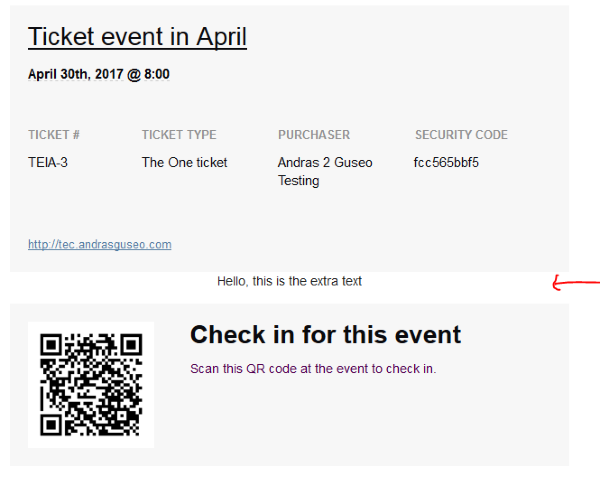
This is the easiest it can go.
You can of course have a longer text, multiple lines and html markup in there as well.
Let me know if this solves it for you.
Cheers,
AndrasApril 19, 2017 at 8:29 am in reply to: Inclued a Google calendar invite on generated ticket #1271637KeymasterHey Johnny,
I’ll check if there is a simple solution for this.
Will get back to you soon.
Andras
KeymasterPS: If you like our plugins, and you didn’t yet do so 🙂 we would be happy to receive a review in the wordpress.org repository. Thanks!
https://wordpress.org/support/plugin/the-events-calendar/reviews/PS2: We’d be also grateful if you would give us feedback on your satisfaction with support. Just click on one of the classy looking emojis below. 🙂 If you can spare a few words, that’s even better. Doublethanks!
KeymasterAwesome, happy to hear that!
Since this is marked resolved I am going to close this ticket, but if you need anything else related to this topic or another please post a new one in the forum and we will be happy to help you out.
Good luck with your project!
Cheers,
AndrasApril 19, 2017 at 8:10 am in reply to: Accidentally Purchased Eventbrite Tickets Key for Site That Already Had One #1271624KeymasterHi Caitlin,
Thanks, one of my colleagues will take a look at that and will process it very soon.
Cheers,
Andras
KeymasterHallo Uwe,
Let me answer to your earlier post first.
I check the google tool and see these warnings: https://cloudup.com/cnROIUDefgr
All these are only warnings and not errors and they are recommended, but not obligatory.
These fields seem to be:
avalibilityStarts -> not sure what this should be. (The ticket selling date goes to validFrom.)
inventoryLevel -> there might be an issue here as my test stock doesn’t show up
priceCurrency -> I tested this, I’m not sure why this is not appearing.
url -> Not sure either why you have this empty, in my test this shows the url of the page of the event
description -> again, not sure, this is the description of the event
eventStatus -> I’m not sure we are providing this value at the moment
So as a conclusion:
- there seems to be an issue with inventoryLevel and priceCurrency. I will open a ticket for this so it can get fixed in the future.
- availibilityStarts and eventStatus: not sure what these should be / we don’t provide or generate that info.
- url and description works for me as expected. Best would be if you could test it with a different theme, likely twetwentysixteen or twentyseventeen
Your second post:
I have an older version of Avada on hand. There in the single-events.php file for example line 24 is this:
<div id="tribe-events-content" class="tribe-events-single vevent hentry">This could be one, or you could add another
<article>container element outside the div and adjust the classes.Does this help?
Andras
KeymasterHappy to be of service. 🙂
April 18, 2017 at 11:57 am in reply to: Accidentally Purchased Eventbrite Tickets Key for Site That Already Had One #1271270KeymasterHello Caitlin,
Sure thing, that can be arranged. You can find the details and ask for a refund on this page:
Hope this helps.
Cheers,
AndrasKeymasterHallo Uwe,
I apologize, this thread fell out of my radar. I reopened the topic and will check if there is a solution for this. I’ll get back to you still this week.
Cheers,
AndrasKeymasterHello Thomas,
Thanks for reaching out! I’m sorry for the troubles with the recurrences, that is definitely nerving.
I would be more than happy to help you find the root cause of the issue, so we can get down to the bottom of this and get your site to working as it should be.
The first step for this would be me testing the same event and recurrence setup. Could you share with me the whole setup of the event? Unfortunately on the screenshots I don’t see the starting date / setup and all the recurrence rule details. If you could share that with me I can immediately jump on testing that issue.
As for your second issue, it can be that since the recurrence is in the past it doesn’t get created. I’m not quite sure it that is considered a bug, I will check. The simple solution would be to put the oldest date as the original start/end, and future dates – future from the oldest – as recurrence rules.
Please then share with me the full setup of that recurring event which is causing you issues and I’ll try to check what could be the issue.
Cheers,
AndrasApril 18, 2017 at 7:55 am in reply to: Errors after updating Event Tickets Plus and WooCommerce #1271105KeymasterHello again,
I just did a test purchase on one of my test sites with a sandbox PayPal account and the process went through without a glitch.
I just saw in your system information you are using an older version of php. Would it be possible to update to 5.6 or even version 7 and check with that?
Cheers,
AndrasKeymasterThis reply is private.
-
AuthorPosts