

Forum Replies Created
-
AuthorPosts
-
Victor
MemberHi Ingrid!
I’ll go ahead and close this thread as it’s a duplicate of this one > https://theeventscalendar.com/support/forums/topic/short-code-for-add-events/
Please let us know if you have any other questions about this in that thread 🙂
Thanks,
VictorMemberHi Tyler!
Thanks for getting in touch with us! Let me help you with this topic.
I don’t think you are doing anything wrong here, it’s just how recurring events are designed to work. Let me explain this further and the way to achieve exactly what you are looking for.
The main event is the one you created for Jan 11 at 10am – 10.30am. All the recurring instances you created (both at the same time and from 10.30 to 11am) are weekly, which means they will be created starting next week Jan 18.
So, if you also want to add another instance for Jan 11 at 10.30am you can create a Once instance for that purpose. See the following event series as an example:
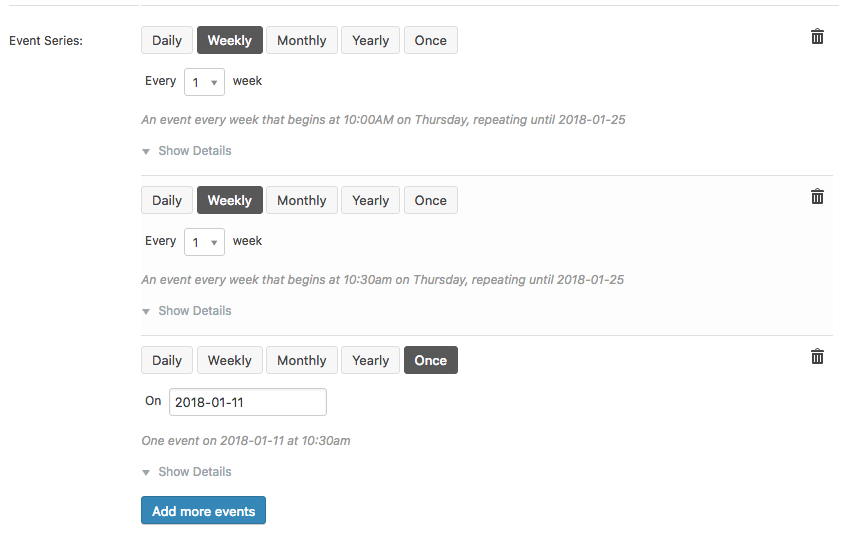
I hope that helps! Let me know if you have any follow up questions.
Best,
VictorJanuary 11, 2018 at 2:07 pm in reply to: How to add a banner image at bottom in the ticket send to customer? #1424102MemberHi Saikat!
Thanks for getting in touch with us! I’m happy to help you with this topic.
You can customize the ticket email template by following one of the methods described in our Themer’s Guide > https://theeventscalendar.com/knowledgebase/themers-guide/.
The email.php template file is located at /wp-content/plugins/event-tickets/src/views/tickets/
I hope that helps! Let me know if you have any follow up questions.
Best,
VictorJanuary 11, 2018 at 1:57 pm in reply to: Woops! We could not complete the requested operation due to an unforeseen proble #1424084MemberHi There!
Just wanted to let you know this issue is no longer present in our latest feature release of Event Tickets and Event Tickets Plus. We encourage you to update to the latest versions and try it out.
To find out more about the release -> https://theeventscalendar.com/release-event-tickets-4-6-event-tickets-plus-4-6-events-calendar-4-6-4-community-tickets-4-5/
We always suggest to setup a dev/staging site so you can test things out and make all plugins, theme and WordPress core updates without disrupting the live site.
As always, don’t hesitate to open a new topic if anything comes up and we’ll be happy to help! 🙂
Best!
VictorMemberHi Ken!
I’m sorry you are experiencing that issue. Let me help you troubleshoot it.
First, please make sure you are using the latest versions of our plugins. Remember you can always download our plugins from your downloads page > https://theeventscalendar.com/my-account/downloads/
If you still experience the error with latest versions, Could you please let us know if after getting the error message, the attendees moved to the other event anyway?
Also, please share with us your system information by following this guide > https://theeventscalendar.com/knowledgebase/sharing-sys-info/. We’ll see if there is anything strange that would indicate an error from there.
Let us know about that.
Thanks,
VictorJanuary 11, 2018 at 8:28 am in reply to: Importing events from agovernment websites with events saved as ics & ? #1423533MemberHi Monika!
Thanks for reaching out to us! Let me help you with this topic.
I have been able to download the ICS file from the City Council website for a single event like you mention, but I could not find a way to obtain a full list of events in ICS format from that site.
Unfortunately, I’m not able to guess what calendar they are using for their events. I don’t think they are using a Google calendar here, so you might want to reach out to them to see if they can provide you with an ICS file that contains all calendar events or other formats.
As a reference, let me point you to a couple of articles that will get you started at importing events from different sources:
- https://theeventscalendar.com/knowledgebase/importing-data-from-a-csv-file/
- https://theeventscalendar.com/knowledgebase/import-from-feed-or-url/
- https://theeventscalendar.com/knowledgebase/importing-events-from-an-ics-file-with-event-aggregator/
I hope that helps. Let me know if you have any other questions.
Best,
VictorJanuary 11, 2018 at 8:04 am in reply to: Event Tickets Plus – Tickets Not Showing on Creating Event #1423530MemberHi Iain!
Thanks for reaching out to us! Let me help you with that.
To be able to create tickets to sell, you also need either WooCommerce or EDD plugins activated. Could you please make sure you have one of them installed and activated?
If so, and issue still persists, then please share with us your system information by following this guide > https://theeventscalendar.com/knowledgebase/sharing-sys-info/. We’ll see if there is anything strange that would indicate an error from there.
Also, could you please see if there are any console errors by inspecting the edit event page? We have an article that explains how to do that here > https://theeventscalendar.com/knowledgebase/using-google-chrome-developer-tools/
Let us know about that.
Thanks,
VictorMemberHi Heid!
Thanks for getting in touch with us. Let me help you with each of your questions.
- This is how the image uploads are handled for community submitted events. You can customize the image module in that form so that it uses the WordPress media uploader. As a reference, let me point you to the following thread where Cliff here suggested an approach on how to to that. This is also an idea posted in our user voice > https://tribe.uservoice.com/forums/195723-feature-ideas/suggestions/5620219-community-events-native-image-file-uploader-on-s
-
We have an extension for that purpose so you can add a list of currency symbols for the user to select > https://theeventscalendar.com/extensions/community-events-cost-currency-symbol/
-
Adding tickets through the community form is only available with our Community Tickets plugin > https://theeventscalendar.com/product/community-tickets/
I hope that helps. Is there anything else I can help you with? Let me know.
Best,
VictorJanuary 11, 2018 at 6:07 am in reply to: "Your preview doesn't have any records to import." #1423445MemberHi Todd!
Thanks for reaching out to us! Let me help you with that issue.
I have tried importing that same event and it’s working fine on my end.
First, could you please see if there are any console errors by inspecting the page when trying to import? We have an article that explains how to do that here > https://theeventscalendar.com/knowledgebase/using-google-chrome-developer-tools/
Also, please try going to Events > Settings > APIs and try refreshing your connection to Facebook to see if any difference.
Please let me know how that goes.
Thanks,
VictorMemberHi Rodrigo!
I’m sorry you are having that issue. Let me help you with it.
Could you please go to Events > Settings > Licenses tab then delete your EA license and save. Then please go to your licenses page > https://theeventscalendar.com/my-account/license-keys/ and disconnect your site from your EA license.
After that, try re-entering the license and saving to see if if clears the issue.
Let me know how that goes.
Thanks,
VictorJanuary 11, 2018 at 5:37 am in reply to: View as Map not showing events however map on events work fine #1423427MemberHi Rodrigo!
Thanks for taking your time to report this.
As you can see in the thread you linked to, it seems there is an issue with the Google Maps API requests and we are already investigating this on our end.
I’ll set this as Pending fix and link it to the report so we’ll keep you posted about it.
In the meantime, the only workaround we’ve found so far is manually editing the venues and adding the missing latitude and longitude coordinates.
In the meantime, could you please log in to your Google API console and see if you are getting errors for your Google Maps Geocoding API requests and the code errors involved?
I apologise for the inconvenience and we appreciate your patience.
Best,
VictorMemberHi Ingrid!
Thanks for getting in touch with us! Let me help you with that.
I’m not exactly sure what you are trying to accomplish. We have several shortcodes you can use to embed calendar views and widgets to your site > https://theeventscalendar.com/knowledgebase/embedding-calendar-views-tribe_events-shortcode/ and https://theeventscalendar.com/knowledgebase/pro-widget-shortcodes/
Do you want to add a link to the Community add event form in a page or somewhere else in your site? If so, please let me know more about this and I’ll be happy to point you in the right direction.
As a reference, if you are trying to create some custom code, we have the following helper functions that you might want to know about > tribe_community_events_add_event_link() and tribe_community_events_list_events_link()
I hope that helps. Let me know if you have any questions.
Best,
VictorJanuary 11, 2018 at 5:22 am in reply to: There seems to be a conflict between Basel & Co theme and Event Tickets Plus #1423412MemberHi Stepan!
Thanks for reaching out to us and for testing for conflicts!
First, could you please see if there are any console errors by inspecting the page before and after clicking the add to cart button? We have an article that explains how to do that here > https://theeventscalendar.com/knowledgebase/using-google-chrome-developer-tools/
Also, please enable WP_DEBUG and WP_DEBUG_LOG. This will create a debug.log file inside the /wp-content directory.
After that, try reproducing the issue a few times, so that in case there is an error, it will be saved into the debug.log file. Please share that log file with us so we can see if any problem from there.
Please let us know about that.
Thanks,
VictorMemberHi José!
Thanks for reaching out to us! Let me help you with this topic.
You can achieve that with some custom coding. Let me point you to the following thread where Nico shared a snippet to do just that > https://theeventscalendar.com/support/forums/topic/allow-categories-and-tags-against-venues-and-organizers/#dl_post-1069752
I hope that helps. Let me know if you have any follow up questions 🙂
Best,
VictorJanuary 11, 2018 at 5:09 am in reply to: Related events show the title for the current event, not future recurring ev #1423405MemberHi Emily!
Thanks for following up with this.
I’m not sure I understand exactly what you want to accomplish. Could you please explain this further? You can also share with us some screenshots if you’d like.
Please let me know about that and I’ll be happy to help you with that.
Thanks,
Victor -
AuthorPosts