

Forum Replies Created
-
AuthorPosts
-
Victor
MemberHi David!
Thanks for coming back with a copy of the plugin.
We will run some tests and investigate the issue on our end to see if we can find a fix for the conflict.
We will get back to you shortly. Please hang in there.
Thanks,
VictorFebruary 27, 2018 at 11:15 am in reply to: After / Problem with the function tribe_get_listview_prev_link () #1465174MemberHi Rivet!
I’m sorry to hear your experience with this thread was not good.
All topics will auto-close after 3 weeks of inactivity. If that happens, don’t hesitate to open a new topic linking to the previous one and we’ll be happy to continue helping with it.
Best,
VictorMemberHi Matt!
Thanks for reaching out to us!
There is no default setting to accomplish what you are looking for.
However, you can further customize our templates using one of the methods described in our themer’s guide > https://theeventscalendar.com/knowledgebase/themers-guide/
I hope that helps. Let me know if any follow up question.
Best,
VictorFebruary 27, 2018 at 6:47 am in reply to: Link to specific event url in meetup, and import thumbnail image #1464777MemberHi Jenny!
Thanks for reaching out to us! Let me help you with this topic.
By default, the website URL should be the event url so it’s strange that you are getting the main meetup page in that field.
Is this happening with all events from meetup or just one in particular?
Could you please share with us the URL (in a private reply if you’d like) where you are trying to import events from?
We’ll run some tests and see if get the same results.
Thanks,
VictorFebruary 27, 2018 at 6:34 am in reply to: CSV importing fifu_image_url custom field for "Featured Image From URL" plugin #1464761MemberHi Victor! 🙂
Thanks for reaching out to us. Let me help you with that issue.
I can see from one of your screenshots that you have not selected the corresponding field to import the fifu_image_url to.
Make sure you select the additional field you have created so that it imports as expected.
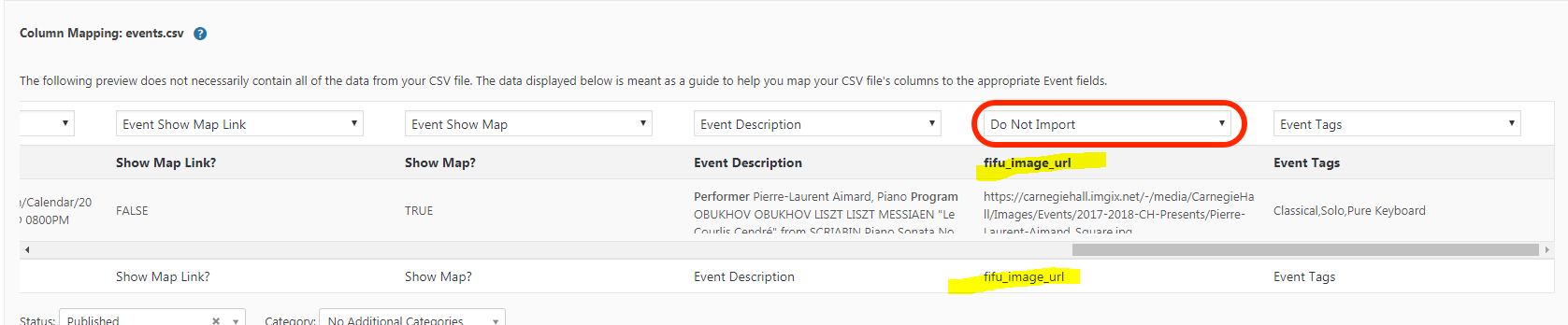
Let me know if that works for you.
Best,
VictorMemberHi Paula!
Thanks for coming back with the logs.
I can see there a are many PHP notices coming from your theme. Could you please try switching to a default theme (like twenty seventeen) and see if any difference?
If no difference, please also try disabling all other plugins except ours (like it states in our Testing for conflicts guide > https://theeventscalendar.com/knowledgebase/testing-for-conflicts/) to make sure we are not dealing with a plugin conflict.
Please let us know how that goes.
Thanks,
VictorMemberHi Becky!
Thanks for testing that out and for coming back with your other threads links.
I have just reviewed them and it seems really possible what Patricia mentioned here > https://theeventscalendar.com/support/forums/topic/events-disappeared-part-3/#dl_post-1373600
The next thing I would recommend doing is creating a fresh test site — this will avoid any disruption to your live site and ensure that we’ve effectively got a “clean canvas” to work with.
- Please install a fresh copy of WordPress in a subdirectory (if you have a CPanel-type hosting account there will probably be a one-click install script to make this really easy)
- Don’t install anything except The Events Calendar, Events Calendar PRO, Filter Bar and Community Events plugins.
- Please also stick to a default theme — again, there’s no need to install anything else just yet!
- Create a few events so we have some test data to work with
- Can you replicate the same problem?
If you find you can replicate the problem under these conditions it would be awesome if you could stop and let us know so we can take a look while the site is still running under default conditions.
Thanks for your help while we work on this together!
Best,
VictorMemberHi Hirsch!
I’m sorry to hear that didn’t work for you.
The good news is that we were able to release a fix for this issue in our latest Event Tickets 4.6.3.1 hotfix release yesterday.
Please update the plugin and see if the fix works for your site.
Thanks,
VictorMemberHi Michelle!
Thanks for clearing that out. Let me try to help you with that.
Are you experiencing the slowdown in all wp-admin pages on just some? If just some, could you please let me know which ones?
Could you please see if there are any console errors by inspecting the slow pages? We have an article that explains how to do that here > https://theeventscalendar.com/knowledgebase/using-google-chrome-developer-tools/
How many events, venues and organizers do you currently have?
Did the slowdown in performance started all of a sudden or did it get slower over time?
Please let me know about it.
Thanks,
VictorMemberHey Gabrielle,
Thanks for testing that out and for keeping us posted.
We’ve seen this notice pop up for customer in other threads. In most of those cases, it boiled down to the hosting service not allowing enough memory to PHP. As a starting point, I would suggest following the steps outlined in this WordPress Codex article — it walks through how to increase that memory limit.
If, however, that does not do the trick, I would recommend reaching out to your hosting provider and asking them for assistance in increasing the PHP memory limit. That should resolve the issue but, if for some reason it does not, please don’t hesitate to let us know and we can dig into this further.
Regarding the Venue option missing from the edit page, it could be a different issue, so let’s first tackle the memory limit error. If after solving the fatal error the venue option is still missing, I’d recommend you try testing for conflicts again to see if any difference under default conditions.
Let me know how that goes.
Thanks,
VictorMemberHi Jeff!
Thanks for chiming in here and letting us know about your findings.
Could you please share with us a copy of the latest Enfold theme in a private reply so we can run some tests and have as reference to investigate the conflict?
Thanks,
VictorMemberHi Dan!
I’m glad you could figure things out! Thanks for keeping us posted.
I also wanted to let you know that we have just released a hotfix release for Event Tickets 4.6.3.1 where this issue was fixed.
Please update to the latest version of Event Tickets and see if the fix works for your site.
Thanks,
VictorMemberHi Mats!
Thanks for following up with this.
We are fairly limited in how much support we can give for custom development questions like that. But, we always like helping out and at least point users into the right direction as much possible.
As I said before, the one function that I found that was deprecated is the tribe_events_the_notices(). You should instead use the tribe_the_notices() function.
Also, when I spin up a local version of the site (clone of the current one), everything works fine. So can´t really figure out what the problem is…
This is also true on my end. I do notice many PHP Notices and Warnings getting generated. This does not necessarily mean something is not working, but your developer should have a look at them, as it could bring problems with future updates.
Regarding the Add to cart button issue you initially reported, you could share with me a link to your site where you are experiencing it. I can have a closer inspection and see what I can find.
Let me know.
Thanks,
VictorFebruary 27, 2018 at 4:15 am in reply to: Events Calendar not reading OG data from All-in-one SEO #1464645MemberHi Tom!
Thanks for keeping us posted about this.
I have just checked and it seems the plugin author said that it works with custom post types.
Could you please try again following the documentations he pointed to and see if it works?
Please let me know how it goes.
Thanks,
VictorMemberHi Paula!
Thanks for trying that out.
We are not able to access your debug.log from our end. You will need to navigate to your site’s files and look for the debug.log file that should be located inside the /wp-content directory.
Please share that file with us in a private reply. Please note that you won’t be able to directly upload the file and you will first need to compress it into a zip file.
Let me know how that goes and if you have any questions in the meantime.
Thanks,
Victor -
AuthorPosts