
Home › Forums › Welcome! › Pre-Sales Questions › CSV importing fifu_image_url custom field for "Featured Image From URL" plugin
- This topic has 7 replies, 2 voices, and was last updated 8 years, 7 months ago by
Victor Levy.
-
AuthorPosts
-
February 25, 2018 at 11:20 am #1463280
Victor Levy
ParticipantHaving the Pro add-on, I’m failing when trying to use the Tribe CSV importing feature to import the fifu_image_url custom field, which is used by the “Featured Image From URL” plugin for displaying the featured image. When I view an event listing created via manual input that has a remote featured image, I see the fifu_image_url field having the correct URL for the featured image. (normal_fifu_url.png)
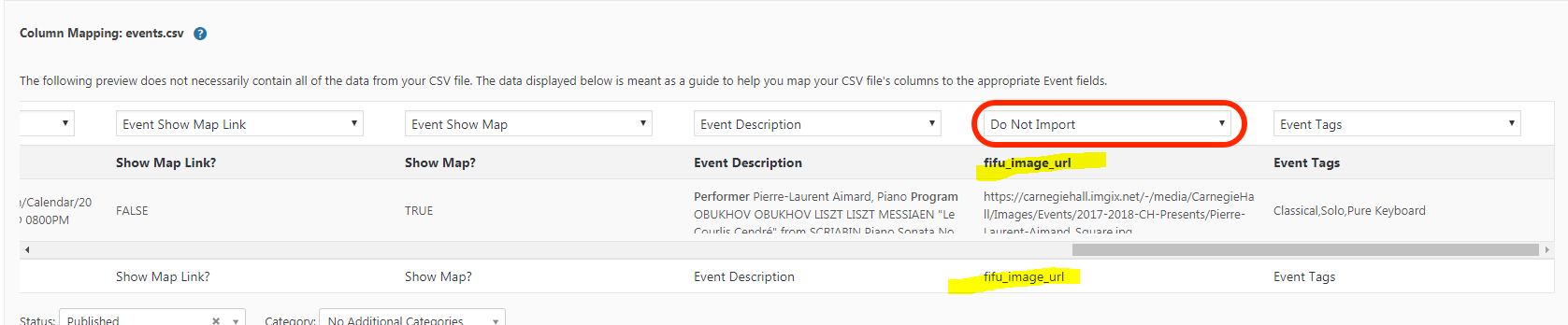
But when I run the importer, in the Preview page, even though I have see fifu_image_url as an imported column, fifu_image_url is not offered as a field to match. (fifu_url_not_matched_1.png and fifu_url_not_matched_2.png)
So I added fifu_image_url as a custom URL field. (fifu_url_custom_field_add.png) and re-ran the CSV import tool. Now, fifu_image_url is available to match as a custom field (fifu_url_matched.png), and I complete the import.
But when I open the imported event listing, the fifu_image_url is shown neither as a custom field nor as an “additional event field.” And the URL is not recognized by Featured Image From URL. (bad_result.png)
Unfortunately the upload limit has prevented me from uploading all of the .png files I’m referring to.
February 27, 2018 at 6:34 am #1464761Victor
MemberHi Victor! 🙂
Thanks for reaching out to us. Let me help you with that issue.
I can see from one of your screenshots that you have not selected the corresponding field to import the fifu_image_url to.
Make sure you select the additional field you have created so that it imports as expected.
Let me know if that works for you.
Best,
VictorFebruary 27, 2018 at 7:05 pm #1465484ParticipantHi Victor, Thanks for looking carefully at the screen shots. You are right that on that one I did not import the field, although I did previously before collecting my screen shots. When I do it once more, I see that the fifu_image_url has been imported as an “Additional event field” but not as a “Custom field.” (Please see the new image.) What I need for the “Featured Image From URL” plugin is a custom field. If use the custom field drop-down to add the fifu_image_url field, it is accepted and I see my image. Is that possible to do using the importer?
Thanks, Vic
February 28, 2018 at 5:39 am #1465828MemberHi Vic!
Thanks for clarifying.
Unfortunately, that is not a built-in option of the Event Aggregator.
You could achieve that with some custom coding, probably using the tribe_aggregator_after_insert_posts action hook located at https://github.com/moderntribe/the-events-calendar/blob/master/src/Tribe/Aggregator/Record/Abstract.php#L1878
I hope that helps. Is there anything else I can help you with?
Best,
VictorFebruary 28, 2018 at 6:24 pm #1466653ParticipantHi Victor, for the time being I am solving the problem using a SQL insert. I’m importing the event as the “additional” field which I have named external_image_url, and from that inserting the ‘fifu_image_url’ custom field.
`/* Delete any existing custom external-image fields that may have been manually inserted into my imported drafts */
DELETE FROM wp_postmeta WHERE meta_id IN (
SELECT * FROM (
SELECT m.meta_id
FROM wp_posts event
INNER JOIN wp_postmeta m ON m.post_id = event.id
WHERE event.post_type = ‘tribe_events’
AND event.post_status = ‘draft’
AND m.meta_key = ‘fifu_image_url’) temp_table
);/* Insert a fifu_image_url custom field in any imported draft having the _ecp_custom_3 (external_image_url) “additional” field */
INSERT INTO wp_postmeta (post_id, meta_key, meta_value) (
SELECT m.post_id, ‘fifu_image_url’, m.meta_value
FROM wp_posts event
INNER JOIN wp_postmeta m ON m.post_id = event.id
WHERE event.post_type = ‘tribe_events’
AND event.post_status = ‘draft’
AND m.meta_key = ‘_ecp_custom_3’
)`This works in my staging environment, but is probably not portable to my production environment without checking the ‘_ecp_custom_3’ name, because I have not yet found out is how EC Pro is linking the ‘_ecp_custom_3’ meta_key in wp_postmeta to the ‘external_image_url’ name. (_ecp_custom_3 is also found in _tribe_modified_fields.) I haven’t spotted any field in the database containing the name of my additional field which I have named ‘external_image_url’.
Possibly you can help with this? Summarizing, where is EC Pro linking the name I have given my additional field, ‘external_image_url’, to the name it has auto-generated for it, ‘_ecp_custom_3’?
Thanks, Vic
March 1, 2018 at 4:21 am #1466908MemberHi Victor!
First, please let me note that we are fairly limited in how much support we can give for custom development questions like that.
That said, we always like helping out and at least point users into the right direction as much possible.
The additional fields are stored in the wp_options table, specifically in the tribe_events_calendar_options option name.
You can use the tribe_get_option( ‘custom-fields’ ) helper function to get an array of custom fields available.
I hope it helps.
Best,
VictorMarch 23, 2018 at 9:35 am #1487056Support Droid
KeymasterHey there! This thread has been pretty quiet for the last three weeks, so we’re going to go ahead and close it to avoid confusion with other topics. If you’re still looking for help with this, please do open a new thread, reference this one and we’d be more than happy to continue the conversation over there.
Thanks so much!
The Events Calendar Support Team -
AuthorPosts
- The topic ‘CSV importing fifu_image_url custom field for "Featured Image From URL" plugin’ is closed to new replies.