

Forum Replies Created
-
AuthorPosts
-
Victor
MemberHi Russell!
Thanks for getting in touch with us.
Unfortunately, that is not a built-in functionality of our plugins and we don’t have any shortcode to achieve that.
You can achieve that with some custom coding, which we can’t give support for as we state here > https://theeventscalendar.com/knowledgebase/what-support-is-provided-for-license-holders/
I did found the following plugin that might achieve what you are looking for > https://wordpress.org/plugins/add-search-to-menu/.
I hope that helps. Let me know if any follow up questions.
Best,
VictorMemberHola Cristobal!
Thanks for reaching out to us! Let me help you with this topic.
We know this also happens with other plugins too and is something generic to WordPress.
Let me share the following thread, where Andras shared some workarounds for this issue > https://theeventscalendar.com/support/forums/topic/csv-export-problems-with-umlauts/#dl_post-1183438
I hope that works for you. Let me know if any follow up questions.
Best,
VictorMemberHi Koen!
I’m sorry you are experienced that issue.
I can confirm this was a bug we recently fixed in our latest release of Event Tickets 4.6.3.1.
Please update the plugin and let us know if the fix works for your site.
Thanks,
VictorFebruary 28, 2018 at 10:05 am in reply to: Event Tickets Plus – Getting Custom Fields to Appear in WooCommerce Notification #1466218MemberHi There!
Thanks for getting in touch with us!
We have an extension to do just that > https://theeventscalendar.com/extensions/add-event-and-attendee-information-to-woocommerce-order-details/
You can download and install is just like any other plugin. Once activated, it will display the information collected by those “attendee meta fields” in the WooCommerce order screens.
I hope that helps. 🙂
Best,
VictorMemberHi David!
Just wanted to let you know that we are already in touch with the plugin developers about this conflict. We will investigate this further to come up with a fix.
I will link this thread to the corresponding report. We will let you know once we have a resolution for it.
We apologise for the inconvenience and we appreciate your patience while we work on this.
Thanks,
VictorFebruary 28, 2018 at 5:39 am in reply to: CSV importing fifu_image_url custom field for "Featured Image From URL" plugin #1465828MemberHi Vic!
Thanks for clarifying.
Unfortunately, that is not a built-in option of the Event Aggregator.
You could achieve that with some custom coding, probably using the tribe_aggregator_after_insert_posts action hook located at https://github.com/moderntribe/the-events-calendar/blob/master/src/Tribe/Aggregator/Record/Abstract.php#L1878
I hope that helps. Is there anything else I can help you with?
Best,
VictorMemberHi Becky,
There is no need to transfer any data yet as this would be a test site to see if we can spot any errors originating with a default installation.
Once we are able to replicate the error under those conditions, we could take a look and find the source of the problem.
We don’t really know if your database is corrupted. So, if you were to transfer your events from one site to another, you could do so by following the steps in this article > https://theeventscalendar.com/knowledgebase/using-wordpress-export-tools-to-migrate-events-content/
Please let us know how the tests go.
Thanks,
VictorMemberHey Hirsch!
It’s great you could spot that out! I’m glad you could solve the issue and all is working as expected 🙂
Thanks for following up to let me know about it.
I’ll go ahead and close this thread now, but feel free to open a new topic if anything comes up and we’ll be happy to help.
Cheers,
VictorMemberHi Brian! Thanks for your confirmation.
I will go ahead and close this thread, but if any of you encounter problems with this or any other topic, please don’t hesitate to open a new thread and we’ll be happy to help.
Best,
VictorMemberHi Julie!
Thanks for coming back with the screenshots.
Unfortunately, we cannot accept login credentials as we state in our terms.
In the Tickets Settings, I can see the shared capacity is set to 6, which causes the event to have a total capacity of 6.
Try setting the shared capacity to 4 if that should be the event total capacity. If you are only creating one ticket for your event, you might want to set a capacity for that ticket only and set the shared capacity to 0 (zero).
Let me know if that works for you.
Best,
VictorMemberThis reply is private.
February 28, 2018 at 4:02 am in reply to: Link to specific event url in meetup, and import thumbnail image #1465758MemberHi Jenny!
Thanks for coming back with the URL.
I run an import and the Website URL imported properly and links to the meetup event as expected.
I can see from your screenshot that the website URL shown is actually the one for the event. Is the actual link still sending you to https://www.meetup.com/ ?
If so, please try switching to a default theme (like Twenty Seventeen) and see if any difference.
Let me know about it.
Thanks,
VictorFebruary 28, 2018 at 3:49 am in reply to: Events Calendar not reading OG data from All-in-one SEO #1465751MemberHi Tom!
I did a few other tests and found out there is a specific setting for social meta.
Once the Social Meta feature is enabled, you will have to enable Events under Facebook settings. Once enabled it rendered the og meta data for events in my site.
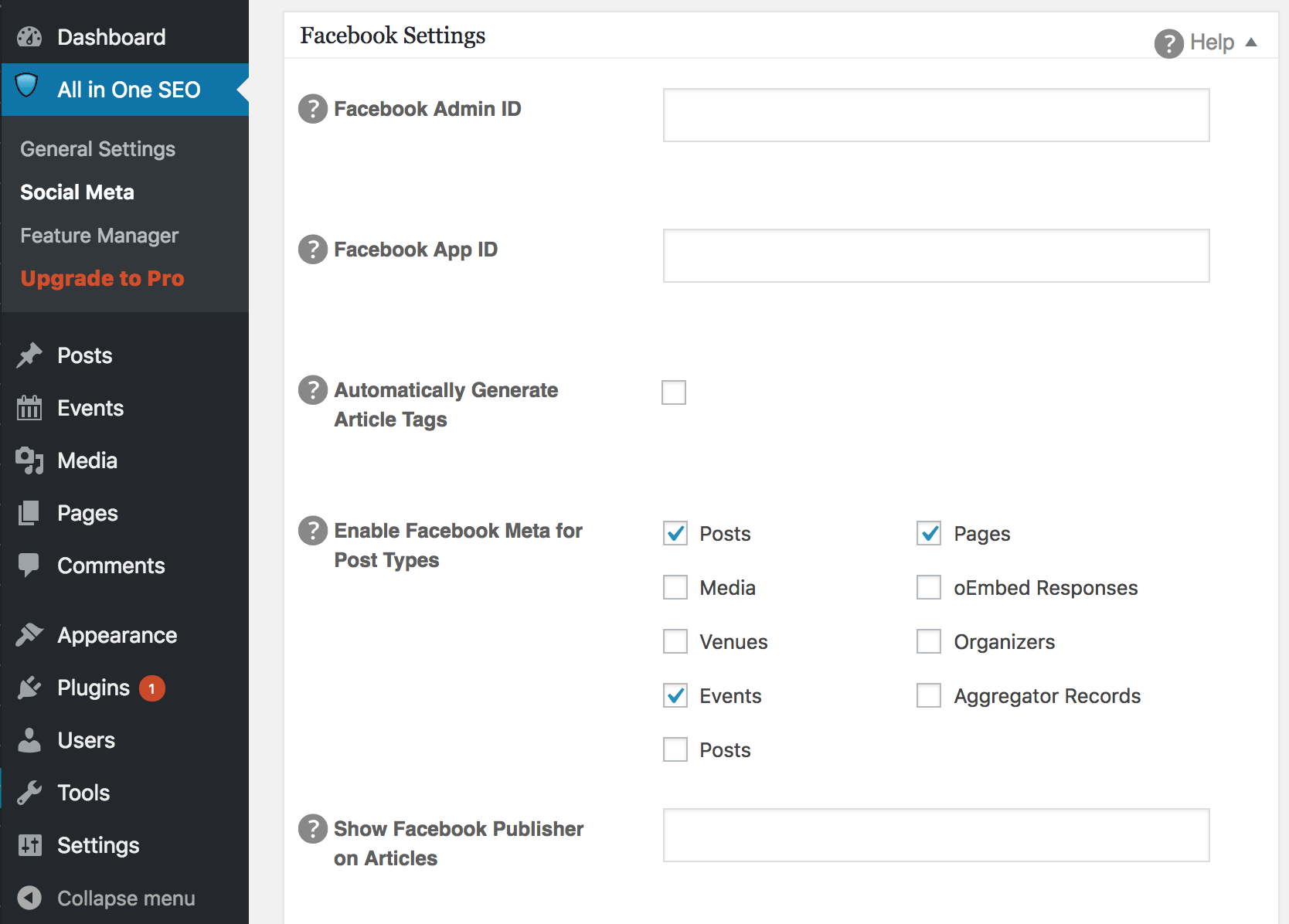
Please try it out and see if it works for you.
Best,
VictorMemberHey Paula!
Happy to hear you could solve the issue 🙂
Thanks for following up to let us know.
I’ll go ahead and close this thread now, but feel free to open a new topic if anything comes up and we’ll be happy to help.
Cheers,
VictorMemberHi Derek!
I’m located in Argentina, so that should be why I’m getting blocked.
I’ve found the following documentation that might be of help to investigate your issue > https://docs.wordfence.com/en/Wordfence_options#Rate_Limiting_Rules
Hope you can find the source of those errors. Let me know if there is any follow up questions. 🙂
Best,
Victor -
AuthorPosts