

Forum Replies Created
-
AuthorPosts
-
October 2, 2017 at 7:08 pm in reply to: Feature: Need to limit event ticket RSVP to specific Domain #1358079
Caroline
MemberHi Joe,
Thanks for taking the time to reach out! While there’s no built-in way to specifically limit RSVPs or ticket purchases to certain domains, you may be able to achieve something similar by restricting your RSVPs to registered users only. By enabling this setting and only allowing users on certain domains to create user accounts, you can limit your RSVPs by whatever criteria you’d like. You can learn more about this setting, as well as all other settings available with Event Tickets and Event Tickets Plus, on our Knowledgebase here:
https://theeventscalendar.com/knowledgebase/configuring-event-tickets/
I hope that helps to get you on your way here! 🙂 Thanks again, and let us know if you should have any other questions!
MemberHi Brent,
Thanks for taking the time to reach out to us here! Purchases of our Community Manager Bundle (and all of other bundles) will not affect your existing license keys in any way. When purchasing this bundle, you’ll simply be granted new licenses for Event Tickets Plus and Filter Bar in addition to your existing ones. As such, you won’t lose any remaining months on your current licenses. Feel free to use both your existing licenses and your new bundled licenses across multiple sites, if you’d like! Once your standalone licenses expire in November, you’re free to continue using your new bundled licenses, and you can renew your entire bundle of products on the same date next year. 🙂
I hope that helps to clarify things a bit! Let us know if you should have any other questions or concerns here. Cheers, and thanks again!
MemberHi Nicolas,
Thanks for reaching out! This type of recurrence can be easily achieved using the Weekly recurrence type in Events Calendar PRO. Simply set your event start and end date and times for the first occurrence of your event, then add a recurrence that repeats every Saturday and ends on the last date of the series. Here’s a screenshot to give you an idea of what this might look like in practice:
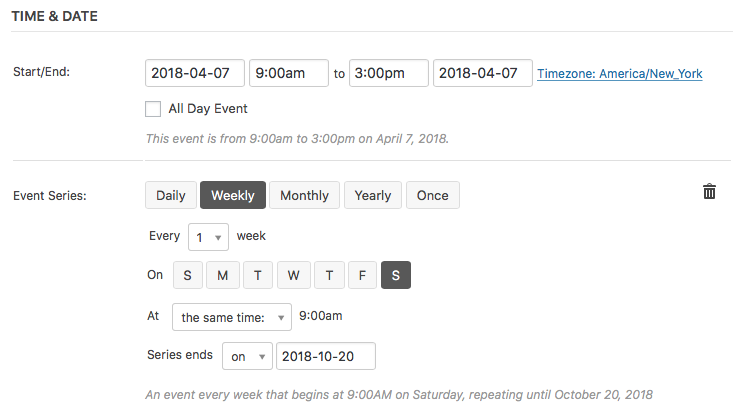
For more information on how to use the event series options available in Events Calendar PRO, check out our Knowledgebase article here:
https://theeventscalendar.com/knowledgebase/pro-recurring-events/
I hope that helps to get you on your way! 🙂 Cheers, and thanks again for reaching out!
MemberHi Mathew,
Thanks so much for your interest in our plugins! While none of our plugins offer the ability to embed events across multiple sites in quite the same way, we do offer a similar type of functionality through our Event Aggregator tool. Using the import capabilities of Event Aggregator, it’s possible to create multiple calendars for each of your sub-sites, then import all events from these sites into a shared “hub” calendar. (The reverse, of course, is also possible!) You can read more about our Event Aggregator import tool on its product page here:
https://theeventscalendar.com/product/event-aggregator/
I’d be glad to answer any specific questions you might have about this plugin or how it might work for your intended setup! Let me know if I can assist in any way. 🙂 Cheers, and thanks again for stopping by!
MemberHi Luca,
Thanks so much for your interest in our plugins! 🙂 I’m happy to report that Event Aggregator does support imports of this type (beginning with webcal://). Simply select “iCalendar” for the Import Origin field when creating your import task, and you’ll be all set to begin importing events from this feed! For more information on performing imports with Event Aggregator, check out our Knowledgebase article here:
https://theeventscalendar.com/knowledgebase/import-from-feed-or-url/
I hope that helps to get you started here! Thanks again, and let us know if you should have any other questions!
October 2, 2017 at 6:37 pm in reply to: The Event Calender Plugin – Avoid bad requests. Am i the only one facing this is #1358063MemberHi Sanjeev,
Thanks for taking the time to reach out–so sorry to hear that you’re having some problems with 404s on your client’s site! While we’re not equipped to provide technical support for current plugin users here in our pre-sales forum, we’d be more than happy to assist you at one of the following locations:
- If you’re using one or more of our free plugins such as The Events Calendar and Event Tickets, you can request assistance on the WordPress.org support forum for the affected product.
- If you’re a current license holder for one of our premium offerings, please log in to your account and submit a post to the appropriate forum for the affected product.
If you can, please take the time to confirm in your post that you’ve run through our conflict testing steps prior to contacting us–this will save us a step and help us to get your issue resolved that much quicker! 🙂
Thanks again, and we’ll see you in the forums!
MemberHi James,
Thanks for taking the time to reach out! While we don’t yet offer this feature as a bundled feature or add-on for Event Tickets Plus, it seems like an idea that’s definitely worth exploring, perhaps for our Extension Library! Would you mind sharing your idea over on our UserVoice forum, where we collect feature suggestions from our user community? This will get your idea on the development team’s radar and will allow other users to share comments and vote their interest, as well!
In the meantime, this forum post may offer some ideas to get you started on a stopgap solution:
https://theeventscalendar.com/support/forums/topic/subscription-3/
I hope that helps to get you on your way here! 🙂 Thanks again, and let us know if you should have any other questions!
MemberHi Rhea,
Thanks for taking the time to reach out to us here! We’ve gone ahead and sent a second copy of your application decision to email address [email protected]. Let us know over in email if this message doesn’t reach you within 24 hours, and we’ll be glad to send a fresh copy to an alternate email address of your choice! You can reach our nonprofit team via the following form:
https://theeventscalendar.com/contact/
Please select the option “Help accessing my account” from the drop-down menu to display the full email form.
Cheers, and thanks again!
MemberHi Nick,
Thanks so much for getting in touch! I’m afraid that we’re not equipped to provide technical support for current plugin users here in our pre-sales forum. We’d be more than happy to assist you at one of the following locations:
- If you’re using one or more of our free plugins such as The Events Calendar and Event Tickets, you can request assistance on the WordPress.org support forum for the affected product.
- If you’re a current license holder for one of our premium offerings, please log in to your account and submit a post to the appropriate forum for the affected product. (Inactive licensing for premium product may require renewal before our support forums can be accessed.)
Please note that custom development requests are beyond the scope of what support services we typically provide, and we may be unable to assist further with these types of inquiries. If you should require custom development services for a particular plugin or feature, we recommend reaching out to one of our listed third-party developers for more information:
https://theeventscalendar.com/knowledgebase/find-a-customizer/
Thanks again, and we’ll see you in the forums!
MemberHi TJ,
Thanks so much for your interest in our Event Aggregator add-on! I’d be more than glad to answer these questions for you. 🙂
The following features from your list are supported out of the box by Event Aggregator’s existing toolset:
- Support for creating and editing scheduled import tasks
- Ability to see the original source of imported events
Settings related to events that are imported and then changed at the source can be specified using the Event Update Authority setting. More information on this setting is provided on our Knowledgebase here:
https://theeventscalendar.com/knowledgebase/event-aggregator-import-settings/
Options for searching, filtering, or tagging scheduled imports are not available at this time, I’m afraid. However, we’re always open to new suggestions in this vein–we invite you to share your feature suggestions with our development team over on our UserVoice forum!
I hope that helps to get you started here! Thanks again, and let us know if you should have any other questions! 🙂
October 2, 2017 at 8:54 am in reply to: Events Tickets Plus license renewal "refunded" and not active, NEED HELP #1357795MemberHi Waseem,
Again, I’m so sorry for the trouble here. With the exception of our Event Aggregator add-on (which relies on our cloud-based servers for performing import tasks), our plugins do not stop working as a result of expired, deactivated, or absent licensing. If you’ve experienced any downtime recently, this is not related to your licensing issues–I’d suggest opening a new thread with some more details in our Event Tickets Plus support forum so that our team can assist in troubleshooting with you.
I hope that helps! Thanks again, and let us know if you should have any other questions or concerns here! 🙂
October 2, 2017 at 8:48 am in reply to: Function to display end date only if it's a different month than start date #1357793MemberHi Caroline,
You’re so very welcome–glad that I could assist, and always happy to help out a fellow Caroline! 😉 I’m going to go ahead and close this thread out since your question here is resolved, but please don’t hesitate to follow up with a new thread if there’s anything else we can do for you! Cheers, and happy calendar-ing!
MemberHi Anwar,
That’s absolutely correct, yes! Events Calendar PRO provides some additional features that you may find useful, since as additional calendar views and support for shortcodes, but purchasing Events Calendar PRO is not required to use Eventbrite Tickets. You’ll only need the free version of The Events Calendar and a purchased copy of Eventbrite Tickets to make this combination work. 🙂
I hope that helps to clarify things here! Thanks again, and please don’t hesitate to follow up if you should have any other questions!
MemberHi Jeff,
Great, I’m so glad to hear it! You’re very welcome! 🙂 Since you’ve gone ahead and marked your question here as resolved, I’m going to close this thread out for now. Thanks again, and please don’t hesitate to follow up with a new thread if there’s anything else we can do to assist!
October 2, 2017 at 8:41 am in reply to: My Events Calendar Pro license did not update when I renewed #1357781MemberHi Richard,
Thanks for following up to confirm–no trouble at all! 🙂 I’ve gone ahead and generated a new equivalent Events Calendar PRO license on your [email protected] account. With that, you should be all set to manage all of your license keys in one place! Since your license key has changed as a result of this transfer, you’ll want to make sure that you’ve updated your license activations for all of your existing sites. You can get your new license key by logging in to your account on TheEventsCalendar.com and accessing your account’s License Keys page:
https://theeventscalendar.com/my-account/license-keys/
Let me know if you should have any other questions or concerns here! Cheers, and thanks again!
-
AuthorPosts