

Forum Replies Created
-
AuthorPosts
-
December 21, 2016 at 9:25 pm in reply to: Order completing without redirecting to payment gateway #1209303
Hunter
ModeratorHello,
Sorry to hear you are both experiencing this issue. @Ian, go ahead and create a separate thread for your issue. Doing so helps decrease the time it takes to get a patch included in an upcoming maintenance release. Thanks!
@Guha, before I’m permitted to test the issue myself, can you please review our Testing for conflicts guide and reply back with your findings? This is a required step to receive support.
Thanks to the both of you for taking the time to submit threads and hopefully we can get this conflict identified and resolved quickly. Cheers!
ModeratorHello 🙂
Thank you for considering purchasing our plugins and welcome to the Pre-Sales Questions channel. To import events directly from veilingagenda.nl to verzamelenmagazine.nl and origine.nl, you would need to purchase an Event Aggregator license for verzamelenmagazine.nl and origine.nl, totaling two EA licenses.
What we would like on all 3 sites.
Is that users after registration and perhaps payment can add their event.You would need to purchase Community Events for all three sites so users could add events to all three sites. Another option would be to purchase one license for Community Events and run that plugin on veilingagenda.nl and use Event Aggregator to import them to verzamelenmagazine.nl and origine.nl.
Please let me know if this helps clarify your questions and let me know if you’ve got any additional questions. Have a great evening and thanks again. Cheers!
ModeratorMeredith,
Thank you for letting me know the issue has been resolved and please feel free to create a new thread if you have any more questions or comments. Take care!
ModeratorAwesome! I appreciate the update and glad to hear the issue has been resolved. Please open a new thread if you have any more questions. Cheers!
ModeratorGary,
Glad I could help!
Can you tell me if the default zoom setting of the Google Map I want to use as the home page is adjustable?
At this time, the zoom level for Google Maps is only adjustable on the single event view. To request new features, such as adjustable maps for Map views, please visit our UserVoice Feature Ideas. We are always pulling the latest and greatest requests to incorporate into upcoming releases.
So could I start with say an over view map of the UK and the user would be able to zoom in to areas where the map pins are located to view each event info?
This is correct! You can get a general idea how the map works on the Map view of upcoming events and the single event pages. I’ve also shared a screenshot below of the Map Settings for our plugin settings.
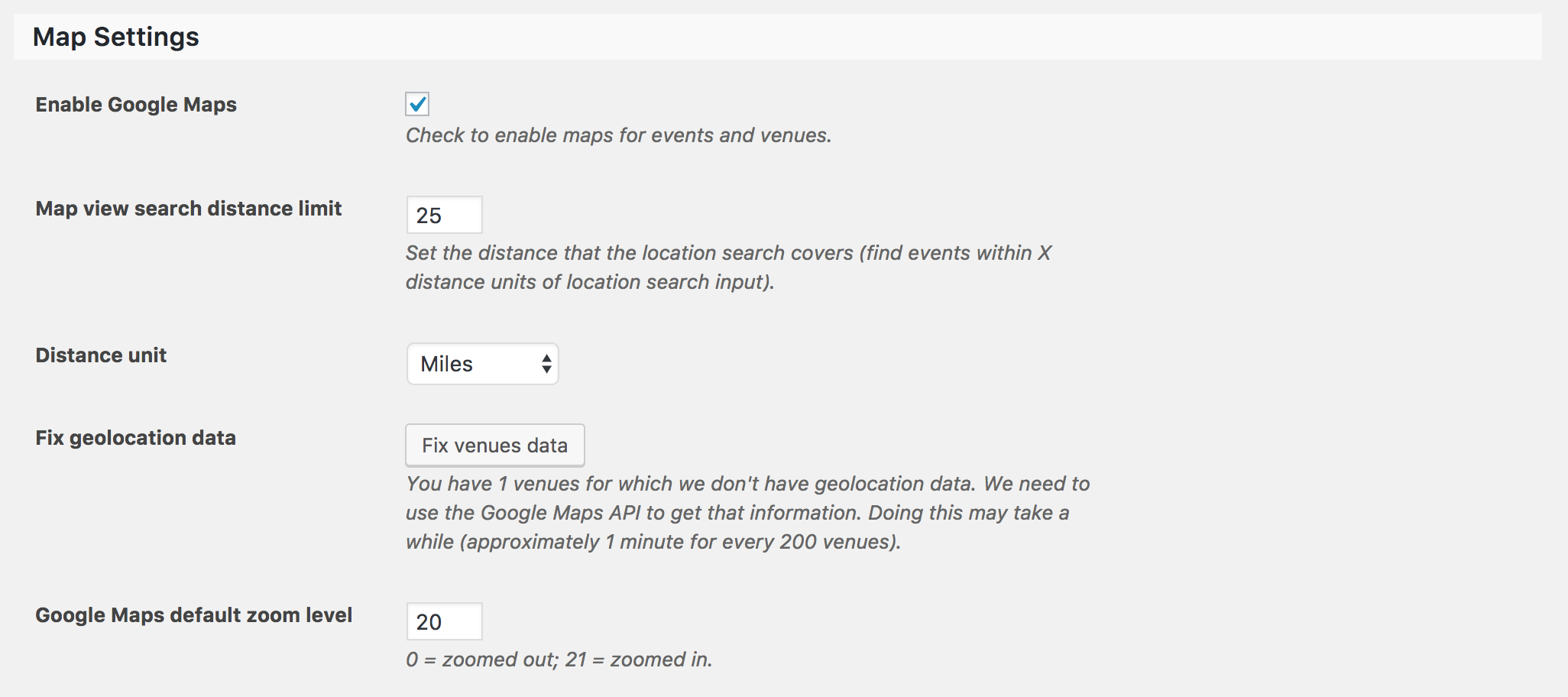
Let me know if I’ve helped answer your questions and feel free to reply with any more you have. Happy holidays!
ModeratorHi and welcome back,
Thank you once again for taking the time to give your thoughts on how the plugin can be improved and sharing the solutions for others to use. I’ll go ahead and close this thread out, but you know where to find us if you have any more questions or requests for upcoming maintenance and feature releases. Have a wonderful holiday season and take care!
December 21, 2016 at 8:32 pm in reply to: Media Library hangs when Events Pro is active and WooCommerce invoices will not #1209278ModeratorHey Bryan,
a) The link for the Testing for conflicts guide is right here.
b) This is another instance where you’ll need to review the Testing for conflicts guide to rule out the potential of a theme and/or plugin conflict. Be sure to note the behavior of each issue during the testing process.
Based on the issues you’re having, I’m almost positive there is a conflict occurring on your site. So once we can identify said conflict, we’ll have a much better idea on how to proceed.
Thanks and take care!
ModeratorHey Ross,
Thank you for the update and following the Testing for conflicts guide instructions. I went ahead and tested the issue and experienced the same behavior as you.
Apparently, when marking the event as “All Day” in the ‘Time & Date‘ section of an event, you get the results of the faulty code. Try setting an actual start/end time for the event and you should see the correct start/end dates/times. I understand this isn’t an ideal workaround. Another option would be to manually revert back versions until you find the one that doesn’t include the bug.
We have a bug logged resembling what you’ve described, so I’ve gone ahead and added this forum thread to the ticket which helps expedite the process of getting a fix included in an upcoming release. I don’t have a precise date when it will be available, but please stay tuned to our Release Notes and the plugin changelogs for more information. Thanks again and let me know if you’ve got any additional questions or comments. Cheers!
ModeratorHey Tony,
Thank you for sending over the System Information. As previously requested, you’ll need to review the Testing for conflicts guide and let me know what you find out. This is a required step to continue receiving support and is recommended you do so prior to creating threads.
I know we have a logged resembling what you’ve described, but having all this worked out before the developers look at the forum threads relating to the bug report for more information will help expedite the process of getting a fix included in an upcoming release. Thanks again and take care.
ModeratorWelcome back!
Thank you for the update. If you visit the System Information page, it goes over the process of gathering and sending over the needed info. Please make sure it’s sent as a private reply.
Can you recall when the issue started? Was it possibly the last update or has it been going on for awhile? I would manually revert back version of our plugins to see if you can identify exactly which version the issue appears to come from. You can get prior version on your Downloads page.
Would you mind running through the Testing for conflicts guide? This time, make sure the only plugin active is The Events Calendar. Then, try it once with both The Events Calendar and Events Calendar PRO to see and reply back with what you learn from both tests. Make sure you’re using the default Twenty Seventeen theme.
Thank you and take care!
ModeratorHi Nancy!
Thank you for reaching out to our premium plugin support forums. I was unsure on how Event Aggregator handled events marked as “Private” in it’s Google Calendar settings, so I went ahead and tested. When the test event I created in Google Calendar was marked as “Private”, the preview did not display my test event in Event Aggregator. When I changed the event from “Private” to “Public” in Google Calendar, the test event did appear in the Event Aggregator preview and I was able to import the event.
I’m a little unsure on how to proceed in regards to support due to the inability to replicate the behavior you’ve experienced. I also checked our logged bug/feature reports to see if anything resembles your issue, but came up empty-handed.
I would probably start by reviewing our Testing for conflicts guide to see if there is a potential theme and/or plugin conflict.
Thanks again and have a great Wednesday. Cheers!
ModeratorHello Tony 🙂
Thank you for your purchase and welcome! Sorry to hear you’ve run into complications. Before we proceed, I’ll need you to review our Testing for conflicts guide and reply back with what you find out. Please include your System Information as a private reply. Thanks and have a great Wednesday!
ModeratorHi James,
Sorry to hear you’ve run into complications. Can you please send over exact step-by-step instructions I need to follow to reproduce the behavior? Please include which plugins I need to have active to reproduce the behavior. Lastly, can you confirm you reviewed the Testing for conflicts guide to rule out both theme and plugin conflicts? If not, please do so any let me know what you learn.
Lastly, your System Information initially came through strangely formatted. Can you resend over your System Information as a private reply?
Thanks and have a great remainder of the day. Cheers!
ModeratorWelcome back, Rick 🙂
The best way to accomplish what you’ve described is to create a custom template override as explained in our Themer’s Guide. You would need to create the custom button using either code or an image and incorporate the Additional Field link into the button you create. You could then include target=”_blank” in the link so it opens in a new window.
Check out this Knowledgebase article for more information and as a starting point. We are unable to provide custom code, so you’ll have to take the reigns from here. For what is covered in the support forums, please review our What support is provided for license holders? Knowledgebase article. Let me know if this makes sense and best of luck with the customizations. Cheers!
ModeratorWelcome, Julius!
Thank you for your purchase and welcome to our premium plugin support forums! Before creating new threads, it’s required you review our Testing for conflicts guide. Once you’ve done that, please reply back with what you find out.
Thanks again and take care. Cheers!
-
AuthorPosts