
Home › Forums › Welcome! › Pre-Sales Questions › Superlist Theme Compatability
- This topic has 12 replies, 3 voices, and was last updated 9 years, 8 months ago by
Support Droid.
-
AuthorPosts
-
December 19, 2016 at 12:34 am #1207621
Gary Moford
GuestHi,
I am looking to purchase Event Calendar Pro, Event Ticket Plus and the Filter Bar but I just wanted to check if you know if these will work with a theme called Superlist – Directory WordPress Theme
Basically I am trying to build a website that is for selling training course, so I need the home page to display an overview map of the UK that shows the number of course available in the various areas…under the map there would also be a list of the courses that are searchable by various ways such as location, date & course type, using the filter bar.
The user can search for courses by drill down using the Superlists map features and when they find the appropriate course they would visit the page that is set up using Event Calendar where they would be able to purchase the course using Event Ticket plus and woo commerce.
Originally I was just going to use a basic theme and your plug in’s but the map feature on Event Calender Pro looks like it only displays lots of single map pins which might look a bit cluttered rather than one map pin per area showing a number of listings/course for each area..
You help or advice would be much appreciated.
Kind regards
Gary
December 19, 2016 at 6:39 pm #1207982Hunter
ModeratorHello!
Welcome to our Pre-Sales Questions channel and thank you for reaching out. Everything you’ve described sounds completely doable using our plugins as you’ve described, but I can’t guarantee things will work out-of-the-box with your custom theme. We build our plugins and test them according to the WordPress codex standards, so there shouldn’t be any issues if your theme follows the same guidelines. You can learn more on the matter here.
We offer a 30-day money back guarantee, so we’d be happy to refund your entire purchase if things didn’t work out as planned.
I hope this helps answer your questions and please let me know if you’ve got any more. Have a great rest of your day and thanks again. Cheers!
December 20, 2016 at 12:20 am #1208054GuestHi Hunter,
Thank you for your help its much appreciated.
Can you tell me if its possible to use the Google Maps View as the default for the home page with the search bar below?
Rather than having to select the map from the search bar…..like this
Also Can you tell me if its possible to set up Map Pin Clusters feature on the Google Maps view?
The maps clusters feature was the only reason I was looking at the Superlist theme but I have since found out that it is possible to add Maps Cluster on most Google Maps but I could not find anything that mentions how to do it on your forum.
If I need to get any custom work done to get these sort of features to work is there anyone that you can recommend?
kind regards
Gary
December 20, 2016 at 2:20 pm #1208523ModeratorGary,
Welcome back! You could most definitely get the home page set up as you described. There are many ways to do it, so if you decide to purchase the plugins and need a little help getting it set up, we’re here to help out!
Also Can you tell me if its possible to set up Map Pin Clusters feature on the Google Maps view?
That is not currently a built-in feature, but we’re always welcoming new feature requests over at our UserVoice Feature Ideas. I imagine it wouldn’t be too hard to set up yourself, though I haven’t done anything similar myself.
We have a list of customizers available to help further assist with any custom work you might need. Luckily, the WordPress community is giant, so as long as you vet your potential contractors and have a solid contract written up before starting work/payment, you shouldn’t have much to worry about.
Please let me know if you’ve got any more questions and have a great afternoon!
December 21, 2016 at 6:31 am #1208819GuestHi Hunter
I really appreciate you help on this.
Can you tell me if the default zoom setting of the Google Map I want to use as the home page is adjustable?
So could I start with say an over view map of the UK and the user would be able to zoom in to areas where the map pins are located to view each event info?
Of is the default map view zoom level fixed?
Regards
Gary
December 21, 2016 at 8:56 pm #1209292ModeratorGary,
Glad I could help!
Can you tell me if the default zoom setting of the Google Map I want to use as the home page is adjustable?
At this time, the zoom level for Google Maps is only adjustable on the single event view. To request new features, such as adjustable maps for Map views, please visit our UserVoice Feature Ideas. We are always pulling the latest and greatest requests to incorporate into upcoming releases.
So could I start with say an over view map of the UK and the user would be able to zoom in to areas where the map pins are located to view each event info?
This is correct! You can get a general idea how the map works on the Map view of upcoming events and the single event pages. I’ve also shared a screenshot below of the Map Settings for our plugin settings.
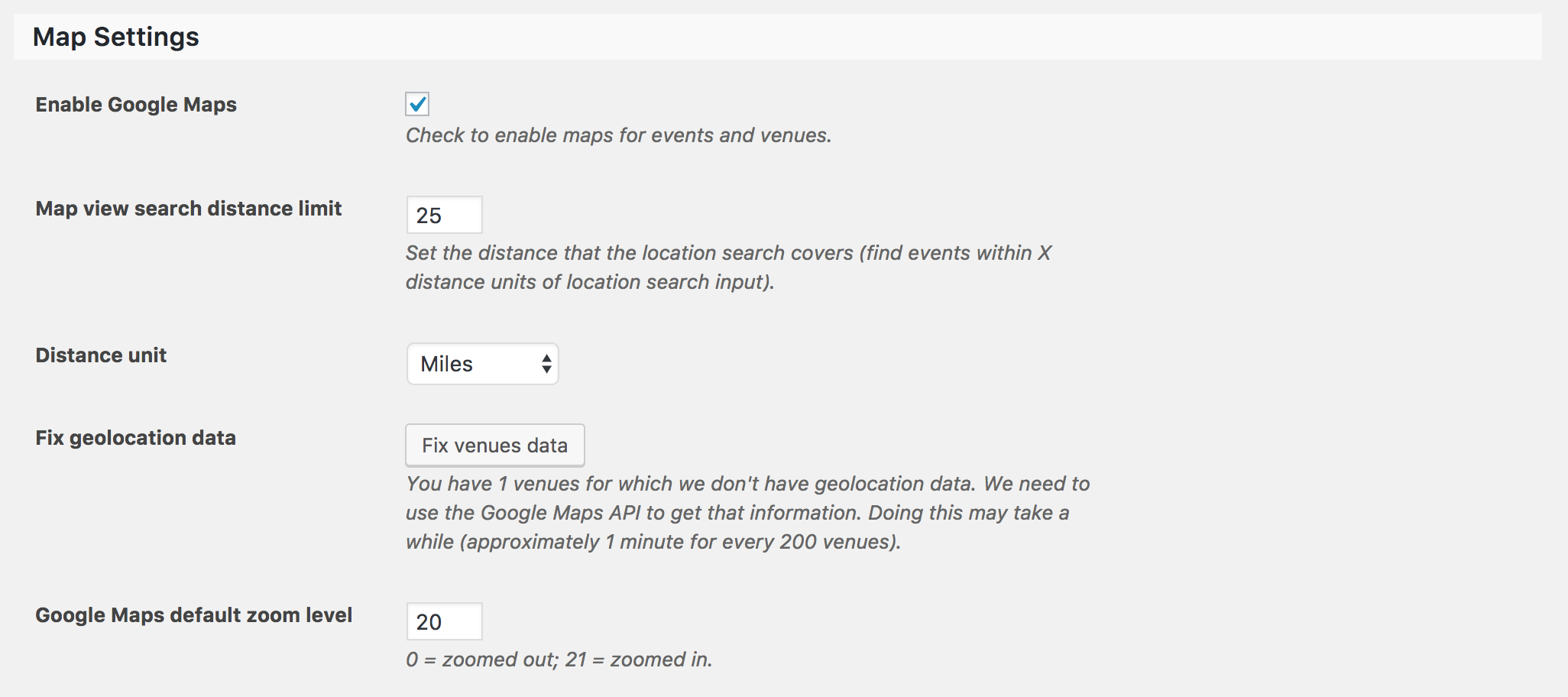
Let me know if I’ve helped answer your questions and feel free to reply with any more you have. Happy holidays!
December 22, 2016 at 9:24 am #1209608GuestHi Hunter
I am still a little confused about the way the map zoom works.
I think you are saying that the individual event listing map zoom is adjustable but not the main search map?
So if the main Map Search View zoom is not adjustable how do I get the map to centre over the UK at a set level as the default when the user first lands on the page?
The map on your demo site is set to max zoom out so show a world view but I have looked at some of the site on your showcase page and they seem to have the zoom set to a more specific level….over a country or city.
Also is are the map in market customisable….can I change the information that is displayed in the pin when it is clicked on?
Thank you again
Gary
December 23, 2016 at 2:04 pm #1210158ModeratorHey Gary 🙂
We’re definitely on the right track.
I think you are saying that the individual event listing map zoom is adjustable but not the main search map?
This is correct. When viewing a Map view with multiple venue markers, the map will adjust according to how far apart the venues are from each other. For example: if you have a venue in Los Angeles and one in New York, the map would display essentially a map of the United States. If there was also a venue in London, then you’d see a map of the United States and Western Europe.
Also is are the map in market customisable….can I change the information that is displayed in the pin when it is clicked on?
You can change which information is displayed in the map venue marker tooltips. Our Themer’s Guide goes over the process of creating and saving customizations.
As always, our support team members are here to help if you ever get caught up along the way. Please let me know if I’ve help clear up any confusion and have a great weekend ahead!
December 31, 2016 at 12:26 am #1211945GuestHi Hunter
I hope you had a great Christmas.
Thank you so much for all your help with this I am recommending to my client that we use all your plug ins for the map & events on their new site.
One other question they have asked me.
Is it possible to change the colours of the google map?
We have seen other sites where the Google maps are in Night mode (so everything is dark) and others where the the colours have been customised to fit the branding on the website….I guess its must be possible but thought it worth asking if you knew anything about this modification
Kind regards
Gary
January 1, 2017 at 4:59 pm #1212175ModeratorHey Gary,
My Christmas was outstanding. Thank you for the well wishes and I hope the same for you! I haven’t personally seen any examples of the Google Maps styled being altered, though I’m sure it wouldn’t be too hard through the use of CSS and the help of our Themer’s Guide.
This is another request I feel worth submitting to our UserVoice Feature Ideaspage. Hopefully we can get that option included in an upcoming feature release.
Feel free to reply back if you have any more questions. Take care!
January 14, 2017 at 12:03 am #1218522Gary
ParticipantHi Hunter,
I purchased the ec pro & ticket plus last week but am having a few problem,
I am using them on this site
http://67.225.189.47/~quicksafepass/
along with the Avada theme.
All ways going ok until I updated to the latest version of the plug ins on Tuesday last week.
Now I have some display issues.
Mainly with the event titles….if you go to the home page you will see that the event title text is not displaying…I just have a blue box, but it worked fine before the update.
I am using a short code to display the calendar & map but as I say it all worked fine before the update.
However, if I go in and change the event setting style sheet from tribe events to skeleton it seems to display ok.
Any ideas what I should do?
Thank you Gary
January 14, 2017 at 6:19 pm #1218682ModeratorHi Gary 🙂
Thank you for your purchase! We are unfortunately unable to provide support in our Pre-Sales Questions Channel, so please open a thread in the Events Calendar PRO support forums and we’d be happy to see if we can help.
Thanks again and have a great rest of your weekend!
February 5, 2017 at 8:35 am #1229678KeymasterHey there! This thread has been pretty quiet for the last three weeks, so we’re going to go ahead and close it to avoid confusion with other topics. If you’re still looking for help with this, please do open a new thread, reference this one and we’d be more than happy to continue the conversation over there.
Thanks so much!
The Events Calendar Support Team -
AuthorPosts
- The topic ‘Superlist Theme Compatability’ is closed to new replies.