

Forum Replies Created
-
AuthorPosts
-
December 20, 2016 at 5:54 pm in reply to: Media Library hangs when Events Pro is active and WooCommerce invoices will not #1208654
Hunter
ModeratorHi Bryan,
Sorry to hear you’ve ran into conflicts and welcome back. We do not have any logged bug reports resembling what you’ve described and I’m not experiencing issues when navigating through the Media Library. Before we investigate any further, I’ll need you to review our Testing for conflicts guide and let me know what you find out. This is a required step to continue receiving support.
In regards to the conflict with the WooCommerce PDF Invoices and Packing Slips plugin, we aren’t able to troubleshoot issues with plugins by other authors. For what we are able to support, please review our What support is provided for license holders? Knowledgebase article.
Thank you and have a great evening. Cheers!
ModeratorHello and welcome to the both of you 🙂
We truly appreciate you taking the time to voice your constructive feedback and include the workaround that best fits your needs. We have a few open feature and bug reports aimed at improving how the plugin handles recurring events, so I’ll go ahead and add this forum thread to said reports. I recommend also visiting our UserVoice Feature Ideas page and submitting the feedback there.
I don’t have any specific as to what changes they have planned nor when they’ll be available in an upcoming release, but as previously stated… we’re always working to improve recurring events as we understand it’s an important feature for many of our users.
If things are just too much of a pain for you, we have a 30-day money back refund policy. If that’s the route you would like to go, please visit our Refunds page and we’d be happy to get that processed for you.
Thanks again for the valuable feedback please stay tuned to our Release Notes and the plugin changelogs for more information. Thanks again and let me know if you’ve got any additional questions or comments. Cheers!
ModeratorHey Ross,
Welcome back! For issue #1, I’ll need you to review our Testing for conflicts guide and reply back with your findings. This is a required step to receive support and is recommended you do so before opening new threads.
In response to issue #2, I was unsure of the default behavior, so I went ahead and tested. I’m not seeing the same “All Events” text on my test website. (see screenshot below)
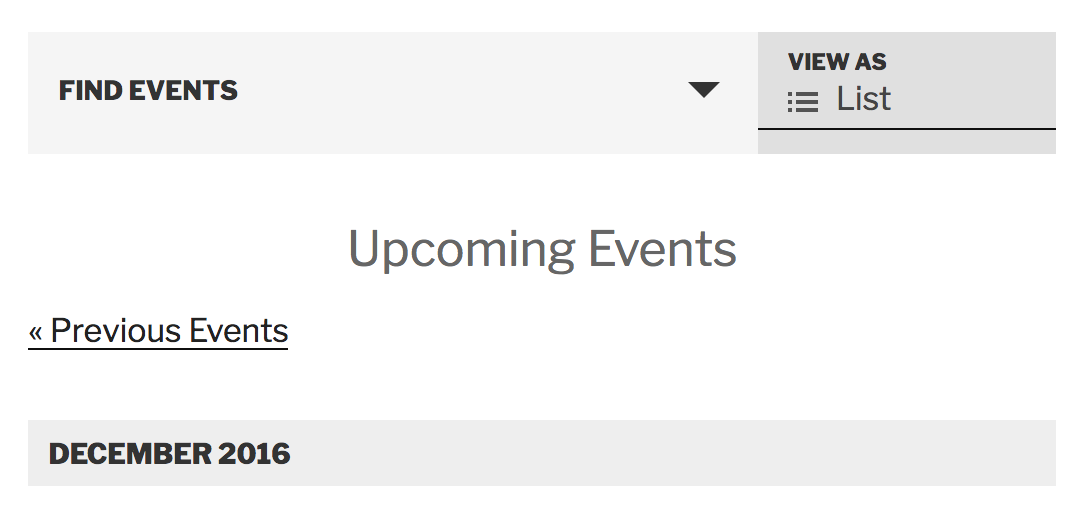
This means there is most likely custom code overwriting the default behavior. The Testing for conflicts guide will help confirm this. Once you’ve identified where the code is coming from, you can simply delete it or hide it using CSS.
Let me know what you find out in regards to issue #1 and best of luck resolving issue #2. Cheers!
ModeratorHi Gareth 🙂
We appreciate your purchase and welcome to the premium plugin forums! We’ve got a Knowledgebase article which should answer your question perfectly! Please let me know how it works out and thanks again. Cheers!
ModeratorHello!
First off, thank you for your purchase and welcome to our premium plugin support forums! There are a few different routes to accomplish what you’ve described. The first would be using shortcodes. We have tons of different options, so I’ll provide links below.
You could also embed single events directly into pages/posts by pasting a link to the event in the body of your pages/posts. More info can be found here. Last idea I can think is to use tribe_get_events to pull in whatever info you want.
We are limited on the amount of support we’re able to provide when it comes to customization requests, so you’ll have to figure out the best approach for your needs. Please review our What support is provided for license holders? Knowledgebase article for more information. If it gets beyond your level of expertise, please review our list of customizers for further assistance.
Good luck with the project and thanks again for choosing PRO. Cheers!
December 20, 2016 at 5:08 pm in reply to: Recurring event data is still being generated for this event #1208644ModeratorHey Matt,
Sorry to hear you’re experiencing troubles. Can you send a screenshot of the ‘Time & Date‘ section for a recurring event which doesn’t work properly? I would also set up a test site using the WordPress Twenty Seventeen theme and only our plugins, then see if you can reproduce the issue.
Please keep me updated and have a great rest of the day. Cheers!
December 20, 2016 at 5:00 pm in reply to: Attendee info not saving or showing in Attendee Lists again. #1208642ModeratorHello 🙂
@John, thank you for taking the time to provide your experience on the issue. @Port, I believe you are correct when you stated:
I suppose if they checkout via PayPal, but go back to cart/checkout, then back to PayPal again, it could also be affecting us.
One other possibility is that the Attendee info doesn’t display until the order has been marked as ‘Complete‘ in WooCommerce. We have two logged bug reports which could be related to the issue you’re experiencing, so I’ll add this thread to both of them. It’s a little hard to tell if either/both of these bugs are contributing to the missing attendee info, but once releases are available, please try testing to see if you can reproduce the issue.
Also, please see this thread that we started just before Thanksgiving that was closed while waiting on a response from you all: https://theeventscalendar.com/support/forums/topic/_tribe_tickets_attendee_user_id-meta_value-being-set-to-0/
I’m going to reopen that thread, so please run through the steps Andras provided in his last response and reply back with the results of your testing. Make sure you send the System Information as a private reply.
I’ll mark this thread as ‘Pending Fix‘ in the mean time. Thanks again to the both of you and have a great afternoon!
ModeratorHi Uwe,
Thank you for posting and welcome to our premium plugin support forums! I am unfortunately unable to reproduce the behavior you’ve shared with me. When I use the same shortcode you provided in your post, there aren’t any style differences like I see in the screenshots you shared with me.
I’ll provide all the resources I have that relate to styling. Please review them and let me know if you are able to identify and resolve the conflict. I would also use your browser’s ‘Inspect‘ tool to help further assist. More info can be found by watching this Using the ‘Inspect’ tool to make changes with CSS YouTube video.
- https://theeventscalendar.com/knowledgebase/pro-color-customizer
- https://theeventscalendar.com/knowledgebase/themers-guide
- https://theeventscalendar.com/knowledgebase/stylesheets-and-page-templates
- https://theeventscalendar.com/knowledgebase/wp-admin-settings-overview
- https://theeventscalendar.com/knowledgebase/changing-fonts-and-colours
- https://theme-fusion.com/avada-doc/special-features/how-to-use-the-events-calendar-with-avada
- https://css-tricks.com/methods-overriding-styles-wordpress
For more information on what is covered in the support forums, please review our What support is provided for license holders? Knowledgebase article. If things get beyond your level of expertise, check out our list of customizers for further assistance.
Thanks again and have a great evening. Cheers!
ModeratorAwesome! I appreciate the update and glad to hear the issue has been resolved. Please open a new thread if you have any more questions. Cheers!
ModeratorThank you for letting me know the issue has been resolved and please feel free to create a new thread if you have any more questions or comments. Take care!
ModeratorNicholas,
Thank you for the update. Unfortunately, the inability to reproduce the incorrect behavior and the fact that there are no logged bugs relating to your issue essentially means there is not more I can do in regards to support.
We just dropped new maintenance releases available for a few of our plugins, so please try updating to the latest versions and running through the Testing for conflicts guide once more to see if for some reason that has an impact on your issue. I also recommend setting up a test installation using the default WordPress theme and only our plugins.
Sorry again I can’t do more and best of luck resolving the conflict. Cheers!
December 20, 2016 at 3:48 pm in reply to: Failed Imports, No Facebook Image, No Google Maps #1208563ModeratorHey Neil,
Thank you again for working with me on your conflicts. I’ll close this thread out due to no relative bugs logged and that I’m unable to reproduce the scheduled import issue. My recommendations for any issues you might have in the future are to have a test site set up (using the default WP theme and only our plugins) so you can fully troubleshoot to identify the source(s) of conflict.
From there, create a separate thread for each individual issue you have. Doing so will help decrease the potential for confusion for both parties involved. My last recommendation is for you to be as detailed as possible on the problem in your initial post, but more importantly, include the exact steps to reproduce the issue so I can get to testing and if a bug is found, log it, so our team can start working on a fix as soon as possible.
Thanks again and have a great holiday season. Cheers!
ModeratorWelcome back,
Thank you for the update. I set up an import to run every 30 minutes with the same settings you’ve got, but I’m not able to reproduce the duplicate venue issue. Have you seen things improve since you posted this statement?
I have since cleared up the backend with the duplicate venues and published the event – and it has stopped duplicating now… But that could be because no changes have been made to that event yet. Fingers crossed when the promoter does I won’t see any problems ?
Enjoy the rest of your day. Cheers!
December 20, 2016 at 2:37 pm in reply to: Filter choices and Filter Bar are lost when advancing to later dates #1208536ModeratorHello,
We aren’t actually able to provide custom work, so you’ll have to contact a developer for that kind of information. If you review the Themer’s Guide, it honestly wouldn’t be too difficult to pull this customization off by yourself or with a little help from someone with a little experience.
This YouTube video goes over the basic principles of creating and saving custom overrides, so give it a shot and see how things go!
Please let me know if this helps and have a great afternoon!
ModeratorHey Kevin,
Thank you for the informative update. Unfortunately, this is going to be up to the developers to improve. There isn’t a “quick fix” I can provide for you at this time. I wish I had a different answer, but as previously mentioned, please stay tuned to our Release Notes and the plugin changelogs for release notes and information. Thanks again and let me know if you’ve got any additional questions or comments. Cheers!
-
AuthorPosts