
Home › Forums › Calendar Products › Events Calendar PRO › Event Calendar Pro and Avada – Misc
- This topic has 5 replies, 4 voices, and was last updated 9 years, 8 months ago by
Uwe Matern.
-
AuthorPosts
-
December 20, 2016 at 6:03 am #1208115
Uwe Matern
ParticipantHello,
I’m using Avada 5.0.6 and Event Calendar Pro in combination with the intension to build a big platform for art course booking. The calendar Pro will be the main plugin to support most of the functions.
But there some issue with the design and behavior of the events-shortcode. It shows a different Layout for using the main event-page and a page where the standard shortcode for all events is used.
Picture 1 is using the short-code: [tribe_events view=”list” tribe-bar=”true” and picture 2 shows the main event page. Do you see the difference. Somehow the setup from events and the setup from avada section events seems to interfere.
Pls help
Regards Uwe
December 20, 2016 at 4:48 pm #1208640Hunter
ModeratorHi Uwe,
Thank you for posting and welcome to our premium plugin support forums! I am unfortunately unable to reproduce the behavior you’ve shared with me. When I use the same shortcode you provided in your post, there aren’t any style differences like I see in the screenshots you shared with me.
I’ll provide all the resources I have that relate to styling. Please review them and let me know if you are able to identify and resolve the conflict. I would also use your browser’s ‘Inspect‘ tool to help further assist. More info can be found by watching this Using the ‘Inspect’ tool to make changes with CSS YouTube video.
- https://theeventscalendar.com/knowledgebase/pro-color-customizer
- https://theeventscalendar.com/knowledgebase/themers-guide
- https://theeventscalendar.com/knowledgebase/stylesheets-and-page-templates
- https://theeventscalendar.com/knowledgebase/wp-admin-settings-overview
- https://theeventscalendar.com/knowledgebase/changing-fonts-and-colours
- https://theme-fusion.com/avada-doc/special-features/how-to-use-the-events-calendar-with-avada
- https://css-tricks.com/methods-overriding-styles-wordpress
For more information on what is covered in the support forums, please review our What support is provided for license holders? Knowledgebase article. If things get beyond your level of expertise, check out our list of customizers for further assistance.
Thanks again and have a great evening. Cheers!
January 10, 2017 at 7:26 am #1215782ParticipantHi Hunter,
thanks so far. But I’m still a bit struggling reg. costumizing the combination Avada/Events calendar. Specifically I try to customize the sidebar information in the single-event view. I asked Avada and they always reply “It’s controlled by Tribe, asked them …” So, what I want to achieve is:
* change the order of blocks in the sidebar
* show only certain content of fields from the other fieldsFurthermore I like to change the featured image with the Titel combination (in the single event view) in a way that only the title (incl. schedule) are displayed and not the image.
Best regards, Uwe
January 10, 2017 at 6:30 pm #1216255ModeratorHello,
I believe the files you need to overwrite to reorder the content in the sidebar are found in /the-events-calendar/src/views/modules/meta. Note the overwrite structure at the top of files when creating template overrides. (see screenshot below)
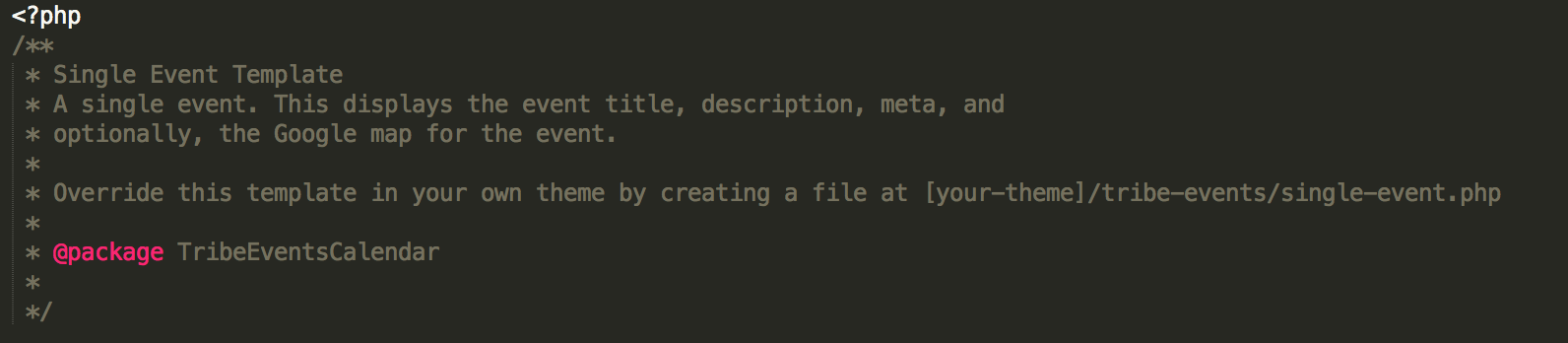
Rather than creating a support ticket each time you need help finding a particular template, it’s recommended you first set up a test site where you can fully test and troubleshoot any questions or comments you might have. This Customizing WordPress #1 – How To Create A Child Theme by LevelUpTuts is a similar example of the process explained in our Themer’s Guide. If you have not already reviewed the Themer’s Guide, it’s the best resource to familiarize yourself with in this instance.
As previously mentioned, we are limited when it comes to these types of support requests. Our What support is provided for license holders? Knowledgebase article provides more information on the matter.
Sorry I can’t do more in this situation. Best of luck and have a great rest of the week!
February 1, 2017 at 8:35 am #1227557Support Droid
KeymasterHey there! This thread has been pretty quiet for the last three weeks, so we’re going to go ahead and close it to avoid confusion with other topics. If you’re still looking for help with this, please do open a new thread, reference this one and we’d be more than happy to continue the conversation over there.
Thanks so much!
The Events Calendar Support Team -
AuthorPosts
- The topic ‘Event Calendar Pro and Avada – Misc’ is closed to new replies.