

Forum Replies Created
-
AuthorPosts
-
Hunter
ModeratorHi Suzanne 🙂
Sorry to see you here under the circumstances. We are unfortunately unable to provide assistance for conflicts with custom themes and plugins by other authors as outlined in our What support is provided for license holders? Knowledgebase article.
I wish I had a better answer for you. Try searching our forums to see if any other users have encountered similar issues. Hopefully you’re able to locate something with a workaround.
Best of luck resolving the conflict. Cheers!
ModeratorHi and welcome back,
We are unfortunately unable to provide support for conflicts with custom themes and plugins by other authors. I wish the case were different, but it’s clearly stated in our What support is provided for license holders? Knowledgebase article.
I’d start by setting up a fresh WordPress installation where you can fully troubleshoot the issue. Make sure you have only the default WordPress theme and The Events Calendar installed and activated on the test site in addition to the plugin you’re having troubles with. Please review our Using One License for Live and Dev Sites and Moving Your License Keys tutorials for more information.
Make sure WP_DEBUG and WP_DEBUG_LOG are enabled on your site’s wp-config.php file. Any errors will display at the top of your page as you try to reproduce the conflict. I also recommend right-clicking your mouse and opening the ‘Inspect’ tool to see if any errors display in the console. Note what you find and please include it in your reply.
I’d be happy to see if I have any ideas based on the information you share with me, but unfortunately cannot promise anything. Thanks and have a great rest of your day. Cheers!
ModeratorHi and welcome back,
I understand this response is not ideal, but you’re correct, there is no built-in way allowing you to alter the display to your liking. It would require customizations beyond what we’re able to provide on the support forums.
You could do a simple template override as explained in the Testing for conflicts guide to adjust the time/date format. Another option is to share your suggestions on how we can improve on the matter over at our UserVoice Feature Ideas.
Lastly, try searching our forums to see if any users have shared working examples of similar functionality. Sorry again I can’t do more in this instance. Please review our What support is provided for license holders? Knowledgebase article.
Cheers!
February 28, 2017 at 6:41 pm in reply to: Filter Bar Bumps the Event list further down the page. #1247332ModeratorHi and welcome back 🙂
I attempted to reproduce the behavior on my test site which has the default Twenty Seventeen theme active in addition to The Events Calendar and Filter Bar, but the filters appear to the left of the content as designed.
I see you checked ‘Yes’ to reverting back to the default WordPress theme and deactivating all plugins other than ours as instructed in the Testing for conflicts guide, but can you please confirm this? Please send over your System Information as a private reply.
Once I have that information I’ll have a better idea on how to proceed. Thanks!
February 28, 2017 at 6:28 pm in reply to: Import history errors and duplicate scheduled imports #1247325ModeratorHi and welcome back,
We have a logged bug relating to the scheduled imports failing. I’ll include this thread to both reports which helps increase attention on the matter. I don’t have any precise timeframe when fixes will be available, but please stay tuned to our Release Notes and the plugin changelogs for more information.
For any ideas you’d like incorporated into a future release, please visit our UserVoice Feature Ideas and submit your request there. Thanks again and let me know if you’ve got any additional questions or comments. Cheers!
ModeratorHello!
First off, thank you for your purchase and welcome to our premium plugin support forums! Can you please describe what happens when you select the “Schedule multiple events” button? Does it allow you to add your desired time/date settings, but won’t save when attempting to publish/update an event?
I see you checked ‘Yes’ to reverting back to the default WordPress theme and deactivating all plugins other than ours as instructed in the Testing for conflicts guide, but can you please confirm this?
Would you mind testing again, ensuring WP_DEBUG and WP_DEBUG_LOG are enabled on your site’s wp-config.php file. Any errors will display at the top of your page as you try to reproduce the conflict. I also recommend right-clicking your mouse and opening the ‘Inspect’ tool to see if any errors display in the console. Note what you find and please include it in your reply.
Thanks again and have a great rest of your day. Cheers!
ModeratorHi and welcome 🙂
We truly appreciate you taking the time to provide feedback on the matter. For this type of activity, we ask you post to our UserVoice Feature Ideas rather than the support forums. Doing so allows for users to upvote your idea.
Thanks for understanding and let me know if you need assistance with any issues relative to your thread topic. Cheers!
February 28, 2017 at 6:16 pm in reply to: Attendees View – Searching on iPad Freezes/stalls #1247319ModeratorWelcome back,
Sorry to see you’re still having issues loading the attendee list on mobile and iPads. Have you tried increasing server-related settings, such as max_execution_time? Try increasing it along with any other settings which might have an impact on the behavior.
If you don’t already, it might be best you set up a fresh WordPress installation where you can fully troubleshoot the issue. Make sure you have only the default WordPress theme and our plugins installed and activated on the test site. Please review our Using One License for Live and Dev Sites and Moving Your License Keys tutorials for more information.
Please let me know what you find out. I checked our logged bug reports but there doesn’t appear to be a widespread problem at this time. Thanks and take care!
ModeratorI’m still looking into your issue, but I get a “The URL provided failed to load.” error when attempting to use the link provided in this response. Please send another URL I can test and I’ll let you know what I find.
Thanks!
ModeratorMy pleasure! Please feel free to open a new thread should you have any more questions. Have a great week ahead!
February 28, 2017 at 5:47 pm in reply to: "One event on invalid date at [time]" error on recurring events #1247310ModeratorHello and thank you for the update.
Go ahead and try flushing your permalinks by visiting Permalinks and hit the “Save Changes” button. As of version 4.3.3 of TEC and PRO, I’m able to see recurring events using the “Once” option on my Month view.
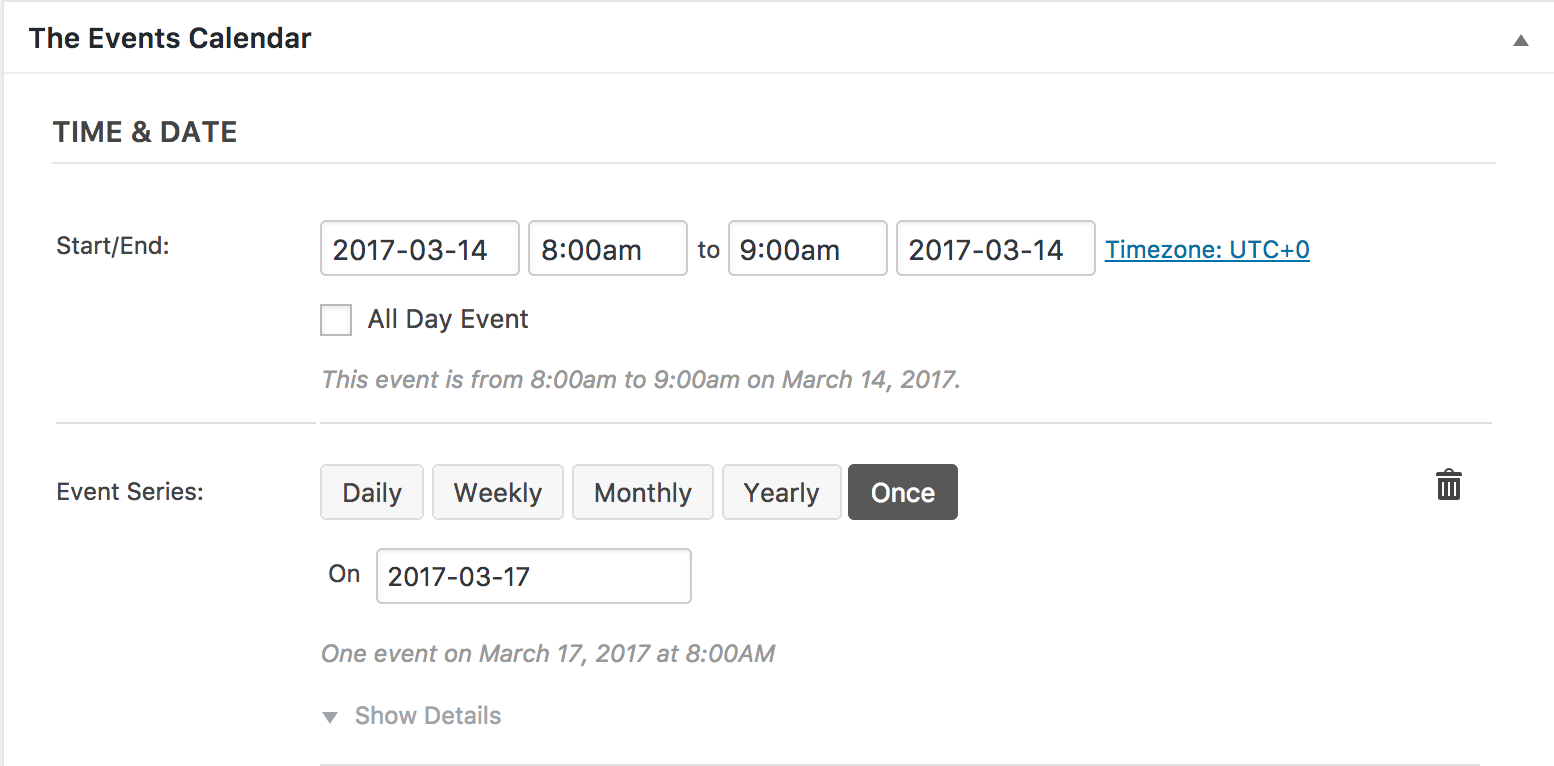
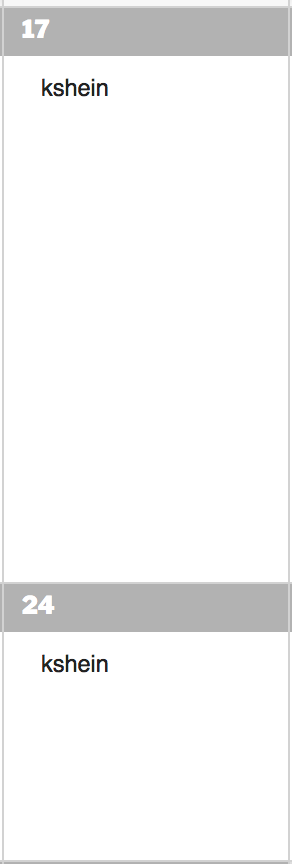
There aren’t any bugs relating to recurring events “Once” rule, so please let me know what you find. Make sure WP_DEBUG is set to true and you’re using the browser ‘Inspect’ tool. Cheers!
February 28, 2017 at 3:51 pm in reply to: Attendee list doesn`t show the Additional Attendee Information #1247262ModeratorThank you for the update. Before I’m able to confirm the behavior you’re experiencing is due to the known bug, can you please confirm whether or not the issue occurs when you have the Woo Checkout Field Editor Pro plugin deactivated? It would be ideal if you could run through the Testing for conflicts guide once again.
When you ran through the Testing for conflicts guide the first time, did you notice any errors in your server log, at the top of your site, and in your browser console? If so, please share those as they’re vital in diagnosing your issue. If you did not have WP_DEBUG set to true and your browser console open, please test again and take note of any errors you see. Detailed instructions can be found in my previous response.
The bug you’re referring to does not apply to 100% of our users, so please provide exact step-by-step instructions on how to reproduce the behavior and I’d be happy to further assist. Screenshots and screencasts are always helpful.
Thanks for your patience while we fully investigate the matter and have a good afternoon!
Moderator@Lars, you would add that code to the bottom of your theme’s functions.php file. Please give it a shot and if you run into any issues, create a separate thread and we’d be happy to help further assist.
In response to the other issue you’ve mentioned, you’ll need to create a new thread as we are not able to mix up thread topics. Thanks and I’ll keep an eye on the queue for your thread. Cheers!
ModeratorThank you for the update. Please review our tutorial on how to share your System Information and be sure to mark your reply as “Private” as it contains sensitive information.
Once I have that, I’ll have a better idea on how to proceed. Thanks again and take care!
ModeratorThank you for the update. I’m still not able to reproduce the issue you’re having with Google Maps and there aren’t any bugs logged resembling what you’ve shared with me. Do you have a test site set up? If not, as previously requested, it might be best you set up a fresh WordPress installation where you can fully troubleshoot the issue. Make sure you have only the default WordPress theme and The Events Calendar installed and activated on the test site. Please review our Using One License for Live and Dev Sites and Moving Your License Keys tutorials for more information.
I’ve also requested you share any errors you’ve found through WP_DEBUG and your browser console, so please take note of any errors you see and share them in your reply. Doing so will help further troubleshoot on my end.
To avoid confusion, let’s keep this particular thread focused on the Google Maps issue. Please create a new thread for any other issues you’re currently experiencing.
Thanks again for your patience and let me know what you find out. Cheers 🙂
-
AuthorPosts