

Forum Replies Created
-
AuthorPosts
-
Hunter
ModeratorWelcome back,
I’ll leave this thread open for the time being, so please let me know if you end up getting it addressed or not. Thanks and take care!
ModeratorHey Patrick,
Sorry to hear about the issue. Can you please review our Testing for conflicts guide and also send your System Information as a private reply?
Let me know how the troubleshooting goes and we’ll take things from there. Have a great evening and thanks for choosing PRO.
Cheers!ModeratorHi and welcome to our premium plugin support forums!
I’m not exactly sure why you’re experiencing the issue at hand, but I would be happy to help out! Have you read through our New User Primer and New User Primer: Community Events articles? They’re filled with details on how to install and properly setup your plugins.
Did you create a WordPress page that has the permalink/slug saved as ‘events’? If so, go ahead and delete this. Our plugin displays your events on whichever URL you’ve entered into ‘Events URL slug‘ under Events > Settings > General.
Let me know if reading through those articles helps and have a great evening.
Cheers!ModeratorHi and welcome back,
I did a quick check and it appears to be planned in an upcoming maintenance release. I can’t give you an exact date, but its “priority” has been bumped up since the last time I looked into it, so that means it’s being addressed sooner rather than later.
I wish I had more information for you at this time and thanks for understanding. Have a great week 🙂
August 8, 2016 at 2:12 pm in reply to: Imported iCal event time off by 1 hour, but only on certain days! #1149192ModeratorHi and welcome back,
I grabbed the iCal URL provided and imported the two test events you created. Prior to importing, I updated my WordPress timezone setting to ‘Chicago’. The events were imported successfully with the correct times (see screenshot below), so I’m at a bit of a loss as to why they’re not importing correctly for you.
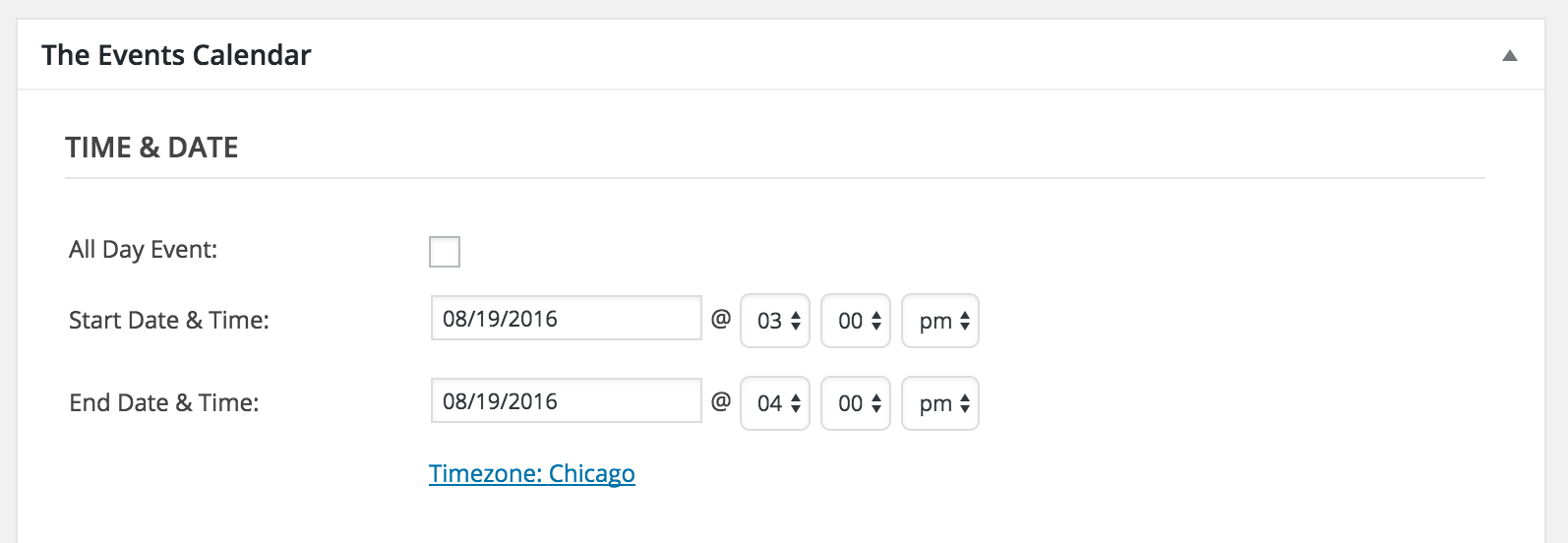
Are you able to set up a test environment on your local machine to test the issue more in-depth? I hate to ask this, but seeing I’m unable to reproduce the problem, it doesn’t appear to be a legitimate bug in our code. Let me know if that’s an option and we’ll go from there. Have a great rest of your Monday.
Cheers!
ModeratorHey John,
It appears the System Information didn’t come through in full. Can you refer to this article on how to provide the entire contents of your System Information as a private reply?
In response to this comment made previously by you:
We have tried the direct editing of the php file as suggested in first thread but it did not fix the iCal export issue.
The fix from the wordpress.org thread you linked to is unfortunately the best solution I can find at this time. If it’s not working properly for you, you might need to hire a developer to help resolve the issue until we can come up with a fix. I know it’s not an ideal answer but it is the best I have for you at this time. We’ve got a list of customizers that can help out.
Please respond back with any comments or questions you have and thanks for understanding. Have a great week!
August 8, 2016 at 1:46 pm in reply to: Recurring events showing on calendar 1 day after end #1149179ModeratorWelcome back,
Forgive me for not asking earlier, but can you provide your System Information as a private reply?
That will help out a lot, so keep me posted and we’ll go from there. Thanks and have a good day. Cheers!
ModeratorHi and welcome back 🙂
I did a quick check and found one thread relating to the MightyMag theme, but unfortunately a solution wasn’t provided. It’s possible the theme author came up with a fix for the conflict, but Molly (customer from aforementioned thread) never responded with the answer.
Also, as Barry mentioned on that thread, we are unfortunately unable to provide support for theme and/or plugin conflicts per Forum Rules. If you do get a remedy from your theme author, please share it here for others who may run into the problem in the future. If the theme authors are unable to help, we’ve got list of customizers that can get the job done.
Thank you for understanding and best of luck resolving the conflict and have a great week!
Cheers!ModeratorHi and welcome back 🙂
Thank you for being so thorough in your initial post! I did some quick testing and it looks like the conflict is actually between WooCommerce and Event Tickets. I was able to reproduce the issue you described with Event Tickets and WooCommerce activated. I tested again, this time with Event Tickets and Event Tickets Plus activated (WooCommerce deactivated) and I was able to update the ticket stock as expected.
With that said, we definitely have identified a bug which I’ve gone ahead and logged. I’ve linked this thread to the bug ticket for the developers to reference. I don’t have a solution for you at this time, but I’ll bring it up first thing in the morning when the rest of the team returns to work and be sure to reply back with any information/solutions we come up with. Rest assured the issue will be resolved in an upcoming maintenance release.
Take care and enjoy the rest of your weekend,
Cheers!ModeratorThis reply is private.
ModeratorHappy Sunday!
I believe I’m the only one “around” today, but I will bring this thread to the attention of our developers tomorrow morning for their confirmation and reply back ASAP. Thank you for the patience and try and enjoy the rest of your weekend!
August 7, 2016 at 10:47 am in reply to: Just purchased iCal. I thought an iCal url was part of the deal. #1148757ModeratorHi Deanna,
Thank you for the response. I’ll keep this thread “open” for the time being, but we have a bot that automagically “closes” thread after a certain timeframe. If you have any more questions, feel free to respond to this thread if it’s still “open”. If not, go ahead and create a new one. Thanks again and have a good rest of your Sunday!
August 7, 2016 at 10:44 am in reply to: Imported iCal event time off by 1 hour, but only on certain days! #1148756ModeratorWelcome back,
Thank you for being so thorough in your testing and communication 🙂
Would you mind sharing the iCal URL you’re having troubles with and I’ll test to see if I can replicate the issue? You can send it over as a private reply if you’d like. Thanks again and have a great rest of your Sunday!
ModeratorHey Jake,
Having the ability to assign multiple locations to events is definitely a useful feature and we’re excited for it’s inclusion in an upcoming feature release! Thanks for your response and patience and have a wonderful rest of your Sunday.
Cheers!
August 7, 2016 at 10:37 am in reply to: Emailed Tickets QR Code Not Generating in Emails/Auto-Completing ticket Orders #1148751ModeratorHey Bryan,
Glad to hear we’re on the right track! Would you mind sending a screenshot of what your screen looks like when viewing the email on your iPhone 6? We don’t have any logged bugs resembling what you’ve described, so a visual of the issue will help immensely.
Have a great rest of your weekend and thanks for keeping me updated.
Cheers! -
AuthorPosts