

Forum Replies Created
-
AuthorPosts
-
October 15, 2016 at 9:58 pm in reply to: Changing the wording on the Tickets Unavailable Message? #1177368
Hunter
ModeratorJames,
Using a filter based on the function in charge of the triggers near line 1376 of /wp-content/plugins/event-tickets/src/Tribe/tickets.php shouldn’t be too difficult. Unfortunately we’re not in the position to help with these customizations, but this list of customizers is a helpful resource if things get above your level of comfort an expertise. This is also a helpful resource on hooks and filters.
Sorry I can’t do more here and good luck with the customizations. Thanks for choosing PRO and have a great rest of your weekend. Cheers!
October 15, 2016 at 9:47 pm in reply to: ticket form not showing up on event page, and no meta box on posts or pages #1177367ModeratorHi and welcome,
Thank you for your purchase and sorry to hear about the ticket issues! I would be more than happy to help troubleshoot to see if we can come up with a solution. To clarify, are the ticket forms not displaying on the back-end or front-end of your website? Or both?
Before going much further, can you please review our Testing for conflicts guide and reply back with your findings?
Thanks again and have a pleasant rest of the weekend. Cheers!
ModeratorHello,
Thank you for reaching out! I hope your weekend is going well. I’m not able to reproduce the issue you’re having nor am I seeing any logged bugs of users reporting similar behavior. I see you checked ‘Yes’ to reverting back to the default WP theme and deactivating all plugins other than ours as outlined in the Testing for conflicts guide, but can you please confirm this?
Thanks again and have a great evening. Cheers!
ModeratorThank you for understanding and have a pleasant rest of your weekend. Cheers!
ModeratorHello,
You have an active license for Events Calendar PRO, so you should be able to visit Events > Settings > Licenses in you wp-admin. Can you send a screenshot of what your Licenses tab displays? Do you have the free version of The Events Calendar also installed and activated?
You do not need the Events Aggregator plugin in order for Events Calendar PRO to work. Have you reviewed our New User Primer? It is a helpful resource filled with details on getting the plugin installed and activated properly.
Keep me updated and have a good rest of the weekend. Cheers!
ModeratorHey Leigh,
Congratulations! Learning these basics can save you a ton of stress and time in the long run. Pat yourself on the back and please feel free to create a new thread if you have any more questions or concerns. Enjoy the rest of your weekend and thanks for choosing PRO.
Cheers!
October 14, 2016 at 12:12 pm in reply to: How do I disable the title bar on top and Google and ical calendars on bottom? #1176767ModeratorHi and welcome back!
You can hide or remove this information using either CSS or custom template overrides as outlined in our Themer’s Guide. This YouTube Video is a handy resource on learning to use the ‘Inspect’ tool to identify and make changes using CSS. I also like to refer users to this YouTube Video on creating custom template overrides using the default WordPress theme.
Please let me know if this information helps and have a great weekend. Cheers!
ModeratorHi and welcome back,
The best way to stay on top of these stylings is learning how to implement the changes you’d like. A few useful resources would be to watch this YouTube Video on using the ‘Inspect’ tool to identify and make changes using CSS.
Another option, if you haven’t already, is to install and tryout the Simple Custom CSS plugin Geoff mentioned in his last response.
CSS is a fairly simple language to learn and once you get the basics down, the rest comes pretty easy!
Please let me know if this helps and keep me updated on your progress. Have a great weekend!
Cheers 🙂
ModeratorHello,
Sorry to hear about the email troubles. In this instance, I usually try a plugin like Easy WP SMTP. There are a variety of reasons emails don’t get delivered, and this plugin usually solves these problems. Let me know if you that’s a possibility and if so, what the results are. Another recommendation is to check your spam folders, though I imagine you already have.
Please keep me updated on the status of your issue and have a good weekend. Cheers!
ModeratorWelcome, Charles 🙂
We are unfortunately unable to provide support through our Pre-Sales forum channel, but you can head over to The Events Calendar WordPress.org support forums for assistance and answers.
If you have a PRO license, you can log into your account and get assistance through the PRO forums. I’ll keep an eye out for your thread.
Thanks for understanding and good luck resolving your issue. Have a good day!
ModeratorHi Paul,
Thank you for reaching out to our Pre-Sales Channel 🙂
It would definitely possible to achieve tabs similar to the site you linked to with some custom development. We unfortunately don’t offer support through our Pre-Sales Channel nor custom development for our Premium support members, but we are always more than happy to point users in the right direction.
I hope this helps answer your question and please let me know if you have any other inquiries. Thanks again and have a great weekend!
ModeratorHello,
Thank you for reaching out 🙂
To see if you’re experiencing a core issue or if it’s a custom template override that might need some adjusting, would you please review our Testing for conflicts guide and reply back with your findings? It would also be helpful if you could look to see if there is a folder titled tribe-events within your theme folder ([your-theme]/tribe-events).
Please keep me updated and have a great weekend. Cheers!
ModeratorHello and welcome,
I’m not aware of any users reporting similar issues, but before I proceed investigating, can you please review our Testing for conflicts guide and reply back with your findings?
Thank you and have a wonderful rest of your Friday. Cheers!
ModeratorHi Katie,
The information you’re looking for is stored as meta_fields found in the wp_postmeta table. (see screenshot below)
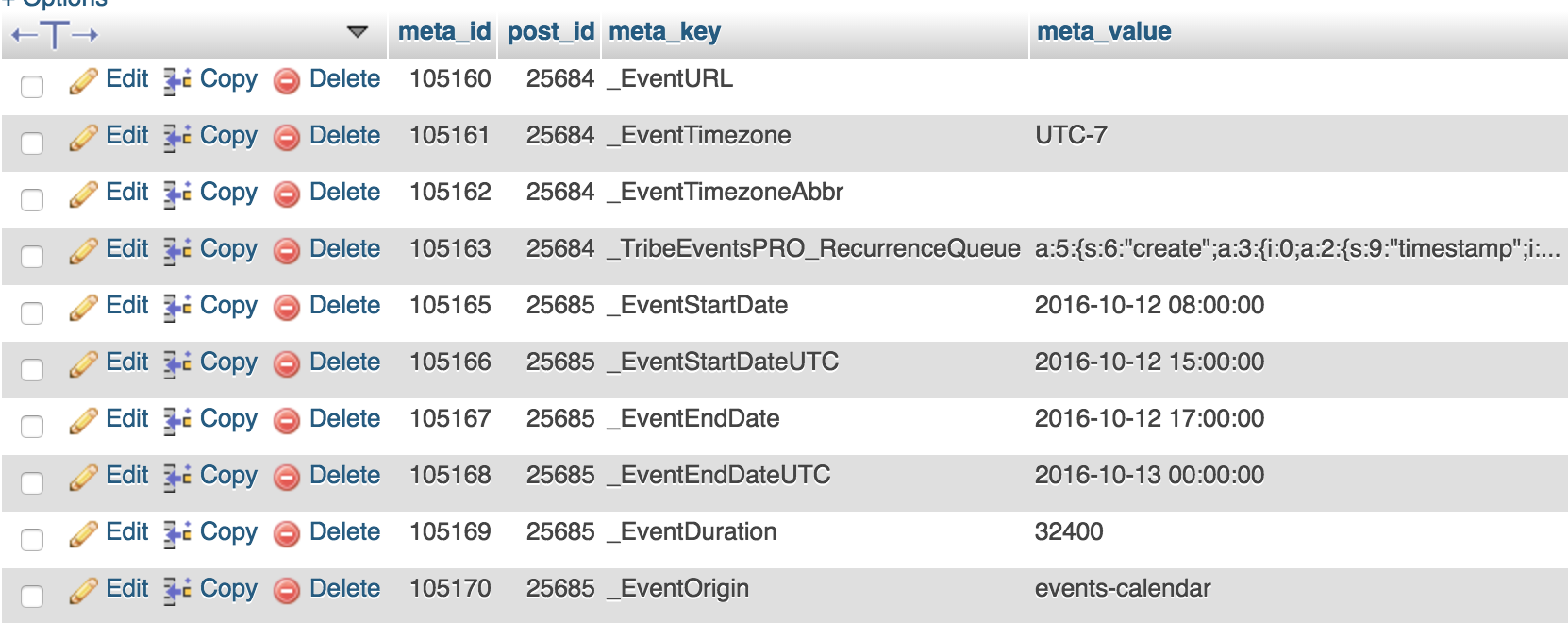
To clarify, these are not taxonomies, so therefore do not have an accessible front-end view like event categories, tags, venues, and organizers. Please let me know if this helps and have a great upcoming weekend. Cheers!
ModeratorHello,
Thank you for your purchase 🙂
I would be happy to help investigate the issue. Before we proceed, I’ll need you to review our Testing for conflicts guide and reply back with your findings. It would also be helpful if you could include your System Information as a private reply.
Thanks again and I look forward to your response. Cheers!
-
AuthorPosts