

Forum Replies Created
-
AuthorPosts
-
Hunter
ModeratorWelcome back and thank you for updating,
I was unable to reproduce the first issue you’re having. As you can see in the screenshots below, the correct number of attendee meta fields displays dependent upon the number of tickets I’ve selected.
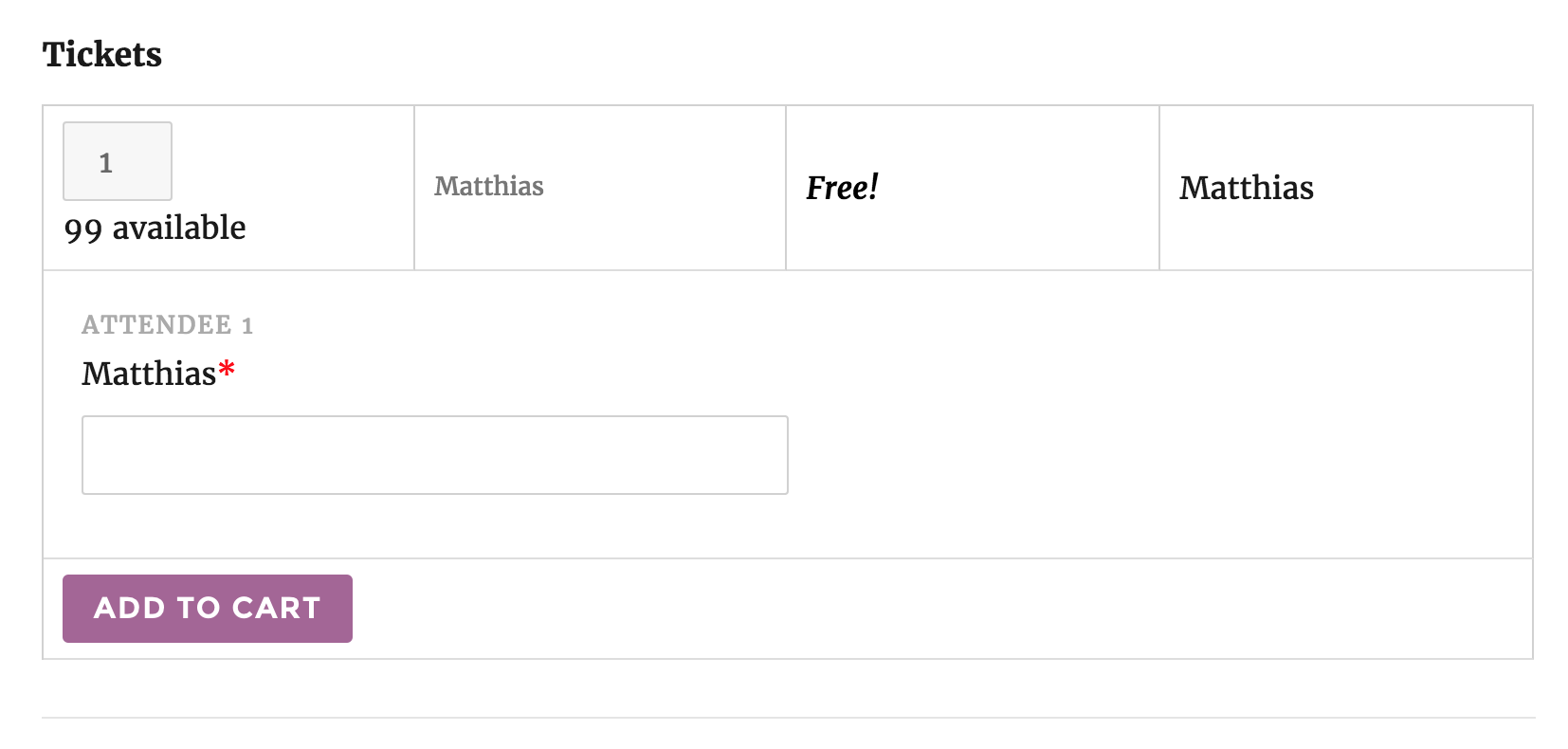
When I select two tickets, two ticket required fields display:
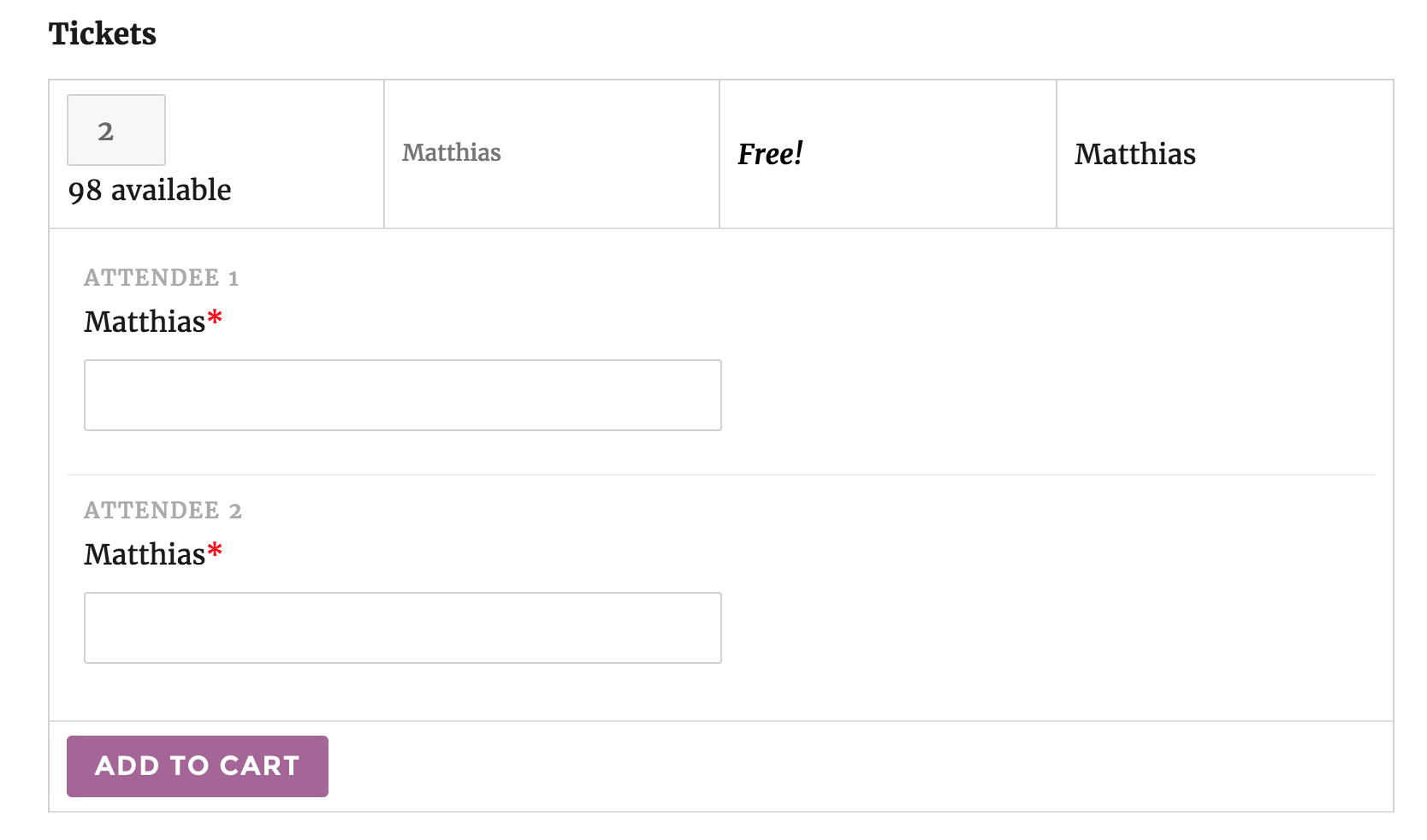
I was also unable to reproduce the second issue you’re having. Can you please review our Testing for conflicts guide and reply back with your findings? This is a required step before we can proceed troubleshooting. Let me know and we’ll go from there.
Thanks again and have a great weekend. Cheers!
ModeratorHello,
I checked and see a few attempted and failed transactions. Can you please walk me through the process you did while attempting to purchase the plugin? If possible, include screenshots of any error notifications during the checkout process and I’ll do my best to assist. We are having other transactions come through, so I don’t believe there are any current issues with our payment system.
Thanks and I look forward to your response. Cheers!
October 13, 2016 at 11:46 am in reply to: Can't select an event category on form submission #1176176ModeratorHey Dave,
I took a look at the link provided and saw there weren’t any categories available for selection as described. You could hide the entire category section using CSS, and if you want to pre-select a category as a default, our support team member Cliff offers up a solution on this thread.
Let me know how it goes and thanks for reaching out. Enjoy the rest of your day 🙂
ModeratorHello, Birgitte 🙂
Thank you for reaching out. I took a quick look at your site but the events appeared to display in the correct chronological order. Is there a particular view this is occurring on? Let me know and we’ll continue investigating from there.
Thanks again and have a great evening. Cheers!
ModeratorHey Mat,
Thank you for the thorough post and sorry to hear about the issues. I noticed you’re running outdated versions of our plugins. Are you able to update to the most recent versions and review our Testing for conflicts guide and reply back with your findings? While I’m awaiting the results, I’ll check the logged bug reports to see if we have anything matching what you’ve described.
Keep me posted and we’ll continue investigating. Thank you and take care. Cheers!
ModeratorJorge,
No worries! It actually took me a minute to remember the best route in this scenario, so we’ll chalk it up to teamwork! Take care and feel free to create a new thread if you have any more questions or concerns. Cheers!
ModeratorHello,
Glad you’re on the right track. We actually have Knowledgebase articles that help address both question you’ve asked! I’ll link to them below and please let me know if you have any more questions.
Enjoy the rest of your Thursday. Cheers!
ModeratorMartin,
Glad I could help answer your questions and please feel free to reach out if you have any more. Take care!
ModeratorHello,
Welcome to our forums and sorry to hear about the issues. I would be more than happy to help out! Before I attempt to reproduce the issue on my test environment, can you please review our Testing for conflicts guide and reply back with your findings?
Once I have that information, we’ll move onto the next step. Thank you for choosing Community Events and have a wonderful evening. Cheers!
ModeratorHey Bryon,
Currently, there is no feature that posts events to Facebook when being published, but take a look at NextScripts: Social Networks Auto-Poster. This also might be an idea worth submitting to our UserVoice Feature Ideas page.
I hope this helps answer your question and take care. Cheers!
ModeratorHi Martin 🙂
Thank you for reaching out! As you’ve pointed out, our PRO Additional Fields are limited at this time, so my best recommendation would be Advanced Custom Fields.
We have a logged feature report aimed to enhance the PRO Additional Fields, so I’ve gone ahead and linked this thread to the report for the developers to review. We also have a submission over at our UserVoice Feature Ideas page resembling what you’ve described, so take a second and upvote it here 🙂
Please let me know if I’ve sufficiently answered your question and have a great Thursday. Thanks again for contacting us. Cheers!
ModeratorHello,
What version were you updating from when you purchased the renewal license? Are you able to set up a test domain with the default WP theme and only our plugins to see if you can reproduce the issue? We don’t have any logged bugs of users reporting similar behavior, and I have not personally experienced this issue myself.
Let me know and we’ll go from there. Thanks!
ModeratorHello,
I would recommend installing the free version of our plugin, which can be downloaded here, and purchase the Facebook Events plugin. You’ll then be able to decide whether or not you need the PRO version.
We offer a 30-day money back guarantee, so if you purchased plugins and they didn’t work out, we’d be happy to refund your purchase! Please let me know if I’ve answered your question and take care. Cheers!
October 12, 2016 at 11:28 am in reply to: Event categories have disappeared, only a few left #1175544ModeratorHello and thanks for the response,
We’ll essentially need to wait until you can access your System Information and get things running a bit smoother before we can investigate this issue. There shouldn’t be any reason categories were deleted from your site. Our plugin doesn’t delete data, even if you deactivate and delete the plugin from your site. The only way to delete this type of content is manually, or if there was some kind of error with another plugin or potentially your theme.
Please keep me updated on the progress with Nico and we’ll continue investigating once I can get your System Information and the results from the Testing for conflicts guide.
Thank you again and have a good afternoon. Cheers 🙂
ModeratorHello,
It unfortunately is still not included in Event Aggregator due to the iCal not allowing a featured image on their end, so there is nothing we would be able to import. What you would need to do is upload your featured images, identify the post_id in the wp_posts table, then update your wp_postmeta _thumbnail_id field with corresponding featured image post_id.
I wish I was able to do more here and we truly appreciate you taking the time to fill out the UserVoice suggestion! If this all gets a little too much for you, we have a list of customizers that can help out.
Good luck and thank you for working with me on the issue. Cheers!
-
AuthorPosts