

Forum Replies Created
-
AuthorPosts
-
Hunter
ModeratorHi Wayne,
Unfortunately we aren’t able to provide support in either fashion you’ve requested. Please review our What support is provided for license holders? for more information.
As previously mentioned, the first step would be to read through the Testing for conflicts guide to see if you can identify the source of conflict. If you can manage that, reply back with what you find out and I’d be happy to continue investigating.
Thanks for your understanding on the matter and have a great afternoon!
ModeratorHey Andrew,
Thank you for posting to our forums and welcome back. It sounds like the files aren’t actually being uploaded. To rule out a theme and/or plugin conflict, can you please review our Testing for conflicts guide and reply back with your findings?
Thanks again and and have a great afternoon. Cheers!
November 21, 2016 at 9:54 pm in reply to: Event Listing Disappearing From Calendar on Day of Event #1195644ModeratorHey Brian,
Welcome to the support forums and I hope you had a great weekend. Sorry to hear you’re having troubles. Have you reviewed our Testing for conflicts guide to see if there are any theme and/or plugin conflicts in play?
Let me know how the results of that are and we’ll continue investigating. Thanks and take care. Cheers!
November 21, 2016 at 9:47 pm in reply to: Event Aggregator Hourly Update not running every hour #1195641ModeratorHello,
Thank you for your patience and I hope you had a great weekend. It’s a little unclear whether the events are being imported on an hourly basis. I’m also unable to see what events were updated, so it’s difficult for me to compare. I recommend you set up a test environment with only our plugins and the default WP theme installed/activated to see if you can reproduce the issues.
I’ve gone ahead and created a new import and will attempt to reproduce the issues on my test environment. Rest assured if there’s a bug, we’ll find it and get it addressed in an upcoming maintenance release. Once I hear back with your results, I’ll respond with what I discover. Thanks again and have a great week ahead. Cheers!
ModeratorAlison,
I’m happy to hear the cause of conflict has been identified and addressed. We also appreciate you taking the time to share your solution in case other users run into similar issues. Have a great week ahead and please feel free to open a new thread if you have any more questions or concerns. Cheers!
ModeratorHey Martin,
Welcome back and I hope you had a great weekend. Unfortunately, there isn’t much I can do here due to your request relating to a theme conflict/customization which we’re unable to support. I’d start by trying to use CSS to apply some fixes without having to write any more technical code. These Identifying errors using the ‘Inspect’ tool and Using the ‘Inspect’ tool to make changes with CSS YouTube videos are very helpful.
Sorry I can’t do more here and if it comes down to it, we have a list of customizers that can help further assist. Thanks for understanding and enjoy the rest of your week. Cheers!
ModeratorHello,
Thank you for the update and I hope you had a great weekend. I see you’re in/near Arizona! If so, howdy neighbor! I’m located in the Phoenix area 🙂
I took a look at your site and noticed all 10 map markers displayed. (see screenshot below)
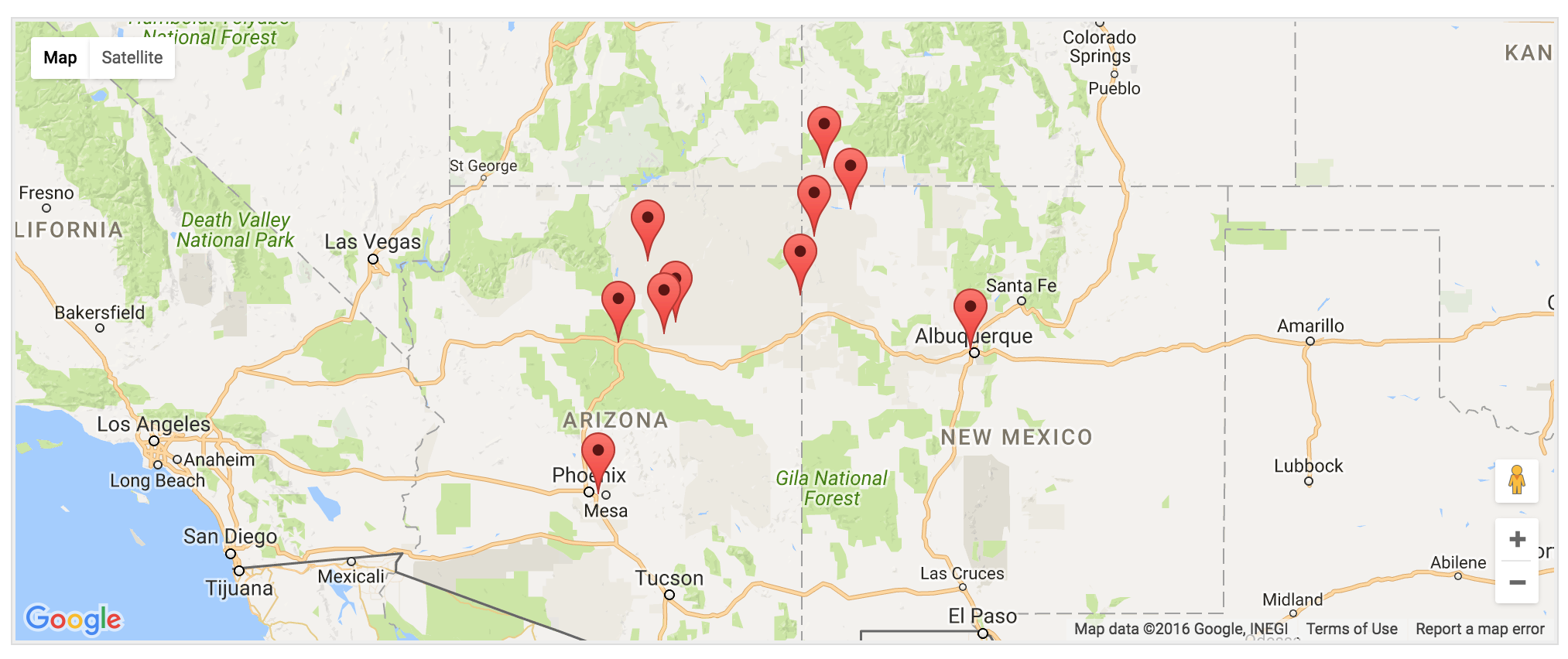
I then navigated to the next page of events and it displayed 3 events, which were all the future events remaining. (see screenshot below)
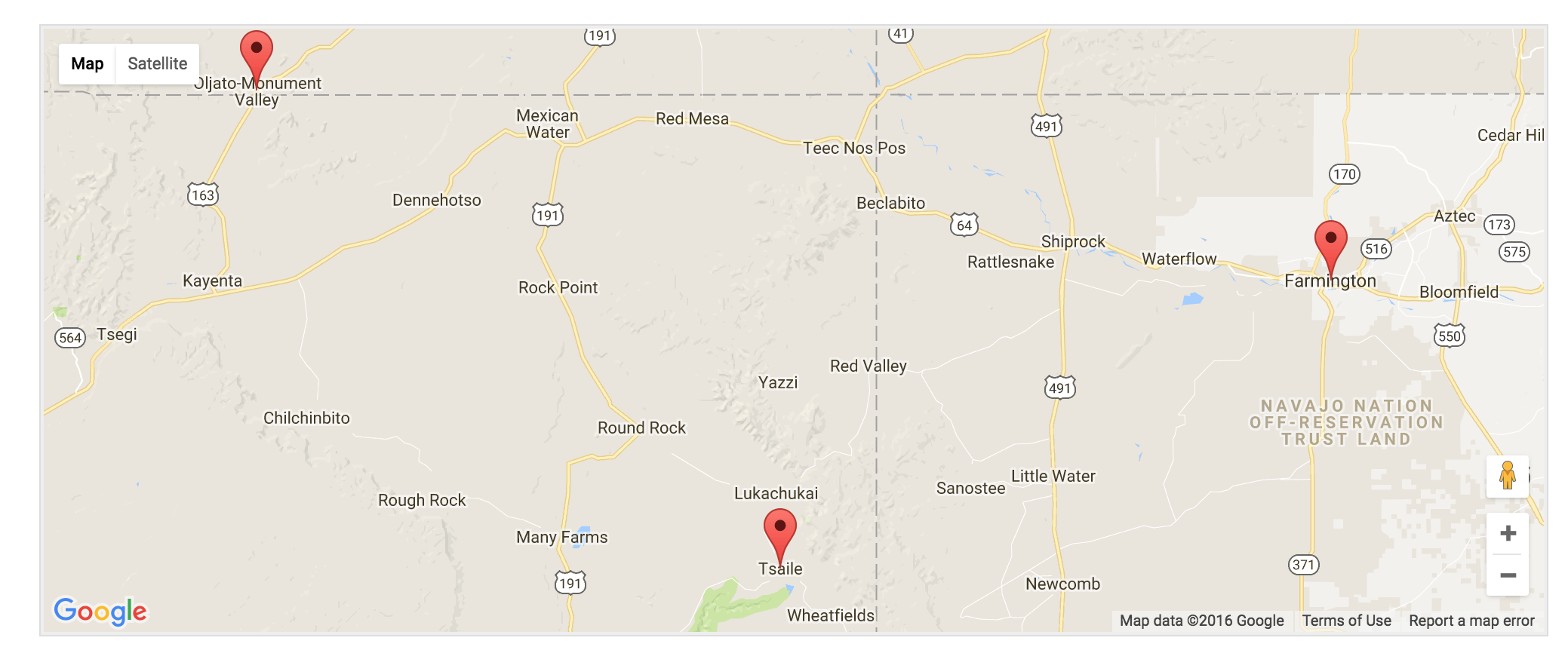
Everything appears to be working properly. Additionally, I’m not able to reproduce the behavior on my test installation. If you’re still experiencing issues, I’d double-check you have the lat/long info entered for the venues not displaying on the map. You can do this at the bottom of the page when adding/editing an event. (see screenshot below)

Please let me know how things are going and if it comes down to it, we have a list of customizers that can help further troubleshoot.
Thanks and have a great week ahead. Cheers!
November 21, 2016 at 1:20 pm in reply to: Automatically update events on site (instead of manually syncing each event) #1195507ModeratorHey Cameron,
Thanks for the update and I hope you had a great weekend. At this time, the only info that gets automatically updated is the ticket name, price, availability, etc. We have logged reports for both the features you’ve asked about, so I’ve gone ahead and attached this forum thread to both reports for the developers to review.
I still recommend posting your request to our UserVoice Feature Ideas too. Unfortunately I don’t have any kind of timeline when these features will be available, but keep an eye our our Release Notes and the plugin changelog for that info.
Thanks again and have a great week ahead. Cheers!
ModeratorHey Callie,
Thank you for the response. It’s definitely strange you’re not experiencing the same behavior I’m getting. Do you have any CSS set to “hide” the messages for any reason? I completely understand your frustration – I’m sure I’d be on the same level. I truly apologize I can’t do more here, but I’ll be sure and pay more attention to the behavior of the messages related to past/future tickets in the case there is a bug somewhere in our code.
For the time being, if it’s ok with you I’ll go ahead and close this thread out, but please feel free to open a new one if you have any more questions. Please let me know and have a great week ahead!
November 21, 2016 at 12:51 pm in reply to: [tribe_events] shortcode CSS doesn't match the "main events page" #1195489ModeratorHey Tommy,
I would love to continue troubleshooting this issue with you but without the ability to reproduce the behavior, there isn’t much I can do. I personally tested the issue on my local environment using the latest version of Avada (5.0.5) and our plugins, but when I made changes through Avada’s Theme Options > CSS, the code was honored for both the main events calendar and any calendars being called onto pages/posts/CPTs using the [tribe_events] shortcode.
Sorry I can’t do more here and I encourage you to reach out to Avada to see if they have any insight on the matter. You might also want to revisit our New User Primer and Events > Settings > Display to see if different options produce the desired results.
Best of luck and have a great week ahead. Cheers!
ModeratorMichael,
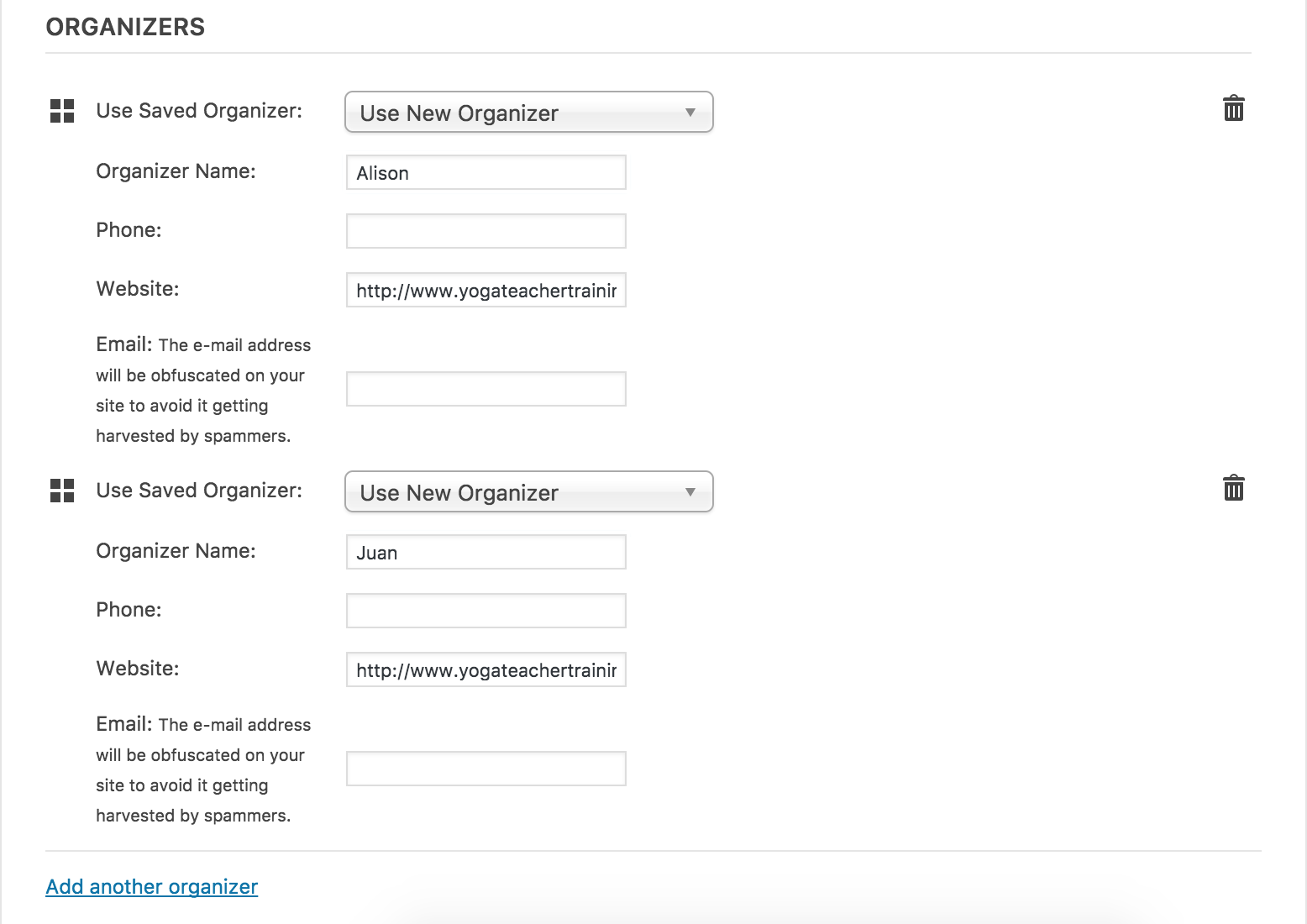
I hope you had a great weekend and welcome back. When you’re adding/editing an event, you should see the ‘Teachers‘ section beneath the ‘Time & Date‘ and ‘Location‘ sections. This is where you can add Alison and Juan as teachers. (see screenshot below)
Once you’ve published an event, the ‘Teacher’ information should display next to the ‘Time & Date‘ and ‘Venue‘ information on the front end of your event. (see screenshot below)
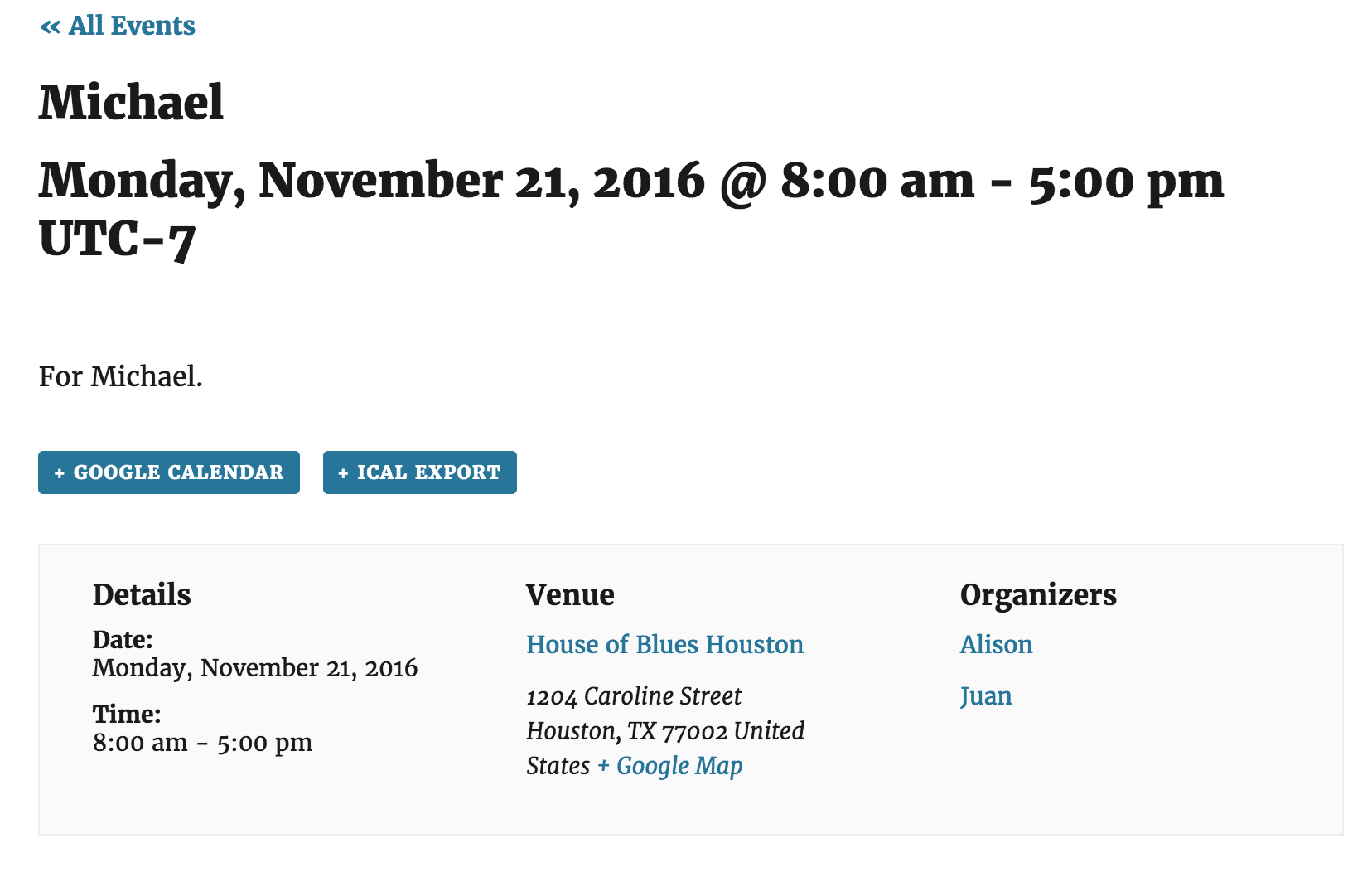
The snippet I provided should change the text from ‘Organizer(s)‘ to ‘Teacher(s)‘ across your entire site. Please let me know if this all makes sense and if you’re experiencing any behavior other than what I’ve described, please refer to our Testing for conflicts guide to see if there is a theme and/or plugin conflict in play.
Thanks again and have a great rest of the day. Cheers!
ModeratorHey Marina,
Thank you for the update. Please update to the latest versions as they contain a fix for the HTTPS issue. More info can be found here.
Fix — Prevent HTTPS websites from attempting to load plugin assets over HTTP.
Unfortunately, I’m not able to replicate the issue with Yoast SEO you’re experiencing on the HTTPS domain and there aren’t any bug reports resembling the issue. Sorry I can’t do more in this instance and if it comes to it, please refer to our list of customizers.
Thanks again and have a great week ahead. Cheers!
ModeratorHi Allison,
Thank you for reaching out and sorry to hear you’re having troubles. Before we go much further, can you please review our Testing for conflicts guide and reply back with your findings? I understand you already did this process with plugins, but we need to eliminate both theme and plugin conflicts.
I am not able to reproduce the behavior you’ve shared with me and I’m not seeing any logged bugs of users reporting similar behaviors, so once we rule out a theme and/or plugin conflict, I’d be happy to further troubleshoot.
Thanks again and have a great weekend ahead. Cheers!
ModeratorHi Wayne,
Thank you for your purchase and sorry to hear you’re having troubles. When you installed and activated PRO, you shouldn’t have lost any data. Can you please review our New User Primer in detail and report back if you’re still having troubles?
I’ll also need you to review our Testing for conflicts guide and report back with what you learn. Please include your System Information as a private reply.
Thanks again and rest assured we’ll get everything figured out. Have a great weekend!
ModeratorHello and welcome back 🙂
We are unfortunately unable to provide support for conflicts relating to plugins by other authors. I went ahead and attempted to reproduce the behavior using the Duplicate Post plugin, but everything worked fine for me.
If you haven’t already, I recommend reviewing our Testing for conflicts guide to identify the exact source of conflict. If it comes down to it, we have a list of customizers available to help further troubleshoot. Sorry we can’t do more here and best of luck resolving the conflict. Have a great weekend!
-
AuthorPosts