
Home › Forums › Calendar Products › Events Calendar PRO › Is it possible to sort & search
- This topic has 9 replies, 4 voices, and was last updated 9 years, 10 months ago by
Michael.
-
AuthorPosts
-
November 4, 2016 at 7:13 pm #1188060
Michael
Participantmy events by the Person in our case Teacher) holding the event
November 6, 2016 at 5:38 pm #1188452Hunter
ModeratorHey Michael,
Welcome back 🙂
You can use either the Tribe Events Bar or for even more features, our Filter Bar Plugin does a great job at allowing users to search and sort your events by date, time, venue, organizer, and even Additional Fields!
Please let me know if this helps answer your question and have a great week ahead. Cheers!
November 7, 2016 at 6:29 am #1188580ParticipantOK – so where would I put the Teachers’ names – if we have 2 is that possible? Usually I just put them in the descriptor.
November 7, 2016 at 1:24 pm #1188798ModeratorMichael,
What I would do is use the snippet below (add to bottom of theme’s functions.php file) to change ‘Organizers’ to ‘Teachers’. You can assign multiple ‘Teachers’ when adding/editing events.
add_filter('tribe_organizer_label_singular', 'change_single_organizer_label' );

function change_single_organizer_label() {

	return 'Teacher';

}
add_filter('tribe_organizer_label_plural', 'change_plural_organizer_label' );
function change_plural_organizer_label() {
return 'Teachers';
}Let me know how this works out for you. Cheers!
November 10, 2016 at 5:38 pm #1190689ParticipantHi Hunter – did that.
I can now add Teachers, but they don’t actually appear on the event? The one I tested was Bali January 2017. I added Emily & Nancy – but don’t see them anywhere. http://www.yogateachertrainingyogacara.com/calendar/
Also – is there an easy way to change the header colours for the calendar?
THX
November 11, 2016 at 8:55 am #1191018ModeratorHello,
Thank you for the update.
I can now add Teachers, but they don’t actually appear on the event? The one I tested was Bali January 2017. I added Emily & Nancy – but don’t see them anywhere.
Do you have any template overrides in your theme folder? More info can be found in our Themer’s Guide. To see if this is the issue, refer to our Testing for conflicts guide. Once you temporarily deactivate your custom theme, I’m guessing the missing information will display on your single event pages.
Also – is there an easy way to change the header colours for the calendar?
Check out the PRO Color Customizer feature and let me know if you’re able to get the desired results.
Keep me posted and have a great Friday afternoon. Cheers!
November 18, 2016 at 10:41 am #1194629Participanthi hunter – still having issues…
I tried to add teachers to the event titled, “Bali Yoga Teacher Training 200 Hour (Teachers: alison & juan)”, however, it wouldn’t save more than 1 teacher and I don’t see the teachers listed on the event page either.
we don’t have any overrode code in place…
November 21, 2016 at 12:10 pm #1195474ModeratorMichael,
I hope you had a great weekend and welcome back. When you’re adding/editing an event, you should see the ‘Teachers‘ section beneath the ‘Time & Date‘ and ‘Location‘ sections. This is where you can add Alison and Juan as teachers. (see screenshot below)
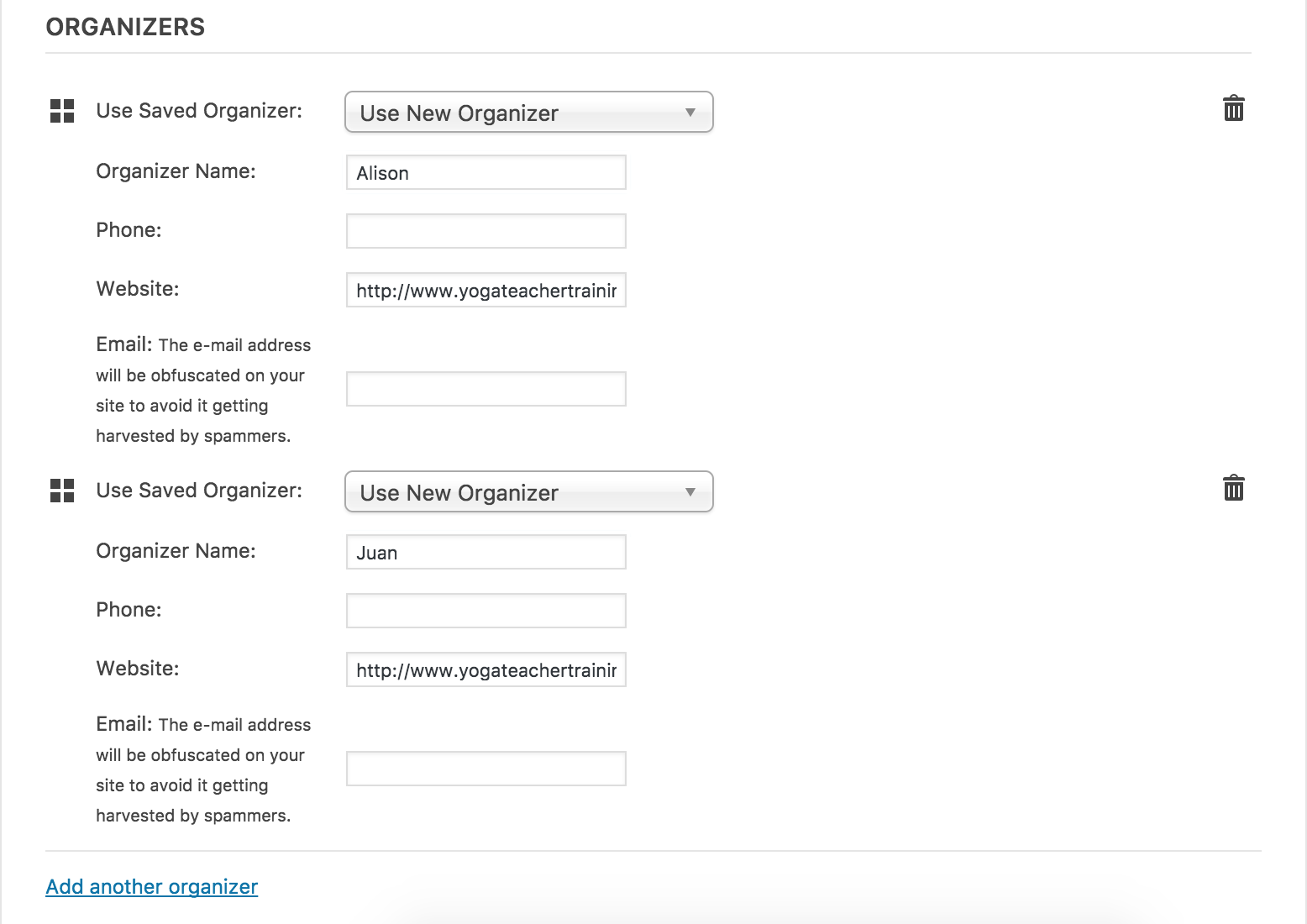
Once you’ve published an event, the ‘Teacher’ information should display next to the ‘Time & Date‘ and ‘Venue‘ information on the front end of your event. (see screenshot below)
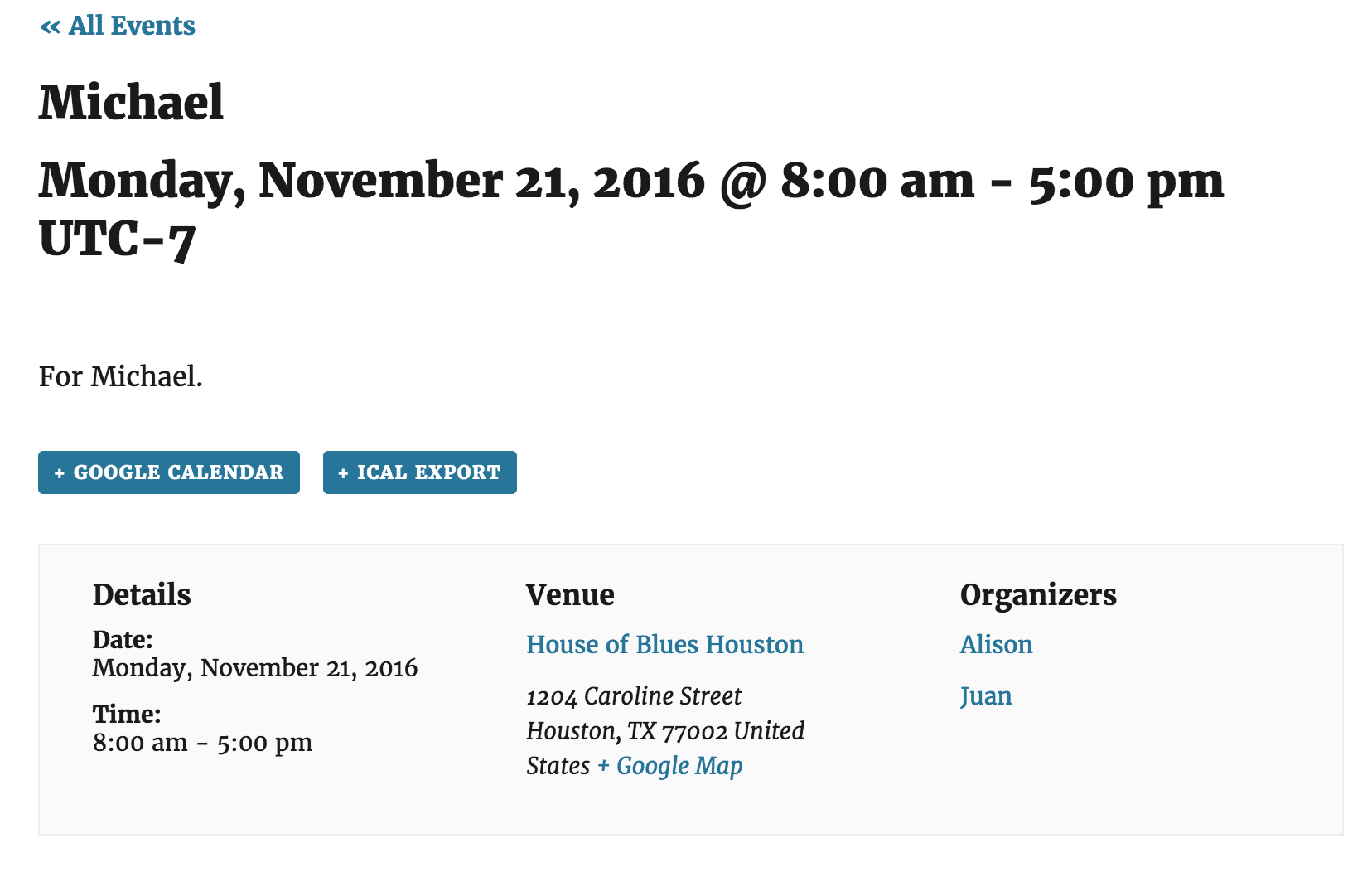
The snippet I provided should change the text from ‘Organizer(s)‘ to ‘Teacher(s)‘ across your entire site. Please let me know if this all makes sense and if you’re experiencing any behavior other than what I’ve described, please refer to our Testing for conflicts guide to see if there is a theme and/or plugin conflict in play.
Thanks again and have a great rest of the day. Cheers!
December 13, 2016 at 8:35 am #1205298Support Droid
KeymasterHey there! This thread has been pretty quiet for the last three weeks, so we’re going to go ahead and close it to avoid confusion with other topics. If you’re still looking for help with this, please do open a new thread, reference this one and we’d be more than happy to continue the conversation over there.
Thanks so much!
The Events Calendar Support Team -
AuthorPosts
- The topic ‘Is it possible to sort & search’ is closed to new replies.