
Home › Forums › Calendar Products › Events Calendar PRO › Yoast SEO conflict
- This topic has 12 replies, 4 voices, and was last updated 9 years, 10 months ago by
Marina.
-
AuthorPosts
-
October 25, 2016 at 7:40 pm #1182940
Marina
ParticipantHello,
The most recent update of the Calendar plugin introduced a conflict with Yoast SEO.
Please take a look at the screenshot. The Yoast SEO window with Meta Title and Description are not loading correctly. When the Calendar plugin is disabled, the Yoast plugin is back to normal. Please advise how to fix the issue or where to get the previous version of the working Calendar plugin.Thank you
October 25, 2016 at 11:10 pm #1183029Hunter
ModeratorMarina,
Welcome! And lovely name 🙂
I took a minute to try and reproduce the issue, but the Yoast SEO meta box looks ok on my test installation. (see screenshot below)
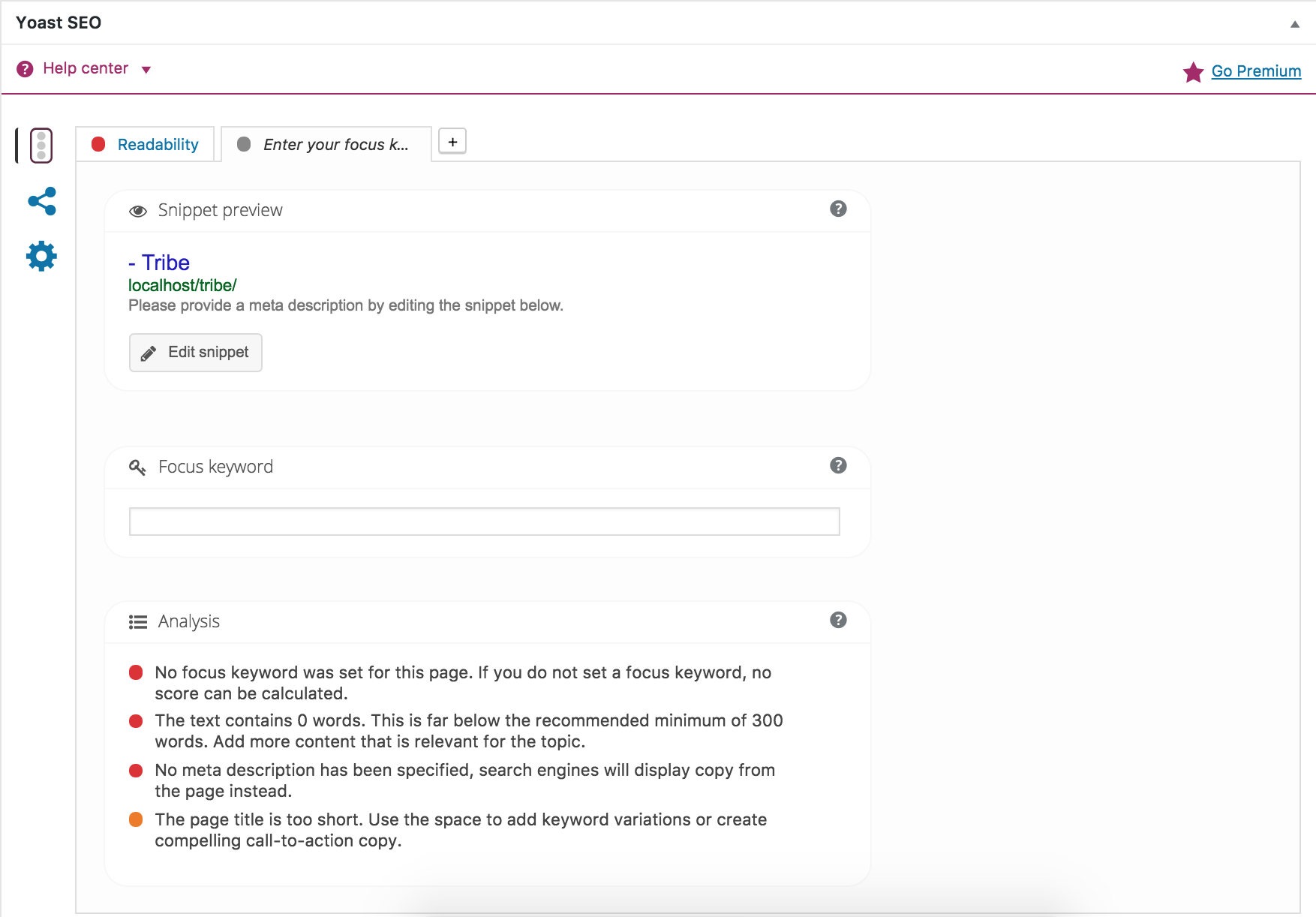
Can you please confirm you’ve reviewed our Testing for conflicts guide? If you haven’t, please take a moment to do so and reply back with your findings. Please include your System Information as a private reply too.
Thank you for choosing us for your events calendar needs and take care. Cheers!
November 2, 2016 at 9:12 am #1186381ParticipantHello Hunter,
I tested the conflict scenario on a separate subdomain with twenty sixteen theme and just Event Calendar and Event Tickets with WooCommerce plugins. I do have a problem updating the existing tickets – the ticket update set of fields are not displayed when I click on the Edit button – it flashes white for a moment and nothing happens. I do not know how to see errors that may be occurring at the time when I click on the Edit button. Please advise.
I also tested another scenario – I cloned the main domain on a subdomain and I do not have a problem with Yoast. Everything is the same in both installs except the main domain runs SSL. I do have a problem updating the existing tickets on the main server.
Please advise!
Thank you
November 2, 2016 at 5:41 pm #1186730ParticipantThis reply is private.
November 2, 2016 at 5:48 pm #1186736ParticipantI also installed a local copy of the app on my mac. There is no problem with either Tribe tickets or Yoast. The major differences that I see right away is SSL (in production) and different PHP versions. It is common to have SSL in production. Can you please test the same setup in your environment with SSL? Also, given not all hosting providers run latest and greatest version of PHP, I would expect Event Tickets to work with older versions. Can you please let me know what other information I can provide you with to have this issue resolved in a timely manner?
Thank you
-
This reply was modified 9 years, 12 months ago by
November 2, 2016 at 10:55 pm #1186847ModeratorHello,
You can read about the System Requirements to run our plugins here. I have to admit, I’m a bit confused by your responses. Can you please clarify whether the Yoast issue was resolved when you reverted back to the default WordPress theme and deactivated all plugins other than ours?
In regards to the other issues you’ve mentioned, you’ll need to open new threads for each individual issue in order to get assistance resolving them. Please keep me updated on the Yoast issue and we’ll go from there.
Thanks and take care!
November 3, 2016 at 6:37 am #1186936ParticipantHi Hunter,
The issue with Yoast has not been resolved. It is still a problem in production that runs SSL. I cloned the prod website onto a subdomain on the same server and the result is – there is no Yoast issue there. The only difference is SSL between the two installs there – this is it.
As to the issue with the Event Tickets plugin, the issue that I am having with not being able to update the existing tickets exists in both installations in Production – the main website and the cloned one on the subdomain.
Hope this explanation is clear. Please let me know if you need more clarification.
Thanks,
MarinaNovember 3, 2016 at 2:50 pm #1187368ModeratorMarina,
Thank you for the clarification. Do you see any mixed content warnings when opening the ‘Inspect’ tool on the backend of your site (add/edit event page) where the Yoast issues are occurring?
Please go ahead and create a new forum thread for the ticket issue and we’d be happy to help. It’s difficult troubleshooting two issues in one thread 🙂
Thanks again and have a great afternoon!
November 19, 2016 at 2:05 pm #1194983ParticipantHi Hunter,
I am going to keep this ticket open for the Yoast SEO issue and create a new one for the Event Tickets Edit functionality.
To summarize what is happening with the Yoast SEO issue:
The image of Yoast SEO panel that I posted on October 25, 2016 is what is present in the production site that runs SSL. Please note, I have disabled ALL plugins except Yoast SEO and Events Calendar (please note I also disabled Event Tickets plugin).
This issue is NOT present on the cloned website that DOES NOT have SSL and is running on a subdomain in the same environment.Regards,
MarinaNovember 19, 2016 at 2:20 pm #1194988ParticipantHunter, I forgot to mention – there is no Mixed Content issue on the website.
November 21, 2016 at 11:52 am #1195455ModeratorHey Marina,
Thank you for the update. Please update to the latest versions as they contain a fix for the HTTPS issue. More info can be found here.
Fix — Prevent HTTPS websites from attempting to load plugin assets over HTTP.
Unfortunately, I’m not able to replicate the issue with Yoast SEO you’re experiencing on the HTTPS domain and there aren’t any bug reports resembling the issue. Sorry I can’t do more in this instance and if it comes to it, please refer to our list of customizers.
Thanks again and have a great week ahead. Cheers!
December 13, 2016 at 8:35 am #1205294Support Droid
KeymasterHey there! This thread has been pretty quiet for the last three weeks, so we’re going to go ahead and close it to avoid confusion with other topics. If you’re still looking for help with this, please do open a new thread, reference this one and we’d be more than happy to continue the conversation over there.
Thanks so much!
The Events Calendar Support Team -
This reply was modified 9 years, 12 months ago by
-
AuthorPosts
- The topic ‘Yoast SEO conflict’ is closed to new replies.