

Forum Replies Created
-
AuthorPosts
-
George
ParticipantHey @Ruby,
You should find some success by white-listing both of the following IP addresses:
• 45.55.7.38
• 162.243.159.176I hope that helps!
GeorgeMarch 29, 2016 at 12:36 pm in reply to: Calendar displays initial page, but can't navigate beyond #1095576ParticipantThanks for all of this information, @Ann. I’m glad to hear about some of the progress here.
GoDaddy’s report, and your site slowness, is consistent with the number of events you have on your site. GoDaddy’s not historically been a high-performing web host, especially if you are on a lower tier of hosting service, so to have 2,000-plus events on their systems, slow performance is to be expected on some level.
I am not denying that we want to improve our plugin performance, too. It’s a huge goal for us and we are improving speed all the time in small ways.
One thing that might help is to head to Events → Settings in your wp-admin and make sure the “Enable month view cache” option is checked. This will, as the name implies, cache your site’s month view a bit, which should make the loading of that view a bit faster….
Best of luck with your site!
GeorgeParticipantInteresting—can you clarify exactly what you mean by “missing meta”?
ParticipantI’m sorry to hear that my workaround attempt didn’t help!
We are indeed actively investigating this as a bug. I have done what I mentioned above and escalated this to a bug. We are working to see if there’s a bug within our plugin code directly—although this currently does not seem to be the case because we cannot recreate these issues.
Regardless, we will investigate, and if there’s a bug then in the coming releases we will patch this up. This could take weeks or months, unfortunately, but I will encourage investigation into this and we will fix it if we find a bug.
The main issue delaying our progress is that we cannot recreate this ourselves. You and the customer in the other thread indeed report the same issues, but we ourselves are still unable to recreate them. 🙁 Geoff B. originally was able to produce similar problems, but we have to dig deeper here.
We’re working on it though! Once we can recreate things, we’ll be able to back-engineer a fix.
This leaves us, unfortunately, with no specific ETA for a fix. But this is a bug and our developers are indeed working on a fix for this.
Sincerely,
GeorgeMarch 29, 2016 at 11:04 am in reply to: WooCommerce completed order – but doesn't appear in Orders or Attendees #1095547ParticipantSorry to hear about this, @Joe!
Can you share your system information to help us investigate this a bit? Here’s how to do that → https://theeventscalendar.com/knowledgebase/sharing-sys-info/
Cheers,
GeorgeParticipantHey @Jasonhunterdesign,
Thanks for reaching out!
Your settings show that the events page should be at /events on your site.
1. Do you happen to have a “page” in your wp-admin that is titled “Events”? If so, does deleting this page make any progress with the behavior you describe here?
2. If activating a default theme like Twenty Sixteen resolves the issue, then whatever OTHER theme you were using is a broken theme. 🙁 It has bad code in it that is conflicting with plugins. There is unfortunately nothing we can do about theme conflicts, but for now, let me know about question #1 above first and we can investigate this further.
Cheers!
GeorgeParticipantHey Gabriel,
By default, if the event is sold out, the “Add to Cart” button does get hidden and cannot be clicked.
1. Do you not find this to be the case? If events are sold out, what do you find specifically?
2. Can you link to an event on your site that has tickets for sale for it and is sold out, but the “Add to Cart” keeps showing?
3. Finally, can you share your system information with us? Here’s how → https://theeventscalendar.com/knowledgebase/sharing-sys-info/
Thank you!
GeorgeParticipantHey @Jordan,
Do you mean that the features of that plugin only let you filter by “date”, not the Event Start Date?
If this is not what you mean, can you elaborate a bit more on what you do mean?
In the meantime, I would also like to be frank and set your expectations early that there is likely little insight we can provide on anything related to that plugin. We do not make that plugin so unfortunately, if your questions come down to specific features/functions of that plugins, you will likely need to take those questions to the authors of that plugin for better, more-specific assistance.
Thank you,
GeorgeParticipantSorry to hear this, @gwebs!
You can request a refund by following the steps here → https://theeventscalendar.com/knowledgebase/refund-policy/
Cheers!
GeorgeParticipantThank you for clarifying! This may be the result of server configuration or something; your web host might have configurations in place that are blocking the requests to our server….
To help investigate that, can you reach out to your web host and see if they notice any blocking of these license-activation requests?
Let us know what they say! I’m sorry to recommend this, but I cannot reproduce the problem and this sort of request-blocking is usually the culprit for these sorts of issues.
The other common culprit is a theme or plugin code conflict. That may be going on here, too. To investigate this possibility, you’d unfortunately have to do the steps listed here and then try “activating” the license after EACH STEP → https://theeventscalendar.com/knowledgebase/testing-for-conflicts/
I would recommend contacting your web host first as that is simpler and might reveal the problem without doing all of the above testing. But if no progress is made with the web host, the above steps are the next best thing to test for.
Thank you!
GeorgeMarch 29, 2016 at 10:15 am in reply to: Arrow Size for Ticket QTY + Customizing Event Confirm Email + Mobile Check-In #1095509ParticipantHi Corey, I will address your other questions as follows:
One last question for now 🙂 – Is it possible to send emails/notifications to all customers attending a particular event? Or do I have to copy/paste their email addresses and send using another system?
There is unfortunately way to send emails other than the default system emails that are auto-sent like the “thanks for your order!” emails. To send marketing emails and other contact, yes, another system must be used.
1. Is there a way to change “out of stock” for tickets to “sold out”? Or does that also require some coding?
Custom coding is indeed required. 🙁 The file where this is located is here:
event-tickets-plus/src/views/wootickets/tickets.php
2. While users who purchase a ticket to a paid event are sent a confirmation email, and get the event sent to their ‘my account’ page, can the same be done for RSVPs?
No, there is unfortunately no out-of-the-box support for doing this for RSVPs. Sorry to disappoint! 🙁
3. For the MT filter bar, can ‘the’ be excluded from being included in the filter? Events starting with ‘the’ are showing up first on the list, which doesn’t quite work with many events.
This is, again, unfortunately not possible unless you get down-and-dirty in the code and restructure the basic filtering of events. The alphabetization is taken literally, so you could tweak the code to do this (which is a complex customization, unfortunately) or literally remove “The” from the titles. 🙁
Sorry to disappoint on a few fronts here!
Cheers,
GeorgeParticipantBest of luck with your project, Pascal!
GeorgeParticipantThanks for posting this information! It reveals that all of your The Events Calendar plugins are out of date: Event Tickets, Event Tickets Plus, Community Events, all of them.
The first order of business here, then, is to update all plugins to their latest versions.
The latest versions for all of those plugins is 4.1 and the files can be accessed here → http://theeventscalendar.com/my-account/downloads
The Events Calendar itself is version 4.1.0.1 and can be grabbed here → http://wordpress.org/plugins/the-events-calendar. Event Tickets is, of course, on WordPress.org too. http://wordpress.org/plugins/event-tickets
Updated everything and let me know what issues persist…
Thank you!
GeorgeMarch 29, 2016 at 10:05 am in reply to: Events Calendar Pro Previous-Next-Click on Month features not working #1095503ParticipantAnother way to add the link to /events to your menu, is to just use the “Custom Links” section in your menu-builder:
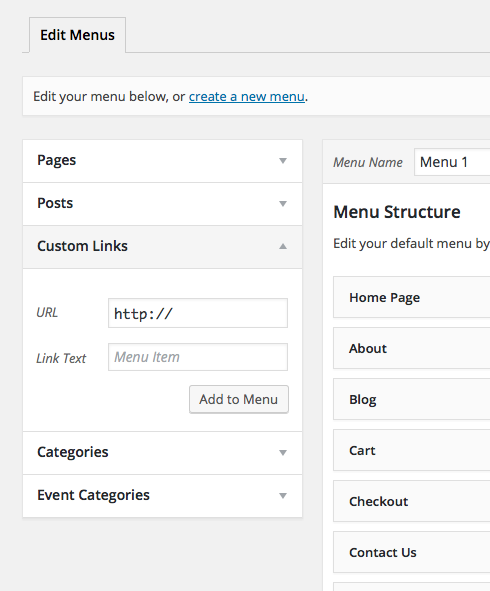
Make the label “Events” or “Calendar” or whichever label is most appropriate for your needs, then make the URL example.com/events, where example.com is replaced with your real domain name of course.
Thrills aside, glad to see the issues resolved nonetheless. 😉
Best of luck with your project,
GeorgeMarch 29, 2016 at 10:02 am in reply to: Previous/Next Feature not working – how do I figure this out? #1095494ParticipantGreat! Best of luck with your site. 🙂
-
AuthorPosts