
Home › Forums › Calendar Products › Events Calendar PRO › Calendar displays initial page, but can't navigate beyond
- This topic has 4 replies, 3 voices, and was last updated 10 years, 7 months ago by
George.
-
AuthorPosts
-
March 28, 2016 at 2:55 pm #1094990
Ann Hutchinson
ParticipantMy Events Calendar Pro has 2,000 events in the backend. The initial page of the events page loads, but I can’t get it to move beyond that page with either the filter, find events or next events. Now and then I can – slowly.
I just did all the troubleshooting on Saturday trying to address a problem with the views. Only the default view worked. Now only the landing page does.
Yes, I changed to 2015 theme.
Yes I deactivated plugins and dumped cache.
And yes, I contacted the host to see if the db was overwhelmed.I really need you to read this entire email and possibly the previous thread I created in case they’re related. I can’t wait for days in between every “have you tried?” response. Our fundraiser to keep this online event calendar going is in a few days. This could ruin us! I need this fixed ASAP.
thanks for your prompt help.
March 28, 2016 at 10:26 pm #1095229ParticipantHi @ann,
I’m very sorry to hear about these issues.
I have two main questions here:
1. You said this: ” Yes, I changed to 2015 theme. Yes I deactivated plugins and dumped cache. And yes, I contacted the host to see if the db was overwhelmed.” What were the results of each test, and what did your host have to say about the database?
2. Your events page lives at /events. Do you happen to have a “Page” in your wp-admin that is called “Events”? If so, please delete this page. If page is titled “events”, then it will try to use the URL slug /events—but The Events Calendar’s calendar is trying to use that, too, so if two things are trying to use the same /events slug, issues can arise.
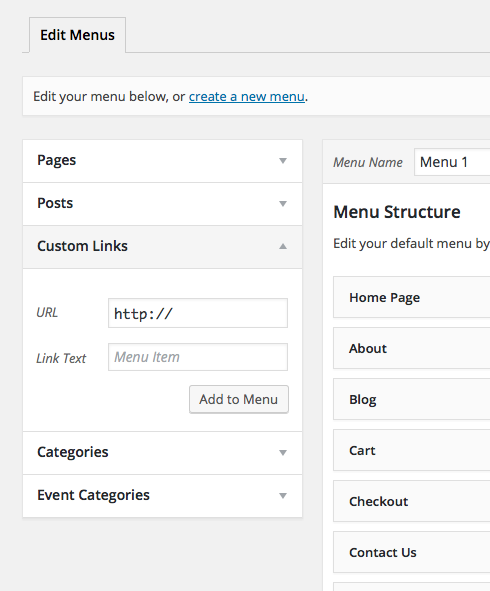
Deleting that page will not affect anything with the site; except it might help here! If you are using a “page” to add the “Calendar” menu item on your site, then no worries. Still delete the page. You can then just go to Appearance → Menus in your site’s wp-admin, and in that page menu item’s stead, just add a “Custom Link” that links to socodancebeat.com/events and is labelled “Events”. Here’s a screenshot of this “custom link” menu option:
Cheers!
GeorgeMarch 29, 2016 at 11:02 am #1095543ParticipantGeorge,
Thanks. I deleted the page and the page menu item, and added a custom link instead to the menu. It’s faster and more reliable than it was, but navigation is still sluggish. I get the gearwheel on my Mac before it refreshes the page regardless of how I am navigating within the calendar.I, meanwhile, cleaned out most of the past events and emptied the trash, thinking that that would help. It didn’t. Or at least not enough, if it did at all.
To your first question. I found no plugin or theme conflict. The problem remained after all that troubleshooting. The host said that their db server is working and not overwhelmed. He said, however that it was very busy. That’s the end of their support. They just make sure the site is talking to the db server. GoDaddy, btw.
Thanks.
AnnMarch 29, 2016 at 11:19 am #1095556Annette
ParticipantI am having the same problem with single events. My recurring events work fine at https://idahovacation.org/events/. I have done everything you have advised. This is not an isolated incident as there are many threads about it. There must be a bug in your plugin. Even if it is a conflict related to a common theme or plugin it would be to your advantage to isolate and fix it. I love your plugin and don’t want to get a refund and look for something else.
Thank you, Annette-
This reply was modified 10 years, 7 months ago by
March 29, 2016 at 12:36 pm #1095576ParticipantThanks for all of this information, @Ann. I’m glad to hear about some of the progress here.
GoDaddy’s report, and your site slowness, is consistent with the number of events you have on your site. GoDaddy’s not historically been a high-performing web host, especially if you are on a lower tier of hosting service, so to have 2,000-plus events on their systems, slow performance is to be expected on some level.
I am not denying that we want to improve our plugin performance, too. It’s a huge goal for us and we are improving speed all the time in small ways.
One thing that might help is to head to Events → Settings in your wp-admin and make sure the “Enable month view cache” option is checked. This will, as the name implies, cache your site’s month view a bit, which should make the loading of that view a bit faster….
Best of luck with your site!
George -
This reply was modified 10 years, 7 months ago by
-
AuthorPosts
- The topic ‘Calendar displays initial page, but can't navigate beyond’ is closed to new replies.