
Home › Forums › Calendar Products › Events Calendar PRO › View As dropdown no longer working
- This topic has 15 replies, 3 voices, and was last updated 10 years, 5 months ago by
Support Droid.
-
AuthorPosts
-
March 19, 2016 at 10:09 am #1091403
Barbara Ann O’Leary
ParticipantSince the new updates the View As dropdown menu no longer functions. Anyone else experiencing this? I can see the options but they don’t function.
My default is set to Lists. If I choose for instance Map… nothing changes. Same is true for all the other options.
Looking forward to hearing from you on this. Thanks.
March 19, 2016 at 11:52 am #1091436George
ParticipantHi @Barbara Ann,
I’m sorry to hear about these issues! I looked at your events page with the JavaScript console open, suspecting a JavaScript error there that is causing the problem you describe—sure enough, there is an error on that page which is preventing the proper functioning of that element.
I cannot recreate this error on my own testing site, unfortunately, so to help us investigate your specific problem a bit more closely, can you share your “System Information” with us? Here’s how to do that → https://theeventscalendar.com/knowledgebase/sharing-sys-info/
Thank you!
GeorgeMarch 20, 2016 at 3:16 pm #1091602ParticipantHave you tried deactivating the filter bar? Because when I deactivate the filter bar the problem goes away.
This is the javascript error I’m seeing when I open the console:
tribe-events-bar.min.js?ver=4.1.0.1:1 Uncaught TypeError: Cannot read property ‘length’ of null
March 21, 2016 at 2:38 pm #1092045ParticipantI’m surprised by that solution, but there could indeed be a bug with Filter Bar on the page. I don’t see it at this time—can you share your full system information with us? Here’s how → https://theeventscalendar.com/knowledgebase/sharing-sys-info/
Thank you,
GeorgeMarch 22, 2016 at 6:51 pm #1092684ParticipantThis reply is private.
March 22, 2016 at 8:20 pm #1092699ParticipantThank you for this information!
I took a look at your site and found the “View As” dropdown was working fine—it seemed that Filter Bar was active, too, so it seems to be genuinely working. Here’s a screenshot of the dropdown working on your site:
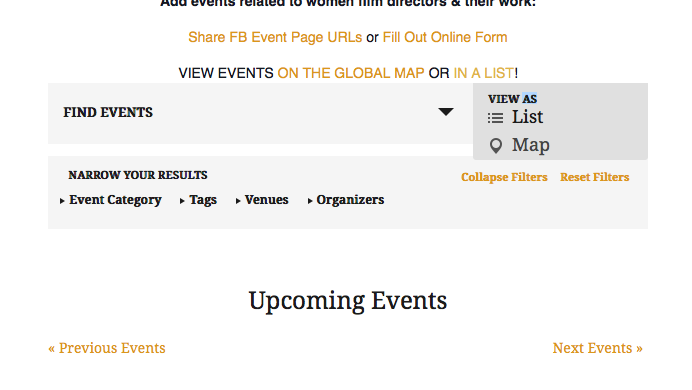
Do you find the same thing, now? Or are there still issues? If so, can you clarify what issues persist?
So sorry for the trouble here! I appreciate your patience with this.
Sincerely,
GeorgeMarch 23, 2016 at 7:01 am #1092854ParticipantThe dropdown menu reveals itself.. but the options do not operate.
When you accessed this, were you able to actually change to the map version and back to lists? That’s what is no longer functioning but was working fine before the last upgrade.
Please give that a look and let me know what you discover. I’ve tried this using different browsers and get the same result.
As I said earlier when I deactivate the filter bar the problem resolves, so it seems to be related to the filter bar in some way.
Thanks for pursuing this with me.
March 23, 2016 at 10:03 am #1092970ParticipantI’m so sorry I missed that problem!
I’ve tested this extensively on my own site, with Filter Activated, and cannot reproduce the JavaScript error that DOES arise on your site (I can confirm that I found the same error on your site that you describe).
I’m interested if you can do a test here that will help reveal if there are any theme or plugin conflicts at play? This test is described in full here → https://theeventscalendar.com/knowledgebase/testing-for-conflicts/
After EACH STEP in that process, check on this issue firsthand again and see if anything changes.
What do you find when you try this?
Thank you for your patience with this issue; it’s an odd one that I cannot recreate, and we don’t have any bugs reported for this yet, so I hope these tests for conflicts reveal a culprit. Let us know what you find!
Sincerely,
GeorgeMarch 24, 2016 at 2:10 pm #1093672ParticipantI had gone through that process before, but I have gone through this again.
Switched to Twenty Fifteen and deactivated all non Event Calendar plugins and cleared cache. Did not make a change.
So then I backed out all of the Event Calendar addons other than Pro… and that fixed the problem. So I started adding back in the Event Calendar add on plugins to see what triggers the problem.
Adding in Community Events did not cause the problem to resurface.
Adding in Facebook Events did not cause the problem to resurface.
Adding in iCal Importer did not cause the problem to resurface.
THEN I added in the Filter plugin and the problem DID return.
So I again deactived the Community Events, Facebook Events, and iCal Importer plugin so that the only plugins active on the site were Events Calendar, Events Calendar Pro and the Filter plugin… and I cleared the cache again.
The problem persists.
I’ve been thorough.
I’m going to restore my theme and plugins for now. They are not the problem. Something is off with the filter plugin.
I have also looked at the site using Chrome and Internet Explorer and get the same results.
March 24, 2016 at 4:00 pm #1093726ParticipantI appreciate all of this testing, Barbara Ann, and am genuinely sorry about the nature of this bug. It’s truly stumping me, because I cannot recreate this behavior no matter what I try. 🙁
I will escalate this as a “bug” so that we can investigate this and see if there’s a bug within our plugin code directly—although this currently does not seem to be the case because we cannot recreate these issues.
Regardless, we will investigate, and if there’s a bug then in the coming releases we will patch this up. This could take weeks or months, unfortunately, but I will encourage investigation into this and we will fix it if we find a bug.
In the meantime, the only solution I can think of is a temporary one like a bit of JavaScript, for example, that forces a click on a “View As” menu item to open the link in a new window altogether. Basically making them like “normal links” instead of the AJAX ones. I know this is not ideal! But just trying to think of some way to help here.
To add the temporary solution to your site, copy and paste the contents of this Gist into your theme’s functions.php file → https://git.io/vapiI
This may not be perfect, but it’s the best solution I’ve been able to come up with in thinking about this issue.
I’m sorry about delivering all this bad news and hope my temporary solution is some degree of improvement.
Sincerely,
GeorgeMarch 29, 2016 at 8:22 am #1095398ParticipantI finally had a chance to try your workaround but that didn’t work. It just launched the exact same page in a different browser window… without giving me access to the drop down menu options at all.
March 29, 2016 at 8:34 am #1095406ParticipantI’m not the only one experiencing this challenge…
Views other than default not working. Appear in drop down, but unresponsive.
March 29, 2016 at 11:11 am #1095551ParticipantI’m sorry to hear that my workaround attempt didn’t help!
We are indeed actively investigating this as a bug. I have done what I mentioned above and escalated this to a bug. We are working to see if there’s a bug within our plugin code directly—although this currently does not seem to be the case because we cannot recreate these issues.
Regardless, we will investigate, and if there’s a bug then in the coming releases we will patch this up. This could take weeks or months, unfortunately, but I will encourage investigation into this and we will fix it if we find a bug.
The main issue delaying our progress is that we cannot recreate this ourselves. You and the customer in the other thread indeed report the same issues, but we ourselves are still unable to recreate them. 🙁 Geoff B. originally was able to produce similar problems, but we have to dig deeper here.
We’re working on it though! Once we can recreate things, we’ll be able to back-engineer a fix.
This leaves us, unfortunately, with no specific ETA for a fix. But this is a bug and our developers are indeed working on a fix for this.
Sincerely,
GeorgeMarch 29, 2016 at 12:06 pm #1095565ParticipantI know how hard it is to solve a problem when it doesn’t show up for you. Good luck getting it resolved.
March 29, 2016 at 2:07 pm #1095623ParticipantThank you! I know how frustrating issues like this can be, and am sorry we don’t have a specific ETA for a fix, but we’re working on it.
To keep things organized, I will close this thread just because there is not a definitive conclusion we can arrive at, at this time. However, if this is ever fixed, it will be announced in two locations:
• http://theeventscalendar.com/blog
• the plugin changelogSo, keep your eyes on those locations whenever a new release is available. A fix for this will be noted there once it finally arrives!
Until then, best of luck with your project—and if other issues arise, open a new thread here any time.
Sincerely,
George -
AuthorPosts
- The topic ‘View As dropdown no longer working’ is closed to new replies.