
Home › Forums › Calendar Products › Community Events › Events Calendar Pro Previous-Next-Click on Month features not working
- This topic has 6 replies, 2 voices, and was last updated 10 years, 7 months ago by
George.
-
AuthorPosts
-
March 21, 2016 at 11:34 am #1091935
livcoit
ParticipantUpgraded to the latest version of event calendar and event calendar pro last week.
The event calendar PREVIOUS and NEXT functions do not work unless you are logged in as administrator. You cannot click on a month at the top “Events In” either. You can only view the current month.
If I click on any of these previous-next (e.g. In the March MONTH view, click on February or April links), I just get the ajax spinning wheel, and the page freezes.
IF I am logged into the site as admin, these features work.
FYI.. the same page “freeze” occurs if I click the “Find Events” button at the top.
The test for conflict did not find any issues.
March 21, 2016 at 11:59 am #1091953ParticipantHey there,
I’m really sorry to hear about this.
Can you share a link to your events page, along with your System Information? Here’s how to share the system information → https://theeventscalendar.com/knowledgebase/sharing-sys-info/
I’ll take a closer look and will see if I can identify a culprit.
Thank you!
GeorgeMarch 28, 2016 at 6:23 am #1094713ParticipantThis reply is private.
March 28, 2016 at 5:03 pm #1095059ParticipantThanks for this information!
I’m curious, do you have a “page” in your site’s wp-admin that is called “Events”? If so, DELETE this page—if it’s titled “Events” then it is probably trying to use the slug /events on your site. But The Events Calendar is trying to use /events too, so only one thing can exist that URL slug, so the conflict could be causing some of the issues you face here.
Also, the events page cannot exist at a sub-folder in URL. example.com/wordpress/events will not work and is not supported; the events slug has to be right at the root, e.g. example.com/events.
Thank you!
GeorgeMarch 29, 2016 at 9:03 am #1095416ParticipantSo I deleted the Events page, and the calendar works, but now we no longer have Events on our website’s menu bar. How do we get it to appear?
-
This reply was modified 10 years, 7 months ago by
March 29, 2016 at 9:52 am #1095489ParticipantAll I had to do was rename my Events page to something else and it worked, no need for anything else!!! Not thrilled with the support on this issue.
March 29, 2016 at 10:05 am #1095503ParticipantAnother way to add the link to /events to your menu, is to just use the “Custom Links” section in your menu-builder:
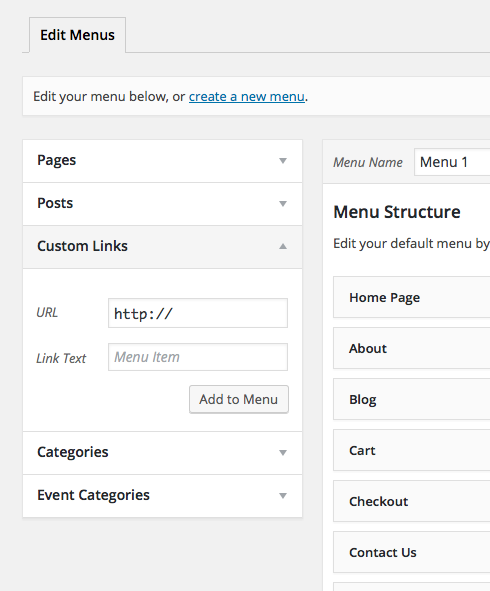
Make the label “Events” or “Calendar” or whichever label is most appropriate for your needs, then make the URL example.com/events, where example.com is replaced with your real domain name of course.
Thrills aside, glad to see the issues resolved nonetheless. 😉
Best of luck with your project,
George -
This reply was modified 10 years, 7 months ago by
-
AuthorPosts
- The topic ‘Events Calendar Pro Previous-Next-Click on Month features not working’ is closed to new replies.