

Forum Replies Created
-
AuthorPosts
-
March 29, 2016 at 10:01 am in reply to: The month-calendar in mobile view shows full weekday-names #1095492
George
ParticipantThank you for this information!
I’m glad to see that all of the calendar plugins are up-to-date. Thank you for updating all of those.
It sounds like this is the only issue remaining on your site:
Except, that the display of the Weekdays on small screens is again set to the full name.
Is this indeed the only calendar issue remaining on your site? If so, I can confirm that there is a bug here that we are still working on and are hoping to have fixed in the next maintenance release—which should be released very, very soon.
Thank you for your patience and persistence here!
GeorgeMarch 29, 2016 at 9:43 am in reply to: ECP causes URL issues / Invalid post type error when using tag filter view #1095485ParticipantThanks for confirming this and for sharing all of this information, @Steve!
I unfortunately have the same results I mentioned earlier; not quite the same bug experience you have, but still that PHP notice I reported….
So we’re unfortunately stuck with no immediate outcome here. I will make a bug ticket out of these reports and hopefully in an upcoming release we patch this up. In fixing that bug one of our developers might be able to reproduce the same behavior you have.
I’m sorry about this not-immediate resolution, but stay tuned to plugin updates going forward. If a bugfix for this is ever included, it’ll be mentioned in the plugin changelog or on http://theeventscalendar.com/blog
Let me know if there’s anything else I can try to help with in the meantime!
Sincerely,
GeorgeParticipantHey @awc,
This indeed does fall out of the scope of our support to a degree, but I can still help point out if there are hooks like you’re looking for.
There unfortunately aren’t such hooks in the This Week widget, so you’re basically stuck with the “normal”/default WordPress hooks like the_content(). You can learn more about this hook and how to use it to add content to other content and such here → https://codex.wordpress.org/Plugin_API/Filter_Reference/the_content
I won’t be able to help with code-specific questions, but if there’s anything else I can try to help with let me know!
Thank you,
GeorgeParticipantHey Matt,
Just another update here—there is unfortunately a litany of scripts and styles on your pages and so getting things looking “just right”, or even just working normally, will unfortunately take some work on the theme side of things on some deeper problem-solving with other plugin’s styles…
However, I wanted to share something that I produced after some tinkering. Try adding this to the bottom of your theme’s style.css file and let me know if it makes any impact with the display of “Sundays” in those mini-calendar datepickers:
body.tribe_community_edit #ui-datepicker-div.ui-datepicker {

    min-width: 64em !important;

}
Thanks,
GeorgeParticipantHey Matt,
The broken mini-calendar styles in the date selectors are, indeed, a CSS issue from your theme. I see some CSS actually arising and conflicting from a “Mad Mimi Signup” plugin, too—if you disable this plugin temporarily, do you notice any improvement with the datepickers?
There is unfortunately little we can do to help resolve CSS issues from themes or other plugins. 🙁 I’ve confirmed on my own testing site in different themes that our own styles work fine, so those other pieces of software are breaking things. I will keep working here and see what I can come up with! But I just want to set your expectations early here that no resolution might come out of this. You will likely need to reach out to your theme developer and/or the plugin developer of the Mad Mimi plugin (if deactivating it makes any difference, of course) for assistance with their CSS.
Let me know what you find by deactivating that plugin!
Thank you,
GeorgeParticipantGlad to hear it—thank you for the update!
Cheers,
GeorgeMarch 29, 2016 at 8:35 am in reply to: "Next Events" Widget does not show next events after upgrade to Pro #1095407ParticipantThank you for this information! I checked out your home page and saw the “no upcoming events” issue; I also went to you main events page and found an empty “events” area there, too → http://kofccouncil10355.org/?post_type=tribe_events
To try and rule out the possibility of conflicts, can you run through the steps we prescribe in this article? → https://theeventscalendar.com/knowledgebase/testing-for-conflicts/
After EACH STEP in that process, check on both the home page and the main events page.
Does the main events page show up anywhere along the way? If so, let me know the last thing you did before things started showing up.
Thank you!
GeorgeMarch 28, 2016 at 10:37 pm in reply to: Failed to parse time string (last day of this month) at position 9 (o): #1095235ParticipantSorry to hear about this, @Michael!
This seems like an issue related to the version of PHP on your site—I will test this out to see if I get the same results on my own testing site, which is using a higher version of PHP.
In the meantime, can you confirm if you have tried any other iCal feeds or files on your site? If so, do any other similar problems arise?
Thank you,
GeorgeParticipantHey @Sibyl,
Sorry to hear about this!
1. For the failed import issue, can you share a link to the ical file you’re using? If it’s a literal file, not a URL endpoint somewhere, then you can upload the file to cloudup.com or something like http://ge.tt and share a link to do that here in your reply…I’ll test it out and see what I find.
2. Also, can you clarify if you are doing manual imports, or is this a “scheduled” import?
As for no events on the events page:
3. Does anything improve if you deactivate all plugins on your site EXCEPT for just The Events Calendar, iCal Importer, and Events Calendar Pro?4. Head to Settings → Permalinks in your site’s wp-admin. What are the permalinks set to on your site? Are they /%postname%/, for example?
Thank you!
GeorgeParticipantThanks for reporting this, @Jay—sorry for the trouble here!
Two things stand out to me about your issues. First is what you said here:
I checked the iCal file and the time zone and time code seem to be correct, so I think it’s an issue with how Microsoft Outlook is interpreting the time zones and possibly daylight savings time.
If our generated time zones are correct, and Outlook is getting the timing wrong a bit, then unfortunately it may indeed be an Outlook issue that we (and you) are at the mercy of. 🙁
However, this is interesting:
Changing the time zone that is set in the event post from America/New York to America/Los Angeles moves the incorrect event time forward 3 hours as expected. I did notice that if the time zone for the event is set to UTC+0, the time is correct when imported into Outlook.
What happens with events when you use their UTC numerical equivalents? So, in other words, for example
• Do a test import where the events are using the timezone America/New York.
• Then do a test import where the events are using the timezone UTC-5.Is there any difference in behavior in this specific testing?
Thank you!
GeorgeMarch 28, 2016 at 10:26 pm in reply to: Calendar displays initial page, but can't navigate beyond #1095229ParticipantHi @ann,
I’m very sorry to hear about these issues.
I have two main questions here:
1. You said this: ” Yes, I changed to 2015 theme. Yes I deactivated plugins and dumped cache. And yes, I contacted the host to see if the db was overwhelmed.” What were the results of each test, and what did your host have to say about the database?
2. Your events page lives at /events. Do you happen to have a “Page” in your wp-admin that is called “Events”? If so, please delete this page. If page is titled “events”, then it will try to use the URL slug /events—but The Events Calendar’s calendar is trying to use that, too, so if two things are trying to use the same /events slug, issues can arise.
Deleting that page will not affect anything with the site; except it might help here! If you are using a “page” to add the “Calendar” menu item on your site, then no worries. Still delete the page. You can then just go to Appearance → Menus in your site’s wp-admin, and in that page menu item’s stead, just add a “Custom Link” that links to socodancebeat.com/events and is labelled “Events”. Here’s a screenshot of this “custom link” menu option:
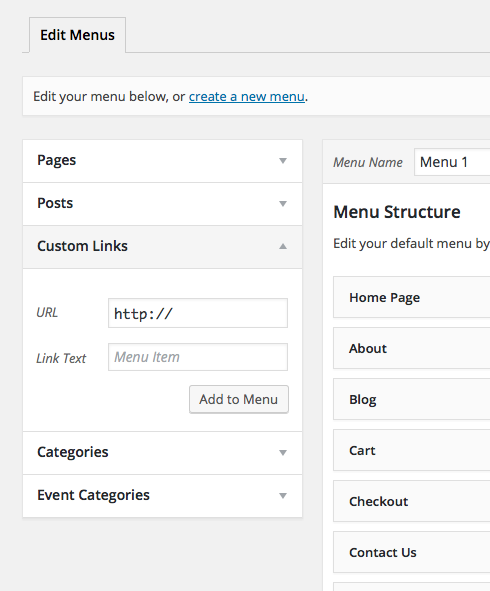
Cheers!
GeorgeMarch 28, 2016 at 10:21 pm in reply to: iCal Importer recurring is creating multiple events and does not overwrite #1095227ParticipantHey @Donald,
I’m sorry to hear about all of the trouble with our plugin, and can confirm much of the behavior you describe. I will investigate it a bit more closely to see how we’re doing in terms of fixing/improving those things.
To help with that, can you first share your system information with us? Here’s how to do that → https://theeventscalendar.com/knowledgebase/sharing-sys-info/
Near then end of your reply you mention this:
If you can help me understand how to make the importer work so that when the import is initiated it wipes any pre-existing data and imports the latest as well as the recurring events that would be great.
There’s unfortunately not a really solid way to go about erasing all events from the site before upon an iCal Import, and doing that would be very inefficient. It’s similar to what you describe here:
I was hoping the frequency of the import with the ability to overwrite the recurring events would just wipe out the calendar and resynchronize the calendar data upon a new import.
There does sound to be like a bug with recurring events, however, which I will investigate.
Let me know if you can post that system information, and I will look through it to see if anything problematic stands out that could be a factor in your sub-par experiences with our plugin.
Sincerely,
GeorgeMarch 28, 2016 at 10:17 pm in reply to: How to display Events Feed by date of event, not published date? #1095226ParticipantI’m sorry to hear about these issues!
Before diving too deeply into them, the first thing I noticed is that your system information shows your site as running version 4.0.3 of Events Calendar Pro. This is outdated and the current version is 4.1.
If you update your site’s version of Events Calendar Pro to 4.1, is any progress made with any of the issues you describe here?
Thank you!
GeorgeParticipantHey @visualizedigital,
Sorry to hear this!
Recurring events show up fine for me in the Events List widget, so to help me investigate why things might not be working on your site, can you post your “system information” here? Here’s how to do that → https://theeventscalendar.com/knowledgebase/sharing-sys-info/
Thank you!
GeorgeMarch 28, 2016 at 10:12 pm in reply to: "Next Events" Widget does not show next events after upgrade to Pro #1095221ParticipantSorry to hear this, @riley!
Can you share your system information with us? Here’s how → https://theeventscalendar.com/knowledgebase/sharing-sys-info/
I’ll use this to investigate the issue a bit more closely, because I cannot recreate the same issues you describe.
Thank you!
George -
AuthorPosts