
Home › Forums › Calendar Products › Event Aggregator › 1 saved import did not complete error message
- This topic has 9 replies, 3 voices, and was last updated 10 years, 6 months ago by
Support Droid.
-
AuthorPosts
-
March 28, 2016 at 4:12 pm #1095014
Sibyl
ParticipantI just installed The Events Calendar Pro and the importer and am getting that error message. The calendar only imports items up to September and then seems to stall out.
I can’t revert to a different theme on the live site and I’m unwilling to buy a separate license to put it on a test site. Please advise on what to do next. I’m happy to grant access if you want to take a look.
March 28, 2016 at 4:16 pm #1095019ParticipantThis reply is private.
March 28, 2016 at 10:35 pm #1095234George
ParticipantHey @Sibyl,
Sorry to hear about this!
1. For the failed import issue, can you share a link to the ical file you’re using? If it’s a literal file, not a URL endpoint somewhere, then you can upload the file to cloudup.com or something like http://ge.tt and share a link to do that here in your reply…I’ll test it out and see what I find.
2. Also, can you clarify if you are doing manual imports, or is this a “scheduled” import?
As for no events on the events page:
3. Does anything improve if you deactivate all plugins on your site EXCEPT for just The Events Calendar, iCal Importer, and Events Calendar Pro?4. Head to Settings → Permalinks in your site’s wp-admin. What are the permalinks set to on your site? Are they /%postname%/, for example?
Thank you!
GeorgeMarch 29, 2016 at 8:28 am #1095403ParticipantThis reply is private.
March 29, 2016 at 10:37 am #1095525ParticipantOk—I seem to have resolved the page display by using a different template, so I’m good there.
I still have the problem with getting the import error message.
March 29, 2016 at 10:53 am #1095532ParticipantHere’s more info:
If I let the import spin long enough, I get this error message: “The server responded with a malformed response. Please see the JS console for more information.”
March 29, 2016 at 1:56 pm #1095617ParticipantThank you @sibyl!
In regards to the importer issues, sorry to get so granular with detail here, but can you clarify if you are importing this ICS file as a file literally, or are you importing a URL?
So, are you choosing an actual downloaded file on your computer, are you using the URL https://calendar.google.com/calendar/ical/v9pqn9ln537o1oghufbefeguu0%40group.calendar.google.com/public/basic.ics?
Thank you!
GeorgeMarch 29, 2016 at 4:48 pm #1095677ParticipantI’m importing a URL. I’m trying to keep it as simple as possible for my client to maintain themselves.
Thanks,
sMarch 30, 2016 at 9:23 am #1095935ParticipantThanks for your patience here, @Sibyl.
I’ve been doing some testing and have interesting results. When I try using the URL to import, I get this result:
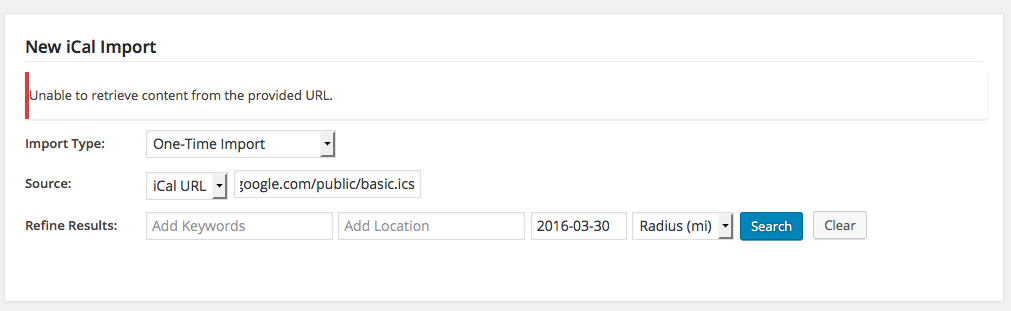
When I download it as a file, though, and then import this file, I get the results correctly:
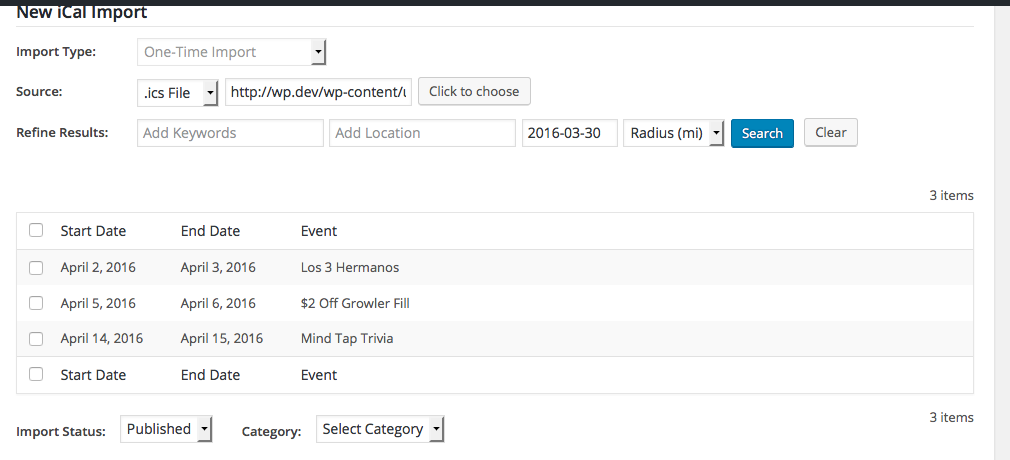
Can you try downloading the file and importing that, and see what your results are, too?
Thank you!
GeorgeApril 14, 2016 at 9:35 am #1102526KeymasterThis topic has not been active for quite some time and will now be closed.
If you still need assistance please simply open a new topic (linking to this one if necessary)
and one of the team will be only too happy to help. -
AuthorPosts
- The topic ‘1 saved import did not complete error message’ is closed to new replies.