
Home › Forums › Additional Help › Translations › month view page
- This topic has 5 replies, 2 voices, and was last updated 10 years, 7 months ago by
George.
-
AuthorPosts
-
March 24, 2016 at 2:05 pm #1093668
Alison Lapidus
GuestFor my website – https://www.pubclub.com we have both the free plugin and pro plugin installed to the website, but we cannot find a way to the monthly view page on the site. When we visit https://www.pubclub.com/events/ it doesn’t show the calendar view.
Any help is appreciated.
Thanks
March 25, 2016 at 7:59 am #1093998ParticipantI’m sorry to hear about this, Alison!
Can you share your system information with us? Here’s how → https://theeventscalendar.com/knowledgebase/sharing-sys-info/
I’ll use that information to take a closer look at things here.
Sincerely,
GeorgeMarch 28, 2016 at 12:17 pm #1094914Kevin
ParticipantHOME URL
https://www.pubclub.com
SITE URL
https://www.pubclub.com
INSTALL KEYS
events-calendar-pro = 6cadc26ae8aaebfc1d175b6c6b8414b1fe5c15b9
WORDPRESS VERSION
4.4.2
PHP VERSION
5.5.9-1ubuntu4.14
PLUGINS
Gravity Forms version 1.9.17.5 by rocketgenius(http://www.rocketgenius.com)
Akismet version 3.1.9 by Automattic(http://automattic.com/wordpress-plugins/)
AMP version 0.3.2 by Automattic(https://automattic.com)
CloudFlare version 1.3.20 by Ian Pye, Jerome Chen, James Greene, Simon Moore, David Fritsch, John Wineman (CloudFlare Team)
The Events Calendar PRO version 4.1 by Modern Tribe, Inc.(http://m.tri.be/20)
Google Analytics by Yoast version 5.4.6 by Team Yoast(https://yoast.com/)
imFORZA version 1.4.7 by imFORZA(//www.imforza.com#utm_source=wpadmin&utm_medium=plugin&utm_campaign=imforzanewsplugin)
Instagram Feed version 1.3.11 by Smash Balloon(http://smashballoon.com/)
InfiniteWP – Client version 1.5.1.1 by Revmakx(http://www.revmakx.com)
Jetpack by WordPress.com version 3.9.4 by Automattic(http://jetpack.me)
Pro Categories Widget version 1.3 by Shambhu Prasad Patnaik(http://socialcms.wordpress.com/)
Soliloquy version 2.4.4.3 by Thomas Griffin(http://thomasgriffinmedia.com)
Testimonials version 1.5.4 by WooThemes(http://woothemes.com/)
The Events Calendar version 4.1.0.1 by Modern Tribe, Inc.(http://m.tri.be/1x)
WordPress Importer version 0.6.1 by wordpressdotorg(http://wordpress.org/)
Yoast SEO version 3.1.2 by Team Yoast(https://yoast.com/)
WP101 version 3.2.3 by WP101Plugin.com(https://wp101plugin.com/)
Local SEO for Yoast SEO version 3.1 by Team Yoast and Arjan Snaterse(https://yoast.com)
WordPress SEO News version 3.1 by Team Yoast(http://yoast.com/)
Video SEO for WordPress SEO by Yoast version 3.1 by Team Yoast(https://yoast.com)
NETWORK PLUGINS
–
MU PLUGINS
Force Strong Passwords – WPE Edition version 1.6.4 by Jason Cosper(http://jasoncosper.com)
Stop long comments version 0.0.4 by WPEngine(wpengine.com)
WP Engine System version 2.2.7 by WP Engine
THEME
Magazine Pro Theme
MULTISITE
–
SETTINGS
schema-version = 4.1.0.1
recurring_events_are_hidden = exposed
previous_ecp_versions = Array
(
[0] => 0
)
latest_ecp_version = 4.1.0.1
disable_metabox_custom_fields = hide
pro-schema-version = 4.1
last-update-message = 4.1.0.1
earliest_date = 2016-03-26 12:00:00
earliest_date_markers = Array
(
[0] => 11629
)
latest_date = 2016-07-17 17:00:00
latest_date_markers = Array
(
[0] => 11681
)
WORDPRESS TIMEZONE
America/Los_Angeles
SERVER TIMEZONE
UTC
COMMON LIBRARY DIR
/nas/content/live/pubclub/wp-content/plugins/the-events-calendar/common/src/Tribe
COMMON LIBRARY VERSION-
This reply was modified 10 years, 7 months ago by
March 28, 2016 at 4:44 pm #1095050ParticipantThanks for this information!
It is, bizarrely, missing the “EventsSlug” option in the system information—which would explain the issues you have with accessing the events page to begin with!
If you head to Events → Settings → General in your site’s wp-admin, what are the “Events URL Slug” options set to? As shown in this screenshot:
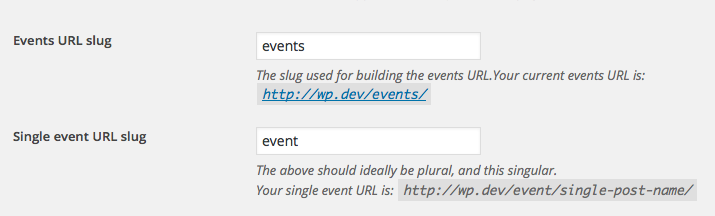
Now, if the value for the Events URL Slug in those options on your site is /events/ then your events page should indeed be at pubclub.com/events. If the value is /calendar, then pubclub.com/calendar, and so on.
Whatever the value is for that option, the behavior of this issue on your site is odd and is behavior that I cannot reproduce. It seems like a theme or plugin code conflict. To investigate this, I would recommend performing EACH of the steps here: https://theeventscalendar.com/knowledgebase/testing-for-conflicts/.
After EACH STEP in that process, check on pubclub.com/events; or pubclub.com/calendar; or whatever your events page is supposed to be. Does any thing improve anywhere along the way in this process?
In closing, I noticed a WP Engine plugin on your site. So, not to be too obvious, but it seems like you’re running your site on WP Engine? Can you confirm this?
If so, then unfortunately WP Engine does lots of non-standard things with WordPress on their platform. If the above troubleshooting steps yield no progress, then the next thing to investigate is perhaps some WP Engine-specific problems here….
But let us know what you find with those troubleshooting steps first! 🙂
Thank you,
GeorgeMarch 29, 2016 at 7:39 am #1095366ParticipantHi George,
Just wanted to let you know that another college of yours figured out the issue. It wasn’t a plugin conflict at all. Simply a page template error. Just so you know for future, under our “Default view” in wp-admin > Events > Settings > Display tab, the events template needed to be changed to “default events template” which it doesn’t do by default.
Thanks!
March 29, 2016 at 8:36 am #1095408ParticipantGlad to hear it—thank you for the update!
Cheers,
George -
This reply was modified 10 years, 7 months ago by
-
AuthorPosts
- The topic ‘month view page’ is closed to new replies.