

Forum Replies Created
-
AuthorPosts
-
George
ParticipantHey Olivier,
Sure thing! Can you provide an example of a current price on your site in US dollars, and then write how you want it to display instead?
I’ll help make that happen.
Cheers,
GeorgeParticipantHey @david,
We have some bug fixes in the next few maintenance releases that will make sure that our scripts and styles ONLY load on pages with events or events widgets.
It’s a more complicated thing to do than it might seem, enough so that there isn’t code I can share here that will resolve all of this, but we have this coming in a maintenance release very, very soon!
Stay tuned 🙂
GeorgeParticipantHi there,
In your CSS, right off the bat, you have no space between the rule and the !important declaration in your style rules. You write this, for example:
background-color: #08215C!important;That is not valid CSS.
Does literally adding a single space there make any difference?
background-color: #08215C !important;Cheers,
GeorgeParticipantHi @dutchess,
Our prices did indeed go up.
To apply for a nonprofit license for Events Calendar Pro (no other products have free licenses for nonprofits, just Events Calendar Pro), please read this article where you can learn more about the program and can find the application link → https://theeventscalendar.com/apply-for-npp/
If you are approved as a nonprofit partner, we can indeed refund that other cost.
Thanks,
GeorgeMarch 30, 2016 at 9:47 am in reply to: Woocommerce Integration Incorrectly Sets Price And Stock #1095983ParticipantHey Neil,
Thanks for reaching out. Can you actually post this in a separate thread? Your problems may be different in their origin and a specific thread will help us keep things organized and better address your specific issues.
When opening that new thread, can you include your “System Information” as well? Here’s how → https://theeventscalendar.com/knowledgebase/sharing-sys-info/
Thanks,
GeorgeParticipantHey @twkmedia, what I mean is that we have some iCal-specific fixes that COULD fix your specific problems.
I’m sorry that this isn’t a locked-in promise of a solution, however even today when I re-tested creating all of the same events dates you have issues with, I cannot reproduce the problem myself.
One thing I’m curious about is that all of your issues seem to be with all-day events. Is this correct?
Next, I’m wondering if you find any progress by heading to Events → Settings in your wp-admin and pushing the “End of Day cutoff” option ahead a few hours? Here’s the specific option I am referring to:
<a href="http://
 ” target=”_blank” />
Try pushing it ahead 2 hours, see if anything improves; if not, then 4 hours and see if anything improves; does any sort of progress arise from this testing?
Your patience means a lot and I am genuinely sorry about all of the trouble here. I’ve been working to try and isolate the culprit, but it’s been a tricky problem to nail down.
Sincerely,
GeorgeParticipantThanks for your patience here, @Sibyl.
I’ve been doing some testing and have interesting results. When I try using the URL to import, I get this result:
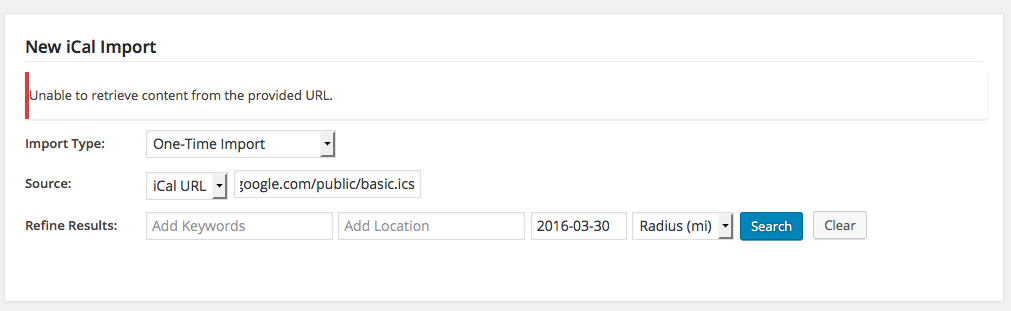
When I download it as a file, though, and then import this file, I get the results correctly:
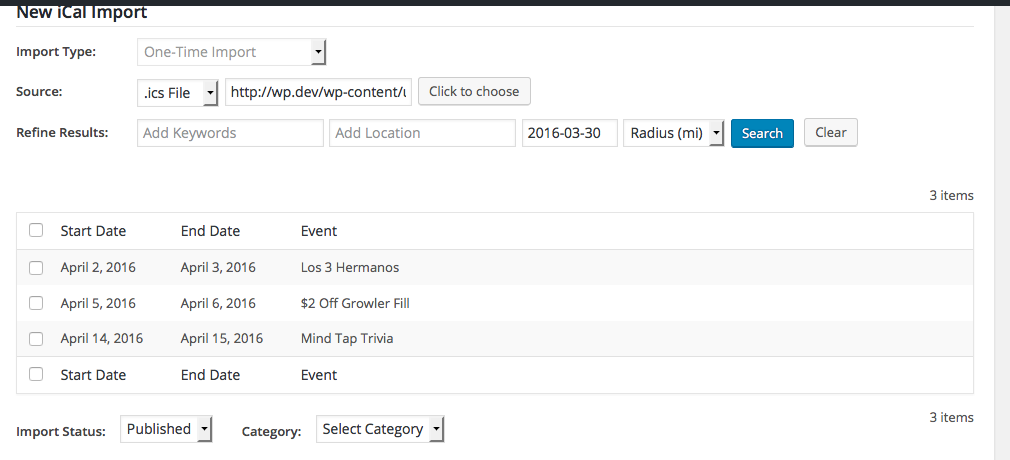
Can you try downloading the file and importing that, and see what your results are, too?
Thank you!
GeorgeMarch 30, 2016 at 9:07 am in reply to: EDD Bot marking payments as paid twice adding attendees two times to an event #1095928ParticipantHi @anne-marie,
If you do not want the public attendees list on your events page, then when creating tickets, simply click the “Hide attendees list on your events page” option which I have shown in this screenshot for you for your reference:
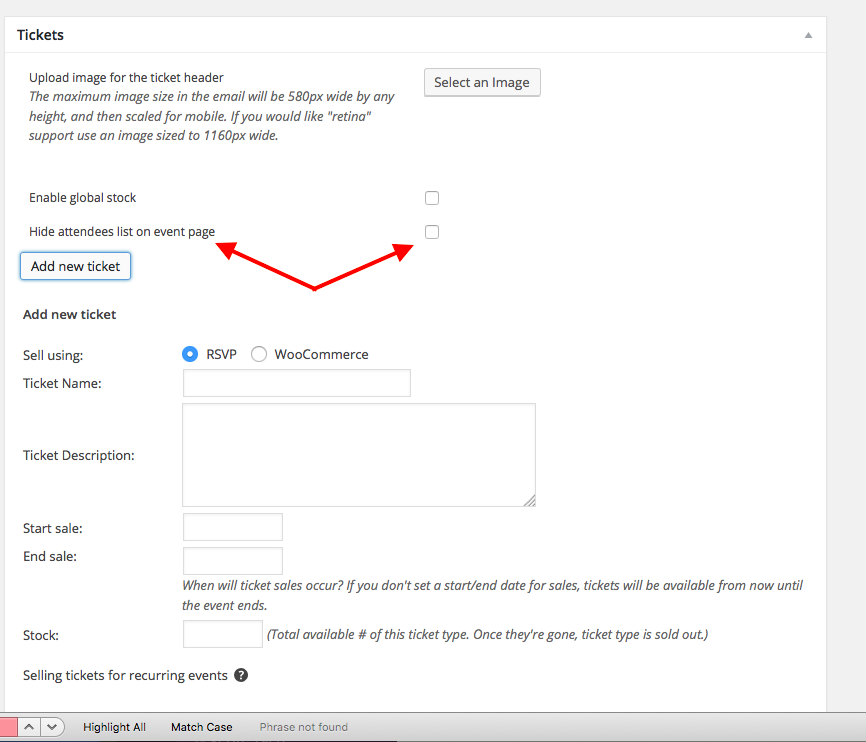
With this in mind, please updated to 4.1 again for Event Tickets Plus. Things will not work if you have mis-matched versions of the plugins, which you currently have.
Thank you,
georgeParticipantThanks for this @Bart!
Your information show that your version of The Events Calendar and its add-ons are all up-to-date.
It also shows that your events slug option is set to /events.
So, if this is getting overwritten to be “tribe-events,” something else is breaking this on your site.
1. Do you have a “Page” in your wp-admin that is called “Events”? If so, delete this page; it will be trying to use the same /events slug that The Events Calendar is trying to use. Two things cannot use the same slug, so this could cause issues.
2. Ensure your site’s permalinks are using “pretty permalinks.” Read this article to learn more about this and to ensure you’re doing this → https://staging.theeventscalendar.com/knowledgebase/permalinks-best-practices/
3. If the above two steps lead nowhere, then deactivate ALL PLUGINS except for JUST The Events Calendar. Then, activate a default theme like Twenty Sixteen. After this, head to Settings → Permalinks; click “Save Changes” without actually changing anything, which is a little “trick” to refresh the permalinks; and then see if the events URL slug is still set to /tribe-events, or if it’s finally working as expected….
Let me know what you find!
Thank you,
GeorgeParticipantHey Bobby,
I’m sorry to bear this news, but we do not have anything like you describe. 🙁 Our code is itself just a wrapper for WP_Query, so it actually IS “normal” loop code.
Your visual content builders are the non-normative, non-standard things. For assistance with using these builders to build events queries, I would recommend reaching out to support teams of these content-builder themes/plugins.
Best of luck with your customizing!
GeorgeParticipantSure thing, @sean—I’ve made that post above hidden from public viewing. Only you and us on the support team can see it. 🙂
As for the issues, I appreciate your testing and have a few more questions since I cannot recreate that behavior.
1. If you head to this site’s Settings → Permalinks page in its wp-admin, what is the option set to there? Is it /%postname%/, for example?
2. When did this issue start happening? Has it been fine for as long as you can remember, then you updated to the 4.1.x versions of things and suddenly the problem arose?
3. This article’s title mentions 404 errors, which is NOT the sort of problem happening here, but the steps in this article could still be helpful here; do the steps on this article and see if any progress is made → https://theeventscalendar.com/knowledgebase/fixing-http-404-errors/
Thank you for your patience and persistence with this!
Sincerely,
GeorgeMarch 30, 2016 at 8:47 am in reply to: The month-calendar in mobile view shows full weekday-names #1095914ParticipantThanks so much for your patience with that Jürgen! I’m sorry for the trouble here—but stay tuned to the next release for sure.
Thank you,
GeorgeParticipantHi Gabriel,
Thank you for elaborating. While there is unfortunately no way for me to solve the issue of the “Add to Cart” option being clickable, what I CAN do here is recommend a solution so that the default ticket quantity is never 0. This will set the quantity in that box to 1, so that there is at least 1 ticket at all times.
You can do this by adding this code to your theme’s functions.php file:
add_action( 'wp_footer', 'tribe_994934_custom_js', 100 );function tribe_994934_custom_js() {
?>
<script>
jQuery(document).ready(function($){
if ( $('.tribe-events-tickets').length ) {
$('.tribe-events-tickets .quantity input.qty').val( '1' );
}
});
</script>
<?php
}
Cheers!
GeorgeMarch 30, 2016 at 8:16 am in reply to: Created recurring event with date exception – yet exception still showing up #1095893ParticipantThank you so much for the screenshots.
When I create an event using the same rules, exclusions work well for me. So, to help figure out the specific problems on your site, can I trouble you with sharing one more piece of information here?
Share your system information with us—I’ll use this to investigate things more closely. Here’s how to share your system information: https://theeventscalendar.com/knowledgebase/sharing-sys-info/
Thank you,
GeorgeParticipantHow are you adding this to your site? I still do not see the code at the bottom of that specific file.
Can you please head to this URL → http://mylocalpocatello.com/wp-content/themes/themify-ultra/style.css?ver=1.3.7
Now, can you share a screenshot of what’s at the bottom of the file? You can do so by uploading the screenshot to Imgur.com, Flickr.com, CloudUp.com, or any similar image-hosting site; then just share the links to those images here and I’ll take a look.
Here’s what I see:
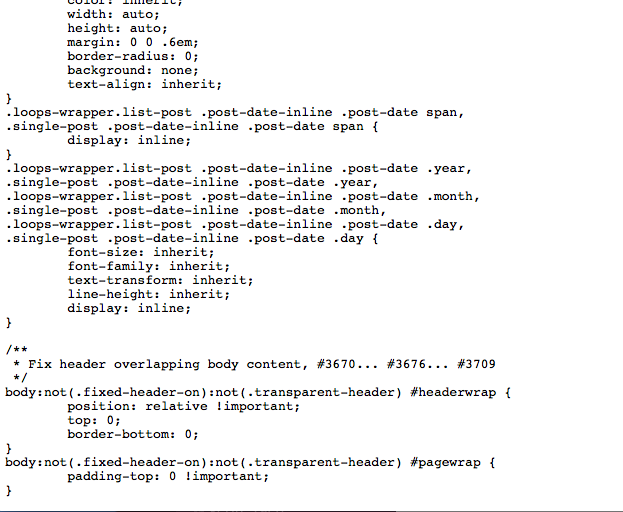
And that’s the end of the file.
Thanks for your patience,
George -
AuthorPosts