
Home › Forums › Ticket Products › Community Tickets › Double Heading for Community Event
- This topic has 8 replies, 3 voices, and was last updated 10 years, 6 months ago by
Support Droid.
-
AuthorPosts
-
March 28, 2016 at 3:15 pm #1094995
jennifer
ParticipantHello.
We added the Events Calendar Community plugin to our website http://www.mylocalpocatello.com. The calendar is “sponsored” by a local business, which I added the logo and text into GENERAL > Advanced Template Settings. It works on the calendar feature and shows well.However, now that we’ve added the community > add, the logo and text I put into the Advanced Template Settings is showing twice when you go to the add page. Below is the link. Any help so that it either doesn’t show on the add page or only shows once.
http://mylocalpocatello.com/calendar/community/add
Thank you.
RoryMarch 28, 2016 at 4:30 pm #1095029George
ParticipantHey Rory,
Sorry to hear about this!
This is an issue that I’ve seen arise occasionally with specific themes and page templates. The only tried-and-true way to fix this for the time being is to add CSS like the following to the bottom of your theme’s style.css file:
body.tribe_community_edit #tribe-events-pg-template > .tribe-events-before-html {

    display: none !important;

}
I hope that helps!
GeorgeMarch 29, 2016 at 8:12 am #1095393ParticipantHi, George. Thank you for the reply.
The CSS didn’t work. I’m using the Themify Ultra theme, which is usually very good. Any other suggestions or possible CSS to try?
Thank you!
Rory
March 29, 2016 at 1:23 pm #1095599ParticipantHey Rory,
I checked out your theme’s style.css file, but that code I recommended isn’t there. Did you remove it? If so, can you add it back so I can analyze what’s preventing it from working?
This is the specific file I mean, to be clear:
/wp-content/themes/themify-ultra/style.cssThank you for your patience and cooperation here!
GeorgeMarch 29, 2016 at 2:09 pm #1095624ParticipantHey.
I added it back in so you can take a look. Its still showing double so hopefully you can help! I really appreciate it. Kinda new to all this stuff, but learning.
Thank you.
Rory
March 29, 2016 at 2:12 pm #1095627ParticipantThanks Rory!
I still do not see the code there! 🙁 See the file here → http://mylocalpocatello.com/wp-content/themes/themify-ultra/style.css?ver=1.3.7
The bottom of the file does not include the CSS I recommended.
Sorry for the trouble here. 🙁
— George
March 29, 2016 at 2:18 pm #1095632ParticipantWeird… I see it at the very bottom. This is what you suggested, correct?
body.tribe_community_edit #tribe-events-pg-template > .tribe-events-before-html {
display: none !important;
}March 30, 2016 at 8:14 am #1095889ParticipantHow are you adding this to your site? I still do not see the code at the bottom of that specific file.
Can you please head to this URL → http://mylocalpocatello.com/wp-content/themes/themify-ultra/style.css?ver=1.3.7
Now, can you share a screenshot of what’s at the bottom of the file? You can do so by uploading the screenshot to Imgur.com, Flickr.com, CloudUp.com, or any similar image-hosting site; then just share the links to those images here and I’ll take a look.
Here’s what I see:
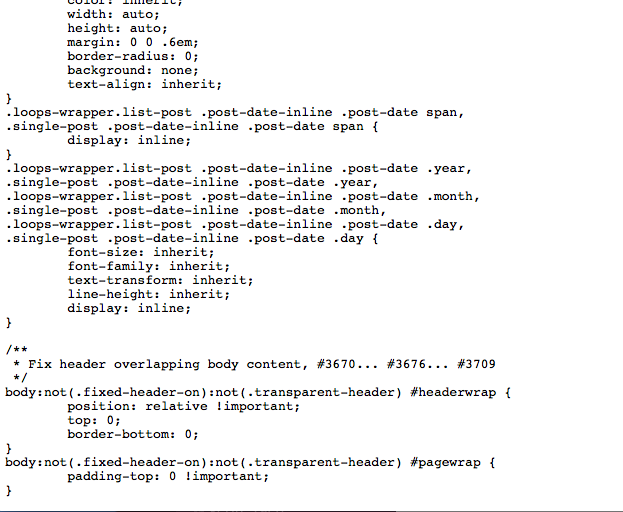
And that’s the end of the file.
Thanks for your patience,
GeorgeApril 14, 2016 at 9:35 am #1102520KeymasterThis topic has not been active for quite some time and will now be closed.
If you still need assistance please simply open a new topic (linking to this one if necessary)
and one of the team will be only too happy to help. -
AuthorPosts
- The topic ‘Double Heading for Community Event’ is closed to new replies.