

Forum Replies Created
-
AuthorPosts
-
Geoff B.
MemberGood afternoon Ale,
I am glad you liked that solution!
You are welcome back in our support forums any time 🙂
For now, I am going to close this thread.
Have a great weekend!
Geoff B.
October 27, 2017 at 10:52 am in reply to: Attendee Information Not Saving when adding to cart #1370289MemberGood afternoon,
OK, great!
You are welcome back in our support forums any time 🙂
For now, I am going to close this thread.
Have a great weekend!
Geoff B.
MemberThis reply is private.
MemberThis reply is private.
MemberGood evening Tom,
Thank you for writing back.
the tickets are created first. Then the event is created with the ticket(s) associated with that event.
That is indeed the process. In fact, this is how it works in the backend as well.
So, I can’t just hide the RSVP form and fill in the form fields as the ticket form would need to be submitted first, wait for the response and then add that ticket to the response that goes with the event submission. Does that sound correct?
That is correct.
I am sure you could find other creative ways to accomplish this, but I am a big fan of mimicking the human process whenever possible.Let me know how that goes.
Best regards,
Geoff B.MemberGood evening,
Thank you for the system info.
Circling back to your initial question.
1) The headline on my event pages. They automatically all have the same headline as my webshop. How come? ?
I believe this is coming from your theme somehow.
Could you please send me a copy of the latest version of your WordPress theme / child theme via a link to a .zip file link (stored Dropbox or Google Drive) so that I can run some tests on my end ? I recommend a private reply for that purpose.
Please ensure you are using the latest files as found on your actual website.
This way I will get access to any updates or customizations you might have made.In the meantime, try different settings for Events Template under Events -> Settings -> Display to see if that helps.
Let me know how my other suggestions went.
Best regards,
Geoff B.
MemberThis reply is private.
MemberGood afternoon James and welcome to the Events Calendar Support forum!
Thank you for reaching out to us.
We are sorry to hear about the struggles you have been experiencing with the CSV imports.
I would love to help you with this topic.As a first troubleshooting step, could you please provide us with your complete system information in a private reply using the instructions found in the following link?
https://theeventscalendar.com/knowledgebase/sharing-sys-info/
Secondly, would you mind sharing the csv file you are working from ? (via a link to a .zip file on Google Drive or Dropbox)
Hang in there!
Geoff B.
MemberGood evening and welcome back!
Thank you for reaching out to us.
I would love to help you with this topic.if a user is logged in wordpress when he goes to events page and he wants to rsvp, the system ask again to fill name and email. Why it doesn’t autofill with user logged in name and email info?
The good news is that we have a template override for that purpose: https://theeventscalendar.com/support/forums/topic/populate-rsvp-form-if-user-logged-in/#post-1170036
We are also planning to add this as a feature at a later point.
You will be contacted when it is.Let me know how that goes.
Best regards,
Geoff B.October 26, 2017 at 12:00 pm in reply to: Licensing issues with staging and development server #1369525MemberGood afternoon Vince and welcome back!
Thank you for reaching out to us.
I would love to help you with this topic.There is no cause for alarm. In a nutshell, the license keys are only necessary to be able to update from wp-admin. They do not block functionality.
Here are 2 awesome articles on that topic:
- https://theeventscalendar.com/knowledgebase/using-one-license-live-dev-sites/
- https://theeventscalendar.com/knowledgebase/moving-your-license-keys/
Let me know if that helps.
Have a great day!
Geoff B.
October 26, 2017 at 11:16 am in reply to: Cost field not showing up in Events Calendar when using Events Ticket #1369497MemberThis reply is private.
MemberThis reply is private.
October 26, 2017 at 11:10 am in reply to: Event Title in Admin Wrapping After Single Character. #1369490MemberGood afternoon Stacey and welcome to the Events Calendar Support forum!
Thank you for reaching out to us.
I would love to help you with this topic.Actually, this is not so much a bug as a consequence of the increased number of columns in wp-admin when the SEO plugin is added.
Simply put, at some point, the different columns are literally fighting for limited space.
The solution is to disable unwanted column using Screen options as you have already found out. It does not have to be specifically the SEO ones, but the goal is to focus on the columns you need exclusively.
Best regards,
Geoff B.
MemberGood afternoon,
Thank you for writing back.
See the following screenshot to know how to reply privately.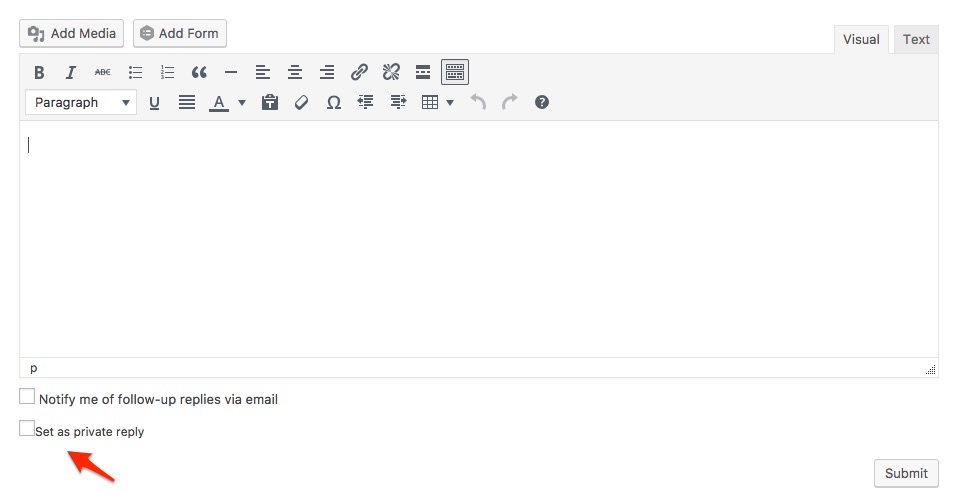
Best regards,
Geoff B.
MemberGood afternoon Andrew,
Thank you for the reply and the info.
As I suspected, this is a combination of things (all CSS):
- The width of the quantity div
- The background color
- The CSS rules for the quantity elements.
In the end there are many solutions, but here is one using a few CSS rules.
You might want to tweak it.Try adding the following CSS rule to your style.css file or in your Custom CSS metabox:
.tribe-tickets-form-row .screen-reader-text {display: none !important}.woocommerce .quantity .minus, .woocommerce .quantity .plus {
width: 28px !important;
color: #000 !important;
}Let me know how that goes.
Best regards,
Geoff B. -
AuthorPosts