

Forum Replies Created
-
AuthorPosts
-
September 30, 2016 at 10:54 am in reply to: Need to change verbiage of Find out more text and Event Category #1171154
Geoff B.
MemberGood afternoon Benjamin and welcome back!
Thank you for reaching out to us.
I would love to help you with this topic.There are 3 ways you can use to change the text in most of our plugins:
- The snippet you pointed to
- Changing strings in the .po file of the required plugin
- Doing a template customization. You might want to read our Themer’s guide to get a sense of how that works.
But the good news is that there is a 4th way that is very specific to the Filter Bar (see attached screenshot). You will need to go to Events -> Settings -> Filters
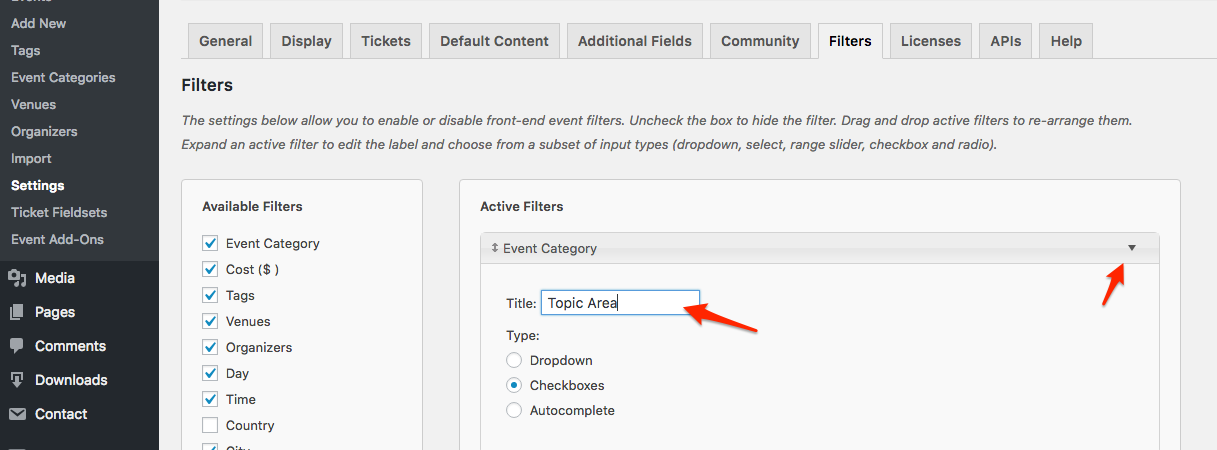
This should solve your first request (Event Category). For your second request, you will need to use one of the 3 other approaches.
I can help you with these should you need to.Let me know if that helps.
Have a great day!
Geoff B.
MemberGood afternoon Shaun and welcome back!
Thank you for reaching out to us.
We are sorry to hear about the error message you have been getting on your website.
I would love to help you with this topic.As a side note, there are other messages that are showing up for your site when you are looking under the Console in Google Chrome’s developer tools.
The one that concerns me the most is the one related to the forbidden call of a Javascript script because the call is performed over http and not https.
The reason for my concern is that Javascript issues tend to prevent proper functioning of any other Javascript on your site.But back to that warning for a second, if you are not displaying maps within your events (and that seems to be the case), you can simply ignore this warning.
But in case you do want to do that (display maps in events), could you please send me a screenshot (in a private reply) of your settings under Events -> Settings -> General and Events -> Settings -> APIs ?Best regards,
Geoff B.
MemberGood afternoon Mary-Anne,
Thank you for testing this a bit further.
I did a bit of extra research and it turns out there is a compatibility issue with the latest version of the Jupiter theme.
Since we first talked, I have found 2 other of our customers with a similar issue:
- https://theeventscalendar.com/support/forums/topic/attendee-information-options-buttonsfields-not-responding/
- https://theeventscalendar.com/support/forums/topic/ticket-fieldset-2/
It is hard to pinpoint exactly where the conflict happens, but by manually dequeueing some of the JavaScript related includes found in the Jupiter theme, the problem disappeared.
So at this point, it looks like this is a question for the theme author. As a side note, you might want to try to downgrade the Jupiter theme to its previous version. I have a hunch that this might help.
I wish I had a better answer for you, but for now it’s the best one I have.
Have a good week-end,
Geoff B.
MemberGood afternoon Oliver and welcome back!
Thank you for reaching out to us.
I would love to help you with this topic.Unfortunately, my colleague Leah is out of the office for some very well deserved vacations.
The good news however is that I am on point for all translation related duties.I have asked our senior staff on the best way to go about this, but we might have to wait for Leah’s return to get a complete answer.
Thank you for your patience while I enquire about this.
Have a good week-end,
Geoff B.
MemberGood afternoon Leonie,
Thank you for the file.
Here is an updated version to put back in the appropriate folder. Normally that should work. details
Let me know if that is not the case.Have a good week-end,
Geoff B.
MemberGood afternoon Peter,
I totally understand your desire to keep this info private.
Just to set expectations, as stated in my last reply, it does look like the issue is actually not related to the translation files themselves as much as your server’s behaviour. If that’s the case, then this means that we might be limited in the level of support we can provide unfortunately.
You can send me your info at [email protected]
Have a good week-end,
Geoff B.
September 30, 2016 at 9:44 am in reply to: Event Site option: is there a way to hide the link behind the name of the event? #1171127MemberGood afternoon Rika and welcome back!
Thank you for reaching out to us.
I would love to help you with this topic.The good news is that you can totally achieve what you are looking for (replacing the website full URL by something else).
To do that, you will need to do a template customization. You might want to read our Themer’s guide to get a sense of how that works.
More specifically, you should do a customization for the following file: /wp-content/plugins/the-events-calendar/src/views/modules/meta/details.php
Let me know if that helps.
Have a great day!
Geoff B.
MemberGood afternoon Eric,
Thank you for writing back.
I am glad that the workaround snippet did the job on your install!
Hang in there as we implement this in one of our upcoming releases.
As promised, you will be contacted as soon as a fix is out.Have a good week-end,
Geoff B.
September 30, 2016 at 9:29 am in reply to: How i save the custom code in the Events Tickets Plus after update this plugin? #1171045MemberGood afternoon Devon and welcome to the Events Calendar Support forum!
Thank you for reaching out to us.
I would love to help you with this topic.How i save the custom code in the Events Tickets Plus after update this plugin?
The correct way is to make sure that the custom code does not get overwritten by an update is in fact to do a template customization.
I am sure you are already familiar with our Themer’s guide.The good news is that this approach should work with all WordPress themes and installs.
The full path you should be using to place the modified file is: /wp-content/themes/[your-theme]/tribe-events/tickets/wootickets/tickets.php
Let me know if that helps.
Have a great day!
Geoff B.
MemberGood afternoon Matthew,
I’m super stoked that this worked out for you.
You are welcome back on our support forums any time 🙂
For now, I am going to close this thread.
Have a great weekend!
Geoff B.a
MemberHey Max,
It looks like Woocommerce’s $249 Bookings option is redundant with the Event Calendar theme correct?
The bookings plugin is about resource management (reservation of a person/thing/room/etc..) whereas the Events Calendar is about event management.
Since I do not know the full extent of what you are trying to accomplish, it is hard to say for sure if that would be redundant in your case.However, you will be glad to know that we actually have a 30 days refund policy if you find out that our plugins do not meet your needs.
All I need to do is go through Woo for the free eCommerce Plugin then I can just get a free payment gateway set up through them too?
The basic WooCommerce plugin already offers a few payment options (including Paypal Express). If you want additional gateways, you can:
- Get them from Woo
- Get them on the wordpress.org plugins page (there are several free or freemium ones)
- Get them through a WordPress plugin vendor such as CodeCanyon (Envato)
All of these should work. It is mainly a matter of shopping around until you find the combination that works for you.
Best regards,
Geoff B.
MemberHey July,
Thank you for clarifying that. I must confess that my German skills are pretty basic.
So I appreciate you taking the time to explain.The good news is that this does not change the solutions 🙂
To replace EINTRITT by SPENDENVORSCHLAG:
- You can edit the .po/.mo files using the free Poedit software: https://poedit.net/
- /wp-content/plugins/the-events-calendar/lang/the-events-calendar-de_DE.po and the-events-calendar-de_DE.mo
- /wp-content/plugins/events-calendar-pro/lang/tribe-events-calendar-pro-de_DE.po and tribe-events-calendar-pro-de_DE.mo
- Add the following snippet (after some tweaking) to your theme’s functions.php: https://theeventscalendar.com/knowledgebase/change-the-wording-of-any-bit-of-text-or-string/
I can assist you with any of these should you need it.
And another problem with the costsview:
is it possible to add a word in front of the Costs?? (see attachment)Yes, this can be done. What you need to do is to identify all the views where you want this to be displayed (single event, week, etc..)
Once that’s done, you will need to do a template customization. You might want to read our Themer’s guide to get a sense of how that works.
Basically, what that means is:
- Create a new folder (/tribe-events/) in your WordPress theme or child theme
- Copy the files from the views you want to modify in this folder and tweak these files to add that extra word in front of the costs
Let me know if that helps.
Have a great day!
Geoff B.
MemberGood morning July,
You are absolutely right! Sorry about that, I think I got lost in translation.
My bad.Here’s what the first CSS rule should have been
.tribe-events-venue a {color:#000 !important}Let me know how that goes.
Best regards,
Geoff B.September 30, 2016 at 7:32 am in reply to: Changing the "all" text in permalinks for recurring events #1170985MemberGood morning Stephane,
I have a couple of good news for you:
- I have opened a ticket so that this slug becomes translatable. Unfortunately, I cannot commit to a release date at this point. But stay tuned, you will be contacted when it is released.
- I have managed to get a snippet for you as a workaround: https://gist.github.com/barryhughes/eef63b959317d96ba4de28bebfd4d3e0
Just make sure you replace ‘everysingleone’ by the string of your choice AND re-save your permalinks after adding this.
Let me know how that goes.
Best regards,
Geoff B.MemberGood afternoon Justin and welcome to the Events Calendar forum!
Thank you for your interest in our products.
We’ll be glad to answer your questions.1) Can the plugins be configured to allow end users (customers) to log into their accounts and upload their own events and create tickets for retail in our woocommerce shop?
Yes, absolutely. To accomplish that you will need:
- Our free the Events Calendar plugin: https://theeventscalendar.com/product/wordpress-events-calendar/
- Our free Event Tickets plugin: https://theeventscalendar.com/product/wordpress-event-tickets/
- Our premium Event Tickets Plus add-on: https://theeventscalendar.com/product/wordpress-event-tickets-plus/
- Our premium Community Events add-on: https://theeventscalendar.com/product/wordpress-community-events/
- Our premium Community Tickets add-on: https://theeventscalendar.com/product/community-tickets/
You can save some money on those by purchasing the following bundle: https://theeventscalendar.com/bundles/bundle-community-manager/
2) If so, is documentation provided when purchased?
All the required documentation is already available on our website. Just look for the “New user primer” links in each of the pages listed above (except for the bundle one of course).
3) If not, can you provide us with support to fulfil this requirement?
Yes, absolutely. Purchasing these plugins also provides you with premium support for a year.
We will gladly assist you setting things up should you need it.4) Relating to the tickets database you mentioned that the database for any specific event can be forwarded as a .csv file for verification but as we’re considering developing a app to scan the bar codes does wordpress or your plugin allow remote access through their/your security?
That is a great question. You can already use pretty much any QR code scanner and it will work wonders to manage check-ins.
You only need to make sure that whoever is using that app is also logged-in WordPress with the proper user role.So the short answer is yes, as long as a person or a service is logged-in properly, they should be able to access what they want.
Let me know if that helps.
Have a great day!
Geoff B.
-
AuthorPosts