

Forum Replies Created
-
AuthorPosts
-
Geoff B.
MemberGood evening Greg,
Thank you for taking the time to write back.
Let me investigate this with Dev and get back to you.Have a great day!
Geoff B.
MemberThis reply is private.
MemberGood evening Joe,
Sorry about that last spam comment on your thread.
I went ahead and deleted it.
Best regards,
Geoff B.
November 23, 2016 at 12:05 am in reply to: Trying to put Upcoming Events into front page of education hub pro #1196337MemberGood evening Donna,
Thank you for writing back.
If you want to know about a black Friday sale, then you should totally read: https://theeventscalendar.com/sale-black-friday-2016/
Keep in mind that you are fully entitled to a refund if you want one as long as you are within 30 days of your purchase. To obtain the refund, you just need to follow the procedure described here.
In other words, you can try our plugins risk-free for 30 days.
You are welcome back in our support forums any time 🙂
For now, I am going to close this thread.
Have a great week!
Geoff B.
November 23, 2016 at 12:02 am in reply to: Event price is missing since installed Ticket plugin #1196333MemberGood evening Jairo,
Thank you for writing back. I sure hope this works out for you.
You are welcome back in our support forums any time 🙂
For now, I am going to close this thread.
Have a great week!
Geoff B.
MemberHey Chuck,
Thank you for taking the time to writing back.
I totally understand where you are coming from. Having this issue on multiple site must be terribly frustrating.
With that in mind, Event Tickets Plus does work great with most WordPress themes out there.
Not just with default ones.That being said, with the shear number of WordPress themes out there and customizations, the truth is that as much as we try our best, we might conflict with some of them from time to time unfortunately. Even the ones that are deemed compatible with our plugins.
What I can tell you however, is that as much as we can, we try to troubleshoot and fix those incompatibilities as we find them.
This is why I was recommending going through the testing for conflicts procedure.
By the sound of it, if we can work together at identifying the cause of this, I am pretty sure you can apply this to all of your sites.
Aside from the testing for conflicts procedure, there is something else that caught my eye (but it might not be related). I notice you are using the WordPress HTTPS plugin.
I am not sure exactly how your SSL installation is setup, but we have seen some odd behaviours on some installations with mixed content on certain pages. You could try the following plugin to investigate: https://wordpress.org/plugins/ssl-insecure-content-fixer/
Best regards,
Geoff B.
MemberGood evening Britani and welcome to the Events Calendar Support forum!
Thank you for reaching out to us.
We are sorry to hear about the blank screen you are getting.
I would love to help you with this topic.As a first troubleshooting step, could you please provide us with your complete system information in a private reply using the instructions found in the following link?
https://theeventscalendar.com/knowledgebase/sharing-sys-info/
By the sound of it, it looks like there is some type of conflict at play.
This is usually because of:- A conflict with another plugin
- A conflict with your WordPress theme
- A template customization for the Events Calendar that requires updating
A first quick test is to simply temporarily revert back to a default WordPress theme such as twenty-sixteen to see if the issue persists.
The next step would be to go through our testing for conflicts procedure (preferably in a staging/dev environment or local install of your WordPress website) and let us know what you find out.
Basically the goal here is to revert back to a bare WordPress installation to see if the problem persists. It also allows us to pinpoint what the cause of the issue is.
But, before you do that, there are 2 things I would advise:
- Make a backup of your database
- Consider activating a “Maintenance Page” plugin if you are doing this on your live site (to minimize impact on your visitors)
Let me know how that goes.
Best regards,
Geoff B.November 22, 2016 at 11:45 pm in reply to: Hide my event from the Events List widget but not the calendar. #1196323MemberGood evening Micheal and welcome to the Events Calendar Support forum!
Thank you for reaching out to us.
I would love to help you with this topic.The simplest way to handle this would be by using Event Categories.
You could have a category that is assigned to every event except the ones you do not want to see in the events list widget.
Once that is done, you can simply filter the events list widget by category: https://theeventscalendar.com/knowledgebase/configuring-the-this-week-widget/
Let me know if that helps.
Have a great day!
Geoff B.
MemberGood evening Erik and welcome to the Events Calendar Support forum!
Thank you for reaching out to us and running a few tests.
We are sorry to hear about the next and previous month links no longer working on your calendar. Yikes!
I would love to help you with this topic.
I went on your site and I see what you mean. I am also seeing the Error in event handler for runtime.onMessage: TypeError: Cannot read property ‘appendChild’ of undefined
jquery-migrate.min.js?ver=1.4.1:2 JQMIGRATE: Migrate is installed, version 1.4.1 error message in your console which might not be helping.By the sound of it, it looks like there is some type of conflict at play.
This is usually because of:- A conflict with another plugin
- A conflict with your WordPress theme
- A template customization for the Events Calendar that requires updating
A first quick test is to simply temporarily revert back to a default WordPress theme such as twenty-sixteen to see if the issue persists.
But, before you do that, there are 2 things I would advise:
- Make a backup of your database
- Consider activating a “Maintenance Page” plugin if you are doing this on your live site (to minimize impact on your visitors)
If that does not yield any results, could you please send me a copy of the latest version of your WordPress theme / child theme via a link to a .zip file link (stored Dropbox or Google Drive) so that I can run some tests on my end ? I recommend a private reply for that purpose.
Please ensure you are using the latest files as found on your actual website.
This way I will get access to any updates or customizations you might have made.Hang in there as we figure this one out.
Best regards,
Geoff B.
November 22, 2016 at 11:31 pm in reply to: Single, Recurring Event with irregular times, some on same day? #1196318MemberGood evening Richard and welcome to the Events Calendar Support forum!
Thank you for reaching out to us.
I would love to help you with this topic.If you have not already done so, I would highly recommend reading the following primer on recurring events: https://theeventscalendar.com/knowledgebase/pro-recurring-events/
When setting up irregular rules properly, you will have to separate what is truly recurring from what is a one time thing.
As for your specific example, I believe the rules should look something like the following screenshot. The starting Thursday is 2016-11-24 in this case:
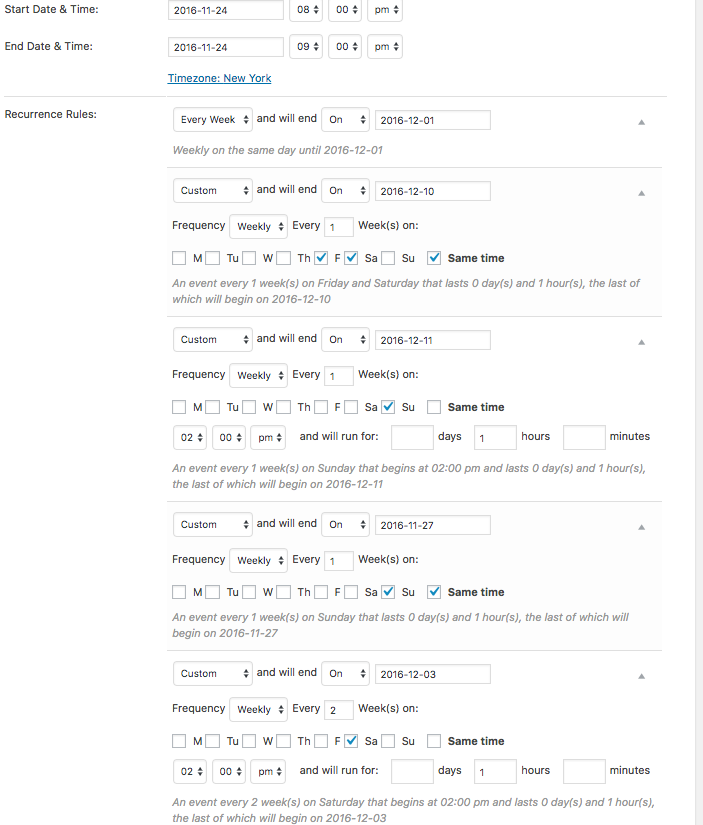
Let me know if that helps.
Have a great day!
Geoff B.
MemberGood evening Sabatha and welcome back!
Thank you for reaching out to us.
I would love to help you with this topic.Currently, this feature would still need more votes: https://tribe.uservoice.com/forums/195723-feature-ideas/suggestions/5602596-tickets-venue-seating-chart-with-different-price
If you have not already done so, please vote there and share your thoughts.
The closest thing we have to that is our Eventbrite Ticket integration.
As you might know, Eventbrite does provide a seating chart.As for the customization, we typically don’t take on that type of project ourselves. But, you can get a quote and hire one of our recommended customizers to do the customization for you.
I wish I had a better answer for you, but for now it’s the best one I have.
Best regards,
Geoff B.
MemberGood evening Gail and welcome back!
Thank you for reaching out to us.
We are sorry to hear about the license is out of installs message you have been getting.
I would love to help you with this topic.I believe simply disconnecting your licenses and reconnecting them should fix this.
You can read all about it here: https://theeventscalendar.com/knowledgebase/moving-your-license-keys/Let me know how that goes.
Best regards,
Geoff B.MemberGood evening Jennifer,
I totally hear you.
I know this is not fun to do, but it is by far the easiest way to troubleshoot.Keep me in the loop of your findings so that we can work on fixing it together.
Best regards,
Geoff B.
November 22, 2016 at 10:32 pm in reply to: Attendee info (name, email, etc) not saving when customer adds it to tickets #1196301MemberHey Paul,
Thank you for writing back and for your understanding as we work on fixing this.
We will absolutely let you know as soon as it’s out.
For now I am going to change this thread status to “pending fix”.Best regards,
Geoff B.
November 22, 2016 at 10:24 pm in reply to: Stylesheet overwriting styles for another plugin's admin panel #1196298MemberGood evening Rob,
Thank you for the files.
Actually, the first option under Events -> Settings -> Display (the radio button option) should let you decide which stylesheet is loaded at a global level. I was curious to see if that would have helped.
As for the plugin, even with all the Events Calendar plugins deactivated, I simply cannot activate it without getting a fatal error: Fatal error: Call to a member function get_page_permastruct() on a non-object in /var/www/vhosts/mysite.com/wp-includes/link-template.php on line 355
So I am afraid that the option to troubleshoot using the plugin is out for now.
What I will do however is ask for a snippet to achieve what you are looking for: prevent the EC styles and scripts being enqueued on admin pages which don’t need them. I believe tweaking the following will probably work: https://gist.github.com/cliffordp/d3e17609114d84eb6a36
What could help, if that is possible, would be to have access to a staging site where we can see your plugin in action in the admin section.
Hang in there as I follow-up for you on this.
Best regards,
Geoff B.
-
AuthorPosts