

Forum Replies Created
-
AuthorPosts
-
Geoff B.
MemberGood afternoon Devorah,
Without having access to your complete system information using the instructions found in the following link, it is hard to say.
https://theeventscalendar.com/knowledgebase/sharing-sys-info/
Ideally, I would recommend logging in theEventsCalendar.com with the email address used to purchase the Events Calendar Pro.
This way you can have access to private replies (to share that info). You will also need to open a premium support thread for that.
The other alternative is to send that info via email while referencing this thread: https://theeventscalendar.com/contact/
My best guess is that you are using non-matching versions of our plugins (between Pro and free).
Best regards,
Geoff B.
November 30, 2016 at 1:08 pm in reply to: Removing Featured Image from Events Element on page #1199974MemberHey Dawn,
First off, thanks to @Mathew for pitching in with an excellent solution!
I’m stoked that you managed to accomplish what you were looking for with his help.
You are welcome back in our support forums any time 🙂
For now, I am going to close this thread.
Have a great week!
Geoff B.
November 30, 2016 at 1:06 pm in reply to: Can't see woocommerce page associated to the event ticket in frontend. #1199971MemberGood afternoon Peter,
I am super stoked that this was helpful to you.
You are welcome back in our support forums any time 🙂
For now, I am going to close this thread.
Have a great week!
Geoff B.
MemberGood afternoon Liz,
I am super stoked that I could be of assistance.
You are welcome back in our support forums any time 🙂
For now, I am going to close this thread.
Have a great week!
Geoff B.
MemberGood afternoon Josh,
Thank you for writing back.
I went ahead and downgraded your license down to personal as per your request.
You are welcome back in our support forums any time 🙂
For now, I am going to close this thread.
Have a great week!
Geoff B.
MemberGood afternoon Andy and welcome back!
Thank you for reaching out to us.
I would love to help you with this topic.The short answer is yes. That can totally be done.
The best way to do this is with a view customizations.
You might want to read our Themer’s guide to get a sense of how that works.Basically, you:
- Make a copy of the view file for the list widget in your theme /tribe-events/ folder
- You tweak it and can loosely borrow code from other views
- This override will have priority over the normal list widget
Let me know how that goes.
Best regards,
Geoff B.MemberHey James,
Thank you for the screenshots and system info.
That allowed me to reproduce the issue.
You are right! This is a bug that is specific to the day view.Unfortunately, I cannot commit to a release date at this point. But stay tuned, you will be contacted when the fix is released.
In the meantime, it’s not much of a workaround, but if you switch from all-day events to an event with a start and end time, the bug vanishes.
Hang in there as we quash this bug for you!
Best regards,
Geoff B.
November 30, 2016 at 12:33 pm in reply to: Unable to toggle between Text and Visual mode in Dashboard #1199947MemberGood afternoon Steve,
Thank you for the system information.
I am noticing a couple of things in there:
- You are using WPML and I would recommend going through the following guide: https://theeventscalendar.com/knowledgebase/setting-up-the-events-calendar-with-wpml/ . For one thing, we highly recommend the use of the WPML translation management plugin
- You are not using the latest version of our plugins. After a backup of your database, I would recommend an upgrade to the latest version.
- Just as I suspected, I believe you are the victim of a mixed content issue. Could you try adjusting your URLs to https for both entries under Settings > General in wp-admin ?
Let me know how that goes.
Best regards,
Geoff B.MemberGood afternoon Jason and welcome to the Events Calendar Support forum!
Thank you for reaching out to us.
We are sorry to hear about the date picker and the venue missing.
I would love to help you with this topic.It looks like there might be an issue with your SSL setup.
Here are a couple of things to try:- Adjust your Site URL settings in
General → Settingsin wp-admin (specifically between http and https) - Try the following plugin: https://wordpress.org/plugins/ssl-insecure-content-fixer/
Let me know if that helps.
Have a great day!
Geoff B.
MemberGood afternoon James and welcome back!
Thank you for reaching out to us.
I would love to help you with this topic.
The easiest way to tackle this would be to use the “Excerpt” field in each event
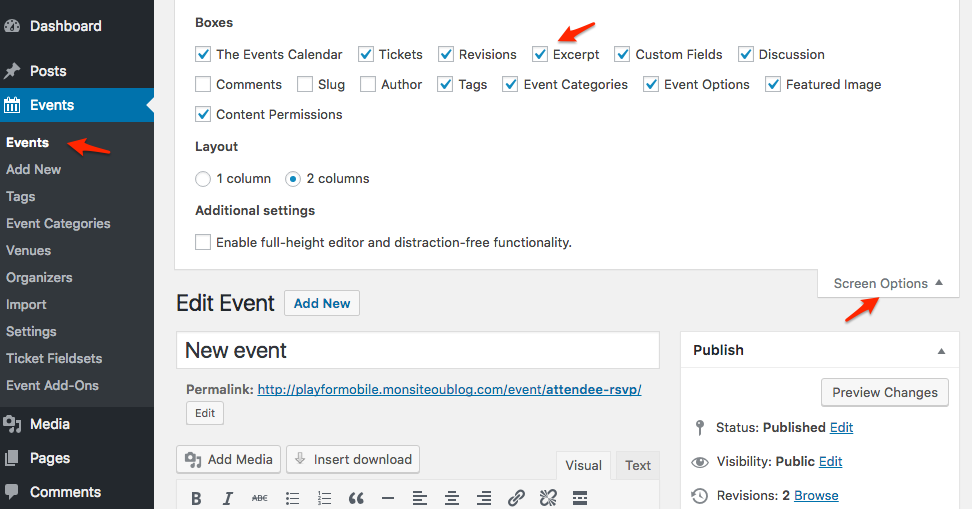
If you want something more automated, you will likely need to dig in to how Avada handles excerpts (automated ones in this case).
Here is an interesting read on that topic: http://smallenvelop.com/limit-post-excerpt-length-in-wordpress/
Let me know if that helps.
Have a great day!
Geoff B.
November 30, 2016 at 11:48 am in reply to: Try to set the status of new ticket orders to "complete" – not working #1199922MemberHey @Jonahgirl,
Thank you for chiming in.
I would recommend opening a separate thread for this.
That way:- We can look at your specific setup and provide you with personalized support without sending notifications to Hans
- We can add more threads to the bug ticket, thus increasing its priority
Cheers,
Geoff B.
November 30, 2016 at 10:15 am in reply to: Problem with Event Tickets Plus & WooCommerce Members Discounts Pt. II #1199876MemberGood afternoon James,
As promised, I ask our code ninjas to take a look at the issue with % based discounts versus the tribe-event-cost.
Full disclosure, they already have quite a full plate between the upcoming maintenance and feature releases, I do not think the odds of the fix being issued in time for your launch are really good unfortunately.
With that in mind, the good news is that I did receive confirmation that the snippet that tackles $ based discounts could be tweaked to handle % based discounts as well.
I wish I had a better answer for you, but for now it’s the best one I have.
Best regards,
Geoff B.
MemberGood afternoon Nicolas,
I was thinking about this thread and I was wondering if you can check if both URLs are set to https under Settings > General on your WordPress install while you are at it ?
Best regards,
Geoff B.
MemberHey Nigel,
I am glad you are making progress on this one!
2. The 404 message. Where do I find the 404 page to check the Permalinks?

4. System Info. I have copied the system info to the clipboard and pasted onto a Word document but it wont let me share a Word document on your ticket. It still won’t allow me to tick the box to share the system info for you guys!
You can simply paste the raw text in the reply OR share your Word document via a link to Dropbox or Google Drive.
Let me know how that goes.
Best regards,
Geoff B.November 30, 2016 at 9:25 am in reply to: How can I show the attendee information in the woocommerce checkout page? #1199843MemberGood afternoon Mike,
I have some good news. I believe I found just the thing for you.
Check it out here: https://theeventscalendar.com/support/forums/topic/woo-event-ticket-cart-separate-tickets-show-attendee-meta/
Let me know if that helps.
Have a great day!
Geoff B.
-
AuthorPosts