

Forum Replies Created
-
AuthorPosts
-
Geoff B.
MemberGood afternoon Sarah and welcome to the Events Calendar Support forum!
Thank you for reaching out to us.
I would love to help you with this topic.Actually, this is not a built-in functionality of the Events Calendar.
However, the good news is that you can use pretty much any third-party plugin that supports Custom Post types duplication, including: https://wordpress.org/plugins/duplicate-tec-event/
Let me know if that helps.
Have a great day!
Geoff B.
MemberBon après-midi Aurélien,
Merci de nous écrire à nouveau.
À titre informatif, les seules possibilités de shortcode sont toutes listées ici: https://theeventscalendar.com/knowledgebase/embedding-calendar-views-tribe_events-shortcode/
Comme vous pouvez le constater, il n’est pas possible (du moins pour le moment) d’ajouter des paramètres provenant du Filter Bar.
Par ailleurs, si j’ai bien compris, le souci que vous éprouvez est que le fait de filtrer par région (j’imagine à l’aide du custom field” ne vous donne pas les résultats escomptés au niveau du SEO.
Pourriez-vous confirmer que c’est bien le cas ?
Cordialement,
Geoff B.MemberGood afternoon Pamela,
Thank you for writing back.
I totally understand how this can be quite the journey when you are not used to it.Private replies can be achieved via a simple checkbox. Your interface is slightly different than mine, but here is the idea.
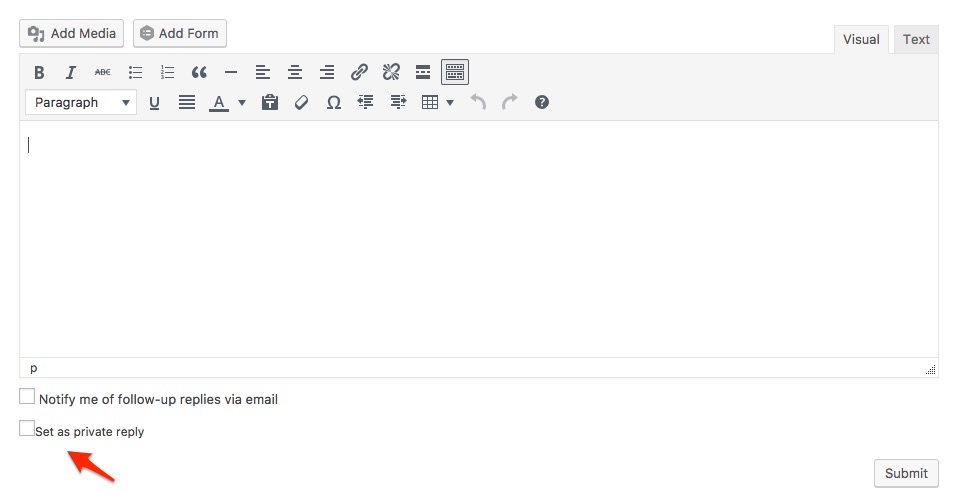
If that does not work out, you can just provide the info with a normal reply and I’ll make it private upon reception.
Hang in there!
Best regards,
Geoff B.
MemberThis reply is private.
MemberGood afternoon Ann,
I am super stoked that this worked for you!
As for your second question, as per your suggestion, could you please open up a new thread ?
This keeps things nice and tidy for everybody 🙂For now, I am going to close this thread.
Have a great week!
Geoff B.
January 18, 2017 at 12:08 pm in reply to: Latest Pro Update crashes front and back end of my site #1220394MemberGood afternoon Timothy,
I am super stoked that this solved your issue!
You are welcome back in our support forums any time 🙂
For now, I am going to close this thread.
Have a great week!
Geoff B.
January 18, 2017 at 12:06 pm in reply to: Image cropped wrong in Single Event View in PRO v 4.3.4 #1220388MemberGood afternoon Yves,
This is awesome! Well done!
Thank you for sharing your solution for everybody’s benefit.
It’s truly appreciated.You are welcome back in our support forums any time 🙂
For now, I am going to close this thread.
Have a great week!
Geoff B.
MemberGood evening Mark,
I am super stoked that this worked out for you!
You are welcome back in our support forums any time 🙂
For now, I am going to close this thread.
Have a great week!
Geoff B.
MemberGood evening Neil,
Thank you for your reply.
I have some good news. I have been able to reproduce the Google maps link not being activated on imported events.
We are actively working on a fix for this and it is ready for QA.
1: I’ve sent 2 images, 1 of the global settings and 1 of the Facebook settings, what other screen shot do you need?
I would need the 2 following screenshots:
- Events > Import > Scheduled imports
- Events > Import > Scheduled imports > Edit (on one of your imports)
But, if I get this correctly, you are actually running manual imports. So there might be nothing on those screens.
2: I haven’t noticed any to be more problematic than others. It’s very hard to tell what’s succeeded and what hasn’t, i can only go by the number of events listed incrementing up. Setting newly imported events to “Draft” or another group isn’t practical.
Thank you.
You are right, adding an extra step (and more work) is certainly not the way to go.
The sooner we can find out what is going on, the better.3: I can’t confirm they were before or after the latest update. Of those 3, they were created 8th of Jan, 8th of Jan and 9th of Jan. I don’t recall when i upgraded the plugins and whether or not they were created with a scheduled import or manual – i would suggest manual, because scheduled doesn’t seem to do much at the moment. (See my other logged issues pending a fix)
The last version was released on January 10.
The reason I am bringing this up is because we specifically released a patch to prevent duplicates of venues and organizers in that version.
Additionally, if you have not already done so, you could use the “Merge duplicate venues” functionality found under Events -> Settings -> General.
The button only appears when there are duplicate venues found.
Other than that, I can see that the fix for your other thread is fairly advanced in its Dev cycle.
Hang in there!
Geoff B.
January 17, 2017 at 11:56 pm in reply to: Latest Release of Events Calendar Pro Broke Divi Theme #1220120MemberGood evening Stephen,
Thank you for the update and the additional information.
Changing the max execution time is done at the webhost level typically (either through the php.ini or .htaccess file most of the time). You will have to ask them.
There are 2 last things I would need to pursue this further, if you don’t mind:
- Can you turn on wp_debug and send me a copy of the error log in a private reply ? https://codex.wordpress.org/Debugging_in_WordPress
- You could also use the debug bar plugin for that purpose : https://wordpress.org/plugins/debug-bar/
Finally, by the sound of it, it looks like there is some type of conflict at play.
This is usually because of:- A conflict with another plugin
- A conflict with your WordPress theme
- A template customization for the Events Calendar that requires updating
A first quick test is to simply temporarily revert back to a default WordPress theme such as twenty-sixteen to see if the issue persists.
The next step would be to go through our testing for conflicts procedure (preferably in a staging/dev environment or local install of your WordPress website) and let us know what you find out.
Basically the goal here is to revert back to a bare WordPress installation to see if the problem persists. It also allows us to pinpoint what the cause of the issue is.
But, before you do that, there are 2 things I would advise:
- Make a backup of your database
- Consider activating a “Maintenance Page” plugin if you are doing this on your live site (to minimize impact on your visitors)
I realize that is slightly time-consuming. However, it is the fastest way to find out what the cause of the issue is and fix it.
Hang in there!
Best regards,
Geoff B.
January 17, 2017 at 11:44 pm in reply to: Recurring Event in a list: "See all" link doesn’t work when translated #1220117MemberThis reply is private.
MemberGood evening and welcome back!
Thank you for reaching out to us.
We are sorry to hear about the errors you received in your targeting report.
I would love to help you with this topic.To make troubleshooting, would you mind sharing a copy of that report (in a private reply).
This will help me troubleshoot this better.
Best regards,
Geoff B.
MemberThis reply is private.
MemberGood evening Robert,
Thank you for writing back and for the precision on the date.
I have escalated this to both the head of support and our product director.
At this point I do not have a release date for you.But, I did stress out the importance of this.
Additionally, I believe you should know that if nothing else, this issue would completely disappear as part of version 4.5 (but that is likely past your deadline).So I am hoping it can get patched in one of our upcoming Maintenance release.
With that in mind, as much as we would hate to see you go, I will gladly make sure the refund is processed correctly if we get there.
Hang in there!
Best regards,
Geoff B.
MemberBonsoir Thierry,
Vous me voyez bien navré d’apprendre que ce fichier ne fonctionne pas pour vous.
Bien que je comprenne entièrement la frustration que cela peut créer, nous n’offrons malheureusement pas de support téléphonique.
Par ailleurs, comme vous vous en doutez, puisque nous ne pouvons pas effectuer les changements sur le serveur de nos clients nous-mêmes, cela nous laisse bien peu d’options à ce stade malheureusement.
En gros:
- Vous pouvez attendre que le bogue soit corrigé. Veuillez noter que nous allons aussi rapidement que possible, mais que nous devons tout gérer en fonction de nombreuses priorités.
- Faire appel à un programmeur qui saura mettre en place la modification
- Utiliser un appareil dont la taille de l’écran est un peu plus grande (ex: une tablette) pour le moment.
J’aimerais avoir mieux à vous offrir, mais j’ai les mains liées à ce propos.
En ce qui concerne votre seconde question, la seule solution serait de valider une capacité à la fois chacune des capacités reliées aux rôles qui fonctionnent et de les comparer avec celles du rôle vendeur.
Lorsque vous aurez trouvé laquelle / lesquelles, le rôle de vendeur devrait pouvoir voir l’information si le ticket est valide ou pas.
Cordialement,
Geoff B. -
AuthorPosts