

Forum Replies Created
-
AuthorPosts
-
Geoff B.
MemberGood evening Keith and welcome to the Events Calendar forum!
Thank you for your interest in our products. It’s truly appreciated.
However, please note that we do not offer support for our free plugin in this premium add-ons forum.
But, the good news is that you are still welcome to consult this forum to your liking and browse it for solutions, snippets and tutorials.
If you don’t mind, in the future could you please post your support questions here: https://wordpress.org/support/plugin/the-events-calendar or perhaps consider the purchase of one of our premium plugins to get access to premium support ?
With that in mind, it looks like the issue comes from the fact that your different menus are expanded somehow (including the mobile menu) by default, causing an issue with the display.
Try different settings under Events -> Settings -> Display to see if that helps.
Try temporarily reverting back to a default WordPress theme such as twenty-sixteen to see if the issue persists.
Best regards,
Geoff B.
May 31, 2017 at 11:21 pm in reply to: Tickets get sent immediately, even if the customer pays via cheque / on-hold #1291619MemberGood evening Kate and welcome back!
Thank you for reaching out to us.
I would love to help you with this topic.Normally, this is controlled by the settings found under Events -> Settings -> Tickets (at the very bottom).
With that in mind, it is possible that something in your theme could be overriding this.
Could you please send me a copy of the latest version of your WordPress theme / child theme via a link to a .zip file link (stored Dropbox or Google Drive) so that I can run some tests on my end ? I recommend a private reply for that purpose.
Please ensure you are using the latest files as found on your actual website.
This way I will get access to any updates or customizations you might have made.Let me know how that goes.
Best regards,
Geoff B.MemberGood evening and welcome back!
Thank you for reaching out to us.
I would love to help you with this topic.Is it possible to set up prerequisites? For example a user must take basic fermentation before they can take advanced fermentation?
The short answer is yes.
However, that will require some customization on your part.
You could probably use a plugins such as https://wordpress.org/plugins/minimum-purchase-for-woocommerce/ to get started.
One idea would be to use the WordPress User Role rules.
For example, anytime somebody takes basic fermentation, that changes which Group or User Role they belong to.You can read about that here: https://theeventscalendar.com/knowledgebase/admin-roles-and-permissions/
Another idea would be to hardcode conditionals for certain products (rules) straight in your theme’s functions.php
Just to set expectations, the scope of our support is mostly to get our customers started on the right track and to help them in case of issues.
We unfortunately do not provide complete support for customization.
Let me know if that helps.
Have a great day!
Geoff B.
MemberGood evening Steve and welcome to the Events Calendar Support forum!
Thank you for reaching out to us.
I would love to help you with this topic.No biggie, I just swapped the licenses for you.
Let me know if that helps.
Have a great day!
Geoff B.
MemberGood evening Eric and welcome back!
Thank you for reaching out to us.
We are sorry to hear about the struggles you have experienced while using our products with WPML.
I would love to help you with this topic.
The good news is that normally, the Events Calendar and the Events Calendar Pro should work well with WPML.
If you have not already done so, I highly recommend reading and using the following guides:
- https://theeventscalendar.com/knowledgebase/setting-up-the-events-calendar-with-wpml/
- https://theeventscalendar.com/knowledgebase/creating-translations-for-events-using-wpml/
As a first troubleshooting step, could you please provide us with your complete system information in a private reply using the instructions found in the following link?
https://theeventscalendar.com/knowledgebase/sharing-sys-info/
With that in mind, it appears that all of these error messages are originating from a single plugin: \wp-content\plugins\cysteme-finder\
It looks like this plugin would need several updates to work properly with the latest version of WordPress.
As such, I would recommend deactivating it for now.
Hang in there!
Geoff B.
MemberGood evening George and welcome back!
Thank you for reaching out to us.
I would love to help you with this topic.I just went on your site and it looks like 4 events are displaying once more.
Kudos!I am wondering if this is not due to a caching issue ?
Can you confirm that all is well on your end as well ?
Best regards,
Geoff B.
MemberGood evening Susie and welcome to the Events Calendar forum!
Thank you for your interest in our products.
We’ll be glad to answer your question.What is the annual cost of the Filter Bar, Events Calendar PRO, and Event Aggregator please?
That is a great question.
Our price structure has been pretty stable for a while now.
But, as you can imagine, I am unable to say if the price will be identical one year from now.We do take pricing very seriously and work hard at making sure we provide our customer with the best value possible while making sure the products support is sustainable.
If history is any indication however, you could expect to pay around the same price as you just did for the bundle.
I wish I had a better answer for you, but for now it’s the best one I have unfortunately.
Have a great day!
Geoff B.
MemberGood evening Tony and welcome back!
Thank you for reaching out to us.
We are sorry about the confusion created around the privacy of support questions.
I would love to help you with this topic.It was our understanding that all of our support requests were private unless a box was checked. It is our current understanding that the opposite is true.
That is correct.
Unless you manually choose an entry in the forum to appear as a private reply, all entries are public by default.
We apologize for the inconvenience this has created.
Based on this, we would like to request that one or two threads be marked as private or removed from your site. How can we do that?
You can simply ask us and we will gladly fix that for you.
Of course, the more precise, the better (the whole thread, just certain replies).Also, there is no ‘make forum request private’ option on this initial question. I think that option should be added.
That is a great suggestion. I will relay it along.
Best regards,
Geoff B.
MemberGood evening Paul and welcome to the Events Calendar Support forum!
Thank you for reaching out to us.
I would love to help you with this topic.What I need is to allow any subscriber (signed in member) to be able to see the Avatars
This is accomplished by unchecking the “Hide attendees” checkbox (see screenshot)
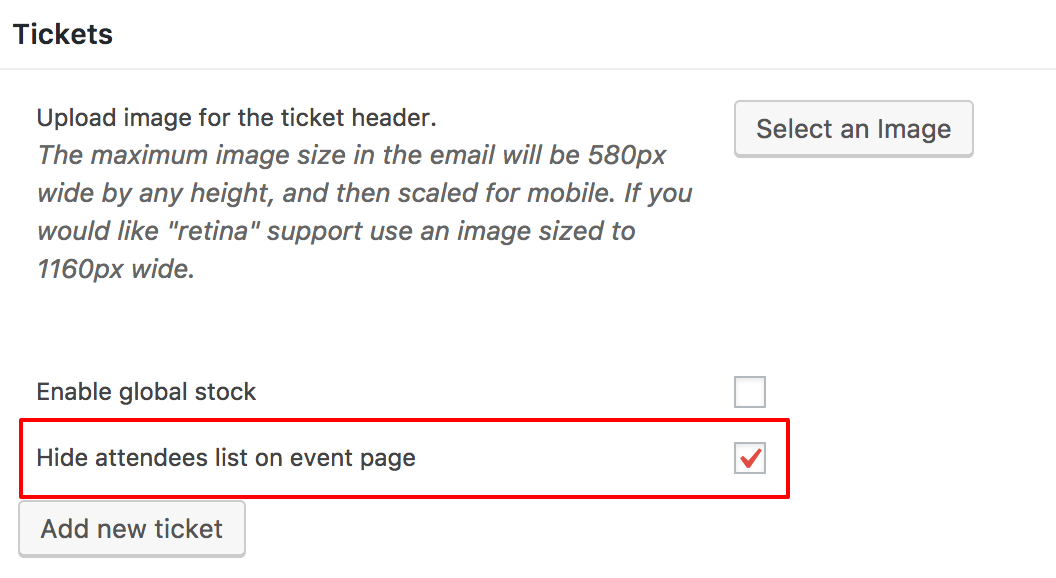
and to see the RSVP details.
For this part, you will need to do a bit of customization.
<span style=”font-size: 0.875rem;”>You might want to </span>read our Themer’s guide<span style=”font-size: 0.875rem;”> to get a sense of how that works.</span>The following template customization should get you pretty close to your goal: https://gist.github.com/niconerd/d2ea62be5375ae3dc088dd29b7350608
When accessing the RSVP details the link to return to the event detail does not work
Would you mind sharing a screenshot on this one ?
We would like the calendar display to have an option to display the calendar in a list format not sure how to activate that, documentation says it is part of the theme
You can typically control that by heading over to Events -> Settings -> Display
On the RSVP display is it possible to change that display to be more of a columnar list.
Yes, absolutely. That can be accomplished by tweaking the view customization I shared.
Let me know if that helps.
Have a great day!
Geoff B.
MemberGood evening Rob and welcome back!
Thank you for reaching out to us.
I would love to help you with this topic.I believe the tutorial you are referring to is this one: https://theeventscalendar.com/knowledgebase/calendar-page-shows-event-title/
This is likely caused by the way your theme handles titles. Since every theme is a bit different, it is hard to say without seeing the files.
Could you please send me a copy of the latest version of your WordPress theme / child theme via a link to a .zip file link (stored Dropbox or Google Drive) so that I can run some tests on my end ? I recommend a private reply for that purpose.
Please ensure you are using the latest files as found on your actual website.
This way I will get access to any updates or customizations you might have made.Hang in there!
Geoff B.
MemberGood evening Deb and welcome back!
Thank you for reaching out to us.
We are sorry to hear about the issues you are experiencing while trying to edit products in WooCommerce.
I would love to help you with this topic.
As a first troubleshooting step, could you please provide us with your complete system information in a private reply using the instructions found in the following link?
https://theeventscalendar.com/knowledgebase/sharing-sys-info/
A first quick test is to simply temporarily revert back to a default WordPress theme such as twenty-sixteen to see if the issue persists. Please leave Event Tickets on as you do that.
But, before you do that, there are 2 things I would advise:
- Make a backup of your database
- Consider activating a “Maintenance Page” plugin if you are doing this on your live site (to minimize impact on your visitors)
Let me know how that goes.
Geoff B.
MemberGood evening Andy and welcome back!
Thank you for reaching out to us.
I would love to help you with this topic.The information is correct.
We did indeed decide to phase out our renewal discount on our different products.As you have read, this is something we did after very careful consideration.
In the words of my colleague Caroline.
Please don’t hesitate to reach out to us via email if you should have any other questions, concerns, or additional comments regarding this new policy change. We’d be more than glad to take the time to assist, and we’re happy to hear any feedback you might care to share.
With that in mind, if your client is a charity, if they have not already done so, they might want to apply for the following program: https://theeventscalendar.com/knowledgebase/do-you-offer-discounts-for-nonprofit-organizations/
Best regards,
Geoff B.
MemberGood evening John and welcome back!
Thank you for reaching out to us.
We are sorry to hear about the odd display you are getting with the list widget.
I would love to help you with this topic.I would need to see it in action to be sure, but based on what I am seeing, this is caused by the following CSS rule from your WordPress theme:
.suf-mag-category li, .sidebar-tab-content ul li, .suf-widget li, .suf-flat-widget li, .suf-panel-widget li {

background-image: url(../../images/icons/bulletgray.png);

}
You might want to add an exception for the events list widget.
Furthermore I hoped that it would be a bit more customizable to fit in the look & feel in the site.
Actually, you can fully customize the look and feel of the size.
The first place to try out is under Events -> Settings -> Display (play with the Default stylesheet used for events templates setting).In order to gain full power on your site’s look and feel, I would highly recommend reading the following articles:
- https://theeventscalendar.com/knowledgebase/wordpress-customizer/
- https://theeventscalendar.com/knowledgebase/using-google-chrome-developer-tools/
- https://theeventscalendar.com/knowledgebase/changing-fonts-and-colours/
- https://theeventscalendar.com/knowledgebase/styling-events-widgets/
Let me know how that goes.
Best regards,
Geoff B.MemberGood evening Robert,
Thank you for reaching out to us.
I would love to help you with this topic.I wished to post the episode one time but continuously add additional dates to the original post each time I get the airing schedule of that particular episode. Is this possible?
Yes, this is absolutely possible.
You simply need to use the “Once” option (see screenshot)
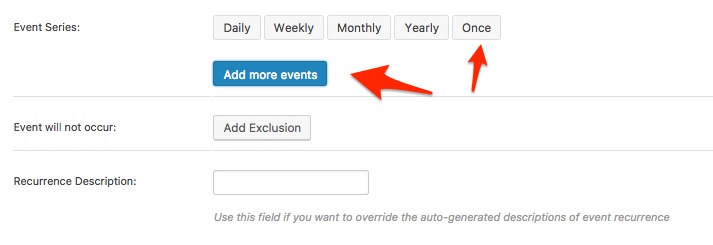
If you have not already, I would also recommend reading the following: https://theeventscalendar.com/knowledgebase/pro-recurring-events/
Let me know if that helps.
Have a great day!
Geoff B.
MemberGood evening Robert and welcome to the Events Calendar Support forum!
Thank you for reaching out to us.
It looks like this is a duplicate from https://theeventscalendar.com/support/forums/topic/event-calendar-recurrence/
As such, I will answer you there and close this thread to keep things nice and tidy.
Have a great day!
Geoff B.
-
AuthorPosts