

Forum Replies Created
-
AuthorPosts
-
May 31, 2017 at 8:53 pm in reply to: HTML content before event content on the main events page only? #1291585
Geoff B.
MemberGood evening Jared and welcome to the Events Calendar Support forum!
Thank you for reaching out to us.
I would love to help you with this topic.Try adding the following CSS rule to your style.css file or in your Custom CSS metabox:
.single .tribe-events-before-html {display: none !important;}Let me know how that goes.
Best regards,
Geoff B.MemberGood evening Jean and welcome back!
Thank you for reaching out to us.
We are sorry to hear about the issues you have faced while trying to install Pro. Yikes!
I would love to help you with this topic.I must say this is a pretty odd error message. It is as though something is forcing the plugins to be installed in the /wp-content/uploads/ folder for some reason.
So using FTP only, my recommendation would be to:
- Delete completely /wp-content/uploads/the-events-calendar
- Repeat this process for events-calendar-pro
Once that is done, still using FTP only:
- Drop your freshly downloaded unzipped copy of the Events Calendar in /wp-content/plugins/
- Walk over to the plugins page and activate the plugin
- If that works, repeat this process for events-calendar-pro
Let me know how that goes.
Best regards,
Geoff B.MemberGood evening Jon and welcome to the Events Calendar forum!
Thank you for your interest in our products.
We’ll be glad to answer your questions.You have an excellent eye.
Indeed with Community Events, you can let users of your choice add and manage events from the front end.However, to be able to do the same thing with tickets, you will also need to grab a copy of Community Tickets (https://theeventscalendar.com/product/community-tickets/) , of Event Tickets (https://theeventscalendar.com/product/wordpress-event-tickets/) and Event Tickets Plus (https://theeventscalendar.com/product/wordpress-event-tickets-plus/).
The simplest solution is probably the Community Manager bundle: https://theeventscalendar.com/bundle-community-manager
Also, will the organizer details be prefilled for an event submission if the organizer is logged in?
This works exactly like in the backend. Each person will get the choice of either selecting an existing organizer or creating a new one.
Let me know if that helps.
Have a great day!
Geoff B.
MemberGood evening Craig and welcome to the Events Calendar Support forum!
Thank you for reaching out to us.
We are sorry to hear about the error message you are receiving when saving new events.
I would love to help you with this topic.By the sound of it, it looks like there is some type of conflict at play.
This is usually because of:- A conflict with another plugin
- A conflict with your WordPress theme
- A template customization for the Events Calendar that requires updating
When it comes to that type of issue, it is preferable to troubleshoot in a staging environment if you have one.
A first quick test is to simply temporarily revert back to a default WordPress theme such as twenty-sixteen to see if the issue persists.
The next step would be to go through our testing for conflicts procedure and let us know what you find out.
Basically the goal here is to revert back to a bare WordPress installation to see if the problem persists. It also allows us to pinpoint what the cause of the issue is.
But, before you do that, there are 2 things I would advise:
- Make a backup of your database
- Consider activating a “Maintenance Page” plugin if you are doing this on your live site (to minimize impact on your visitors)
Hang in there!
Geoff B.
MemberGood evening Brian,
I totally see your point.
You are right, it looks like there might have been some code changes there.As such, I will reach out to the Dev team to see if they have suggestion or perhaps some hooks to help you out with this.
If not, you are absolutely right. Downgrading is certainly worth a shot.
I recommend reading the following: https://theeventscalendar.com/knowledgebase/downgrading-plugin-past-version/
Let me check to see if there is not an obvious code change we can pin this on.
Best regards,
Geoff B.
May 31, 2017 at 8:23 pm in reply to: Event Aggregator cannot import events, outdated version message #1291578MemberGood evening Terry
Yes, I am using the URL import (see screenshot)
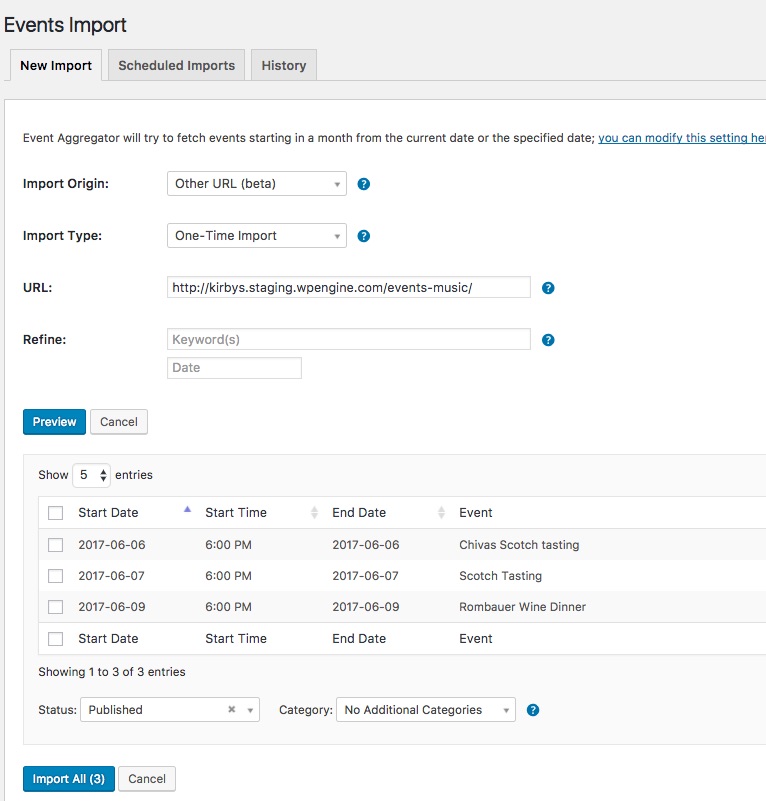
Let me know if you can also get that result.
Best regards,
Geoff B.
MemberThis reply is private.
MemberThis reply is private.
MemberGood evening Wayne,
Thank you for taking the time to write back.
I totally understand where you are coming from.
I respect your decision fully.To your point, it is true that by the very nature of the different WordPress installations, some of our customers have encountered issues.
As much as we do everything in our power to prevent such things from happening, it can still happen.
This is why we work hard at troubleshooting and helping our customers workaround issues when they arise. We value each customer and we want to make sure we provide them with the best experience possible, even when things do not go as expected.
In fact, even though we cannot make up for lost time, I just went ahead and refunded you fully.
It is the very least we can do.If you ever change your mind, you are truly welcome back.
If you do, please do not hesitate to reach out to us sooner in the process, so that we can help.Best regards,
Geoff B.
MemberThis reply is private.
MemberGood evening Brian,
As promised, I followed up on this for you.
The reason why the HTML tags are stripped upon submission to the database is because of they are used for calculations.
With that in mind, I believe that you can still accomplish your goal with a more flexible solution: WordPress custom fields: http://www.wpbeginner.com/wp-tutorials/wordpress-custom-fields-101-tips-tricks-and-hacks/
This way you will be able to display the multiple costs exactly to your liking.
For that purpose, you will simply need to do a view customization of the single event view.
You might want to read our Themer’s guide to get a sense of how that works.Let me know if that helps.
Have a great day!
Geoff B.
MemberGood evening Eric and welcome to the Events Calendar forum!
Thank you for your interest in our products.
We’ll be glad to answer your questions.The short answer is that our free version does not provide shortcode capability.
However, our the Events Calendar Pro premium add-on provides shortcodes for both widgets and full-calendar views: https://theeventscalendar.com/product/wordpress-events-calendar-pro/
- https://theeventscalendar.com/knowledgebase/pro-widget-shortcodes/
- https://theeventscalendar.com/knowledgebase/embedding-calendar-views-tribe_events-shortcode/
Let me know if that helps.
Have a great day!
Geoff B.
MemberGood evening Lenny and welcome to the Events Calendar forum!
Thank you for your interest in our products.
We’ll be glad to answer your questions.The short answer is yes.
You can even decide which events have that feature or not using the Hide attendees list on event page setting.This feature is part of our Event Tickets Plus premium add-on: https://theeventscalendar.com/product/wordpress-event-tickets-plus/
Let me know if that helps.
Have a great day!
Geoff B.
MemberGood evening Matthew and welcome back!
Thank you for reaching out to us.
I would love to help you with this topic.Unfortunately, our support for tickets with recurring events is fairly limited for now.
In fact, you can read about it here: https://theeventscalendar.com/product/wordpress-event-tickets-plus/The only option currently available is:
- Use one set of tickets for ALL the events in the series
In other words, each recurring event shares the exact same tickets. We are not able to offer distinct ticket for each event in that series for now.
- If you want, it is possible to only display the tickets in the first event of the series.
The only other workaround is to:
- Create your recurring events without a ticket
- Break all the single events from the series
- Create separate tickets in all of these events manually.
I wish I had a better answer for you, but for now it’s the best one I have unfortunately.
Let me know if that helps.
Have a great day!
Geoff B.
MemberGood evening Pablo and welcome to the Events Calendar forum!
Thank you for your interest in our products.
We’ll be glad to answer your questions.I need a calendar with recurring events, and I need to sale tickets with paypal for that events, your solutions is to buy calendar pro and also tickets pro?
You are correct.
To get these features, you will need a copy of :
- the Events Calendar Pro: https://theeventscalendar.com/product/wordpress-events-calendar-pro/
- Event Tickets Plus: https://theeventscalendar.com/product/wordpress-event-tickets-plus/
However, our support for tickets with recurring events is fairly limited for now.
The only option currently available is:
- Use one set of tickets for ALL the events in the series
In other words, each recurring event shares the exact same tickets. We are not able to offer distinct ticket for each event in that series for now.
- If you want, it is possible to only display the tickets in the first event of the series.
Let me know if that helps.
Have a great day!
Geoff B.
-
AuthorPosts