
Home › Forums › Ticket Products › Event Tickets Plus › Help RSVP display
- This topic has 3 replies, 2 voices, and was last updated 9 years, 3 months ago by
Paul.
-
AuthorPosts
-
May 31, 2017 at 10:23 am #1291387
Paul
ParticipantPurchased Event Tickets Plus and upgraded our site yesterday with Events Calendar Pro. As a car club we generally need the ability to share with the club members who is going to an event, how many people are coming and if the members have any comments about the event.
I was able to add the three fields to the RSVP section of the ticket. Number of people (pull down, required), number of cars (pull down, required), and comments (multi-line text, optional)
What I need is to allow any subscriber (signed in member) to be able to see the Avatars and to see the RSVP details. Currently this is limited to the administrator of the site.
When accessing the RSVP details the link to return to the event detail does not work
We would like the calendar display to have an option to display the calendar in a list format not sure how to activate that, documentation says it is part of the themeOn the RSVP display is it possible to change that display to be more of a columnar list that would consist of something like this:
Member name Member cell phone # # of cars #of people Comments
Cope, Paul (909) 569-1520 2 4 We’ll bring both cars
Doe, John (951) 999-9999 1 1 just meThis type of display would allow the person putting on the event to have a list or see who is coming to the event and they be able to make a list of attendee and call them if they are not at our meeting place.
May 31, 2017 at 10:48 pm #1291609Geoff B.
MemberGood evening Paul and welcome to the Events Calendar Support forum!
Thank you for reaching out to us.
I would love to help you with this topic.What I need is to allow any subscriber (signed in member) to be able to see the Avatars
This is accomplished by unchecking the “Hide attendees” checkbox (see screenshot)
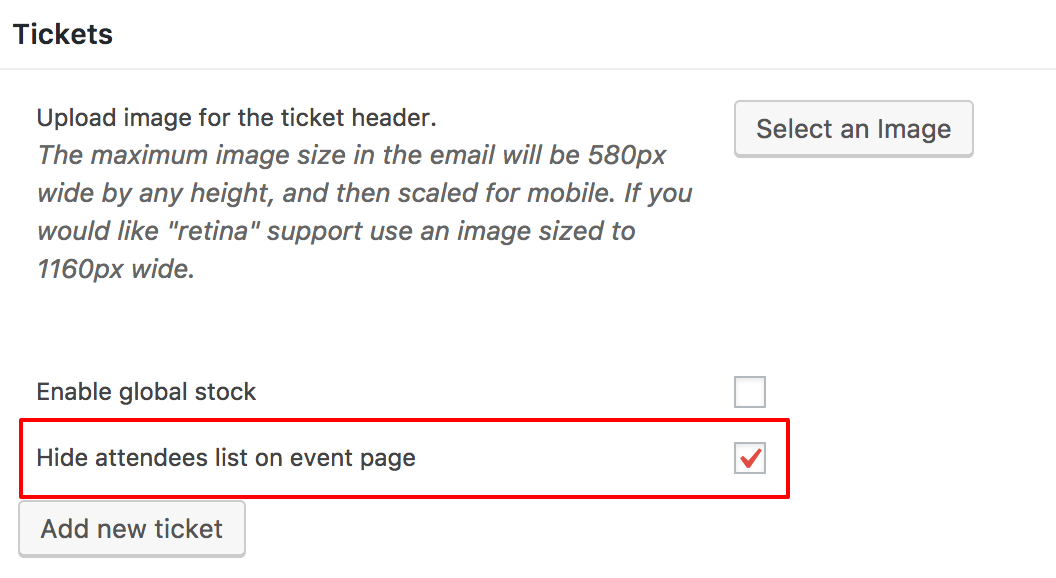
and to see the RSVP details.
For this part, you will need to do a bit of customization.
<span style=”font-size: 0.875rem;”>You might want to </span>read our Themer’s guide<span style=”font-size: 0.875rem;”> to get a sense of how that works.</span>The following template customization should get you pretty close to your goal: https://gist.github.com/niconerd/d2ea62be5375ae3dc088dd29b7350608
When accessing the RSVP details the link to return to the event detail does not work
Would you mind sharing a screenshot on this one ?
We would like the calendar display to have an option to display the calendar in a list format not sure how to activate that, documentation says it is part of the theme
You can typically control that by heading over to Events -> Settings -> Display
On the RSVP display is it possible to change that display to be more of a columnar list.
Yes, absolutely. That can be accomplished by tweaking the view customization I shared.
Let me know if that helps.
Have a great day!
Geoff B.
June 22, 2017 at 9:35 am #1301831Support Droid
KeymasterHey there! This thread has been pretty quiet for the last three weeks, so we’re going to go ahead and close it to avoid confusion with other topics. If you’re still looking for help with this, please do open a new thread, reference this one and we’d be more than happy to continue the conversation over there.
Thanks so much!
The Events Calendar Support Team -
AuthorPosts
- The topic ‘Help RSVP display’ is closed to new replies.