

Forum Replies Created
-
AuthorPosts
-
Geoff B.
MemberGood evening Jatinder and welcome back!
Thank you for reaching out to us.
I would love to help you with this topic.Technically speaking, each subdomain counts as a domain for the purpose of licensing.
For that purpose, people usually opt for a multisite license (which gives the added perk of being able to update from wp-admin).
You can read all about it here: https://theeventscalendar.com/knowledgebase/multisite-license/
Let me know if that helps.
Have a great day!
Geoff B.
MemberGood evening Daniel and welcome to the Events Calendar forum!
Thank you for your interest in our products.
We’ll be glad to answer your questions.Each Venue and Each Organizer has 1 featured image.
However, you can add as many images as you want within the Venue description and Organizer description.
Let me know if that helps.
Have a great day!
Geoff B.
MemberGood evening Justine and welcome to the Events Calendar Support forum!
Thank you for reaching out to us.
I would love to help you with this topic.This is because the short code you used is meant to display widgets (not the full calendar).
In other words, that is normal behaviour.You might want to try the full calendar view shortcodes instead: https://theeventscalendar.com/knowledgebase/embedding-calendar-views-tribe_events-shortcode/
Let me know how that goes.
Best regards,
Geoff B.MemberGood evening Jane and welcome back!
Thank you for reaching out to us.
I would love to help you with this topic.There are a couple of ways to go about this. But here’s the simplest.
You could apply the following snippet in the functions.php file of your theme (without the PHP tag at the top): https://gist.github.com/elimn/d1a9d6edbff993978f57b7f8e9a7b56b
Let me know how that goes.
Best regards,
Geoff B.MemberGood evening Casper and welcome back!
Thank you for reaching out to us.
I am super stoked that you found a workaround.
Thank you for sharing it for everyone’s benefit.You are welcome back in our support forums any time 🙂
For now, I am going to close this thread.
Have a great week!
Geoff B.
June 21, 2017 at 5:22 pm in reply to: RSVP public attendees list: attendant, who will not attend the event, are listed #1301455MemberHi again Dirk,
The behaviour you are describing seems a bit suspicious.
As a first troubleshooting step, could you please provide us with your complete system information in a private reply using the instructions found in the following link?
https://theeventscalendar.com/knowledgebase/sharing-sys-info/
Could you also please send me a copy of the latest version of your WordPress theme / child theme via a link to a .zip file link (stored Dropbox or Google Drive) so that I can run some tests on my end ? I recommend a private reply for that purpose.
Please ensure you are using the latest files as found on your actual website.
This way I will get access to any updates or customizations you might have made.Hang in there!
Geoff B.
June 21, 2017 at 5:19 pm in reply to: RSVP public attendees list: attendants not in list when same email #1301454MemberGood evening Dirk and welcome back!
Thank you for reaching out to us.
I would love to help you with this topic.This is actually possible to accomplish via a template override.
You might want to read our Themer’s guide to get a sense of how that works.Please make sure you put the following attendee-list.php file (https://gist.github.com/niconerd/d2ea62be5375ae3dc088dd29b7350608) in [your-theme]/tribe-events/attendees-list.php
That should solve that issue.
Let me know how that goes.
Best regards,
Geoff B.MemberGood evening Gernot and welcome back!
Thank you for reaching out to us.
I would love to help you with this topic.If you have not done so already, I would highly recommend reading the following: https://theeventscalendar.com/knowledgebase/pro-recurring-events/
I believe your ticket will be to use the “Once” option several times and tweak the end times accordingly.
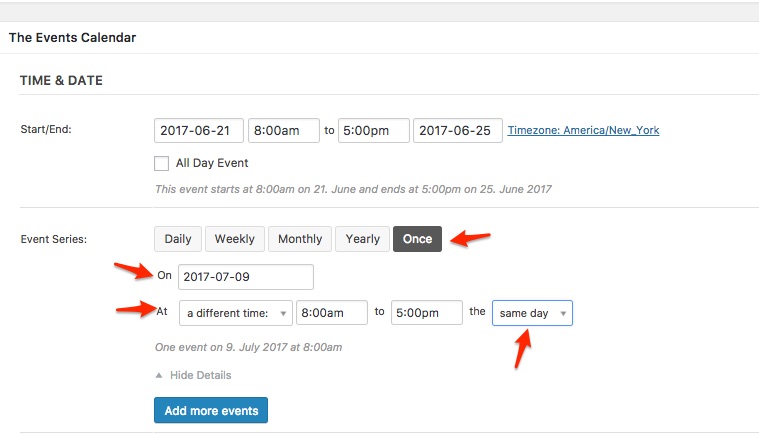
Let me know if that helps.
Have a great day!
Geoff B.
MemberGood evening Dorene and welcome back!
Thank you for reaching out to us.
I would love to help you with this topic.Will this functionality of receiving an email notification be baked into the Pro version? If not, can I use the same code?
This will depend if you use free tickets only (with Event Tickets Plus features) or if you are looking to also use WooCommerce.
Long story short, the code will work for all free tickets (RSVP).
But, if you use WooCommerce, this is handled by WooCommerce itself. So that code will not work for that.
By default, WooCommerce sends emails to all site admins. But you could gain more control through the use of WooCommerce plugins or some customization:
- https://docs.woocommerce.com/document/advanced-notifications/
- https://www.mootpoint.org/blog/customising-woocommerce-notification-emails-hooks-filters/
Will the email notification then contain the more expanded field information options, like additional attendee names if multiple RSVPs are made at the same time? Or specific need requests, like wheelchair assistance, etc.?
Again, it depends which type of ticket you will be using (RSVP or WooCommerce).
We do have an extension that allows you to add attendee info and the event name to the order confirmation email when using WooCommerce: https://theeventscalendar.com/extensions/add-event-and-attendee-information-to-woocommerce-order-details/
You could also customize the content of pretty much any view, including tickets.
You might want to read our Themer’s guide to get a sense of how that works.If coding is not really your cup of tea, you could always hire one of our recommended customizers to do the customization for you.
Just to set expectations, the scope of our support is mostly to get our customers started on the right track and to help them in case of issues. We unfortunately do not provide complete support for customization.
Let me know if that helps.
Have a great day!
Geoff B.
MemberGood evening Paula,
Actually, you can simply click on “Download Zip” and the use the “Upload plugin” option (as explained here: http://www.wpbeginner.com/beginners-guide/step-by-step-guide-to-install-a-wordpress-plugin-for-beginners/)
Let me know how that goes.
Best regards,
Geoff B.MemberThis reply is private.
MemberThis reply is private.
MemberGood evening Joe,
Thank you for writing back. That is actually a pretty good idea.
I would suggest you add your idea and vote here: https://tribe.uservoice.com/forums/195723-feature-ideas/suggestions/6095921-add-waitlist-capabilityI am pretty sure you could work some custom code that watches the stock of tickets and sends them to the appropriate email addresses. Not unlike what a plugin such as https://wordpress.org/plugins/bnfw/ does.
You can read about customizations here: https://theeventscalendar.com/customizations/
If coding is not really your cup of tea, you could always hire one of our recommended customizers to do the customization for you (as we do not take on custom work ourselves).
Have a great day!
Geoff B.
MemberGood evening Børge and thank you for writing back,
If this string is not found in your po file, it means that your PO file needs an update.
The solution is to update your translation files using the pot file. You can do this by using the Poedit software and heading to Catalog > Update from pot file.
Also, here’s are relatively recent files in your language that contain that string (in case that helps): updatedfile
Let me know how that goes.
Best regards,
Geoff B.MemberGood evening Vuk,
Thank you for writing back.
Can You please tell me what do you mean by “customizations” and what should i do to update your customized theme for things to work ?
What I mean is that the way your site looks when it comes down to the view selector is completely different than what we offer built-in.
Just take a look at our demo site to get a sense of what I mean: http://wpshindig.com/events/
The only way this can be this the case is through some template override.
You might want to read our Themer’s guide to get a sense of how that works.Could you please send me a copy of the latest version of your WordPress theme / child theme via a link to a .zip file link (stored Dropbox or Google Drive) so that I can run some tests on my end ? I recommend a private reply for that purpose.
Please ensure you are using the latest files as found on your actual website.
This way I will get access to any updates or customizations you might have made.I’ll try to find a solution, but I looked at .pot file and there is no “Month” or “List” there. Should I add them manually ? I’m not sure how these translations work. However i know that this “loco plugin” actually searches for strings in php files.
I highly recommend reading the 3 following articles on translation:
- https://theeventscalendar.com/knowledgebase/translating-the-events-calendar/
- https://theeventscalendar.com/knowledgebase/how-to-override-plugin-language-files/
- https://theeventscalendar.com/knowledgebase/incomplete-translations/
Normally, the Month string is in the Croatian language file for the Events Calendar.
You can also check here if you want: https://translate.wordpress.org/projects/wp-plugins/the-events-calendar/stableOut of curiosity, can you tell me if you the Events Calendar related language files located in the à /wp-content/languages/ or /wp-content/languages/plugins/ folder?
Hang in there!
Geoff B.
-
AuthorPosts