

Forum Replies Created
-
AuthorPosts
-
Geoff B.
MemberGood evening Cynthia and welcome back!
Thank you for reaching out to us.
We are sorry to hear about the event title not displaying properly after you have removed the featured image. I would love to help you with this topic.
Try adding the following CSS rule to your style.css file or in your Custom CSS metabox:
.fusion-events-featured-image {

min-height: 100px !important;

min-width: 100% !important;

}
where exactly the customized template should be located?
That depends on the view file you are editing. More specifically, it will depend on where the file you are editing is located (in which plugin): the Events Calendar, the Events Calendar Pro, etc…
For example, a view file that comes from Pro will go in /wp-content/themes/your-theme/tribe-events/pro/
But do that, especially with Avada, we highly recommend using a child theme.
Otherwise your changes will be lost the moment you upgrade the theme.That being said, to edit the single event view, your file structure looks sound.
Another strange thing, the calendar is no longer showing up on right side/column.
I am not quite sure what you mean by that.
On the single event page ? Elsewhere ?If you could share both the context and perhaps and example of a site where this is working to your expectation, that would be awesome.
Have a good weekend,
Geoff B.
MemberGood evening Robert and welcome back!
Thank you for reaching out to us.
I would love to help you with this topic.I believe you might want to look into using a third-party WooCommerce product to add product options instead of using different tickets.
There are quite a few out there, but here is an example: https://wordpress.org/plugins/woo-extra-product-options/
Simply put, that should let you edit the ticket in WooCommerce and add the different options to it.
Let me know if that helps.
Have a great day!
Geoff B.
July 28, 2017 at 8:20 pm in reply to: Recuring events featured image does not display for recuring events #1327781MemberGood evening Steph and welcome back!
Thank you for reaching out to us.
I would love to help you with this topic.As a first troubleshooting step, could you please provide us with your complete system information in a private reply using the instructions found in the following link?
https://theeventscalendar.com/knowledgebase/sharing-sys-info/
Secondly, can you try temporarily reverting back to a default WordPress theme such as twenty-sixteen to see if the issue persists ? (ideally with a maintenance page plugin active or in a staging environment).
Hang in there!
Geoff B.
July 28, 2017 at 10:16 am in reply to: I get the same download error for ETP- Sorry, you are not allowed… #1327563MemberGood afternoon Trevor and welcome to the Events Calendar Support forum!o
First off, I would like to apologize for the delay answering.
We are currently experiencing a higher level of requests than usual.Please rest assured that we are working hard at correcting this situation.
We appreciate your patience while we try to normalize things.Thank you for reaching out to us.
We are sorry to hear about the issue you have had downloading your purchase.
I would love to help you with this topic.I am not exactly sure why this is the case, but it definitely looks like a glitch on our end.
The simplest solution is to simply grab your download from here: https://theeventscalendar.com/my-account/downloads/
Let me know how that goes.
Best regards,
Geoff B.MemberGood evening Robert and welcome to the Events Calendar Support forum!
Thank you for reaching out to us.
Just to set expectations, the scope of our support is mostly to get our customers started on the right track and to help them in case of issues.
We unfortunately do not provide complete support for customization.
With that in mind, you could rotate the images with CSS using the correct properties:
- https://www.w3schools.com/cssref/css3_pr_transform.asp
- https://www.w3schools.com/cssref/css3_pr_rotation.asp
However, since you are looking to rotate your images every 3 seconds, I would recommend trying to achieve that via a slider plugin.
More specifically, you could have a little slide show consisting of 4 images (with the different rotations) for each of your images and then integrate these slideshows in your calendar.
Have a good weekend,
Geoff B.
MemberGood afternoon Mark and welcome back!
Thank you for reaching out to us.
We are sorry to hear about the issues you are experiencing with recurring events.
I would love to help you with this topic.By the sound of it, it looks like there is some type of conflict at play.
This is usually because of:- A conflict with another plugin
- A conflict with your WordPress theme
- A template customization for the Events Calendar that requires updating
When it comes to that type of issue, it is preferable to troubleshoot in a staging environment if you have one.
A first quick test is to simply temporarily revert back to a default WordPress theme such as twenty-sixteen to see if the issue persists.
The next step would be to go through our testing for conflicts procedure and let us know what you find out.
Basically the goal here is to revert back to a bare WordPress installation to see if the problem persists. It also allows us to pinpoint what the cause of the issue is.
But, before you do that, there are 2 things I would advise:
- Make a backup of your database
- Consider activating a “Maintenance Page” plugin if you are doing this on your live site (to minimize impact on your visitors)
With that in mind, the other possibility is that there is some kind of sever performance issue at stake here. But before we get there, it is well-advised to perform the above tests.
I realize this can be time consuming, but in the end, it is still the fastest way to get to the bottom of the issue.
Let me know how that goes.
Geoff B.
MemberGood evening Pascal and welcome to the Events Calendar Support forum!
Thank you for reaching out to us.
We are sorry to hear about the issues you have bumped into while using our plugins with WPML.
I would love to help you with this topic.The first thing you should know is that we do not fully support Event Tickets Plus integration with WPML yet: https://theeventscalendar.com/knowledgebase/wpml-support/
This feature is scheduled to be released later this year. Initially we planned for spring, but there was some pushback.
In the meantime, you could get it to partially work, but this is unsupported.
To achieve that, you will need:
- WooCommerce multilingual
- Some manual intervention
After creating the ticket AND saving the event, head over to WPML > Support > Troubleshooting page.
Once you are there, you should see several cleanup buttons. I would recommend:
- Clearing WPML cache
- Using the button that forces language assignment to items (which is what is creating the issue). This can also be accomplished by deactivating and reactivating WPML.
Your ticket will now magically appear.
The only downside is that the tickets you create in other languages are not really translations of the initial ticket. They are completely independent new tickets.
Let me know if that helps.
Have a great day!
Geoff B.
July 28, 2017 at 9:59 am in reply to: After latest update, tickets no longer appear/not connected to WooCommerce #1327544MemberGood afternoon David and welcome back!
Thank you for reaching out to us.
We are sorry to hear about the box disappearing on you. Yikes!
I would love to help you with this topic.From the looks of it, Event Tickets Plus is deactivated on your install.
If reactivating the plugin does not work, I would recommend deleting altogether.
Once that is done, grab a copy from https://theeventscalendar.com/my-account/downloads/ and reinstall it from scratch.Let me know how that goes.
Best regards,
Geoff B.MemberGood afternoon Donald and welcome to the Events Calendar Support forum!
Thank you for reaching out to us.
We are sorry to hear about the link not working.
I would love to help you with this topic.I am not exactly sure what happened, but I would recommend trying to grab the plugin from here: https://theeventscalendar.com/my-account/downloads/
Let me know how that goes.
Best regards,
Geoff B.MemberGood afternoon Johan,
Sorry about the confusion.
To answer your question, there is no limit that I am aware of as far as the number of websites is concerned.
The limit is on the number of import batches (jobs) per day.
So if 10 websites are doing 9 scheduled imports every day, that comes to 90.This means that it looks like 100 scheduled imports per day should cover your needs.
But I am only speculating about your needs here.
Let me know if that helps.
Have a great day!
Geoff B.
July 28, 2017 at 9:37 am in reply to: cosmetic issue : centering of Return to Current Month link #1327531MemberGood afternoon Mark,
Thank you for writing back.
I believe I have just the thing for you.
Try adding the following CSS rule to your style.css file or in your Custom CSS metabox:
.tribe-events-nav-current {

    float: none !important;

    margin: 0px auto !important;

}
Let me know how that goes.
Best regards,
Geoff B.MemberGood afternoon Jason,
Thank you for writing back.
Actually, the reason the private reply is not available is because your premium licenses have expired.In any case, I tested things out, and it turns out the issue is not caused by Yoast, but rather by your theme.
More specifically, this comes from /wp-content/themes/brooklyn/partials/hero-archive.php if you replace “Archives” by “Events” on that line, you should be fine.
Have a good weekend,
Geoff B.
MemberGood afternoon Joseph,
Thank you for writing back.
That is a great question.Here is where the option is located
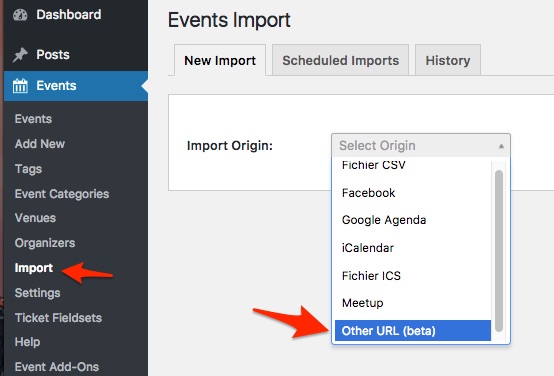
This works exactly like any other import from Event Aggregator. You can choose one-time imports or scheduled ones.
You can read more about that here: https://theeventscalendar.com/knowledgebase/new-user-primer-event-aggregator/
Have a good weekend,
Geoff B.
MemberGood morning Fred,
Thank you for writing back.
I am super stoked this did the trick for you.
You are welcome back in our support forums any time 🙂
For now, I am going to close this thread.
Have a great weekend!
Geoff B.
July 28, 2017 at 8:54 am in reply to: Assign a different theme template to the month calendar view #1327467MemberGood morning Robert,
Thank you for writing back.
I believe you will find all the documentation you need here: https://theeventscalendar.com/customizations/
If coding is not really your cup of tea, you could always hire one of our recommended customizers to do the customization for you.
As an alternative, try adding the following CSS rule to your style.css file or in your Custom CSS metabox:
.events-archive .art-content-layout .art-sidebar1, .events-archive .art-content-layout .art-sidebar2 {display: none !important}Let me know how that goes.
Best regards,
Geoff B. -
AuthorPosts