

Forum Replies Created
-
AuthorPosts
-
Geoff B.
MemberGood evening Robert,
Thank you for writing back.
First off, I would like to apologize for the delay answering.
We are currently experiencing a higher level of requests than usual.Please rest assured that we are working hard at correcting this situation.
We appreciate your patience while we normalize things.Unfortunately, the images you attached did not make it with your replay alas (I believe this occurs with email-based answers).
I am sorry to hear the integration with that specific third-party plugin was not as straight forward as I had hoped. It looks like some additional code might be required to have the two plugins play nicely together.
I realize this is probably a bit too involved to your liking. But in short, this means you are looking for a customization.
You can read about that here: https://theeventscalendar.com/customizations/
If coding is not really your cup of tea, you could always hire one of our recommended customizers to do the customization for you.
With that in mind, since this could be a cool feature to have, you can suggest it in our User Voice forum. That way other customers can vote for it!
I wish I had a better answer for you, but for now it’s the best one I have unfortunately.
Best regards,
Geoff B.
MemberGood evening Tricia,
First off, I would like to apologize for the delay answering.
We are currently experiencing a higher level of requests than usual.Please rest assured that we are working hard at correcting this situation.
We appreciate your patience while we try to normalize things.I am glad you were able to fix one of the issues.
As per the number of events showing up being limited to 5, this is actually caused by a setting from the Extra theme. You can see that by temporarily reverting back to a default WordPress theme such as twenty-sixteen.
Walk over to Extra > Theme options and find the Number of Posts displayed on Archive pages setting.
Changing that value should fix your issue for good.
Let me know how that goes.
Best regards,
Geoff B.MemberGood evening Brian,
Thank you for writing back.
First off, I would like to apologize for the delay answering.
We are currently experiencing a higher level of requests than usual.Please rest assured that we are working hard at correcting this situation.
We appreciate your patience while we try to normalize things.I totally appreciate where you are coming from.
It can take a little while to get acquainted with the structure of our calendar views.I am not sure if you know, but we do not offer support for our free plugin in this premium add-ons forum.
Our free plugin users can post their questions here: https://wordpress.org/support/plugin/the-events-calendar or perhaps consider the purchase of one of our premium plugins to get access to premium support ?
But, the good news is that you are still welcome to consult this forum to your liking and browse it for solutions, snippets and tutorials.
With that in mind, the date format displayed is found in several files (depending on the view you want to modify). In all cases, you will want to tweak the tribe_events_event_schedule_details function found in /wp-content/plugins/the-events-calendar/src/functions/template-tags/general.php at line 961.
Best regards,
Geoff B.
August 1, 2017 at 10:22 pm in reply to: After latest update, tickets no longer appear/not connected to WooCommerce #1329267MemberGood evening David,
First off, I would like to apologize for the delay answering.
We are currently experiencing a higher level of requests than usual.Please rest assured that we are working hard at correcting this situation.
We appreciate your patience while we try to normalize things.I am sorry to hear that you did not have a good experience and resolved to deleting all plugins (without reinstalling them). Yikes!
This is especially sad considering that normally we are able to get to the bottom of such issues (typically caused by either some corruption during the download or conflict with something else on your installation).
In any case, if you ever change your mind and are willing to let us troubleshoot this with you, We will be glad to do so.
For now, I am going to close this thread.
Best regards,
Geoff B.
MemberGood evening Lou,
Thank you for writing back and sharing your findings.
This is pretty awesome and generous of you!Kudos on figuring things out.
You are welcome back in our support forums any time 🙂
For now, I am going to close this thread.
Have a great week!
Geoff B.
MemberGood evening Robert,
I have some pretty good news.
It turns out that you can achieve exactly what you are looking for with the following extension for Image Widget Plus: https://theeventscalendar.com/content/uploads/2017/07/iwp-auto-advance.zipBy default, it rotates every 5 seconds, but you can bring that down to 4 seconds by changing the 5000 value to 4000 in the code.
Let me know how that goes.
Best regards,
Geoff B.August 1, 2017 at 8:55 pm in reply to: What is needed for plugin to work on a dual-language site? #1329240MemberGood evening Andreas and welcome to the Events Calendar Support forum!
Thank you for reaching out to us.
I would love to help you with this topic.I highly recommend reading and using the following guides:
- https://theeventscalendar.com/knowledgebase/setting-up-the-events-calendar-with-wpml/
- https://theeventscalendar.com/knowledgebase/creating-translations-for-events-using-wpml/
That should enable you to use the Events Calendar with WPML.
However, if you are interested in shortcodes, you will need to grab a copy of the Events Calendar Pro: https://theeventscalendar.com/product/wordpress-events-calendar-pro/This will let you use the following types of shortcodes:
- https://theeventscalendar.com/knowledgebase/pro-widget-shortcodes/
- https://theeventscalendar.com/knowledgebase/embedding-calendar-views-tribe_events-shortcode/
Let me know if that helps.
Have a great day!
Geoff B.
August 1, 2017 at 7:57 pm in reply to: CUSTOM STYLESHEET "/Tribe-events/tribe-events.css" NOT APPLYING #1329218MemberGood evening Oli,
I am super stoked I managed to help you out AND teach you new tricks along the way.
You are welcome back in our support forums any time 🙂
For now, I am going to close this thread.
Have a great week!
Geoff B.
MemberGood morning Robert,
Thank you for writing back.
I am terribly sorry.
This totally my bad.Somehow I did not see the Image Widget Plus category attached to your question.
As a result, I provided you with a solution that applies to the Event Calendar plugin.My apologies.
I am not seeing an option that autoplays the slideshow.
With that in mind, I have reached out to the plugin author to see if a workaround is available.I am thinking that a quick snippet targeting the “next button” would do the trick.
Something along the lines of https://stackoverflow.com/questions/33185302/how-to-make-a-php-function-loop-every-5-secondsHang tight as I follow up on this for you.
Geoff B.
July 30, 2017 at 11:22 pm in reply to: Product Purchase Switching: Event Tickets Plus to Community Tickets #1328242MemberThis reply is private.
July 30, 2017 at 11:16 pm in reply to: cosmetic issue : centering of Return to Current Month link #1328239MemberThis reply is private.
MemberGood morning Paula,
I am super stoked that you like the plugin.
Hopefully, it will be useful to many others customers.You are welcome back in our support forums any time 🙂
For now, I am going to close this thread.
Have a great week!
Geoff B.
MemberGood evening Doron,
Just a quick follow-up to see if you had a chance to set that environment up ?
I can’t wait to get to the bottom of this for you.
Have a good weekend,
Geoff B.
July 28, 2017 at 10:49 pm in reply to: CUSTOM STYLESHEET "/Tribe-events/tribe-events.css" NOT APPLYING #1327821MemberGood evening Oli,
Thank you for your awesome understanding.
As promised, I have reached out to our coding ninjas.
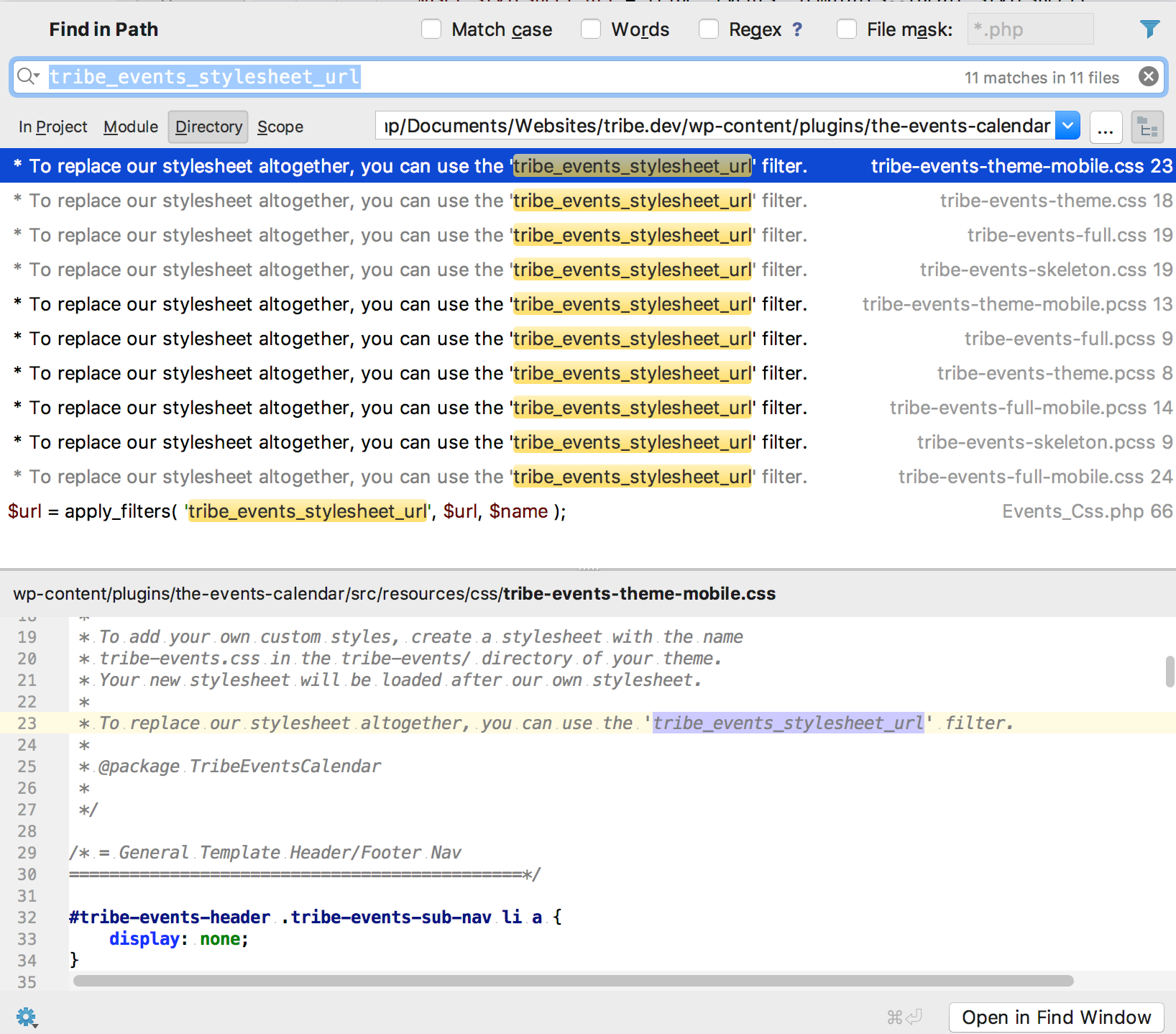
Apparently, the stylesheet hierarchy has not budged lately (which is great news in a way).However, it turns out that the tribe_events_stylesheet_url filter does not extend the default stylesheet, but replaces it completely. See the following screenshot for that
are there any rules/exceptions to keep in mind when working out how specific we need to be with certain elements Geoff?
That is a great question.
The short answer is that this is a case by case situation.
However, you can always try to cheat a little.For instance, if I am in a hurry, what I will do is take the CSS rule I want to change and add one element to it as far up as possible in the CSS hierarchy (making sure it stays relevant to this specific view).
As per your example, if I want to override
.tribe-events-photo-event-wrapI will use something like
#tribe-events-photo-events .tribe-events-photo-event-wrapAs you can see, there is no need to specify every single element between the 2 CSS elements.
Furthermore, adding a CSS ID (whenever available) is better than a class as it will always have priority.A rule that would have priority over the one I just gave you would be
#tribe-events-content .tribe-events-photo-event-wrapSame idea, the higher in the class, the better.
So in the end, this is totally up to you.
Purist will frown upon !important as it is “less clean”.But personally, I am more of a “as long as it works” type of guy 😉
Have a good weekend,
Geoff B.
MemberGood evening Rainer,
I am super stoked you managed to find the cause of the issue.
Kudos and thank you for sharing.You might want to reach out to the OptimizePress team to see if they cannot come up with a tweak or an update on some of their scripts.
Have a good weekend,
Geoff B.
-
AuthorPosts