

Forum Replies Created
-
AuthorPosts
-
Geoff
MemberHi Anne,
Thanks for following up! I appreciate the extra context for what you’re doing!
The shortcode embed of the calendar will take up all of the space it is provided. If you want another column for content next to the Photo View embed, then my suggestion is to create a new template in your theme that has two columns: one for the page content and one where you can embed the Photo View. That will give you both components on the same page in the layout you are looking for, but it will take a little bit of custom work on your end to create that template.
And, yes, you are correct about he recurring events setting I recommended being the same setting that Victor mentioned in your other thread. 🙂
Cheers!
GeoffMemberHi Marieke,
Thanks for getting in touch and sorry for the confusion here. Let’s dig into this together and get everything straightened out and working for you.
I checked your account and it looks like you have the following products:
- Events Calendar PRO
- Event Aggregator
- Filter Bar
I do not see Event Tickets listed on your account, so you seem to have purchased and received the correct licenses. I also confirmed that the order you placed this morning (#1259466) was for those same plugins and also did not include Event Tickets.
One thing I do want to note is that Event Aggregator is already included in The Events Calendar so there is nothing you need to install. As long as you have purchased an Event Aggregator license (which you have and is available in your account), then you can enter the license on the Events > Settings > Licenses screen in the Event Aggregator field and begin using the import features.
To confirm, will you please visit the My Account > Licenses screen here on our site and verify that the licenses I mentioned above are the ones on your account? I want to make sure you are not seeing something different than what I see.
Thank you for your patience while we look into this together.
Geoff
MemberRight on, thanks for following up, Robert! I’ll go ahead and close this thread but let us know if any other questions come up and we’d be happy to help. 🙂
Cheers and have a great weekend!
Thanks,
GeoffMemberHi Matteo,
Thanks for following up!
I’m afraid there is no direct setting in the plugin to notify the person who submitted the event once it has been published.
You could certainly do that manually, or there could very well be a hook you could use to trigger that. Events are simply a custom post type, so you could likely hook into any of the default WordPress post publish functions to notify the post author of an update.
While I haven’t tried it personally, it looks like this plugin might help do that — at least worth checking it out:
Notification – Custom Notifications and Alerts for WordPress
Cheers!
GeoffMemberHi Anne,
Thanks for getting in touch!
I’m afraid that the Photo View layout is not directly configurable in the plugin settings. The layout will always be three columns, except on smaller screens, where it narrows to a single column.
However, yes, it is possible to show only the first instance of a recurring event instead of all of them. You can find that setting on the Events > Settings screen:

Selecting that option and saving your settings will hide all recurring events, except for the next upcoming event in the series.
Does this help answer your question? Please let me know. 🙂
Cheers!
GeoffMemberHi Matteo,
Thanks for getting in touch!
Great questions and I’m happy to help answer them.
Yes, you can absolutely moderate event submissions before they are published. That is an available setting in the plugin and we have more information on it here:
The same is true for receiving an email for new submissions. The plugin settings allow you to notify one or multiple email addresses when a new event has been submitted:
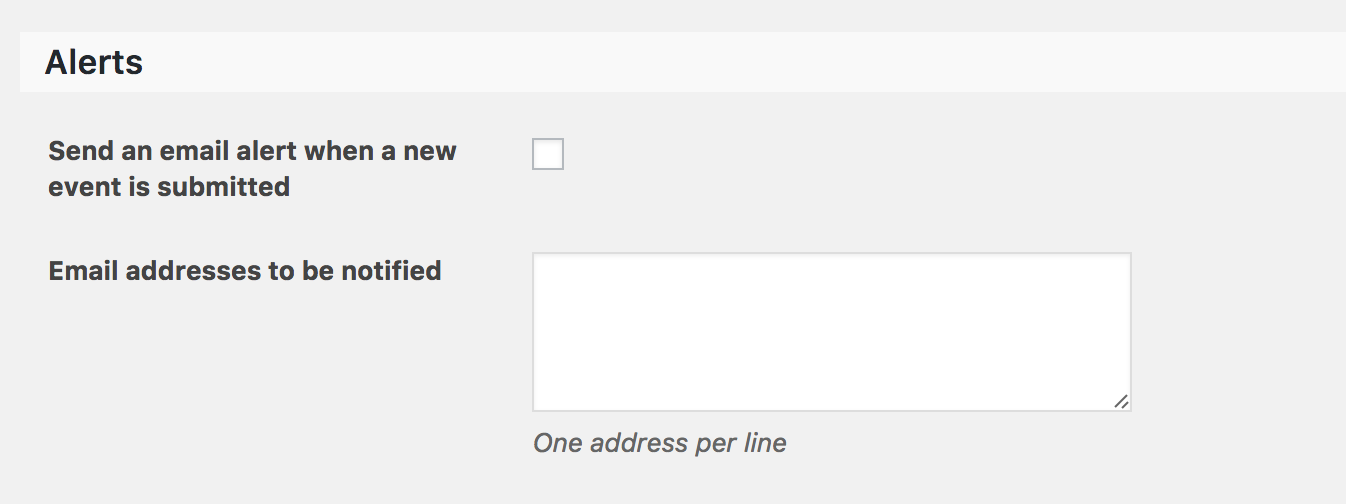
Does this help answer your questions? Please let me know. 🙂
Thanks,
GeoffMemberRight on! I’m so glad to hear everything is working smoothly and I appreciate you following up to let us know. Definitely keep us posted if any other questions come up and we’d be happy to help. 🙂
Cheers!
GeoffMemberHi Joe,
Yes, that is correct. Setting a different location for an instance in a recurring series will require the event to be edited and editing an instance will break it from the series.
Yes, you can use custom fields on tickets:
https://theeventscalendar.com/knowledgebase/collecting-attendee-information/However, what I was suggesting in my last reply is that recurring events do not support tickets — so, either way, your instance will need to be broken from recurring series to either edit the location or support ticketing.
Cheers,
GeoffMemberHi Riccardo,
Yes, that is correct: hiding the link to create a new event is something you will want to do either in the PHP template or using CSS.
Cheers!
GeoffMemberHi Nick,
Yes! You can absolutely configure Filter Bar to filter events by multiple states. All you need to do is change the setting for the State filter to use checkboxes and that will allow multiple selections:
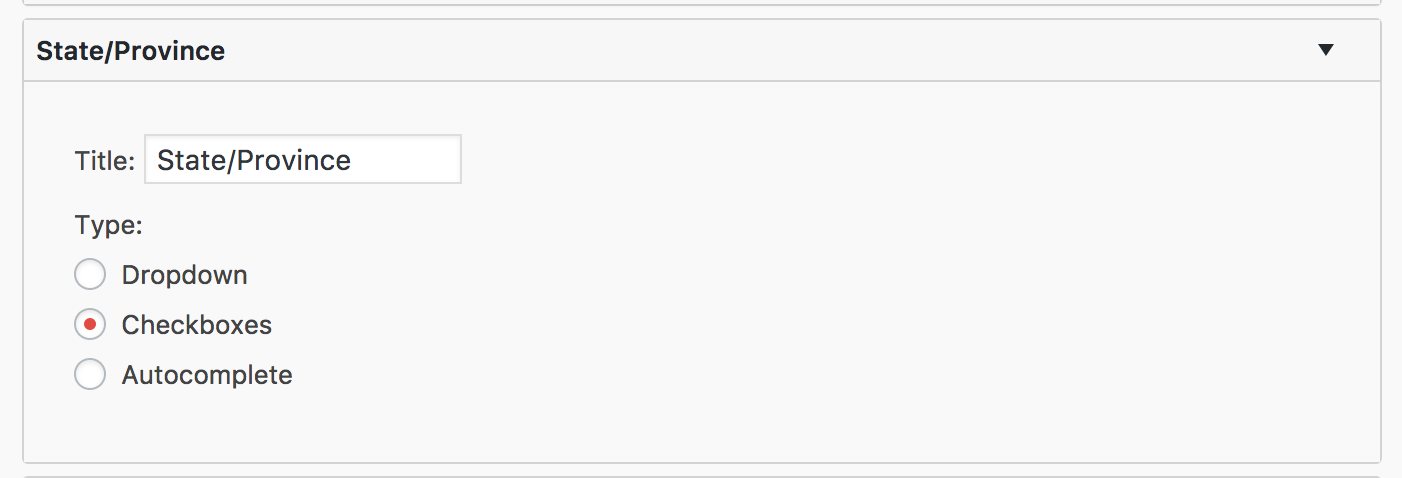
Does this help answer your question? Please let me know. 🙂
Cheers!
GeoffMemberHey Roberto,
Thanks for getting in touch!
That’s a really cool idea! I think the best way to get started with a customization like that is to look into connecting other post types to the Events post type.
We actually have a guide on how to do this:
https://theeventscalendar.com/knowledgebase/abstract-post-types/The idea is that you can create a new post type and register it to your theme, then connect it to Events so that you can have a new way to create Speakers, Presenters or any other post type to events just like Organizers and Venues.
Will that help get the ball rolling for you? Please let us know. 🙂
Thanks,
GeoffMemberHey Ben,
Thanks for getting in touch and really sorry that we’re just now getting back to you.
These are great questions, so let’s dive right in:
1. Seat Selection
Event Tickets Plus does not have seat select built right into it. That said, it would be possible to make something similar to seat selection. For example, make a ticket type for each section of the venue, limit the number of tickets per type to the number of available seats, then provide an image of the venue seating chart in the event description to illustrate the ticket types.
That sort of answers the second part of your question: there is no way to sell “Row 4, Seat B” but you can create the seating categories (i.e. GA, VIP, etc.) and limit the ticket quantities that way.
2. Ticket Sale Credit
Yes, it is possible to pick your fighter using the custom fields option in Event Tickets Plus. That will allow you to create a dropdown for each ticket that requires an attendee to select a fighter.
It’s worth noting that Event Tickets Plus is not actually collecting the payment, but integrates with WooCommerce, which does collect payments. I wanted to mention that because selecting a fighter in the ticket will not affect the way the payment for the ticket is handled. That would need to happen in WooCommerce (or any of the other e-commerce plugins compatible with Event Tickets Plus).
Does this help answer your question? Please let me know. 🙂
Cheers!
GeoffMemberHi Joe,
Welcome back and nice to see you again!
Good question. Yes, you can edit any single instance of a recurring event and change the venue for it.
Keep in mind, however, that editing an event in a recurring series removes it from the series.
That’s actually a good thing in this case because recurring events do not support tickets at this time. That means breaking the event out of the series will allow you to create tickets for that event.
Does this help answer your question? Please let me know. 🙂
Cheers!
GeoffMemberHi Janneke,
Thanks for getting in touch!
Tickets unfortunately do need to be created for each event in the event post.
That said, there is an open feature request for this and it would be awesome if you added a vote to it. Looks like it’s gotten a few votes already but could definitely use more. I can also see how super helpful it would be to have this built right into the plugin because it would be way easier to set up tickets for events, just like we do for default ticket fieldsets.
Sorry to be the bearer of bad news, but does this at least help answer your question? Please let me know.
Cheers,
GeoffMemberHi Mitchell,
Thanks for getting in touch!
Good question. Yes, Event Aggregator does fetch all of the content from a Facebook event and brings it into The Events Calendar — including the event photo, which is used as the event post featured image.
Does this help answer your question? Please let me know. 🙂
Thanks,
Geoff -
AuthorPosts