

Forum Replies Created
-
AuthorPosts
-
Geoff
MemberYou bet! Happy to be of service and to hear that the plugins sound like a good fit. 🙂
As a reminder, all of our products come backed with a full refund within 30 days of purchase. Hopefully you don’t need to use it, but it’s nice to know it’s there and I wanted to make a note of it.
I’ll go ahead and close this thread but let us know if any other questions come up and we’d be happy to help.
Cheers!
GeoffMemberHi Shen,
Thanks for following up!
You can limit the number of tickets available for an event, but there is no setting to limit the number of tickets made in a single purchase.
Sorry for the bad news, but does this at least help answer your question?
Thanks,
GeoffMemberYou are absolutely correct — you will need both Events Calendar PRO and Community Events to get all of the features you need.
Did you have any other questions about the plugins before checking them out? Let me know and I’d be happy to help as best I can. 🙂
Cheers!
GeoffMemberHi Mike,
Thanks for following up!
1) How much does a license renewal cost?
The renewal price is the same as the license — it’s all the same.
2) Do I need to use regular events calendar if I have events calendar pro?
Yes, that is correct. Events Calendar PRO is an add-on to The Events Calendar so you will need to have both installed together.
3) My client is running workshops for people. She needs the ability for them to sign up for a workshop, pay through her site for the workshop, while also tracking participants for each workshop. What would you recommend being my best option of your products for this sort of feature?
Even though you specifically mentioned not needing tickets, this client request sounds very much like tickets to me. I personally would lean toward using Event Tickets with Event Tickets Plus for the selling and attendee report features. Plus, Event Tickets Plus integrates with WooCommerce, so that handles all of your sales reports as well.
Cheers!
GeoffMemberNo worries at all, Pablo! That’s excellent feedback and I appreciate you sharing it. 🙂
I’ll go ahead and close this thread. Definitely let us know if any questions pop up with the other plugins — we hope this are going well and working smoothly for you.
Cheers!
GeoffMemberHi Riccardo,
Great question!
The first thing I want to note is that you will also need Event Tickets Plus in order to use Community Tickets.
We do have a bundle available that gives you all the plugins you need at a discounted price:
https://theeventscalendar.com/bundles/bundle-community-manager/
Events Calendar PRO is not included in that bundle, but you can purchase that at the same time and still get a great discount on all the others.
Second question, I will test it out with our system and see if these plugins work, if not, can I gt a refund for all three within 30 days? thanks
Yes, absolutely. All of our products come with a full refund within 30 days of purchase. That should give you a nice amount of time to try things out. And, if they don’t work out for any reason at all, you can request that refund here:
Does this help answer your question? Please let me know. 🙂
Cheers!
GeoffMemberHi Pablo,
So sorry to hear Event Aggregator isn’t cutting it for you, though I’m happy to help you with a refund.
I’ve gone ahead and issued a refund for your order (#1255391) and the funds should be back in your account within 5-10 business days.
Cheers and thanks for your support!
Geoff
MemberHi Mike,
Thanks for getting in touch!
Yes, updates refers to plugin updates. And you may absolutely continue to use the plugin even after the license has expired — you will simply lost access to future versions that are released.
On that note, please know that we recommend keeping our plugins in sync with one another so that they use the same versions — for example The Events Calendar 4.4 with Events Calendar PRO 4.4. That ensures all the plugins are fully compatible with one another. I wanted to point that out because that means you will want to avoid updating The Events Calendar once your Events Calendar PRO license expires.
Does this help answer your question? Please let me know. 🙂
Thanks,
GeoffMemberRight on! I’m so glad to hear everything is working smoothly and I appreciate you following up to let us know. Definitely keep us posted if any other questions come up and we’d be happy to help. 🙂
Cheers!
GeoffMemberHi Carlos,
I’m afraid the zero event option is the best way of accomplishing that right out of the box.
If you set the number of events to 5, then a link will display, but only if there are more than 5 events on that given day.
Sorry for the bad news, but does this at least help clarify things a bit?
Thanks,
GeoffMemberHey there,
Glad that helped!
Yes, The Events Calendar can be translated in a number of ways. We actually have a few helpful articles on the topic that I think will cover all your questions about translations.
Can the calendar be shown in the sidebar or footer and the list of event in the body?
Sure! You will need Events Calendar PRO because it includes widgets and shortcodes you can use in any registered sidebar in your theme.
The funny thing is that the example you linked to actually uses our products — so, yes, you are definitely good to go. 🙂
Cheers!
GeoffMemberHi David,
Thanks for getting in touch!
There’s a couple of ways you can access reports for your courses.
The first is to access the individual report of each course. You can find those by clicking on the “Attendees” link underneath the course title in the WordPress Admin:

The second is to get a snapshot of ticket sales across all events in the WordPress Admin. For that, I would recommend installing the Advanced Post Manager plugin. That will give you a number of items you can add to the list of events in the admin, including Sales and Stock. Here is how that looks when installed and configured:
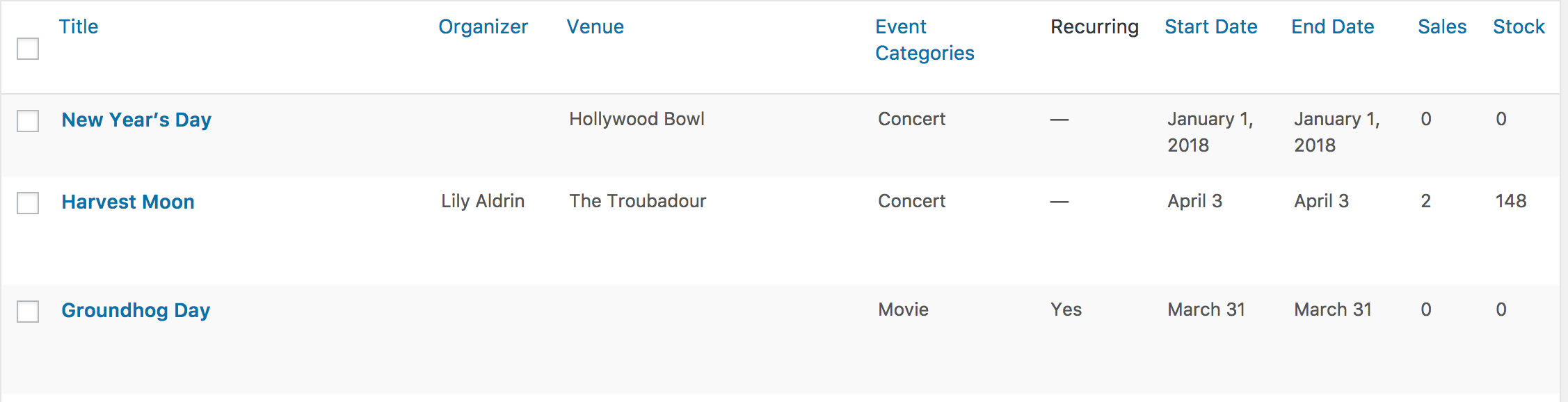
Does this help answer your question? Please let me know. 🙂
Cheers!
GeoffMemberHey there and thanks for getting in touch!
Yes, I do believe that our plugins can help you out here. We have an add-on called Community Events that allows visitors of your site to submit events to The Events Calendar from a front-end submission form.
You can set that form to take submissions from logged in users assigned to specific roles, or allow anonymous submissions. It also includes reCAPTCHA options to secure the submissions.
Does that sound like what you’re looking for? Please let me know. 🙂
Cheers!
GeoffMemberHi Carlos,
Thanks for getting in touch!
Yes, it is possible to click a link in the Mini Calendar widget that takes you to a page that shows all of the events for that day.
The easiest way to do this is to configure the widget (Appearance > Widgets screen) to show zero events:

If you do that, then clicking a date on the Mini Calendar widget will take you to a page that lists events for that day.
Does this help answer your question? Please let me know. 🙂
Cheers!
GeoffMarch 22, 2017 at 6:59 am in reply to: Can’t view added events from frontend on admin events list #1257989MemberHey Freilla and thanks for getting in touch!
We’d be happy to help — but I do want to note that our pre-sales forum is used to answer questions about purchasing our premium plugins.
If you’re looking for technical support, it would be awesome if you could post your question to our WordPress.org support forum.
Or, if you already have an active license for one of premium plugins (and it sounds like you do because you mention Community Events), will you please log into your account and post your topic to our premium support forum instead?
And, when you do post a new thread, it would be awesome if you could do a couple of things to help us get started:
- Provide your system information – this helps us check your settings for any possible issues
- Test for conflicts – follow the steps in this guide to make sure the issue is not related to your theme or another installed plugin
Thanks so much!
Geoff -
AuthorPosts