Forum Replies Created
-
AuthorPosts
-
February 9, 2016 at 4:53 am in reply to: Can't See Event Details When Link Is Clicked in Calendar #1069996
Cliff
MemberThis reply is private.
MemberI also noticed the account you posted this question from only has Event Tickets Plus license, not Filter Bar.
You’ll want to make sure you’re using all the latest versions of our plugins and have a current license to receive support for Filter Bar.
As such, I’ll mark this thread as Closed. If you need additional support and purchase Filter Bar or post the question from your other user account that did purchase Filter Bar, please update this ticket or create a new thread referencing this ticket.
Thanks a lot for using our plugins and for your understanding.
MemberHi John. No trick. It should automatically refresh with the results (i.e. without needing to click “Submit”).
I’d suggest trying another browser just to make sure that’s not your issue.
Next, please follow our Testing for Conflicts Guide and see if that helps narrow down the cause of this.
Let us know what you find out.
Thanks.
MemberIt sounds like you’re wanting that iCal URL to include a longer time period. Please try this code to customize it for your needs:
here: https://gist.github.com/cliffordp/ab1f7c4d95723ee6f892
I hope this helps. Please let me know.
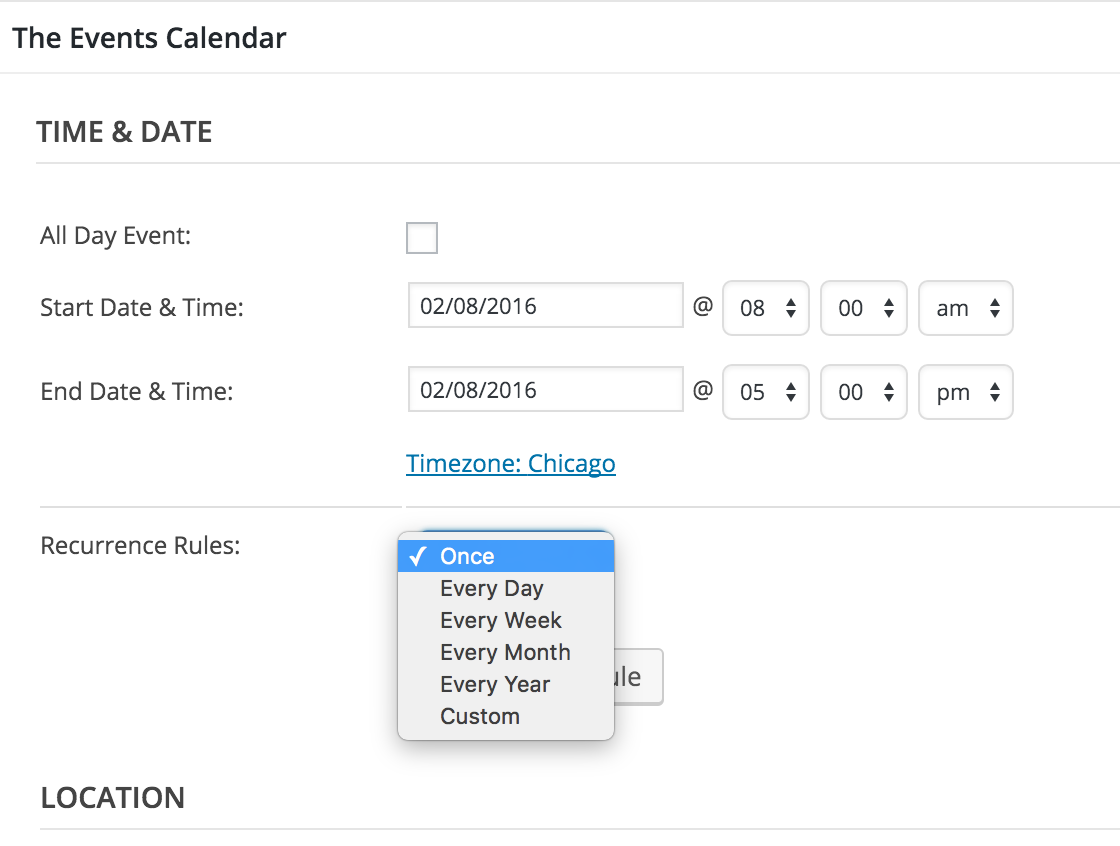
MemberThanks for the screenshot. That definitely isn’t the way it’s supposed to be.
You might enable WP_DEBUG or look in your Console log to see if there’s anything obviously causing this issue.
If any errors do appear while navigating your Events wp-admin Add/Edit screen, it may help you determine the cause of the issue (e.g. conflicting plugin). If you can’t determine it from WP_DEBUG or Console log, please follow our Testing for Conflicts Guide and see if that helps narrow down the cause of this.
Let us know what you find out.
Thanks.
February 9, 2016 at 3:32 am in reply to: Tickets SKUs no longer auto generating in Event Tickets / Plus #1069975MemberSorry for the delayed reply here. Thanks for sharing your code. However, it looks like you’re editing Event Tickets Plus. I think the best route would be a modification via Community Tickets so as to not affect other usage of Event Tickets Plus (probably doesn’t worry you for your own setup but FYI if others come across this thread).
I dug into the code for Community Tickets 3.12.1 vs 4.0.2 and saw the src/Tribe/Main.php file in both has function ajax_handler_ticket_save(), which contain
$form_data['ticket_woo_sku'] = "{$post->ID}-{$post->post_author}-" . sanitize_title( $form_data['ticket_name'] );That looks like what you’re wanting, but I couldn’t get any more helpful information than that for you.
I’ll update our bug tracker for now.
Thanks again.
MemberHi Jennifer. Thanks for your question and the helpful link.
File uploads are not an easy or straightforward issue to tackle, due to write permissions, file type permissions, security concerns, size limitations, where to store the files (e.g. on server or also add to Media Library database).
As such, my guess is that it’d be easier to get a WordPress plugin that handles file uploads (e.g. Gravity Forms + Custom Post Types, Caldera Forms, Ninja Forms, etc.) and map the form submissions to the tribe_events custom post type, along with our plugins’ custom fields.
Please know that we cannot provide in-depth customizations, per our Scope of Support Terms, but you might be interested in contacting one of our known customizers. (We do not take such customization work.)
I hope this info helps!
MemberHi Matthew. We appreciate your business and of course would like to have features to please all our current and prospective customers. Currently, it’s not part of the plugin, as you’ve noticed. However, it is available as a feature request at https://tribe.uservoice.com/forums/195723-feature-ideas/suggestions/3738379-collect-all-attendee-information-for-multiple-tick
It says “Started” so hopefully that means it’ll be available sooner than later for you. I can’t provide you with a time estimate or a guarantee of its completion.
For now, please add your vote to that feature request.
Thank you.
February 8, 2016 at 3:53 pm in reply to: Several questions: RSVP functionality, Event listing limits, Zip search #1069842MemberHi Dave. Thanks for your questions.
- The Events Calendar PRO is an add-on for the core/free The Events Calendar plugin. Similarly, Event Tickets Plus is an add-on for the core/free Event Tickets plugin. Event Tickets enables RSVP functionality for any custom post type (but, of course, it works great with The Events Calendar). If you want to sell tickets (not free RSVPs) for one or more events, you’d want to buy the Plus version.
- We’ve seen setups with thousands of events. Like anything else hypothetical, it’s expected that a site with 10,000 events would probably need more horsepower than a site with only 50 events (assuming the same number of users/hits).
- Yup, zip code searches can work. For example, enter “66044” into the “Near” search and you should see the “Women in Tech Monthly Meeting” event in Lawrence, KS on the monthly calendar.
I hope this helps.
Let me know if you have follow-up q’s.
Thanks.
MemberHi Alan. Sorry you’re having this issue.
This is the current view in wp-admin Add New Event screen. Are you seeing something else?
 Member
Hi. I visited http://www.reachdowneast.com/calendar/events/community/add and it worked for me (no 500 error).
The links generated by your event settings page are, at the least, missing the separating forward slash before “community”.
1) Please let me know if you’re still experiencing any issue besides the bad links displayed on the event settings page.
FYI: I cannot reproduce the issue of the bad event settings page links, even if I change the “Events URL slug” setting from “events” to “calendar”.
2) If this is still happening for you, please follow our Testing for Conflicts Guide and see if that helps narrow down the cause of this.
Let us know what you find out.
Thanks.
MemberHi Michael.
If you’re referring to the “Export Month’s Events” button’s iCal link/file, that’ll only be the current month’s worth of events (which can be modified via custom code for a different time period).
Are you saying you have a recurring event that occurs more than once in the current month but only shows up once in the month’s iCal file?
If yes, please provide your iCal link.
Thanks.
February 8, 2016 at 3:00 pm in reply to: Event Details don't popup when you hover over title in Calendar View #1069814MemberAwesome. Great find by our dev!
MemberI logged in via the credentials you provided and immediately noticed you have a lot of plugins enabled.
As stated previously, please follow our Testing for Conflicts Guide and see if that helps narrow down the cause of this.
If you want me to try to login again, please leave things in that state (all other plugins deactivated and a default WordPress theme like Twenty Fifteen).
Let us know what you find out.
Thanks.
February 8, 2016 at 11:03 am in reply to: Help setting up PayPal API for split payments in Community Tickets #1069653MemberTo set the password for the -facilitator or -buyer email address, go to https://developer.paypal.com/developer/accounts/, click on the applicable email address, click “profile”, and click “Change password”.
Regarding your checkout video with checking out via PayPal, if you’re having issues, please make sure all other plugins are deactivated and you’re using a default WordPress theme (e.g. Twenty Fifteen).
Please let me know how it goes.
-
AuthorPosts