Forum Replies Created
-
AuthorPosts
-
February 8, 2016 at 10:47 am in reply to: Event Details don't popup when you hover over title in Calendar View #1069645
Cliff
MemberBeth, thanks for checking WP_DEBUG.
One of our developers noticed your theme doesn’t seem to support body_class(), which it should according to WordPress best practices.
I appreciate you wanting to get things working with the theme you’re using, but we cannot provide theme-specific / in-depth customization help, per our Terms.
Our general rule of thumb is that if a theme follows WordPress best practices, it should be compatible with our plugins.
I hope the suggestion to follow WordPress’ best practices helps you and/or your theme author to get things fully working with our plugins.
MemberThis reply is private.
MemberI saw you marked my answer as “correct”. I’m glad it answered your question. I’m going to close this ticket. Feel free to open a new ticket if you have any other questions come up. Have a great day!
February 6, 2016 at 4:52 am in reply to: All available event categories not showing on event creation template #1068633MemberI saw you marked my answer as “correct”. I’m glad it solved your issue. I’m going to close this ticket. Feel free to open a new ticket if you have any other questions come up. Have a great day!
February 6, 2016 at 4:51 am in reply to: Help setting up PayPal API for split payments in Community Tickets #1068632MemberGlad to hear things are moving forward for you.
When doing a sandbox purchase, checkout via PayPal with the “[email protected]” credentials (see Step 5 of Sandbox Mode)
For the Stripe / WooCommerce / checkout issues, please do a video screencast (e.g. with Jing or CloudApp) of what you’re seeing at each step.
You may choose to set your reply to “Private” if you don’t want the links to be as publicly-accessible.
February 5, 2016 at 3:06 pm in reply to: Event Details don't popup when you hover over title in Calendar View #1068531MemberThanks. I checked the link and
tribe-events-tooltip-isn’t anywhere in the page source except fortribe-events-tooltip-[[=eventId]]So the tooltips aren’t outputting at all on the page (i.e. it’s not a CSS or JS issue).
Please enable WP_DEBUG and share any PHP errors you see while navigating your site’s wp-admin, home page, events page, single-event pages, and any other of your site’s pages relevant to this ticket.
Let us know what you find. 🙂
MemberThanks for your research. I checked with the rest of the support team and we just don’t have specific integration for X Theme. Apparently we used to get quite a few threads about it (as you’ve discovered) but haven’t had such a demand for it in a while.
I’m not certain if any of the past threads will still work, since we’re now on v4 of our plugins (since Dec 2015), but of course you’re welcome to try!
We don’t guarantee support with non-default WordPress themes, per our Scope of Support Terms, and I’m guessing X Theme doesn’t specify compatibility with our plugins. Sometimes this happens working with multiple vendors…
If we have enough demand, we may be able to come up with some code to make things compatible (like a “bridge” plugin) but that’s not anywhere on the to-do list at this time so you’d need to resolve any incompatibilities.
I know this isn’t the answer you wanted to hear, but I hope it helps explain things a bit more.
We definitely appreciate you.
February 5, 2016 at 2:19 pm in reply to: Help setting up PayPal API for split payments in Community Tickets #1068501MemberHi Andrea. I know it can be frustrating dealing with integrations between two vendors. Thanks for your patience and sticking it out!
Here’s the step-by-step answer for you:
Note: PayPal’s Developer documentation for API Credentials may be helpful but shouldn’t be necessary to review prior to reading the information below…
How to obtain Sandbox credentials (for testing/fake money)
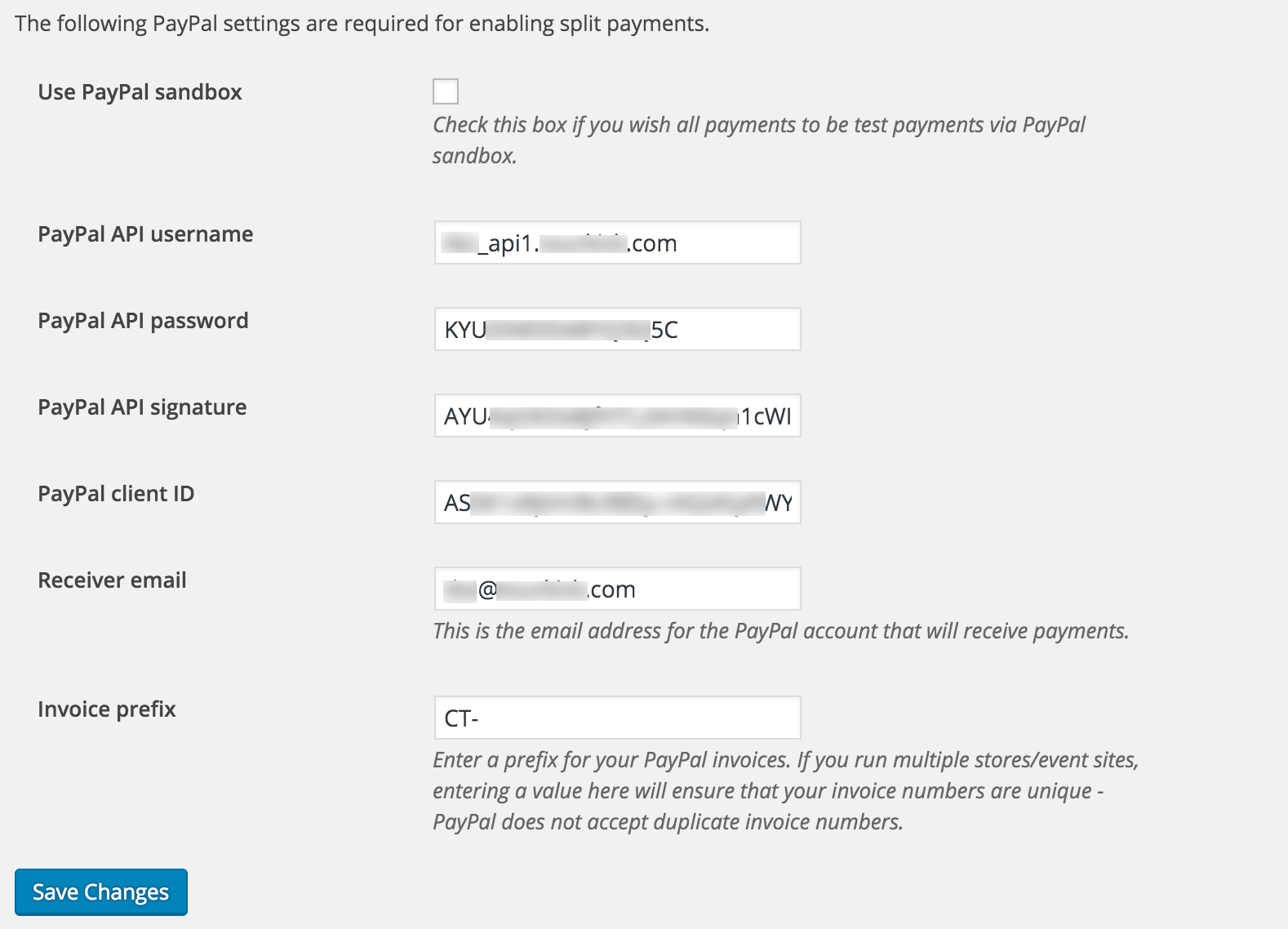
Example of wp-admin PayPal Split Payments settings for Sandbox mode

- Login to https://developer.paypal.com/
- Click to Dashboard
- Under “REST API apps”, click “Create App” and give it a descriptive name (e.g. Example.com Community Tickets app)
- Refresh your Dashboard until your newly-created REST API app appears (may take a few minutes)
- Click Sandbox > Accounts. Click on your “[email protected]” email address. Click the “Profile” link that appears under it to display your “Account Details” pop-up.
- Click the “API Credentials” tab to obtain the information you should enter in wp-admin for these settings:
- PayPal API username
- PayPal API password
- PayPal API signature
- Still in the “Account Details” pop-up window, click your REST Apps app name
- Look in the upper-right corner for the “Sandbox” / “Live” toggle, and make sure you’re in Sandbox mode
- Enter this Client ID in the wp-admin settings: PayPal client ID
- Enter this Sandbox account email address in the wp-admin settings: Receiver email (note the “-facilitator” email address)
Now that wp-admin settings are setup correctly, you should test that Community Tickets is working as desired, including how PayPal is handling the fake money.
How to obtain Live credentials (for real money)
Example of wp-admin PayPal Split Payments settings for Live mode

Once you’ve tested in Sandbox mode and you’re ready to start handling real money:
- Clear out all the Sandbox credentials and save the fields as empty/blank. This helps make sure you don’t make errors mixing Sandbox credentials with Live credentials.
- Visit the PayPal API Signature page
- Click “Show” to reveal the information to be entered into wp-admin:
- PayPal API username
- PayPal API password
- PayPal API signature
- Visit your PayPal Developer Dashboard
- Click to your REST API app
-
- Look in the upper-right corner for the “Sandbox” / “Live” toggle, and make sure you’re in Live mode
- Enter this Client ID in the wp-admin settings: PayPal client ID
- Enter this Live account email address in the wp-admin settings: Receiver email (note “-facilitator” is NOT in the email address)
===
I hope this helps get you over the finish line for setting up Community Tickets.
Please let me know.
MemberHey Sergio.
I don’t know what “C.A.P.” is, but this is what I entered: http://cl.ly/3V47040F290K
And then I clicked to View the Venue: http://cl.ly/1J3T28353A2N
Is that not what happens for you? Is that screenshot’s map location incorrect?
If more than 1 of your venues is having mapping issues, please make sure to review your settings at wp-admin > Events > Settings > Map Settings section
February 5, 2016 at 12:39 pm in reply to: Timezone incorrect for events imported with iCal Importer #1068434MemberI checked with http://severinghaus.org/projects/icv/ and that iCal link validates, which is a good start.
Please update me here once you think you’re done testing things. Thanks.
February 5, 2016 at 12:36 pm in reply to: Event Details don't popup when you hover over title in Calendar View #1068433MemberCould you please disable all plugins and theme customizations and just have the conflicting theme active and send me the link to take a closer look?
MemberHi. I see you’re using the Ronneby theme, which doesn’t explicitly state compatibility with our plugin, like some others do: ThemeForest themes compatible with The Events Calendar / PRO
I didn’t see any Console errors, which is always a good thing.
Your theme has quite a few styling rules that affect all <form> and form field elements.
Here are some examples:
http://elsa.org/wp-content/themes/ronneby/assets/css/app-1.css seems to be the main cause of the styling issues.
- It affects the TinyMCE Buttons. (FYI: You could uncheck “Use visual editor for event descriptions” in wp-admin > Events > Settings > Community tab if you don’t want to mess with the Description textbox TinyMCE button styling.)
- It sets all ‘select’ and ‘input’ form elements to 100% width (e.g. the hour, minute, am/pm selects and the datetime inputs).
- It has a rule for ‘table tbody tr:nth-child(even)’ to add alternating background coloring (gray/white).
I hope you can see the issue is not with Community Events, specifically. It is simply a <form> with form fields. Your theme adds styling that doesn’t look good. It’s up to you to determine if you want to customize the styling for your own usage of the theme.
If you decide to customize your theme’s styling, please let me know if there are any tweaks you can’t quite complete and maybe I could help.
I hope this helps 🙂
MemberI saw you marked my answer as “correct”. I’m happy that it solved your issue. I’m going to close this ticket. Feel free to open a new ticket if you have any other questions come up. Have a great day!
MemberI saw you marked my answer as “correct”. I’m glad it solved your issue. I’m going to close this ticket. Feel free to open a new ticket if you have any other questions come up. Have a great day!
MemberI saw you marked my answer as “correct”. I’m glad it solved your issue. I’m going to close this ticket. Feel free to open a new ticket if you have any other questions come up. Have a great day!
-
AuthorPosts