

Forum Replies Created
-
AuthorPosts
-
November 17, 2016 at 2:35 pm in reply to: OPEN: wootickets child template file dont get called before parent template file #1194160
Andras
KeymasterSuper happy to hear that!
Since the issue is resolved I am going to close this ticket, but if you need anything else related to this topic or another please post a new topic in the forum and we will help you out.
Cheers,
AndrasPS: If you like our plugin, and you didn’t yet do so 🙂 we would be happy to receive a review in the wordpress.org repository. Thanks!
https://wordpress.org/support/view/plugin-reviews/the-events-calendarPS2: We’d be also grateful if you would give us feedback on your satisfaction with support. Just click on one of the classy looking emojis below. 🙂 If you can spare a few words, that’s even better. Doublethanks!
KeymasterNo problemo! Happy it helped.
Since this is marked resolved I am going to close this ticket, but if you need anything else related to this topic or another please post a new topic in the forum and we will help you out.
Cheers,
AndrasPS: If you like our plugin, and you didn’t yet do so 🙂 we would be happy to receive a review in the wordpress.org repository. Thanks!
https://wordpress.org/support/view/plugin-reviews/the-events-calendarPS2: We’d be also grateful if you would give us feedback on your satisfaction with support. Just click on one of the classy looking emojis below. 🙂 If you can spare a few words, that’s even better. Doublethanks!
November 17, 2016 at 2:31 pm in reply to: Can caching be used of the page with the tickets when scanning QRcodes? #1194156KeymasterYou are very welcome, Jack! Happy I could be of help.
I am going to close this ticket, but if you need anything else related to this topic or another please post a new topic in the forum and we will help you out.
Cheers,
AndrasPS: If you like our plugin, and you didn’t yet do so 🙂 we would be happy to receive a review in the wordpress.org repository. Thanks!
https://wordpress.org/support/view/plugin-reviews/the-events-calendarPS2: We’d be also grateful if you would give us feedback on your satisfaction with support. Just click on one of the classy looking emojis below. 🙂 If you can spare a few words, that’s even better. Doublethanks!
November 17, 2016 at 2:30 pm in reply to: Adding additional ticket options with price adjustment #1194154KeymasterHiya Tom,
Sure thing. If that is something you would like as a feature I encourage you to visit our User Voice Page and either upvote an existing request or make a new request there.
Is there anything else related to this topic?
Cheers,
AndrasKeymasterHi liamrabbitt,
Thanks for your patience. So far I don’t have good news.
The issue at hand is that an import gets queued up, it runs as much of it as it can, and then defers to another cycle. If something is causing that not to complete, it’ll just keep retrying indefinitely. It is handled by the cron of WordPress which runs every once in a while.
There might be one option to stop the import, one of our developers is looking into that. I will have to ask for a bit more patience on your side, until we try to figure this.
The other option is that the import gets done in the meantime. (Did it finish, by chance?)
I’ll get back to you as soon as I have something.
Andras
November 17, 2016 at 2:16 pm in reply to: Adding Field sets to Email Template and Order page #1194144KeymasterHey Chris,
Sorry, got confused, that plugin does add it to the orders-received page as well.
Please check and let me know if this works for you.
Cheers,
AndrasNovember 17, 2016 at 2:06 pm in reply to: Adding Field sets to Email Template and Order page #1194137KeymasterHello Chris,
Thanks for reaching out with your request.
As for the ticket email, we have a small extension plugin that would do this for you. You can download it here and install it like any other plugin. It will give you an extra setting under Events > Settings > Tickets
https://theeventscalendar.com/content/uploads/2016/10/tribe-ext-tickets-email-options-0-3-0.zip
This will add the attendee meta in the ticket email as well as the order details page.
As for the order-received page, I will need to check, please give me some time.
Meanwhile let me know if the above helps.
Thanks and cheers,
AndrasNovember 17, 2016 at 2:00 pm in reply to: Paypal Split Payment – 'Pending Payment' after paypal payment CANCELLATION #1194133KeymasterHello Nicolas,
Thanks for using our plugins and welcome back! I’m sorry you are having issues with the split payments.
I believe that is not the expected behavior and it is very unfortunate. Indeed the status should be set to cancelled.
I will check with the team if anyone has encountered this issue before and will let you know we have a fix for this.
However, since WooCommerce and the payment gateways are not handled by us I would recommend that you get in touch with the support team at WooCommerce and / or the payment gateway plugin provider (if it’s not the Woo guys).
I’ll get back to you soon on what I find.
Cheers,
AndrasKeymasterHello Neil,
I am truly very sorry for writing you a reply after so much time. Because the ticket is set to pending fix I overlooked that it had a new post from you. I apologize, that’s my bad, and it taught me a lesson.
I want to thank you for your feedback, it is very much appreciated. Thank you for taking the time to give voice your concerns and frustrations. Feedback like yours is really important to us, it gives us a reality check; we can see what works, what our users like or don’t like. And at the end will help us make better products.
The launch of Event Aggregator was successful, though not without issues and bugs. Due to the multitude of different environments, setups and working conditions it is simply impossible to test every scenario, so unfortunately issues appear, no matter how thoroughly we test everything. And I can assure you that our QA team is giving the developers a real hard time. 🙂
It is unfortunate that you are having these serious issues with the service. We don’t know yet what could be the cause and so far there was only one other report of this happening. We have a bugticket on file and our developers will definitely look into the issue.
As for your feedback, I already flagged it to my manager, and will share it with the EA team as well.
In the meantime, I would like to urge you to submit your suggestions on our UserVoice page. If a feature request there gets enough votes, it will become a core functionality of the plugin. You can search through the repo so see if anybody suggested something similar that you want and vote on that, or you can create a new recommendation.
http://tribe.uservoice.com/Again, apologies for the troubles you had to endure so far and thank you for your honest feedback.
I will be in touch as soon as we have a fix for the issue.
Thanks and cheers,
AndrasKeymasterThis reply is private.
KeymasterHey babak,
Sorry you are still having issues. Fortunately most of them are fixable. Let’s go one-by-one.
Just was wondering, is there anyway to show the main calendar via shortcode?
Absolutely. We have recently introduced more shortcodes with version 4.3, and we even improved it with the Maintenance Release which was shipped yesterday.
You can find more info on the shortcodes here:
https://theeventscalendar.com/knowledgebase/embedding-calendar-views-tribe_events-shortcode/1. We can add the sidebar as I mentioned before, but it is in the right side. As soon as we change the css to bring it to left, the calendar does not function anymore at all!!!
I tried this css snippet quickly and it seemed to work:
.with_aside .sections_group {
float: right;
}
.with_aside .four.columns {
float: left;
}If this doesn’t do it for you, then you might consider creating your own template for the different views. These guides should help you get started on this:
https://theeventscalendar.com/knowledgebase/themers-guide/
https://theeventscalendar.com/knowledgebase/template-overview/
2. If we do not have the permalink set to pretty, the week view does not show up!
I’m really sorry about his. This is a bug, which we discovered yesterday. It is already ticketed with high priority. I will add your issue to it as well to give it more push. I would expect this to be fixed in the next Maintenance Release, however, at this time I cannot confirm and dates for this yet. Until then the only workaround I can suggest is to use pretty permalinks. Sorry about this.
(You can find more on our release schedule here.)
Do the aboves help?
Cheers,
AndrasKeymasterHey AG,
That is already possible. The single event page includes those buttons by default.
Check this screenshot:
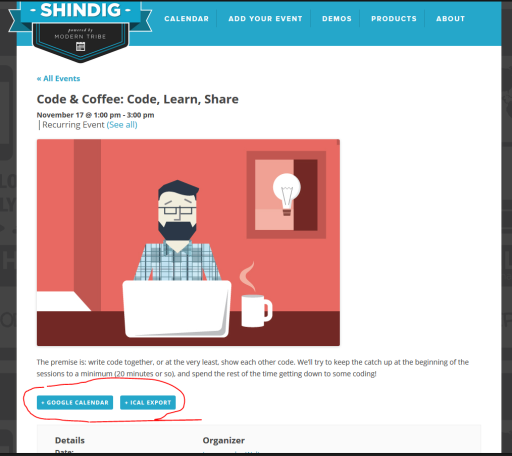
Let me know if there’s anything else you want to know.
Cheers,
AndrasKeymasterHello Kathrine,
I’m sorry to keep you waiting this long. I needed to pull in some help to get a solution for this.
So the above should stop the ticket email. If you want that functionality, then leave that snippet where it is.
In order to stop the emails about the change, than also add this snippet to your functions.php file:
https://gist.github.com/elimn/6bde40a8b14444bb76700d9f225f9ccf
Note, in the return line where you see the blackhole@ email address, it is best to replace that with something that is under the same domain as the website. Preferably a blackhole email address: basically an email address that exists but nobody reads or emails get automatically deleted. Something like [email protected]. You can contact the IT dept to give you one.
Please try this and let me know how it works out for you.
Cheers,
AndrasKeymasterHello again,
I’m sorry 🙂 I wanted to share with you the link to that knowledgebase article as well, but I guess I forgot to copy it first, and just pasted in the one before. :blush:
I’m sorry to hear the code didn’t work out. Could you please clarify which code it was which turned your site blank?
Regarding pasting that code into your functions.php file, make sure that if functions.php already begins with < ? php then make sure you don’t copy that again. Only one at the beginning of the file is enough.
I would also like to ask you to share your system information with me. That might also shed some light on the issue. Here’s a nice guide for that: https://theeventscalendar.com/knowledgebase/sharing-sys-info/
Thanks and cheers,
AndrasNovember 16, 2016 at 7:53 am in reply to: Adding additional ticket options with price adjustment #1193135KeymasterHi Tom,
Automatically assigning a WooCommerce category to a ticket can most probably be done, but it would require custom development, which is beyond our scope of support. There’s no solution for this right out of the box.
Here’s a list of developers though, who could help you out with this, in case you need it:
https://theeventscalendar.com/knowledgebase/find-a-customizer/
All set?
Andras
-
AuthorPosts