
Home › Forums › Calendar Products › Events Calendar PRO › SOS Sidebar for the main calendar
- This topic has 8 replies, 5 voices, and was last updated 9 years, 9 months ago by
babak.
-
AuthorPosts
-
November 16, 2016 at 1:27 am #1193017
babak
ParticipantHello.
Thanks for your great plugin.
We have few problems which we need to find solution for as soon as possible.
Due our company policy, we can not enable the pretty permalinks which means the calendar page’s “current URL” is automatically generated for us. The problems are:
– There are no menus or … in this url, just the calendar
– we need to have a sidebar in the page of the big calendar (It is a must). We read all your forum’s discussions and could not find a solution that works for this matter.
We use a betheme as a template.
Please get back to us as soon as possible.Thanks in advance
BestNovember 16, 2016 at 2:25 am #1193036Participant-Update:
Found the problem of the menu not showing up and solved it.November 16, 2016 at 2:47 am #1193044Andras
KeymasterHello babak,
Thanks for going Pro and welcome to the forums! And thank you for your kind words, I am happy to hear you like our products. Sorry about the issues you are having, let me try to help you with them.
Regarding the sidebar I suggest to try this setting:
Events > Settings > Display > Events template > Default Page template
Or choose a page template there which has a sidebar.
This is how it looks in the admin:
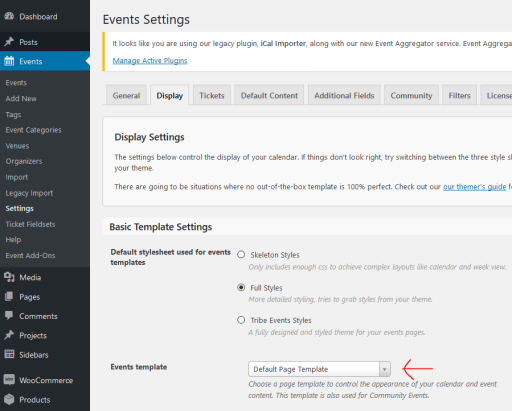
Let me know if this solves it for you.
Cheers,
AndrasNovember 16, 2016 at 3:43 am #1193053ParticipantHello Andras.
Thank you for your quick reply. That is the first thing i tried!!!
At the moment I had some success. In the “BeTheme”, there is a sidebar specified for events calendar. Trying to figure it out. Will let you know if I have more questions!Just was wondering, is there anyway to show the main calendar via shortcode? Like mini calendar and so on. That would be the easiest solution. What if we want to show the main calendar in two different pages?
Thanks again
Cheers
BabiNovember 16, 2016 at 6:22 am #1193093ParticipantHello.
There are few problems.
1. We can add the sidebar as I mentioned before, but it is in the right side. As soon as we change the css to bring it to left, the calendar does not function anymore at all!!!
2. If we do not have the permalink set to pretty, the week view does not show up!
The link is : mywebsite/?post_type=tribe_events&tribe_event_display=weekPlease answer as soon as possible
Thanks
CheersNovember 17, 2016 at 2:24 am #1193748KeymasterHey babak,
Sorry you are still having issues. Fortunately most of them are fixable. Let’s go one-by-one.
Just was wondering, is there anyway to show the main calendar via shortcode?
Absolutely. We have recently introduced more shortcodes with version 4.3, and we even improved it with the Maintenance Release which was shipped yesterday.
You can find more info on the shortcodes here:
https://theeventscalendar.com/knowledgebase/embedding-calendar-views-tribe_events-shortcode/1. We can add the sidebar as I mentioned before, but it is in the right side. As soon as we change the css to bring it to left, the calendar does not function anymore at all!!!
I tried this css snippet quickly and it seemed to work:
.with_aside .sections_group {
float: right;
}
.with_aside .four.columns {
float: left;
}If this doesn’t do it for you, then you might consider creating your own template for the different views. These guides should help you get started on this:
https://theeventscalendar.com/knowledgebase/themers-guide/
https://theeventscalendar.com/knowledgebase/template-overview/
2. If we do not have the permalink set to pretty, the week view does not show up!
I’m really sorry about his. This is a bug, which we discovered yesterday. It is already ticketed with high priority. I will add your issue to it as well to give it more push. I would expect this to be fixed in the next Maintenance Release, however, at this time I cannot confirm and dates for this yet. Until then the only workaround I can suggest is to use pretty permalinks. Sorry about this.
(You can find more on our release schedule here.)
Do the aboves help?
Cheers,
AndrasDecember 8, 2016 at 2:25 pm #1203535Nico
MemberHey,
I wanted to share the news that a fix has finally arrived for this issue with switching views and plain permalinks.
Just update The Events Calendar to version 4.3.4, and go to WP-Admin > Events > Settings > Display > Save Changes. That should fix the issue!
Please let us know if it works for you,
Best,
NicoDecember 30, 2016 at 8:35 am #1211779Support Droid
KeymasterHey there! This thread has been pretty quiet for the last three weeks, so we’re going to go ahead and close it to avoid confusion with other topics. If you’re still looking for help with this, please do open a new thread, reference this one and we’d be more than happy to continue the conversation over there.
Thanks so much!
The Events Calendar Support Team -
AuthorPosts
- The topic ‘SOS Sidebar for the main calendar’ is closed to new replies.